AI Invoice Automation thatSaves You 40+ Hours Monthly

TallyScan: Best AI Receipt Scanner and Invoice Data Extraction for Notion, Google Sheets and Drive. Saves 40+ hours every month on manual bookkeeping.

End the manual entry marathon. Forward emails or upload files to extract data and sync directly to Sheets, Notion, and Drive.

99.9% AI Accuracy
Instant Extraction
Sync to Sheets & Notion
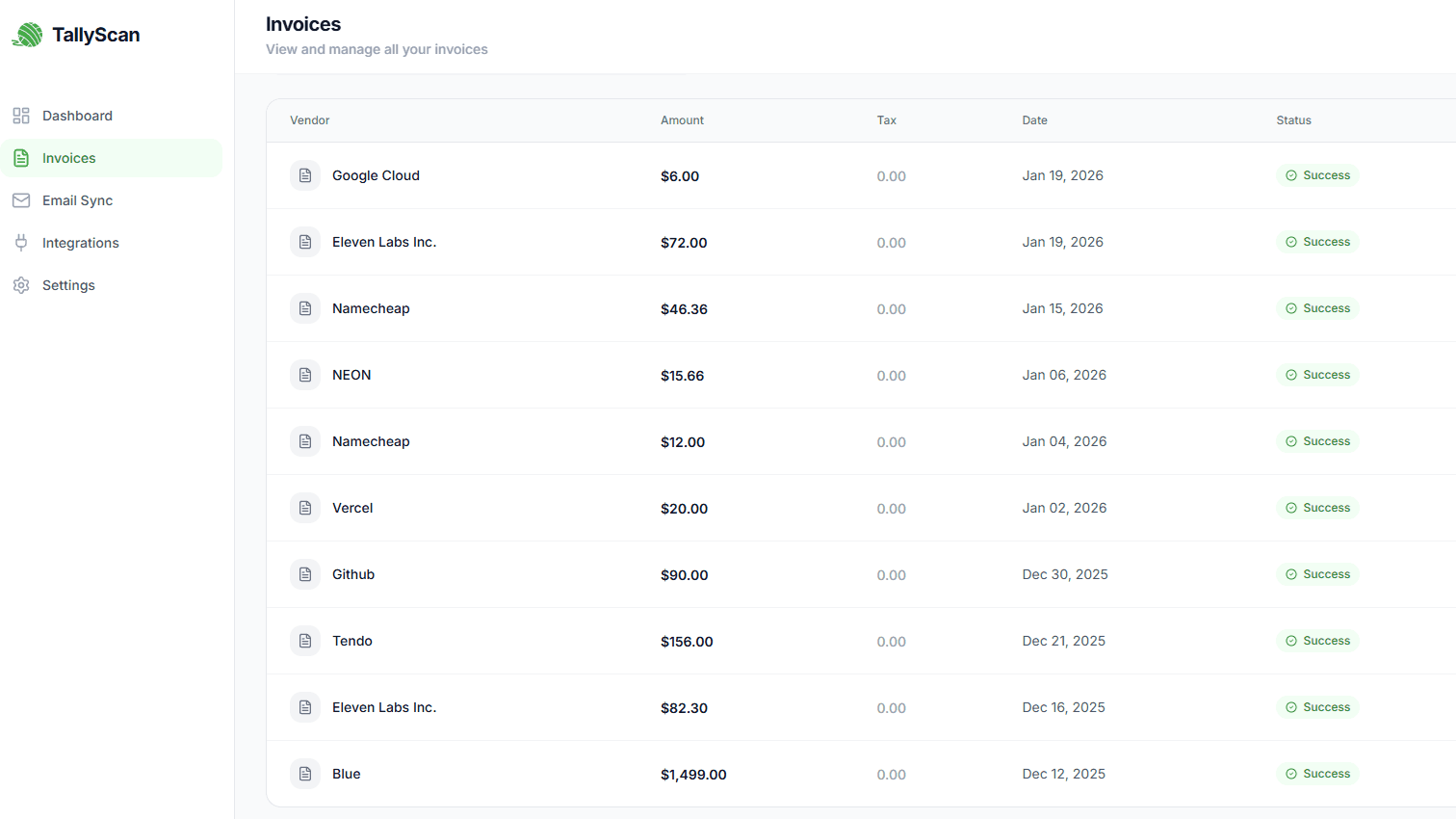
TallyScan AI dashboard showing automatic invoice data extraction and sync to Notion and Google Sheets
Core Features

Built for Busy Business Owners

Stop wasting time on repetitive manual typing. Focus on growing your business instead.

Forward from Your Email

Invoices scattered across your inbox, hard to organize

Get your own dedicated email address. Forward invoices once, we handle the restβ€”no inbox access required

Saves You 40+ Hours Monthly

Manually typing invoice data is a month-end marathon that wastes days

AI extracts vendor, amount, date, and items instantly with 99.9% accuracy

Your Data Stays Private

Worried about giving access to your email or financial accounts

We never access your inbox directly. You control what you share with us. No email inbox access, no unnecessary permissions required

Privacy-First Approach

No Inbox Access. Maximum Privacy.

We do not ask for full access to your email account.

Traditional Way

Full Inbox Access

  • Requires full Gmail/Outlook authorization

    Access to all your emails, contacts, and sensitive data

  • Privacy risks

    Your personal emails could be scanned or accessed

  • Security concerns

    Third-party apps with broad permissions are risky

  • Hard to revoke

    Once granted, difficult to know what is being accessed

TallyScan Way

Email Forwarding Only

  • No email account authorization needed

    We never ask for access to your inbox

  • You stay in control

    Only invoices you forward are processed, nothing else

  • Maximum privacy protection

    Your personal emails stay private and untouched

  • Easy to stop anytime

    Just stop forwarding, no complex permissions to revoke

Step 1: Your Inbox

you@company.com
Invoice from Amazon
Adobe Receipt
Office Supply Order
Forward

Step 2: Your TallyScan Email

invoice-abc123@fwd.tallyscan.comYour dedicated address
AI processing invoices...

How It Works

1

Get Your Dedicated Email

Sign up and receive your personal TallyScan email like invoice-abc123@fwd.tallyscan.com

2

Set Up Auto-Forward (Optional)

Create a rule in Gmail/Outlook to auto-forward invoices, or manually forward when you receive them

3

We Handle Everything

AI extracts all invoice data and syncs to your tools automatically

Maximum Privacy Guarantee

We never access your Gmail or Outlook inbox
You control exactly what invoices we see
No OAuth permissions or dangerous access
Your emails stay in your inbox, untouched
Powered by AI

Handle Invoice Efficiently and Smartly

Our AI has processed millions of invoices. It knows what to look for and how to organize information perfectly.

AI Processing...
VendorAcme Corp
Amount$1,234.56
DateJan 15, 2025

Reads any invoice format (PDF, image, email)

Extracts vendor, amount, date, line items

Detects currency and converts automatically

99.9% accuracy on all fields

Processes in under 5 seconds

Learns from your corrections

The Result

What used to take 5 minutes per invoice now happens automatically in seconds. You will save 40+ hours of manual work every single month.

Step-by-Step Guide

From Stack of Invoices to Clean Data in Seconds

01

Upload Your Invoice

Drag and drop your invoice PDF or image. Or forward it from your email. We accept all common formats.

02

We Extract Everything

Vendor name, amount, date, items, and everything else is captured automatically in seconds.

03

Sync to Your Tools

Your data flows automatically to Google Sheets, Drive, Notion, or exported to CSV, ZIP, and other formats.

Success Stories

Join the teams getting their weekends back

β€œI'm not a 'founder'β€”I'm just one guy trying to do good work. TallyScan is like having a part-time assistant who only costs as much as a cup of coffee.”

🎨

David Lee

Freelance Product Designer

Read full story

β€œI used to spend every Saturday morning hunting for PDFs. TallyScan turned my most hated task into a background process that just works.”

πŸ‘¨β€πŸ’»

Mark Smith

Digital Agency Founder

Read full story

β€œIt took 2 minutes to set up, and we haven't manually opened a PDF invoice since. Our annual audit took 4 hours instead of 4 days.”

πŸ‘©β€πŸ’Ό

Sarah J.

Operations Lead

Read full story
Support & FAQ

Frequently Asked Questions

Can't find the answer you are looking for? Contact our support team

Start with our free plan to process up to 10 invoices per month. If you need more, our Starter plan at $19/month for 100 invoices per month is perfect for small businesses. You can upgrade anytime as your needs grow.
When you sign up, you'll receive a unique email address like invoice-abc123@tallyscan.com. Simply forward any invoice emails to this address, or set up an auto-forward rule in Gmail/Outlook/Yahoo/Zoho/AOL. We never access your inboxβ€”you stay in complete control.
Absolutely. We only see what you explicitly forward to us. All data is encrypted in transit and at rest, and we're fully GDPR compliant.
We support all common invoice formats including PDF, PNG, JPG, and JPEG. You can upload files directly or forward them via email. Our AI can read invoices from any layout or design.
Yes! You can process up to 10 invoices per month completely free, forever. No credit card required to start. It's a great way to test TallyScan with your actual invoices.
No worries! If you exceed your monthly limit, you'll still have full access to TallyScan to view and manage your existing data. However, processing new invoices will be paused until your next billing cycle starts. To continue processing immediately, you can simply upgrade to a higher plan or purchase additional credits at any time.
Yes, you can cancel your subscription at any time. There are no contracts or cancellation fees. If you cancel, you will still have access until the end of your current billing period.
We offer a full refund within 3 days of payment, no questions asked. We want you to be completely satisfied with TallyScan.
We use Stripe as our payment processor. You can use your credit card, PayPal, Apple Pay, Google Pay, or bank transfer to pay for your subscription.
All data is stored securely in AWS data centers with enterprise-grade encryption. Your invoice data is never shared with third parties. You can delete your data at any time from your dashboard.
Currently, we support Google Sheets and Notion, with QuickBooks, Xero, and more coming soon. You can also export your data as CSV or Excel anytime.
Our AI achieves 99.9% accuracy on standard invoice fields like vendor name, amount, date, and line items. You can always review and correct any extractions before syncing to your tools.
Yes! TallyScan works with both invoices and receipts. Upload photos of paper receipts or forward digital receipts via emailβ€”we'll extract all the important data.
We plan to support more accounting software in the future. But for now, you can export your data as CSV, ZIP, and other formats and import it into your accounting software manually.

Still have questions?

Our support team typically responds within 24 hours. Get in touch β†’

Ready to Get Your Weekends Back?

Join 50+ businesses saving 40+ hours every month. Start free today.

Free to start
No commitment