It's 4:30pm on a Tuesday. A $12,000 invoice from your largest supplier has been sitting in someone's inbox for six days, unapproved, unpaid, and now generating a late fee. Your AP clerk just found it buried under 80 other emails. Your vendor is about to call. And the "2/10 Net 30" discount you could have captured? Gone.
This isn't a horror story. It's a Tuesday.
Manual accounts payable doesn't fail spectacularly. It fails quietly, one lost invoice at a time. And at scale, that quiet failure has a very loud price tag. The businesses pulling ahead in 2026 have figured this out, and they've stopped treating AP as a back-office cost center. They've automated it, and they're running a fundamentally different kind of operation as a result.
This guide covers the 10 most significant accounts payable automation benefits—not just what they are, but how to actually realize them in your organization.
1. Radical Processing Speed and Touchless Efficiency
The most immediate accounts payable automation benefit is the dramatic improvement in processing speed. Manual AP is notoriously slow. Invoices get trapped in email threads, sit on desks during approvals, and pile up during absences. The result is a consistently unpredictable payment cycle that frustrates vendors and strains cash flow visibility.
Automation removes that unpredictability. By digitizing invoices the moment they arrive, the system extracts data instantly via AI and routes documents to the correct approver based on preset rules—no chasing, no forwarding, no delay.
Case study:Siemens cut its invoice processing time by 80% by implementing automated digital workflows. Invoices that match a Purchase Order within defined tolerances move from receipt to "ready-for-payment" in seconds, not days.
How to Implement for Maximum Speed
Map your approval hierarchy first. Before configuring any software, document who needs to approve what, based on dollar amount, department, and vendor type. Automation can only be as fast as the rules you give it.
Create a dedicated invoice submission channel. Direct all vendor invoices to a single email address connected to your automation platform. Eliminating inbox scatter is the single change that has the most immediate impact on processing speed.
Set exception thresholds. Define which invoices get auto-approved (e.g., recurring vendors under $500) and which require a human review. This creates a fast lane for routine transactions while keeping oversight where it matters.
2. Significant Operational Cost Reduction
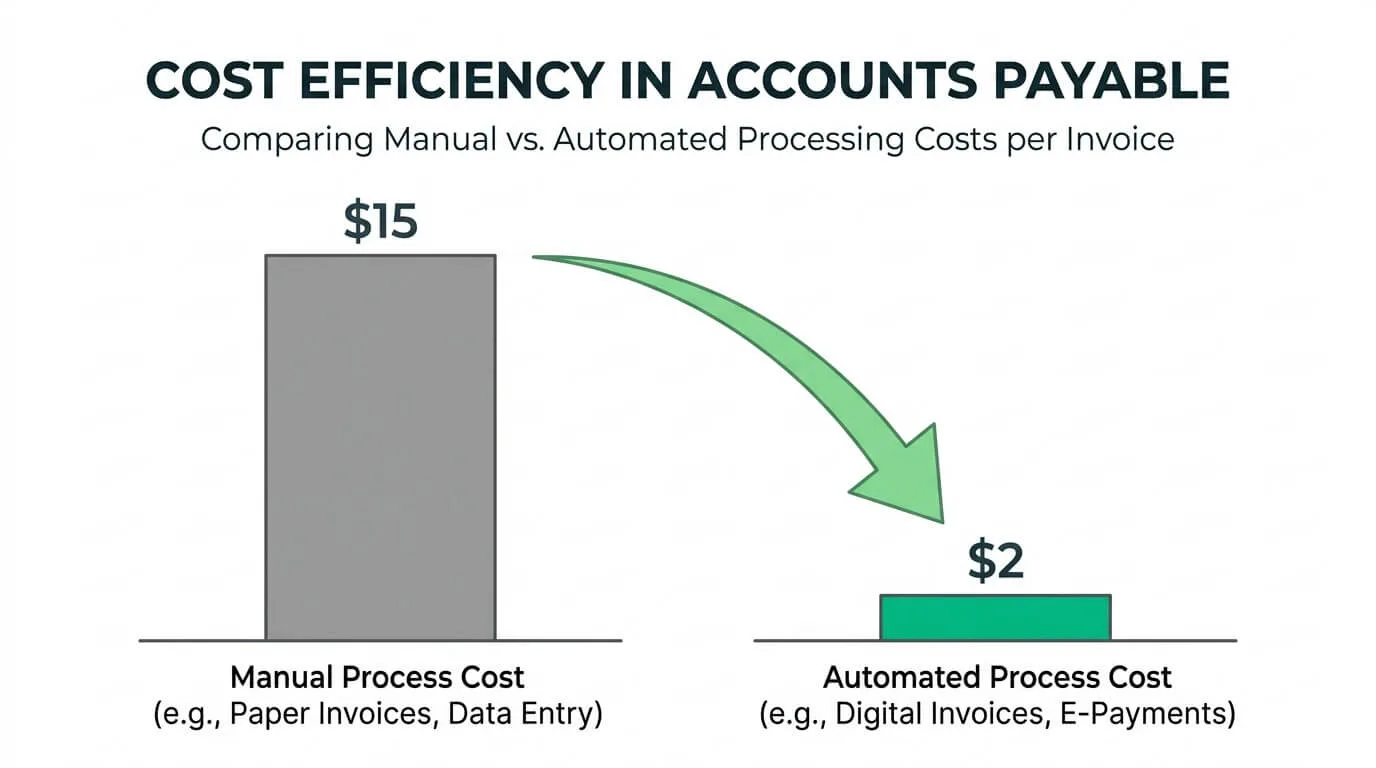
Manual AP is deceptively expensive. Most finance leaders think of it as a fixed labor cost. In reality, every manual touchpoint (data entry, printing, routing for physical approval, filing) adds cost to every invoice processed.
Industry benchmarks consistently show that manually processing a single invoice costs between $15 and $25 when all direct and indirect costs are factored in. AP automation targets each of those costs directly.
Ford Motor Company eliminated $2 million in annual costs by moving to a paperless, automated AP system.
Coca-Cola slashed its per-invoice processing cost by 60% through streamlined AI capture.
The true ROI isn't just the money saved on processing—it's the reallocation of your finance team's time. Instead of 40 hours a week on data entry and paperwork, your staff can focus on strategic work like vendor contract negotiation, cash flow forecasting, and spend analysis.
How to Implement for Maximum Savings
Calculate your current cost per invoice before you start. Factor in AP staff hours, paper, printing, postage, and physical storage. This baseline number is what you'll measure improvement against, and it's usually higher than most finance leaders expect.
Prioritize capturing early payment discounts. Faster processing means you can consistently hit "2/10" discount windows. For high-volume businesses, this discount capture alone often pays for the automation software within the first few months.
Track "invoices processed per FTE" monthly. This metric makes the productivity improvement visible and helps you make the case for the investment to stakeholders who didn't experience the old process firsthand.
3. Near-Perfect Accuracy and Elimination of Human Error
Human fatigue is the leading cause of financial leakage in manual AP. A misplaced decimal, a duplicate payment, or a wrong GL code doesn't just cost money—it costs the time required to find it, reverse it, and repair vendor trust.
Modern AI invoice extraction is categorically different from legacy OCR. Traditional OCR reads characters. AI understands context: it knows that "Tax" must be a percentage of the "Subtotal," that a German vendor formats their invoice differently than a US one, and that a vendor ID should match an existing record in your system.
Microsoft achieved a 99.5% accuracy rate in its invoice processing after switching to an AI-first model.
Unilever reduced total processing errors by 98% after implementation.
How to Implement for Maximum Accuracy
Configure comprehensive validation rules upfront. Set the system to check: does the invoice total match the sum of line items? Does the PO number exist in your system? Does the vendor bank account match your master file? These checks catch the most common and expensive errors automatically.
Activate duplicate detection immediately. Cross-reference invoice numbers, vendor names, amounts, and dates against your historical database. Preventing a single duplicate payment on a mid-size invoice typically pays for several months of software cost.
Build a clear exception workflow. Define exactly what happens when the system flags an anomaly—who reviews it, within what timeframe, and how the resolution gets documented. A good exception workflow ensures flagged invoices don't become a new bottleneck.
4. Optimized Cash Flow and Early Payment Discount Capture
One of the most strategic accounts payable automation benefits is gaining real control over working capital. Manual processes routinely miss "2/10 Net 30" discounts because the approval cycle takes longer than the discount window allows. That's not a vendor problem—it's a process problem.
With real-time visibility into every invoice's status, CFOs can make deliberate decisions about payment timing rather than paying "whenever the paperwork is done."
Procter & Gamble increased its capture of early payment discounts by 300% after automating its approval engine.
Dell optimized its payment timing to improve cash flow by $50 million.
In a high-interest environment, the ability to hold cash precisely until the due date—rather than paying early by default—creates measurable value on your own balance sheet.
How to Implement for Maximum Cash Flow Impact
Flag invoices with discount terms automatically. Configure your system to identify and prioritize "2/10" or "1/15" terms the moment the invoice is ingested. These invoices should move to the front of the approval queue.
Integrate with your treasury or banking platform. Connecting your AP system to your cash position data gives you the information to make active decisions about whether to pay early (capturing the discount) or hold (maximizing available cash).
Track Days Payable Outstanding (DPO) weekly. This metric tells you whether you're holding cash optimally or paying too early out of habit. Even a 3-day improvement in DPO can have significant working capital impact at scale.
5. Strengthened Vendor Relationships and Transparency
A healthy supply chain depends on trust, and trust depends on predictable, transparent payments. Late payments, lost invoices, and constant "Where is my payment?" inquiries erode vendor relationships gradually, until vendors start offering you worse terms, or worse, prioritizing other customers.
AP automation makes your payment process a source of reliability rather than friction. Modern platforms include vendor self-service portals where suppliers can check invoice status, approval progress, and scheduled payment dates 24/7, without calling your team.
The Home Depot cut vendor inquiries by 70% after implementing self-service transparency tools.
When vendors know they'll be paid on time, every time, they become more willing to negotiate better terms, offer priority inventory access, and resolve disputes faster. Being a "reliable payor" is genuinely valuable leverage.
How to Implement for Stronger Vendor Relationships
Notify vendors proactively at key milestones. Configure automated status emails when an invoice is received, approved, and when payment is dispatched. Most vendors just want to know their invoice isn't lost—this addresses that anxiety without requiring a phone call.
Onboard your top vendors to the portal first. Start with the suppliers you transact with most frequently. Their adoption of the self-service portal will have the biggest immediate impact on your AP team's inbound inquiry volume.
Collect vendor feedback after the first 90 days. Ask how the new process feels from their side. Their perspective will surface usability issues you can't see from inside your organization.
6. Secure Digital Audit Trails and Compliance
For regulated industries—and increasingly for all businesses—the inability to produce a clean document trail during an audit is a serious risk. Hunting through filing cabinets or email archives for a three-year-old invoice approval is not just slow; it's genuinely uncertain. What if the email was deleted? What if the approver has left the company?
AP automation eliminates that uncertainty. Every action—receipt, data extraction, routing, approval, payment—is permanently logged with a timestamp and user ID in an immutable digital record.
Johnson Controls automated its SOX compliance processes globally, ensuring every invoice has a clear, unalterable path from receipt to reconciliation.
Instead of spending weeks preparing for an audit, you grant the auditor read-only access to your digital archive. The documentation is already there—organized, timestamped, and complete.
How to Implement for Airtight Compliance
Embed your compliance rules directly into the workflow. Configure the system to automatically flag invoices from unapproved vendors, payments that exceed policy thresholds, or any transaction that bypasses the standard approval chain.
Schedule regular automated backups of your audit archive. Your digital records are only as reliable as your backup strategy. Confirm your platform provides secure, redundant storage of all transaction records and that you can restore them if needed.
Document your exception handling process. Every time someone overrides a system flag or manually approves an out-of-policy invoice, that decision should be documented with a reason code. This protects you during audits and helps you identify patterns that need policy clarification.
7. Real-Time Visibility and Business Intelligence
You cannot manage what you cannot see. In a manual AP environment, your financial data is always weeks behind reality. By the time you review last month's invoice aging report, the problem it describes has already compounded.
Automation provides a live view of your entire AP pipeline: outstanding invoices by vendor, approval queue status, upcoming payment obligations, and spend by category, all updated in real time.
General Motors leverages real-time dashboards to monitor over $50 billion in annual spend, enabling immediate identification of cost-saving opportunities across global entities.
By analyzing spend patterns across vendors and categories, your AP function transforms from a recording operation into a source of strategic intelligence.
How to Implement for Maximum Visibility
Design role-specific dashboards from day one. A CFO needs a high-level view of total liabilities and cash position. An AP clerk needs to see their pending approval queue and flagged exceptions. Build each view for its actual user—don't give everyone the same screen.
Set up automated alerts for critical events. Configure notifications for invoices over a defined dollar threshold, approvals that have been pending longer than 48 hours, and payment due dates within 72 hours. Proactive alerts prevent the problems that generate reactive scrambles.
Review spend analytics quarterly with leadership. Bring your AP data into strategic planning conversations. Consolidation opportunities, maverick spend patterns, and vendor dependency risks are all visible in the data—but only if someone is actually looking.
8. Seamless Scalability for Business Growth and M&A
A manual AP department is a ceiling on your growth. Doubling your business volume means doubling your invoice count, which in a manual environment means hiring more AP staff, accepting more errors, or falling behind. None of those are good options.
Cloud-native AP automation handles volume spikes without proportional headcount increases. Whether it's seasonal demand, rapid organic growth, or integration of an acquired company's payables, the system scales with you.
Uber relies on automation to process payments for millions of global drivers—impossible at that volume with manual methods.
Microsoft uses its automated AP system to integrate acquired companies' financial operations in weeks rather than months.
How to Implement for Maximum Scalability
Choose a cloud-native platform, not an on-premise solution. On-premise systems require hardware investments and IT resources to scale. Cloud platforms expand on demand without capital expenditure.
Model your peak volume scenarios before go-live. Test the system at 3–5x your current invoice volume during setup. This surfaces performance limitations or configuration gaps while you still have time to address them.
Build an M&A integration playbook. If acquisitions are part of your growth strategy, document the standard process for onboarding a new entity's vendors and AP workflows into your platform. Having this ready reduces integration time from months to weeks.
9. Advanced Fraud Prevention and AI Anomaly Detection
In 2026, Business Email Compromise (BEC) is one of the fastest-growing financial crimes targeting AP departments. Attackers impersonate vendors, send convincing invoice modifications, and redirect payments to fraudulent accounts. Manual processes—relying on human review of individual emails—are extremely vulnerable.
AP automation uses machine learning to identify anomalous behavior that humans routinely miss:
Vendor bank account changes: If a long-standing vendor suddenly updates their payment details, the system flags it as high-risk and holds payment pending verification.
Domain spoofing detection: The system checks whether an invoice claiming to be from "amazon.com" actually originated from a lookalike domain like "amazon-payments.net."
Frequency pattern analysis: If a vendor typically submits 4 invoices per month and suddenly submits 18, the system flags the anomaly for human review.
How to Implement for Maximum Fraud Prevention
Enforce a strict vendor master file change protocol. Any change to vendor bank details should require a secondary verification step—an out-of-band phone call to a known contact, not an email reply to the change request.
Configure velocity rules for payment amounts. Set alerts for payments that are significantly higher than a vendor's historical average. This catches both fraud attempts and internal errors before money leaves the account.
Review your anomaly detection logs monthly. Treat flagged items not just as individual cases to resolve but as data about your risk exposure. Patterns in the anomaly log tell you where your process has vulnerabilities.
10. ESG and Sustainability Tracking
Modern enterprises are increasingly required to measure and report "Scope 3" carbon emissions—which include the indirect emissions from their supply chain and procurement activity. In a manual AP environment, this data is locked inside paper invoices and PDF attachments that no one can easily analyze at scale.
AP automation that extracts line-item data from invoices can automatically surface sustainability intelligence:
Fuel and energy purchases from utility invoices can be mapped to emissions factors.
Travel expenses from airline and transportation receipts can be converted to carbon estimates.
Vendor sustainability ratings can be cross-referenced against procurement spend to identify high-risk supply chain relationships.
This allows finance teams to generate audit-ready ESG reports without running separate, manual data collection projects—turning AP data into compliance infrastructure.
How to Implement for ESG Tracking
Start with your highest-spend vendor categories. Energy, logistics, and business travel typically represent the majority of your Scope 3 exposure. Prioritize line-item extraction from these invoice types first.
Work with your ESG or sustainability team to define the data requirements. Understand which fields and vendor categories need to be captured before you configure the extraction rules.
Build your ESG reporting into the same dashboard as your financial reporting. When sustainability data lives alongside spend data, it becomes part of normal strategic conversations rather than a separate compliance exercise.
Comparison: Manual AP vs. AI Automation
Feature
Manual Process
AI Automation
Business Impact
Processing Speed
10+ Days
< 24 Hours
Faster payment cycles; early discount capture.
Cost Per Invoice
$15.00 – $25.00
< $3.00
Direct bottom-line savings at scale.
Data Accuracy
~92% (human error rate)
>99% (AI reasoning)
Audit-ready books; fewer corrections.
Discount Capture
Frequently missed
Optimized and automatic
Converts AP into a net revenue contributor.
Visibility
Historical, weeks delayed
Real-time, live
Better cash decisions and strategic planning.
Your Next Steps: Moving From Manual to Automated AP
You've seen the benefits. The question isn't whether AP automation delivers value—the evidence on that is clear. The question is how to start in a way that actually sticks.
Step 1: Audit your current bottlenecks with specificity.
Don't just note that "AP is slow." Measure it. How many days does the average invoice take from receipt to approval? What percentage of invoices require manual follow-up? Where do exceptions most commonly originate? Specific baseline numbers give you targets to hit and make the ROI calculation concrete.
Step 2: Define your non-negotiables before evaluating software.
What integrations does the tool need to support? Does it need to connect to your existing ERP—QuickBooks, Xero, NetSuite? What does your approval hierarchy look like, and can the software replicate it? Does it offer forwarding-based document ingestion rather than full inbox access (which preserves your email privacy)? Make this list before you watch a single demo.
Step 3: Involve your AP team in the selection process.
The people who process invoices daily know where the friction lives better than anyone in management. Their buy-in isn't just nice to have—it's the difference between a tool that gets used and one that gets worked around. Show them how the automation eliminates the tasks they find most tedious. When AP clerks see automation as a career upgrade rather than a threat, adoption happens fast.
Step 4: Run a focused pilot before full rollout.
Start with one vendor category, one department, or one document type. Process real invoices through the new system while keeping the old process running in parallel for four weeks. Compare accuracy, speed, and exception rates. A clean pilot result gives you the confidence—and the internal evidence—to roll out company-wide.
The AP department that figures this out doesn't need more staff to handle more volume. It needs better infrastructure. And the businesses that build it now are the ones that will outpace the ones still chasing email approvals in five years.
Frequently Asked Questions
How quickly can I expect to see ROI from AP automation?
Most businesses see measurable ROI within 60 to 90 days. The combination of eliminated data entry hours and captured early payment discounts typically offsets the software cost within the first quarter. Larger organizations with high invoice volumes often see payback in the first month.
Is AP automation practical for small businesses?
Absolutely—and arguably the ROI is highest for smaller teams. A two-person finance function that automates invoice processing effectively gains the capacity of a much larger team without the headcount cost. Modern cloud-native tools have made enterprise-grade AP automation accessible at price points that work for businesses processing 50 invoices per month.
Will automation replace my accounting team?
No. It replaces manual data entry, not accountants. The realistic outcome is that your finance team stops spending the majority of their time on repetitive processing tasks and starts spending it on analysis, forecasting, and strategic decisions—work that requires human judgment and that most finance professionals find significantly more engaging.
Can AP automation handle complex or multi-page invoices?
Modern AI-powered extraction—unlike legacy OCR—handles multi-page PDFs, line-item detail, multi-currency formatting, and non-standard invoice layouts reliably. The AI reasons about the document semantically rather than matching templates, which means it handles edge cases that traditional OCR systems routinely fail on.
How long does it typically take to get a system up and running?
A straightforward implementation—connecting to your accounting platform, configuring basic approval rules, and onboarding your top vendors—can be completed in an afternoon. More complex setups involving multi-entity routing, custom integration with an ERP, or large vendor master data cleanup typically take two to four weeks. The most time-consuming element is almost always data cleanup, not the software itself.
Can it integrate with my existing accounting software like QuickBooks or Xero?
Yes. Purpose-built AP automation tools are designed to plug into the accounting platforms you're already using, not replace them. For example, TallyScan syncs extracted invoice data directly into QuickBooks and Xero as draft bills for your review—so you get the automation layer on top of the familiar ledger you already trust.
Manual AP isn't just an efficiency problem—it's a strategic liability. Every hour your team spends chasing approvals and entering data is an hour not spent on the financial analysis that drives better decisions.
Ready to turn your AP department into a strategic asset?Start your free TallyScan trial today and see how AI-powered invoice processing can transform your workflow.