You already run the books in Xero. The invoices still hit email first: hosting PDFs, Stripe receipts, a supplier scan someone forgot to forward. Getting those files into Bills to pay as drafts, without retyping every field, is straightforward once you know where Xero's built-in bills email lives. But that same address has limits most walkthroughs quietly ignore. For the parallel QuickBooks path, see how to email invoices to QuickBooks. Product sync details for TallyScan → Xero live in our sync update.
How do you email invoices to Xero?
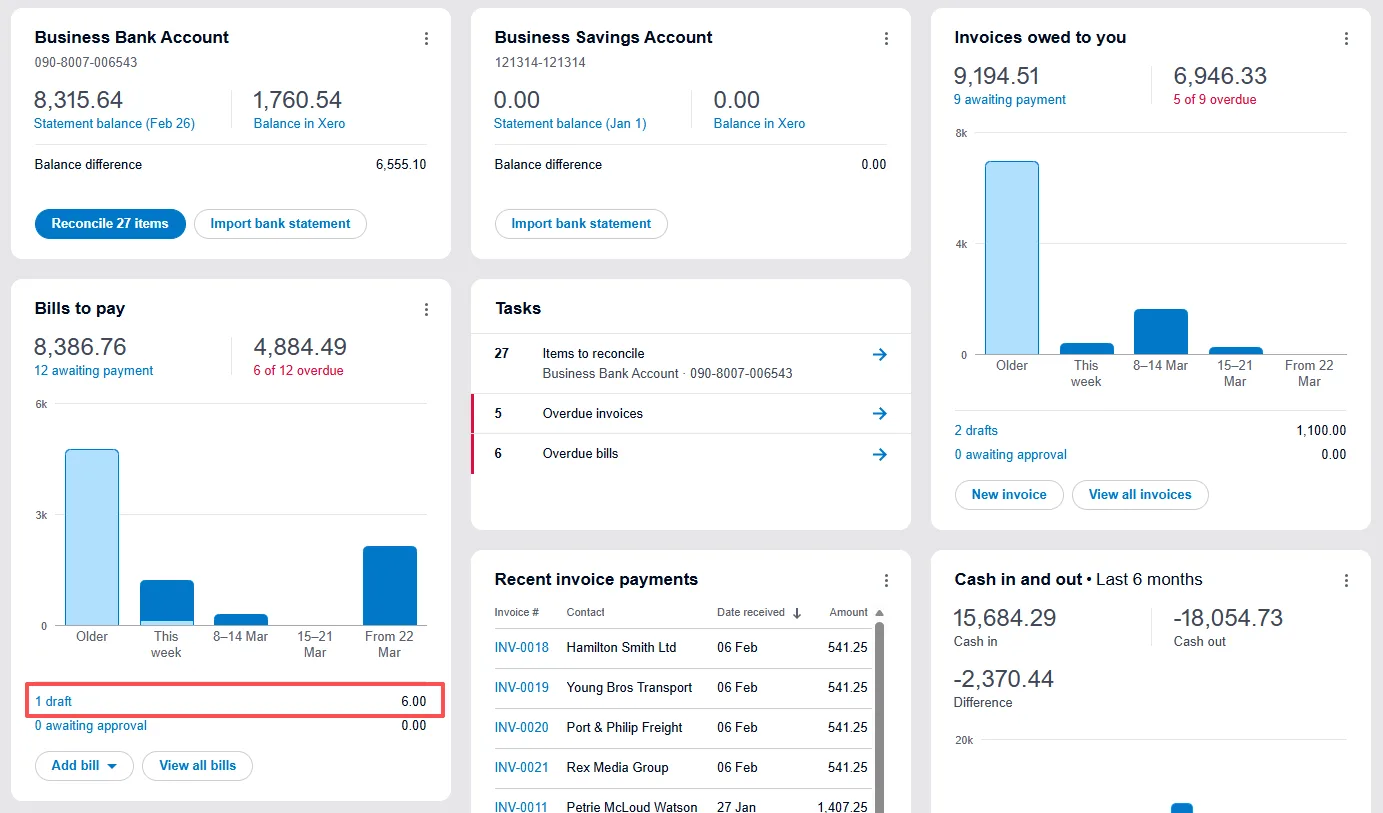
- Copy your organisation's unique bills email in Xero (Business → Bills to pay → Create bill from email, or the equivalent New bill path).
- Forward one PDF, JPG, or PNG attachment per email to that address. Xero creates a draft bill with the file attached and often pre-fills contact, dates, total, and reference.
- Review, code, and approve in Bills to pay.
- Add a capture tool when volume grows, when invoices live only in the email body, or when you want extraction before the ledger. With TallyScan, forward to a dedicated address, extract with AI, land in Google Sheets / Drive / Notion first, then use Xero bills sync (Beta) on Pro if you want drafts in Xero.
Many Xero shops also keep Hubdoc for bank and utility fetches bundled with paid Xero plans. Built-in bills email, Hubdoc, and a privacy-first capture tool can coexist.
Three ways to get invoices into Xero
| Method |
Effort |
Best for |
Weak spot |
| Type bills by hand |
High |
One-offs |
Does not scale |
| Xero bills email |
Low per PDF |
Clean supplier PDF/JPG/PNG attachments |
HTML bodies, portals, forgotten forwards |
| Capture tool → Xero (or Sheets first) |
Setup once |
Recurring vendor and SaaS email |
Portal-only vendors still need a download |
How to find and use Xero's bills email address
Every Xero organisation has a unique bills email address. Treat it like a password: anyone who has it can create draft bills in your org.
- In Xero, go to Business → Bills to pay (or Purchases → Bills, depending on your navigation).
- Open Create bill from email (or New bill) and Copy the unique bills email shown.
- Forward a supplier invoice as a PDF, JPG, or PNG attachment to that address.
- Open Bills to pay. A draft appears with the original file attached.
- Check the pre-filled fields, add account codes and tax, then approve.
When the scan is clear, Xero often fills Contact, Date, Total, Due Date, and Reference so review is minutes, not data entry.
Confirm labels against Xero's current help articles if the UI has moved in your region.
Tips that keep drafts clean
- One invoice per email. Separate messages create cleaner drafts than a multi-PDF dump.
- Prefer the supplier PDF over a phone photo of a printout.
- If you must photograph paper, shoot flat, fill the frame, avoid glare.
- Keep the bills address private. Share only with people and tools that should create bills.
- Cap total message size (commonly 25MB per email). Large scan batches can bounce.
What Xero's email-in can and cannot do
| Works |
Does not work |
| PDF / JPG / PNG attachments |
Invoices only in the HTML or plain-text body |
| Draft bill + source file in Bills to pay |
Portal invoices that were never emailed |
| Pre-fill when the document is legible |
Unlimited "set and forget" without someone forwarding |
| Team members who know the address |
Tracking who forwarded what (shared secret address) |
Inline SaaS receipts (many Stripe-style messages with no attachment) will not create a bill through Xero's bills email. Save as PDF first, or use a tool that reads the body. Broader email capture options are covered in extract invoices from email automatically. Gmail and Outlook filter setups: Gmail guide · Outlook guide.
Why your emailed bill did not show up
Walk this checklist before you blame Xero:
- Body only, no attachment. Email-in ignores inline receipts.
- Wrong file type. Word docs and some phone formats (for example HEIC) are skipped; use PDF/JPG/PNG.
- Over the size limit. Split the batch.
- Wrong or stale address. Re-copy the current org bills email.
- Draft created but fields empty. Faint scans still land as drafts; you fill Contact and Total by hand.
If the same failure repeats every week, email-in has hit its ceiling for your mix of vendors.
Privacy-first path: dedicated address → extract → Xero
When the bottleneck is vendor email volume, put capture in front of Xero instead of living only on the bills address.
How TallyScan fits
- Copy your dedicated TallyScan forward address.
- Forward or auto-filter supplier and SaaS invoice mail there. No full-inbox OAuth.
- AI extracts vendor, dates, totals, and line items from attachments and supported email bodies.
- File somewhere useful immediately: Google Sheets, Notion, Google Drive, or OneDrive on Starter and higher.
- On Pro / Enterprise, connect Xero bills sync (Beta). Synced items are intended as drafts in Bills to pay so you still approve before they hit the books.
You can keep Xero's bills email for tidy supplier PDFs, Hubdoc for statements you already get free with Xero, and TallyScan for the SaaS inbox pile.
Pro Tip: During Beta, sync five known invoices, confirm vendor matching and draft status in Bills to pay, then widen your filters. Do not dump a year of history on day one.
When to use which
Use Xero's bills email when you…
- Receive clean PDF bills from steady suppliers
- Want zero extra cost inside Xero
- Are happy to forward (or filter) each attachment yourself
Keep Hubdoc in the mix when you…
- Already pay for Xero and need bank / utility statement fetch (see Hubdoc alternative for an honest fit check)
Add TallyScan when you…
- Get many SaaS and supplier emails, including HTML bodies
- Want Sheets or Drive copies for your bookkeeper before ledger posting
- Prefer not to grant a tool full Gmail or Outlook access
- Are ready to try Xero bills sync on Pro (Beta) after extraction looks right
Frequently Asked Questions
Where do I find my Xero bills email address?
In Xero, open Bills to pay (or Purchases → Bills), choose Create bill from email / New bill, and copy the unique address. Keep it private.
What file types can I email to Xero?
PDF, JPG, and PNG attachments, within the per-email size limit (often 25MB total). The invoice must be an attachment.
Does Xero read data from an emailed invoice?
Yes, when the document is legible. Xero can pre-fill key bill fields on the draft. You still review coding and approve.
Can Xero capture invoices that are only in the email body?
No. Built-in bills email is attachment-only. Use a capture tool that reads HTML bodies, or save the receipt as a PDF first.
How do I get Amazon or portal invoices into Xero?
Download the PDF from the portal, then email it to the bills address or to your capture tool. Nothing email-only can fetch a file that was never sent.
Can several people email bills to Xero?
Yes. Anyone with the org bills address can forward into it, which is why Xero treats that address like a secret. For per-person tracking without sharing one password-like address, use individual forwards into a capture tool, then sync drafts to Xero.
Should I use TallyScan instead of Xero's bills email?
Not instead. Use bills email for simple supplier PDFs. Use TallyScan when you want automated extraction from vendor email, Sheets/Drive hand-off, and optional Xero sync (Beta).
Start with the free bills address, then automate the rest
Copy your Xero bills email today. Forward three real supplier PDFs and approve the drafts. Most people discover their ceiling within the first week: a Stripe receipt that lands with no attachment, a portal PDF they had to download manually. That is exactly where a capture layer in front of Xero earns its keep. Start free on TallyScan and run one Stripe or AWS message through your dedicated address. See pricing when you are ready to scale volume.