Picture this: your sales team closes a deal in the CRM, celebrates, and moves on. Three days later, someone in finance notices that the invoice was never created. An AP clerk is manually re-entering the same vendor details across four different systems. Your e-commerce orders from last week are sitting in a CSV export on someone's desktop, waiting to be reconciled.
This is what happens when your business tools don't talk to each other. And for most growing companies, it's the invisible tax on their productivity—paid in wasted hours, data errors, and month-end chaos.
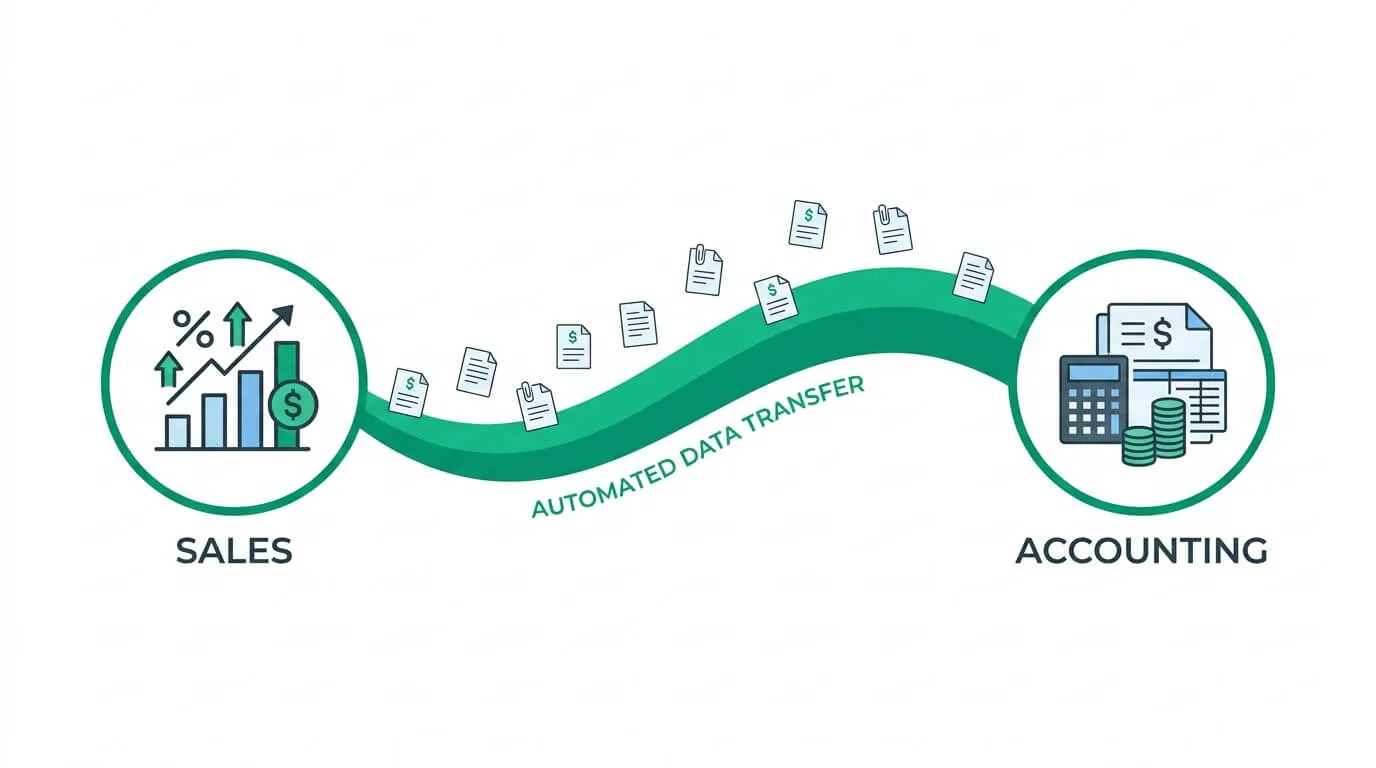
Accounting software integration is the solution. It's the process of building secure, automated bridges between your accounting ledger and every other system that generates or consumes financial data. When it's working, data moves automatically the moment a transaction occurs. No manual re-entry. No copy-paste. No reconciliation panic.
This guide covers everything you need to build and maintain that connected ecosystem: the three integration approaches, the full implementation roadmap, the common failure modes, and how to measure whether it's actually working.
Why Accounting Software Integration Is Now Non-Negotiable
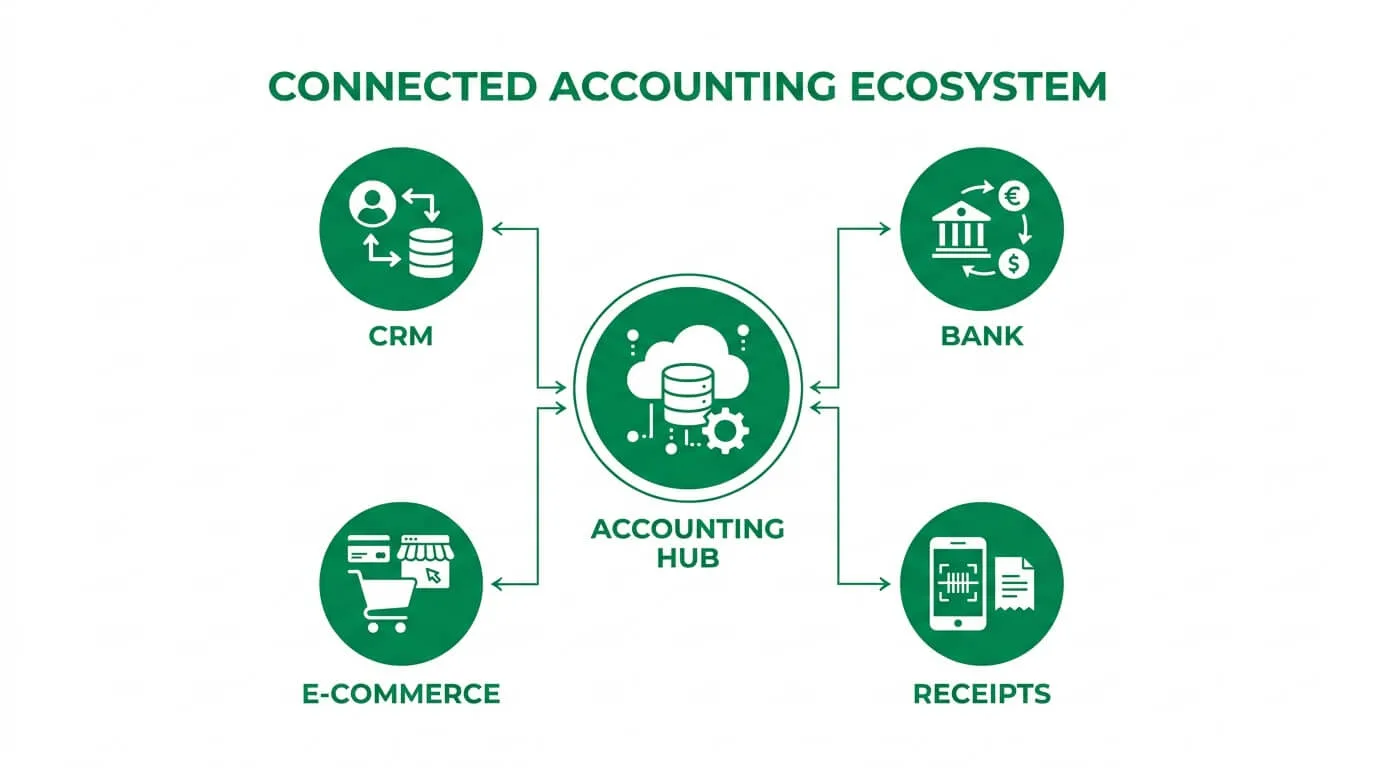
Most high-growth teams operate across a stack of 7 to 12 different tools: a CRM for pipeline management, an e-commerce platform for orders, payment processors, payroll software, and specialized finance tools. If none of these communicate with your accounting ledger automatically, your team spends a disproportionate amount of time acting as the manual connective tissue between them.
Research from Deloitte shows that 73% of small businesses still lose over 8 hours per week to manual data entry and reconciliation. Integration reduces that to near-zero by replacing the human middleman with automated data flows.
The downstream effects are significant:
- Fewer errors: Human re-entry is the single largest source of data discrepancies in financial reporting. Automated sync eliminates the typos, missed decimals, and duplicated entries.
- Real-time visibility: Instead of waiting for monthly exports, your dashboards reflect what's happening right now—across sales, inventory, and cash position simultaneously.
- Audit-ready records: Every transaction has a clean, traceable origin. When an auditor asks for the invoice behind a GL entry, it's one click away.
Manual vs. Integrated Accounting Workflows
| Finance Task |
The Manual Struggle |
The Integrated Advantage |
| Sales Invoicing |
Re-creating invoices by hand in the ledger after a deal closes in the CRM. |
Invoice auto-generated the moment a deal hits "won" status. |
| E-commerce Orders |
Cleaning messy CSV exports from Shopify every Friday afternoon. |
Continuous background sync of orders, fees, and multi-jurisdiction taxes. |
| Expense Tracking |
Chasing staff for receipts and manually keying line items. |
AI extraction pushes receipts straight into the chart of accounts with correct coding. |
| Bank Reconciliation |
Ticking transactions against paper statements with a highlighter for hours. |
Real-time bank feeds auto-match transactions for one-click reconciliation. |
| Month-End Reporting |
Spending days fixing formula errors in exported spreadsheets. |
Live dashboards pull clean data for instant P&L and cash flow visibility. |
Choosing Your Integration Approach
Not all integration paths are created equal. Before you evaluate any specific tool, you need to understand the three architectural options available to you—and which one actually fits your situation.
Think of it like setting up a home theater. You could use the cables included in the box, hire a professional for a fully custom install, or use a universal smart remote to make everything work together. All three work, but the complexity, cost, and flexibility vary considerably.
Option 1: Native Integrations (Plug-and-Play)
Native integrations are pre-built connections made by the software developers themselves. You'll find them in the "App Marketplace" or "Integrations" section inside platforms like QuickBooks or Xero. Getting one running typically takes a few clicks and a permission grant.
Best for: Connecting common, popular tools (Shopify + Xero, Stripe + QuickBooks) where an official integration already exists.
Limitations: You're dependent on what the developers chose to connect. If you use niche or custom software, there may not be a native option.
Option 2: Third-Party Integration Platforms (The Switchboard)
Platforms like Zapier, Make (formerly Integromat), and n8n act as intermediaries between thousands of apps that don't have direct connections to each other. You build "Zaps" or "Scenarios" using if-then logic: when a new payment is processed in Stripe, log the transaction details to QuickBooks as a new bill.
Best for: Connecting less common apps, building multi-step workflows, or automating processes without writing any code.
Limitations: Adding a third-party layer introduces an additional dependency and potential latency. Complex workflows can also become difficult to debug when something breaks.
Option 3: Custom API Integration (The Tailor-Made Solution)
An Application Programming Interface (API) is a standardized way for two software systems to communicate directly. Building a custom integration gives you complete control over exactly which data moves, in which direction, and on what trigger.
Best for: Business-critical workflows that require precision, complex logic (multi-entity routing, multi-currency), or situations where no native or third-party connector exists.
Limitations: Requires developer resources, either in-house or contracted. Higher upfront cost and ongoing maintenance.
Rule of thumb: Start with native integrations. If those don't exist or don't cover your specific use case, evaluate third-party platforms next. Reserve custom API development for workflows that are high-frequency, high-stakes, or genuinely unique to your business.
For businesses building their own products or managing multiple accounting platforms simultaneously, Unified API services like Apideck or Rutter let you support QuickBooks, Xero, Sage, and others through a single integration layer—cutting development time by up to 80%.
Technical Standards Worth Understanding
If you're evaluating integration vendors or working with a developer, a few technical concepts will significantly sharpen your conversations.
Bi-directional synchronization: Data shouldn't only flow into your accounting software. A high-quality integration also reads from the ledger. For example, when a client's payment clears your bank feed, that "Paid" status should automatically update back in your CRM—so your sales team has accurate account information without checking two systems.
Event-driven webhooks vs. polling: Legacy integrations "poll" your systems—checking for changes every 30 or 60 minutes. Modern integrations use webhooks, which trigger an action instantly when an event occurs. The practical difference: a webhook-based bank reconciliation matches transactions in real time; a polling-based one might be an hour behind. For fast-moving businesses, that lag matters.
Continuous close bookkeeping: When bank feed integrations use real-time webhooks, daily reconciliation becomes possible. Instead of a multi-day month-end scramble, your books are consistently current throughout the month, turning close from a crisis into a brief review.
For a deeper look at how these integrations power your invoice processing workflow, the technical foundations are the same.
A 3-Stage Implementation Roadmap
Successfully integrating your finance stack is less about the technology and more about the preparation. McKinsey research shows that 83% of integration projects fail or exceed budgets due to poor data hygiene and scope creep—not technical complexity. The roadmap below is designed to keep you in the 17% that succeed.
Stage 1: Assess and Plan
The most common and costly mistake is skipping straight to software selection. Before you evaluate anything, spend time mapping your current state.
Inventory your tools. List every system currently in use: CRM, e-commerce platform, payment processors, payroll, expense management, and your accounting ledger. Include any spreadsheets being used as "temporary" solutions (they're never temporary).
Identify your biggest bottlenecks. Where does your team lose the most time? Where do errors most commonly originate? Interview your AP clerk, your bookkeeper, and whoever does month-end close. Their daily frustrations are your integration roadmap.
Define measurable success criteria. Vague goals like "reduce manual work" are useless for measuring outcomes. Concrete goals are not: "Reduce invoice processing time by 60% within 90 days" or "Eliminate all manual GL entries from Shopify orders by Q2."
Identify the Source of Truth for each data type. Your CRM is typically the master for customer contact information. Your accounting software is the master for payment status and financial balances. Defining this upfront prevents conflicts when the same data field exists in multiple systems.
Stage 2: Prepare and Migrate
This is where most projects underestimate the effort required. Data migration and preparation typically consume 50% of the total project time—and skipping it is why integrations produce garbage output.
Data cleansing: Before connecting anything, audit the data in your source systems. Duplicate vendor records, inconsistent naming conventions, outdated GL codes, and misformatted fields will all carry over into your accounting software if you don't clean them first. A vendor named "Amazon Web Services", "AWS", and "Amazon.com" in three different systems will create three separate records in your ledger.
Data mapping: For each integration, draw an explicit map: which field in System A corresponds to which field in System B. "Customer Name" in Salesforce → "Contact Name" in QuickBooks. "Order Total" in Shopify → "Invoice Amount" in Xero. This documentation becomes critical when something breaks six months later.
Sandbox configuration: Build and test your integration in a non-production environment before touching live data. Configure your rules, test edge cases (refunds, multi-currency orders, partial payments), and document the expected behavior for each scenario.
Stage 3: Test and Launch
Once your sandbox is working correctly, expand your testing to production conditions before full rollout.
Run a pilot group: one department, one vendor category, or one specific workflow. Process real transactions through the new integration while keeping your old process running in parallel. Compare the outputs. Any discrepancies are far cheaper to fix in a pilot than in a company-wide rollout.
Set a hard go-live date with a parallel cutover period—typically two to four weeks where both the old and new processes run simultaneously. Once the integration data consistently matches expectations, sunset the manual process and commit fully.
After launch, review your success metrics monthly for the first quarter. Most integrations benefit from configuration adjustments in weeks three through eight as real-world edge cases surface.
Common Integration Challenges (and How to Handle Them)
Even well-planned integrations encounter friction. Knowing the common failure modes in advance dramatically reduces their impact.
Poor Data Quality ("Garbage In, Garbage Out")
The most universal problem. If your vendor master data is inconsistent or your chart of accounts is a decade of accumulated compromises, the integration will replicate that mess into your connected systems—faster than before. The only solution is to treat data cleanup as a required prerequisite, not an optional nice-to-have. Budget time for it explicitly.
Misaligned Workflows
Your sales team closes deals one way. Your finance team processes invoices another way. If the underlying business processes don't match, no integration can bridge the gap cleanly. Map both workflows side by side before building anything. In most cases, 50% of the real work is agreeing on the process, not the technology.
Scope Creep
What begins as "connect Stripe to QuickBooks" has a way of becoming "and also sync Shopify, and also automate payroll posting, and also..." each addition that lands mid-project extends timelines and inflates costs. Define a clear scope document before you start, and treat new requests as Phase 2 items. This discipline is what keeps projects on budget.
Hidden Costs
The software subscription is just one line item. Budget explicitly for: initial data cleanup labor, developer or consultant fees, team training, and ongoing maintenance (APIs update; your integration will occasionally break and need fixing). Projects that account for these upfront run significantly more smoothly than those that discover them mid-execution.
Technical Skills Gap
If your team doesn't have an in-house developer, a complex custom API integration will stall or be built incorrectly. Be honest about this early. Native integrations and third-party platforms like Zapier exist precisely for this situation—they make advanced workflows accessible without code. For higher-complexity needs, a specialist contractor hired for the specific project is often more cost-effective than trying to make it work internally.
How to Know If It's Actually Working
Integration without measurement is just infrastructure. These are the metrics that indicate whether your connected stack is delivering real value.
| KPI |
Baseline (Before) |
Target (After 90 Days) |
| Manual data entry hours/week |
Track current time |
Reduce by 70%+ |
| Invoice error rate |
% of invoices requiring correction |
Reduce to under 2% |
| Month-end close duration |
Days to complete close |
Reduce by 50%+ |
| Audit preparation time |
Hours to gather source documents |
Reduce from days to hours |
| Duplicate payment rate |
Incidents per quarter |
Reduce to zero |
Establish your baseline numbers before you go live. Without them, you can't demonstrate ROI to stakeholders or identify which parts of the integration are underperforming.
What AI-Powered Integration Looks Like in 2026
The integration landscape has moved significantly beyond simple data pipes. When your CRM, e-commerce platform, and accounting ledger share data continuously, AI can operate across that combined dataset in ways that weren't previously possible.
Predictive cash flow analysis: A system that sees a sales pipeline spike in your CRM can calculate the corresponding cash flow impact 30 days forward—before it hits your bank account. Instead of reacting to liquidity problems, you can see them coming.
Intelligent anomaly detection: When every expense has a digital trail from source to ledger, machine learning can identify spending patterns that don't fit historical norms—flagging potential duplicate payments or unusual vendor charges before they're approved.
Automated expense categorization: ML models trained on your historical GL coding can categorize new transactions with 95%+ accuracy, reducing the manual review burden to only genuinely ambiguous edge cases.
The AI in accounting market is projected to grow from $6.68 billion to $37.6 billion by 2030. The trajectory is clear: integration is becoming intelligent, and the businesses that build the connected foundation now will be best positioned to leverage it.
For a broader look at where this is heading, accounting process automation explores the full scope of what's being automated across modern finance teams.
Frequently Asked Questions
What exactly is accounting software integration?
It's the process of building secure, automated data connections between your accounting ledger and other business tools—so financial data flows automatically when transactions occur, eliminating the need for manual re-entry across systems.
Is it worth building for a small business?
Often more so than for large enterprises. A small business or solo operator handling what would otherwise require a full finance department benefits disproportionately from automation. The ROI on eliminating even 5 hours of weekly manual entry is immediate and measurable.
How much should I budget for an integration project?
It depends heavily on the approach:
- Native integrations: Often free or included in existing subscriptions.
- Third-party platforms (Zapier, Make): $20–$500/month depending on volume and complexity.
- Custom API development: Typically $3,000–$20,000+ for the initial build, plus ongoing maintenance.
Factor in data cleanup labor, team training, and a contingency buffer for unexpected complexity. Projects that plan for total cost—not just software cost—consistently deliver better outcomes.
Why do accounting integrations fail?
The most common causes are poor data quality (syncing messy data produces messy results), misaligned underlying processes (technology can't fix a broken workflow), and scope creep (adding requirements mid-project). None of these are technology problems—they're planning problems, which is why the Assessment stage is so critical.
Which integrations should I prioritize first?
Start with what we call the "High-Value Trinity": first, your live bank feeds (eliminates reconciliation grunt work immediately); second, your payment processor such as Stripe or PayPal (ensures revenue recognition is accurate and automatic); third, your primary sales or billing tool such as your CRM or e-commerce platform (closes the gap between sales activity and financial recording). These three integrations alone typically eliminate the majority of manual entry for most businesses.
How long does implementation take?
A simple native integration or Zapier workflow can be live in an afternoon. A custom API build with complex logic and large data migration should be planned over 4–12 weeks depending on scope. The single most time-consuming element for most projects is data cleanup—not development. Build that into your timeline from day one.
Building an integrated accounting ecosystem isn't a one-time project—it's an ongoing capability. Start with the highest-leverage connections, measure their impact, and expand from there.
The businesses that have done this well don't have larger finance teams. They have smarter infrastructure.
Ready to connect your invoice processing to your accounting system? Try TallyScan for free and see how AI-powered invoice extraction syncs directly into QuickBooks, Xero, and other platforms—in minutes, not months.