Manual bookkeeping is no longer a sustainable way to scale a business. As we move into 2026, the conversation has shifted from "can we digitize paper?" to "how accurately can we understand data?"
If you've been using traditional OCR (Optical Character Recognition), you know its limitations: it's brittle, it fails on non-standard layouts, and it requires constant human correction. At TallyScan, we are moving beyond OCR to a new era of Invoice AI powered by state-of-the-art Large Language Models from OpenAI and Google Gemini.
What is Invoice Automation actually?
Invoice automation is the process of using technology to capture, extract, and sync data from financial documents into your accounting system without manual typing. While old-school tools act like a digital scanner, TallyScan acts like a digital accountant.
Instead of just looking at pixels, the Invoice AI understands the context of the document. It knows the difference between a shipping address and a billing address, identifies tax rates across different jurisdictions, and can even process faded or crumpled receipts that traditional OCR would miss.
The Comparison: Manual vs. OCR vs. AI Invoice Extract
To understand the ROI of switching to TallyScan, let's look at how the three methods stack up:
| Feature |
Manual Entry |
Traditional OCR |
TallyScan Invoice AI |
| Processing Speed |
3-5 minutes per bill |
~1 minute (plus correction) |
Seconds |
| Accuracy |
Prone to human fatigue |
~80% (fails on new layouts) |
>98% (Context-aware) |
| Complex Tables |
Extremely tedious |
Usually breaks |
Handled with precision |
| Setup Time |
None |
High (requires templates) |
Instant (Zero templates) |
Why "Understanding" Matters for Invoice AI
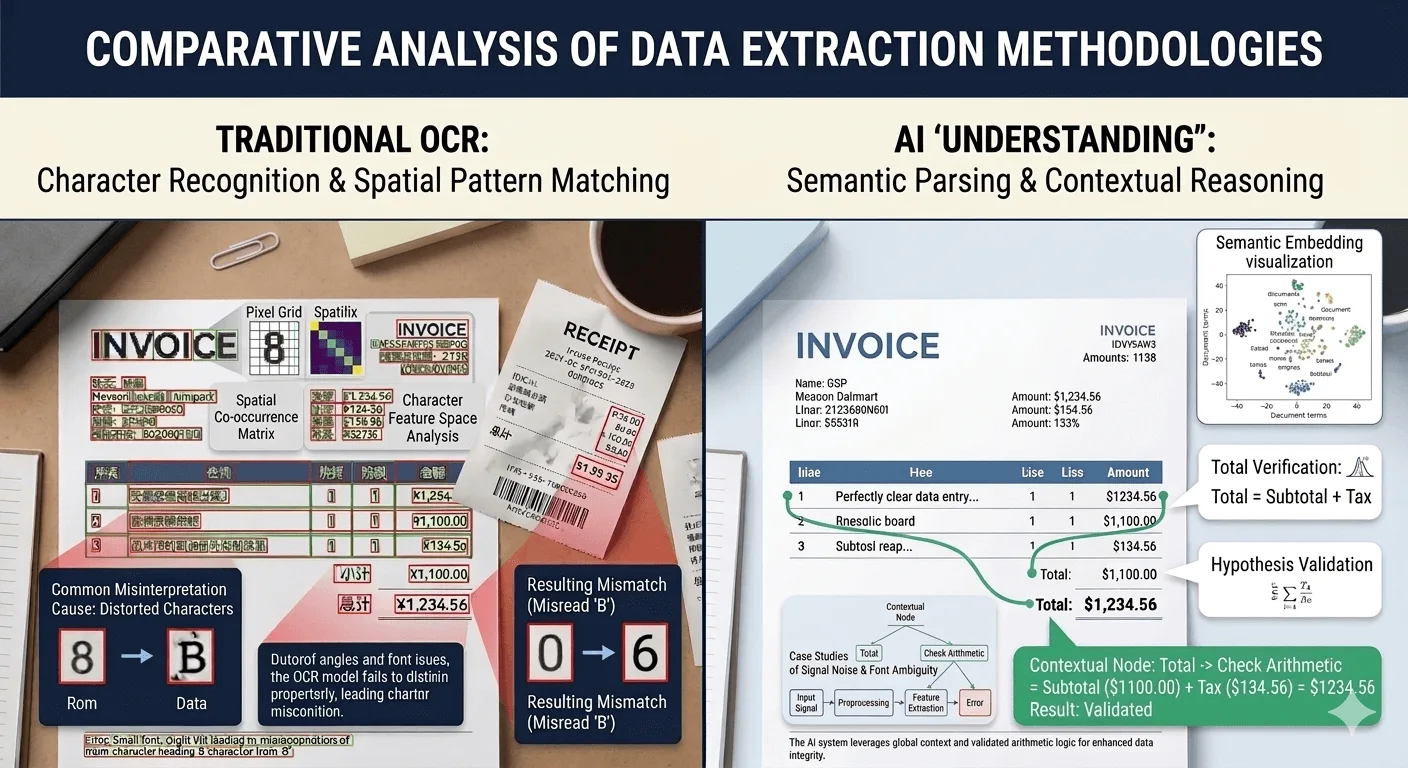
The fundamental difference between OCR and AI is reasoning. Traditional OCR only sees shapes and tries to guess letters. If a vendor puts the "Total" in a weird font or a hidden corner, OCR often gets lost or misreads the value.
AI Invoice Extract is a generational leap:
- Semantic Logic: The AI doesn't just look for keywords; it understands the structure of a financial document. It calculates subtotals, taxes, and discounts to verify that the final amount is mathematically sound before extraction.
- Contextual Correction: Even if a character is blurry or partially obscured, the AI uses its knowledge of global vendor names, VAT/GST rules, and business logic to "reason" the correct value — much like a human accountant would.
- Zero Templates & Layout Agility: Traditional OCR requires a specific "map" for every vendor layout. If the vendor changes their design, the automation breaks. TallyScan's AI adapts to any new layout instantly, making it truly "set and forget."
This level of intelligence ensures that when you invoice extract, you're getting validated business data, not just a digital copy of text.
Privacy-First Invoice Processing Workflow
A common challenge for business owners is that invoices and receipts are often scattered across multiple personal and professional email accounts. Many invoice automation platforms solve this by requesting full "Read" access to all your Gmail or Outlook inboxes.
However, we believe this "scan everything" approach has major drawbacks:
- Privacy Concerns: Granting a third-party app access to your entire digital life — including private conversations — is a significant security risk.
- Token Inefficiency: Using AI to scan thousands of non-financial emails just to find one receipt is extremely expensive and consumes unnecessary tokens, driving up costs for the user.
Why We Focused on Email Forwarding
At TallyScan, we prioritize privacy and cost-effectiveness. Instead of scanning your entire inbox, we assign every user a unique, dedicated forwarding address: xxx@fwd.tallyscan.com.
- Total Privacy Control: You decide exactly which documents enter your accounting workflow. No accidental syncing of personal emails.
- Better Value: We only consume AI tokens on the specific documents you forward, allowing us to offer much more competitive pricing.
- Centralized Management: No matter how many email accounts you use, simply forward your bills to one central TallyScan address.
While direct AI mailbox scanning is a powerful concept for the future, we believe Email Forwarding currently offers the best balance of speed, cost-efficiency, and security for modern businesses.
Future-Proofing Your Accounting: QuickBooks & Xero Sync (Beta)
While our core focus is building an accurate invoice extract engine, we are also striving to provide more user-friendly features. We are currently beta-testing deep integrations with:
- QuickBooks Online: Push processed data directly to your Unpaid Bills.
- Xero: Create Draft Bills automatically for your review.
These features are still in beta, and we are concerned they may cause errors or inconvenience for users. You can read more about our latest platform updates in our article on Syncing Invoices to QuickBooks, Xero & Google Drive. If you have any suggestions, please feel free to contact us.
Conclusion: Scale Your Business, Not Your Chores
If your team is still spending hours every week on data entry, you are losing more than just time — you are losing the ability to focus on high-level financial strategy. AI invoice processing is no longer a luxury; it’s a competitive necessity.
Ready to see the difference between "reading" and "understanding"?
Get Started for Free Today — Your first 10 invoices are on us!
FAQ for AI Invoice Processing
Is AI more accurate than OCR for invoice extraction?
Yes. While OCR only recognizes characters, AI understands the relationship between data points, allowing it to process complex and varied layouts with much higher precision.
Can I automate invoices from different vendors without setting up templates?
Absolutely. TallyScan's AI engine is template-free. It can process a brand-new invoice layout from a first-time vendor instantly.
Does TallyScan support multiple currencies?
Yes, our invoice AI automatically detects and extracts currency symbols and codes from global invoices.