In the fast-paced business world of 2026, relying on manual data entry for your finances is not just slow. It is a liability. For many businesses, the accounts payable (AP) process remains the single biggest bottleneck in finance: a source of frustration, errors, and costs that compound quietly every month.
If your finance team is still drowning in email threads, manually keying in data from PDFs, or chasing down approvals, it is time to automate accounts payable. This guide walks you through everything you need to know: from diagnosing your current process to selecting the right technology and running a rollout that actually sticks.
Step 1: Understand Your Current AP Reality
Before jumping into solutions, you need to know exactly where you stand. It is easy to feel like your AP process is "slow" or "clunky," but vague discomfort does not help you choose the right tool or set a realistic goal. Think of it like a doctor running diagnostics before writing a prescription.
The True Cost of Manual Invoice Processing
Manual AP processes are deceptively expensive. The direct cost is obvious, but the ripple effects are where the real damage occurs.
- High Processing Cost Per Invoice: Industry studies show that manually processing a single invoice costs between $15 and $25. A study by IOFM (Institute of Finance and Management) puts the figure even higher, at $16 to $22 per invoice when factoring in exception handling and corrections. With automation, this drops to under $3.
- Human Error: Typos in invoice numbers, amounts, or vendor details lead to reconciliation nightmares and potential overpayments.
- Lost Time: Finance professionals spend up to 40% of their time on low-value transaction processing instead of strategic analysis.
- Late Fees and Missed Discounts: Slow approval cycles mean you miss early payment incentives and often incur late penalties.
The adoption gap is closing fast. At the start of 2025, only about 9% of AP departments were fully automated. But by the end of the year, nearly two-thirds of finance professionals anticipated their AP processes would be completely hands-free. This is not just a trend. It is a competitive necessity.
AP Readiness Self-Assessment
Before evaluating any software, complete this quick self-assessment. It will tell you exactly where to focus first.
| Process Area |
Signs You Are Still Manual |
Readiness Score |
Priority |
| Invoice Entry |
Staff manually keys data from paper or PDF invoices; high error rates |
2/10 (High manual effort) |
High |
| Approval Workflows |
Invoices are emailed for approval, causing delays and lost threads |
3/10 (Inefficient and slow) |
High |
| Payment Processing |
Payments are processed individually or in manual batches |
4/10 (Time-consuming) |
Medium |
| Supplier Communication |
Frequent calls from suppliers asking about payment status |
3/10 (Reactive, not proactive) |
Medium |
| Reporting and Analytics |
AP data requires manual spreadsheet work to compile |
2/10 (Lacks visibility) |
High |
Areas scoring below 4/10 are your highest-priority automation targets because they offer the largest and quickest wins. Use this data to set concrete goals: not "we want to be more efficient," but "reduce average invoice processing time by 40% within six months."
Step 2: Understand What AP Automation Actually Does
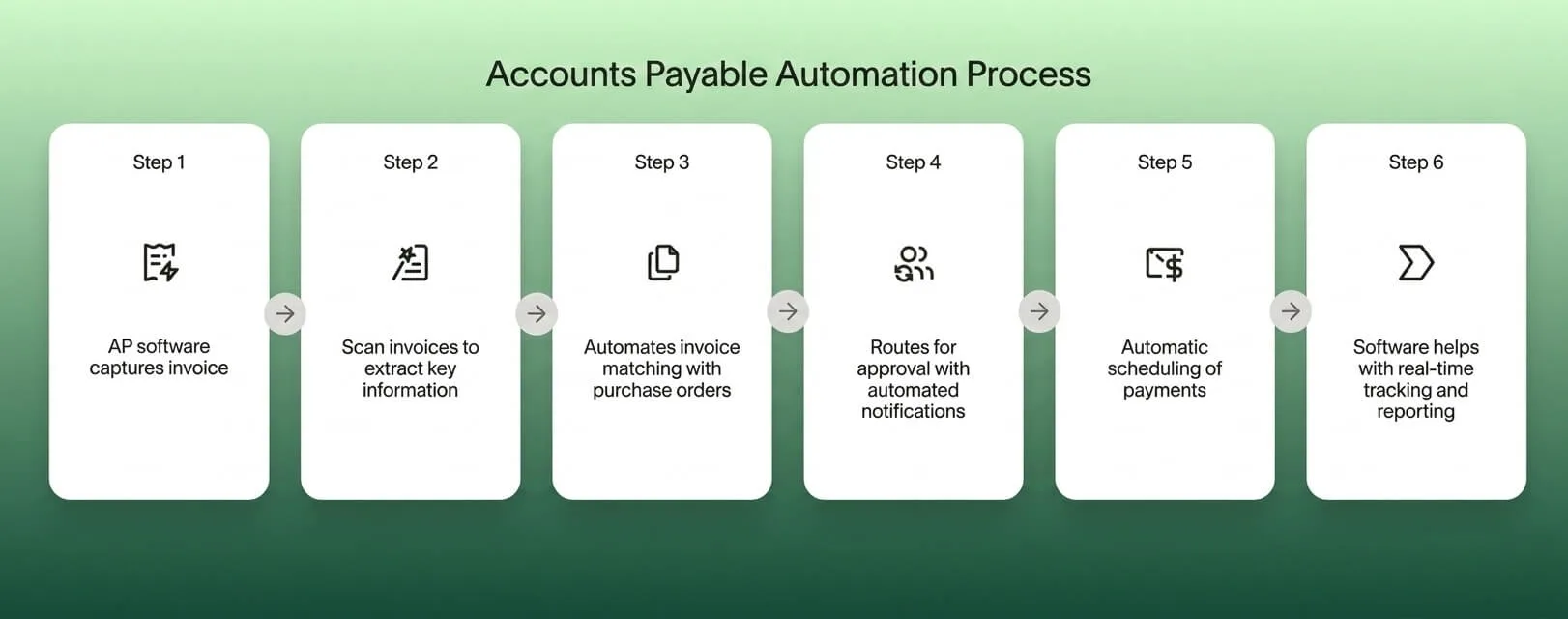
To automate accounts payable means to use technology to handle the end-to-end process of receiving, coding, approving, and paying invoices. It replaces manual touchpoints with intelligent digital workflows.
Modern automation goes far beyond simple digitization. It leverages Artificial Intelligence (AI) and Machine Learning (ML) to:
- Capture invoice data automatically from any source and format.
- Code expenses to the correct general ledger accounts without manual input.
- Route invoices to the right approvers based on amount, vendor, or department rules.
- Sync everything directly with your accounting software such as QuickBooks or Xero.
OCR vs. Modern AI: Why the Difference Matters
Traditional Optical Character Recognition (OCR) was the standard for years, but it is brittle. It relies on templates and breaks the moment a vendor changes their invoice layout.
Modern AI Invoice Processing, like what powers TallyScan, is fundamentally different. It reasons about documents the way a human would.
- Contextual Understanding: It knows a date near the top right is likely the "Invoice Date," regardless of the label used.
- Handwriting Recognition: It can decipher handwritten notes, totals, and vendor names on receipts.
- Line-Item Extraction: It captures detailed line items, not just totals, giving you granular visibility into spending.
- Continuous Learning: Every correction you make trains the model, so accuracy improves over time on your specific vendor formats.
Step 3: Know the Key Components of a Modern AP Stack
When evaluating an accounts payable automation solution, look past the marketing language and focus on the features that drive real results.
Intelligent Invoice Capture
Your capture layer is the front door for all incoming bills. It must handle everything: crisp PDFs from large suppliers, blurry photos of crumpled receipts, multi-page documents, and invoices in multiple languages. The best approach is to create a single, dedicated intake channel (like invoices@yourcompany.com) and let the automation handle the rest from there.
Automated Approval Workflows
The email approval chain is where efficiency goes to die. An automated approval system enforces your internal controls without any manual chasing.
- Smart Routing: Send invoices to the correct department head automatically based on vendor, category, or dollar amount.
- Multi-Level Approvals: Configure rules such as "Invoices over $5,000 require CFO approval."
- Mobile Approvals: Allow managers to approve from their phones, cutting cycle time from days to hours.
Automated 3-Way Matching: The Core Control Mechanism
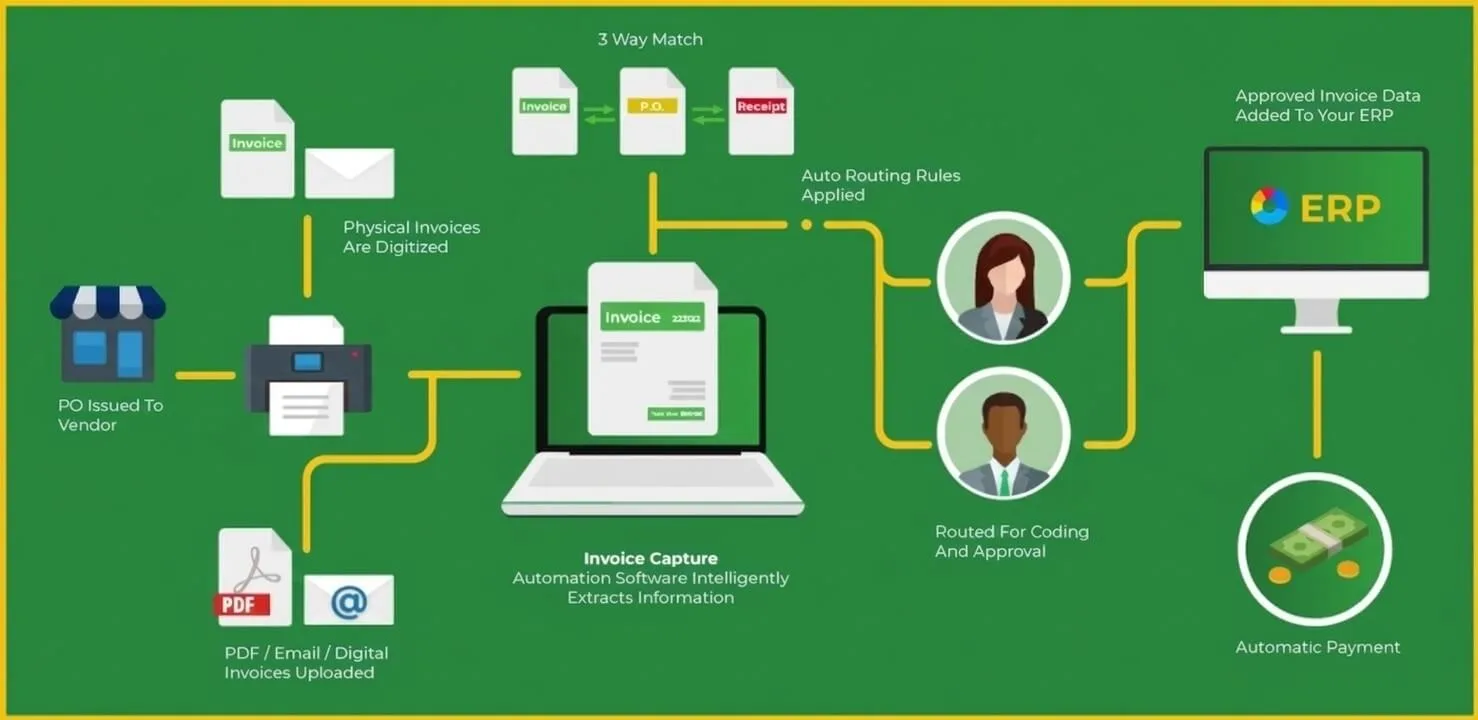
For businesses dealing with inventory, procurement, or manufacturing, automated 3-way matching is the most powerful control available. It acts as an automated auditor, cross-referencing three critical documents in seconds.
Document 1: The Purchase Order (PO) - "What We Ordered"
The contract between you and the supplier. It defines expected items, quantities, and agreed prices before the transaction happens. The system checks whether invoice details align with the original authorization.
Document 2: The Goods Receipt - "What Arrived"
The proof of delivery from your warehouse team. It confirms goods were physically received in the correct quantity and condition. The system verifies you are not being billed for 100 units when only 80 arrived.
Document 3: The Vendor Invoice - "What We Were Billed"
The payment demand from the supplier. The system compares line items, unit prices, and totals against both the PO and the Goods Receipt.
When all three documents align within your tolerance threshold (for example, less than 1% price variance), the invoice is straight-through processed to payment without any human intervention. When there is a discrepancy, the system flags it and routes it directly to the purchasing manager with all relevant documents attached. This eliminates 90% of manual verification work while stopping overpayments automatically.
Step 4: Evaluate Technology That Fits Your Business
The market to automate accounts payable is crowded with vendors making similar promises. The real differentiator is how the software fits into your existing workflow, not how it performs on a perfect demo invoice.
The Data Access Question: Full Inbox vs. Privacy-First
How the software ingests invoices is a security decision as much as a convenience one. Two dominant models exist in the market today.
Full Inbox Access: The software connects to your email account with full read permissions and scans everything for invoices automatically. While convenient, this grants an AI access to all your private communications, not just bills.
Privacy-First Forwarding: The software assigns you a dedicated intake address (for example, bills@fwd.tallyscan.com). You only forward what needs processing. This zero-trust approach ensures the AI never sees your personal emails, sensitive client communications, or confidential attachments.
For businesses where data privacy is a priority, a forwarding-based model like TallyScan provides the automation benefits without the inbox exposure risk.
Integration Depth Matters
A tool that only exports CSV files is not an integration. It is scheduled manual work. Look for a platform with a native two-way API connection to your accounting software. It should import your Chart of Accounts, Vendor list, and Tax Rates automatically, and sync approved invoices back in real time.
Step 5: Measure the Real ROI
Is AP automation worth the monthly fee? The numbers are straightforward. Here is a realistic comparison for a business processing 100 invoices per month.
| Cost Category |
Before Automation |
After Automation |
Savings |
| Manual Data Entry Labor |
$5,000/month |
$500/month |
90% reduction |
| Invoice Approval Cycle Time |
15 days average |
3 days average |
80% faster |
| Late Payment Fees |
$1,200/month |
$100/month |
92% reduction |
| Early Payment Discounts Captured |
$200/month |
$1,500/month |
650% gain |
| Error and Fraud Losses |
$800/month |
$50/month |
94% reduction |
Businesses that automate accounts payable report an average 29% reduction in total invoice processing costs within the first year. The savings are not just from cutting manual labor. They come from preventing errors, capturing discounts that previously expired unnoticed, and eliminating fraud that manual reviews routinely missed.
Step 6: Build a Secure AP Process
When you automate accounts payable, you hand over access to sensitive financial data. Security cannot be an afterthought.
What Good AP Security Looks Like
Modern AP platforms use machine learning to establish a baseline of normal behavior. When something unusual appears, such as a vendor's banking details changing suddenly or an unusually large first-time payment request, the system flags it for human review before any money moves.
Beyond the software itself, strong AP security is built on the principle of segregation of duties: no single person should be able to both enter and approve a payment.
Practical Security Controls to Implement
- Role-Based Access: Configure permissions so AP clerks can enter invoices but cannot approve payments or add new vendors. Each team member should only see and do what their role requires.
- Mandatory Two-Person Approvals: Require at least two separate approvers for any payment above a defined threshold. This single rule eliminates the most common AP fraud vector.
- Immutable Audit Trails: Every action, from invoice receipt to final payment, is automatically logged with a timestamp and user ID. This makes compliance reviews fast and transparent, and provides clear evidence in the event of a dispute.
- Vendor Change Verification: Set up a rule requiring a secondary confirmation whenever a vendor's bank account or payment details are updated. This stops the most common form of payment fraud (BEC - Business Email Compromise) cold.
Step 7: The Strategic Benefits Beyond Cost Savings
The case for AP automation extends well beyond the cost-per-invoice calculation.
Real-Time Cash Flow Visibility
When invoices are trapped in email inboxes, you do not know your true liabilities until someone manually books them. Automation gives finance leadership a live view of accounts payable, enabling accurate cash flow forecasting and better working capital decisions.
Stronger Supplier Relationships
Suppliers value reliability above almost everything else. By eliminating lost invoices and consistently paying on time, you become a preferred customer. This gives you genuine leverage to negotiate better payment terms, volume discounts, and priority service.
Strategic Payment Optimization
With an automated system tracking every invoice, you can make proactive payment decisions. When a supplier offers a 2% early payment discount, your system flags it immediately and you can decide in seconds whether capturing the discount outweighs holding the cash. Teams that optimize payment timing regularly find the early-payment discount gains alone justify the cost of the automation platform.
Step 8: Implementation Roadmap
A structured rollout is what separates successful AP automation projects from expensive shelfware. Follow this phased approach.
| Phase |
Duration |
Key Milestones |
Success Metrics |
| Phase 1: Assessment |
Week 1 |
Map current invoice workflow; calculate baseline cost per invoice and cycle time; define integration requirements |
Documented baseline metrics; clear list of must-have features |
| Phase 2: Selection and Integration |
Weeks 2-3 |
Evaluate 3-5 platforms; test with real invoices (not demo data); verify two-way accounting sync |
Successful test sync with Chart of Accounts; >95% accuracy on your actual invoices |
| Phase 3: Pilot |
Week 4 |
Select one department or a small group of frequent vendors; configure approval matrix; process live invoices |
95% data capture accuracy; positive feedback from pilot users |
| Phase 4: Full Rollout |
Week 5+ |
Train all AP staff and approvers; notify vendors of new invoice submission address; go live company-wide |
100% of invoices processed through new system; cycle time reduced by 30%+ |
Leading Your Team Through the Change
Technology is only half of any automation project. The other half is people. Your team has built habits around the old process, and habits take effort to change.
- Lead with WIIFM ("What's In It For Me"): Show your AP clerks that automation eliminates the tedious data entry they dislike most, freeing them for more interesting work. Show approvers that mobile approvals mean no more invoice backlogs waiting for them on Monday morning.
- Create Internal Champions: Identify two or three team members who are enthusiastic about the new system and train them first. They become your on-the-ground support and generate positive word-of-mouth before the full rollout.
- Set a Hard Cutoff Date: Announce a date after which paper receipts and unforwarded invoices will no longer be processed manually. Clear deadlines accelerate adoption faster than any incentive program.
Conclusion: Future-Proof Your Finance Team
The question is not whether you should automate accounts payable. The question is how much longer you can afford not to. The technology is mature, the ROI is proven, and the competitive gap between automated and manual finance teams is widening every quarter.
By automating the tedious parts of AP, you free your finance team to focus on what actually matters: strategic planning, cost analysis, and driving business growth. A well-implemented AP automation system does not just process invoices faster. It turns your AP department from a cost center into a genuine financial intelligence asset.
Ready to transform your accounts payable process? Start your free TallyScan trial today and see how AI-driven invoice automation turns chaos into clarity.
FAQ: Common Questions About AP Automation
Is AP automation suitable for small businesses?
Absolutely. Small businesses often benefit the most because they have fewer resources. Automation allows a small team to handle the workload that would otherwise require additional headcount. Most modern platforms offer pricing tiers designed for businesses processing as few as 50 invoices per month.
How long does it take to implement?
With modern cloud-based solutions like TallyScan, basic setup takes under an hour. The primary steps are connecting to your accounting software and setting up your invoice forwarding address. A full company-wide rollout including team training and vendor onboarding typically follows the 4-phase roadmap above and takes 4 to 6 weeks.
Can AI really read handwritten receipts or non-standard invoices?
Yes. Unlike legacy OCR templates that break when a layout changes, modern Vision AI models reason about documents contextually. They can decipher messy handwriting, crumpled receipts, multi-language invoices, and complex line-item tables with high accuracy.
How does the system prevent duplicate payments?
The system automatically checks every incoming invoice against your complete payment history. If it detects a matching invoice number, amount, or vendor combination already on record, it flags the new submission as a potential duplicate for human review before any payment is processed.
What happens if the AI makes a mistake?
Automation is designed to be a co-pilot, not an autopilot. You set confidence thresholds: if the AI is uncertain about a specific field, it flags that invoice for human verification. You always have final approval before any data is synced or payment is triggered.
Will automation replace my accountant?
No. Automation replaces data entry, not accounting judgment. It empowers your accountant to be a strategic advisor rather than a data processor, spending time on cash flow analysis, tax strategy, and business growth instead of keying invoice numbers into a spreadsheet.
How do I handle the security risk of giving software access to financial data?
Choose a platform with SOC 2 Type II compliance as a baseline security requirement. For email-based invoice capture, prefer a privacy-first forwarding model over full inbox access. Implement role-based permissions and mandatory two-person approvals for payments above a defined threshold. These three controls together eliminate the vast majority of AP security risk.