AI
Invoice Process Automation for Smarter Payments
How invoice process automation works, real ROI calculations, a 6-point tool selection framework, 5 implementation phases, pitfalls to avoid, and 8 FAQs.

TallyScan Team
Let's be honest about how most small business bookkeeping actually happens. It's Friday afternoon, you're exhausted, and instead of closing your laptop, you're opening a spreadsheet. You're hunting down a $45 receipt from three weeks ago, trying to decipher a forwarded email attachment, and manually matching bank transactions one by one.
You didn't start a business to become a part-time data entry clerk.
Switching to automated bookkeeping isn't about becoming a tech wizard. It's a simple mindset shift: you stop doing the books and start supervising a smart system that does the heavy lifting for you. In 2026, AI-powered tools can automatically capture, sort, categorize, and match your financial data with up to 98% accuracy—leaving you to focus on the decisions that actually grow your business.
In this guide, we'll break down exactly how to automate your bookkeeping workflow step by step: the real cost of not automating, how to choose the right tools, how to set up document capture, train your AI, streamline bank reconciliation, and use the resulting data to make genuinely smarter business decisions.
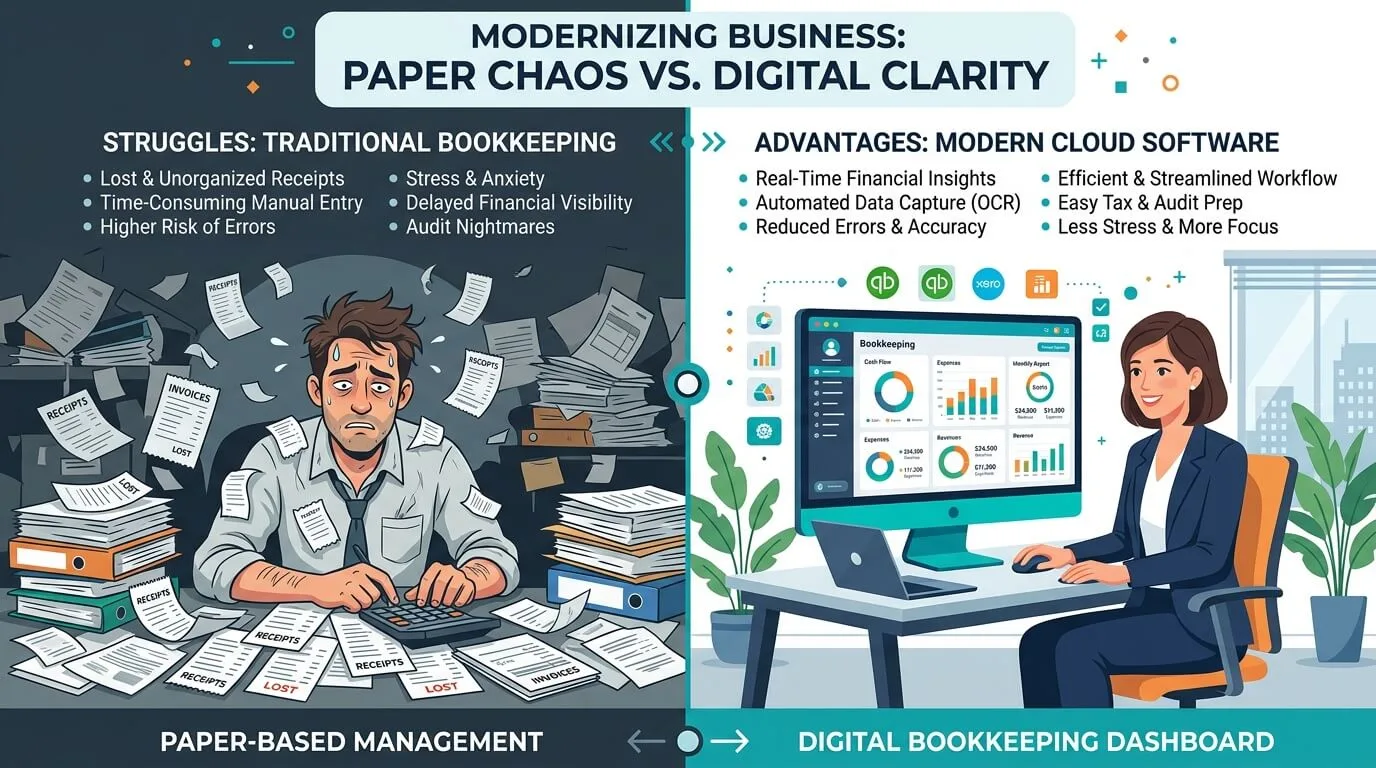
Before building a better system, it's worth understanding exactly where the current one is bleeding time and money. For most businesses handling more than 20–30 invoices or receipts a month, the friction points are surprisingly universal.
The numbers back this up. According to Gartner's finance research, finance teams that rely heavily on manual processes spend up to 80% of their time on data collection and only 20% on actual analysis. Automating the routine work flips that ratio—giving you more time for the decisions that matter.
Before diving into tools and tactics, run through this 60-second checklist. If you answer "yes" to two or more, you're already a prime candidate for automation:
If those questions resonated, the tools available today are built precisely for your situation.
| Aspect | Manual Bookkeeping | Automated Bookkeeping |
|---|---|---|
| Time Spent | High (5–10+ hours/week) | Low (1–2 hours/week for review) |
| Accuracy | Prone to typos and omissions | Up to 98% AI extraction accuracy |
| Data Freshness | Books only current after month-end | Real-time; updated daily via bank feeds |
| Scalability | More transactions = proportionally more manual work | Software handles 30 or 3,000 transactions effortlessly |
| Hidden Costs | Wasted time, late fees, accountant cleanup charges | Predictable monthly SaaS subscription |
Picking the right software isn't about chasing the biggest brand name. It's about finding the platform that fits your workflow—not the other way around. The automated bookkeeping market was valued at $15 billion in 2025 and is projected to grow at 15% annually—which means the options are expanding fast, and not all of them deserve your attention.
Here's how to evaluate them properly.
The most important thing to check: does the tool connect to the other software you use every day? A bookkeeping platform that can't sync with your bank, payment processor, or sales channels will create more manual work, not less.
Map your current workflow before you evaluate anything. Key integrations to look for:
If a tool fails even one of these for your specific business type, keep looking.
There are two architectural approaches to bookkeeping automation:
All-in-one platforms like QuickBooks or Xero handle invoicing, expense tracking, payroll, and reporting under one roof. For most businesses that want a single source of financial truth, this is the right starting point—everything speaks to everything else.
Specialized apps excel at one specific job: capturing receipts, managing AP approvals, or processing invoices. You'd pair one of these with your core accounting platform when you have a high-volume pain point that the all-in-one doesn't solve well. TallyScan, for example, is purpose-built for AI invoice extraction and sync—it handles the document capture and extraction, then pushes clean data to QuickBooks or Xero.
The right architecture depends on your complexity. Start with the all-in-one to establish your base; layer in specialized tools when you hit a specific bottleneck.
The freelancer who handles 30 transactions a month today might be running a 10-person team with 3,000 monthly transactions in two years. Before you commit to a platform, ask: does the pricing scale reasonably? Does the software slow down or add friction at higher volumes? Will the integrations still work when you add a second business entity?
Buying what fits today can cost you a painful migration in 18 months. Spend 20 minutes on this question before you sign up.
Once you have your toolset, the first thing to build is a frictionless document capture system—a funnel that catches every supplier invoice, coffee shop receipt, and SaaS subscription automatically, before they have a chance to get lost.
Most people receive invoices and receipts mixed in with everything else—client emails, newsletters, Slack notifications forwarded to email. When it comes to automated bookkeeping, how you handle that inbox is actually one of the most consequential decisions you'll make. There are three main approaches, each with real trade-offs.
Option 1: Let AI scan your entire main inbox Some platforms offer to connect directly to your main mailbox and have AI scan everything—finding invoices and receipts among all your other emails. The appeal is obvious: zero setup, no behavior changes. The problem is privacy. You're granting a third-party application read access to your entire email account, including client communications, HR threads, personal messages, and anything else that lands there. For most business owners, that's a trade-off not worth making regardless of how trustworthy the vendor claims to be.
Option 2: Email forwarding to a dedicated processing address (the TallyScan approach)
A smarter middle ground: you keep your existing email habits, but set up a simple forwarding rule. When an invoice or receipt arrives in your main inbox, you forward it to a dedicated address (like sample@fwd.tallyscan.com) where the AI processes only what you deliberately send. You stay in control of exactly what gets shared. The small friction cost—one extra click to forward—is a reasonable trade for keeping your main inbox private.
Option 3: A dedicated financial inbox (the cleanest long-term setup)
The most elegant solution is to create a separate email address specifically for financial documents—something like invoices@yourbusiness.com or ap@yourbusiness.com—and route all vendor communications there from the start. You then connect this clean, purpose-built inbox to your bookkeeping software and let it scan the whole thing. Since nothing personal ever lands there, there's no privacy concern.
The real work for Option 3 is in the vendor migration:
After a few weeks of this, the dedicated inbox handles itself. Documents flow to you rather than you hunting them down.
For physical receipts—client lunches, gas, emergency office supplies—the discipline that kills most people is "I'll scan it later." By Friday, that receipt is crumpled at the bottom of your bag or already in the bin.
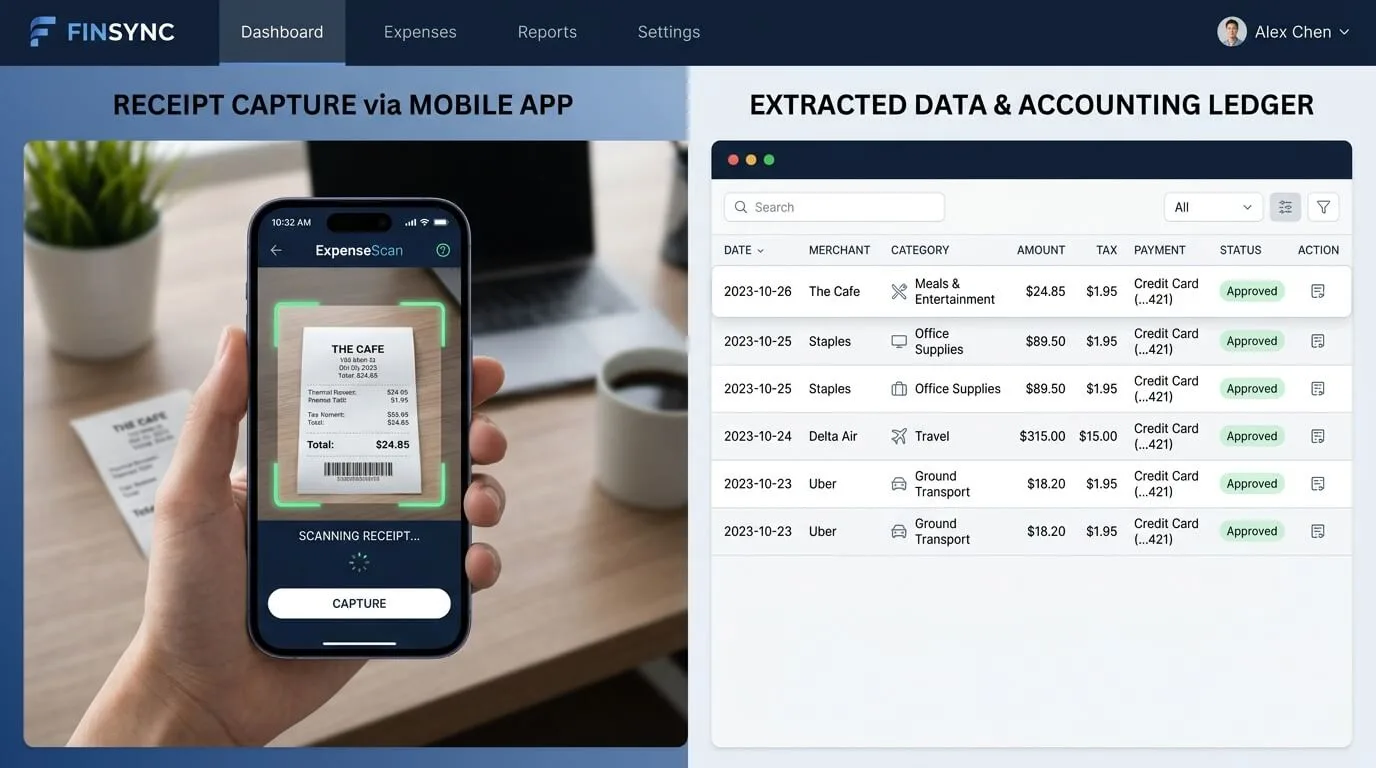
Use a mobile scanner app built on Optical Character Recognition (OCR) technology. Snap the receipt the moment the cashier hands it to you. Ten seconds. The AI reads the vendor name and total, and the expense is logged before you leave the store.
Pro Tip: Make scanning receipts a non-negotiable rule the same way you'd make wearing a seatbelt non-negotiable. The habit takes about two weeks to stick. After that, it's effortless—and you'll never lose another receipt.
You have documents flowing in automatically. Now—how do you stop them from sitting in a queue waiting for someone to type them into QuickBooks? This is where modern AI genuinely earns its keep.
Traditional OCR just reads text off a page. AI-driven automation understands context: it knows that a charge from "AWS" belongs in "Cloud Infrastructure," not "Office Supplies," and that a payment to a vendor with a German VAT ID requires different tax handling than a domestic invoice.
When a document enters the system, the AI automatically extracts the vendor name, total, dates, invoice number, and individual line items. It then suggests a GL code based on pattern matching from previous transactions. You review, confirm, and move on.
The learning loop is simple but powerful:
The percentage of invoices entered manually into accounting systems dropped from 85% in 2023 to 60% in 2024—and AI-first platforms are continuing to push that number down. By the time the system has processed 2–3 months of your data, most businesses find 80–90% of routine transactions categorize themselves.
Don't just wait for the AI to learn—accelerate it by configuring explicit rules for your most predictable recurring expenses. This is the highest-ROI activity in the entire setup process.
| Transaction Type | Example Rule | Benefit |
|---|---|---|
| SaaS Subscriptions | If vendor = "Adobe" or "Microsoft" → Software & Subscriptions | All recurring tech costs grouped correctly every month with zero clicks. |
| E-commerce Payouts | If description contains "Stripe Payout" → Sales, split out fees separately | Gross revenue and processing costs tracked accurately—no blended numbers. |
| Freelancer Payments | If vendor = "Upwork" or contractor name → Contractor Expenses | Consistent tracking for tax time and budget analysis. |
| Utility Bills | If vendor = "National Grid" or "City Water" → Utilities | Core operational costs never land in generic "Office Expenses." |
Once these rules are active, the vast majority of your routine transactions are handled before you even open your laptop.
This is the final and most satisfying piece of the puzzle. When you connect your bookkeeping software directly to your bank via a live feed, the dreaded month-end reconciliation transforms from a multi-day slog into a 10-minute approval session.
The system now has two data streams: the documents you've captured (invoices, receipts) and the transactions flowing in from your bank daily. Its job is to match them.
Here's what this looks like in practice: You forward a $50 Asana invoice to your dedicated email on Tuesday. It's extracted and logged. On Thursday, the $50 charge from Asana appears in your bank feed. The AI notices the identical amount and vendor name, flags the match, and puts it in your review queue. You click "OK." Done.
The system gets progressively more confident over time. After confirming the same vendor two or three times, it starts auto-matching—no approval needed. Your books are updating themselves daily.
Pro Tip: Set aside 10 minutes every Tuesday and Friday to approve the AI's pending suggestions. This "little and often" approach means you roll into month-end with your books already 99% reconciled. No scramble, no panic, no late nights.
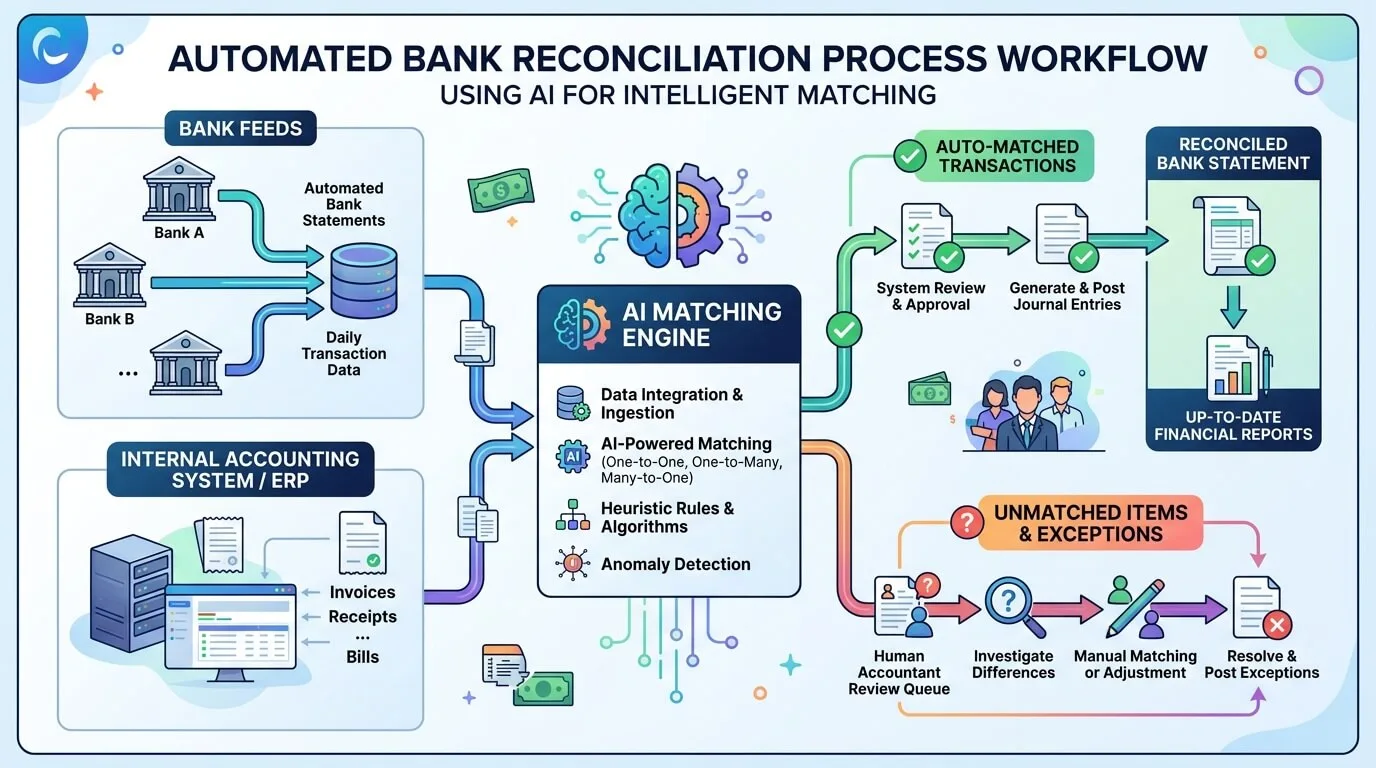
No system is 100% perfect—and that's fine, because the exceptions are easy to handle. The three most common ones:
The key insight: you're actively managing these handful of exceptions—not every single transaction. That's the whole point.
A common question is whether you can automate everything. The honest answer is: no, and you shouldn't try to. The sweet spot is automating all the repetitive, rules-based work while keeping humans in charge of judgment and strategy.
Automate immediately:
Keep human oversight for:
This division of labor is what makes automation genuinely powerful: your team stops being data entry operators and starts being financial analysts.
Here's the payoff that most guides skip over: once your bookkeeping is automated, you get something more valuable than saved time. You get reliable, real-time financial data—and with it, the ability to make genuinely smarter decisions.
Standard P&L and cash flow reports are a start. But the real leverage comes from tailoring your reports to your specific KPIs.
An e-commerce business might want Cost of Goods Sold as a percentage of revenue tracked weekly. A marketing agency might compare monthly recurring revenue against client acquisition cost. A service firm might want a billable hours utilization rate.
You can build these by filtering expenses by category, comparing time periods side-by-side, or drilling down into a single revenue stream. The data that used to take a half-day to compile now takes 30 seconds.
The most valuable financial habit you can build is receiving key reports automatically—before you think to ask for them.
Set up a weekly cash flow summary delivered to your inbox every Monday morning. Schedule a monthly "Budget vs. Actual" report to arrive on the first of each month. Configure a low-cash-balance alert for anything under your defined threshold.
Scheduling tip: Start with just two automated reports. A weekly cash flow summary (keeps liquidity front of mind) and a monthly budget-vs-actual (your reality check). Once those are habits, add others based on what questions you're actually asking your bookkeeper.
This is what automated bookkeeping actually looks like when it's working:
That entire cycle—spotting an issue, investigating, acting—used to take a conversation with your accountant, a data export, and a spreadsheet. Now it takes three clicks. That's the real return on investment.
Automated bookkeeping uses software—powered by AI, OCR, and bank integrations—to handle repetitive financial tasks without manual data entry. This covers fetching bank feeds, extracting data from receipts and invoices, categorizing recurring expenses via rules, suggesting reconciliation matches, and generating reports automatically.
Yes—and it's safer than it might feel. Reputable platforms connect via read-only API integrations (often using regulated intermediaries like Plaid). The software can see your transactions to categorize them—it cannot move, transfer, or initiate any payment. Your funds are never at risk. Look for platforms that offer end-to-end encryption, SOC 2 compliance, and compliance with GDPR or your local data privacy regulations.
Absolutely—and you should. The best automation tools are designed to enhance these platforms, not replace them. For example, TallyScan can sync extracted invoice data directly into QuickBooks or Xero as draft bills, letting you review before anything posts to your books. You keep the familiar ledger and get the automation layer on top.
Most small business owners report recovering 5–10 hours per week. Month-end close cycles typically shrink from several days of scrambling to a few hours of reviewing AI suggestions. The specific saving depends heavily on your current invoice volume—a business processing 200+ invoices monthly often sees the most dramatic results.
Most cloud-native platforms charge a monthly subscription, typically $30–$100/month depending on features and volume. To assess ROI, use this simple calculation: if automation saves you 8 hours per month and you value your time at $50/hour, that's $400 in recovered value for a $50 software cost—an 8x return before you count the late fees eliminated and accountant cleanup hours avoided. For most businesses, the payback period is under 60 days.
Most businesses can be up and running—with their bank connected, top vendors configured, and key automation rules active—within a single afternoon. The first week involves some active training: reviewing the AI's category suggestions and correcting where it's wrong. By week three, most routine transactions are handling themselves. The system is largely "tuned" by the end of month two.
You didn't go into business to wrestle with receipts and reconciliation. With the right setup—a dedicated capture inbox, AI-powered extraction, smart categorization rules, and live bank feeds—bookkeeping becomes a quiet background process that surfaces insights rather than creating headaches.
The three steps in this guide aren't complicated. They take an afternoon to configure. And within two weeks, you'll wonder how you ever managed the old way.
Ready to eliminate manual invoice entry? Try TallyScan for free and have your first batch of invoices processed by AI in under 10 minutes.
How invoice process automation works, real ROI calculations, a 6-point tool selection framework, 5 implementation phases, pitfalls to avoid, and 8 FAQs.
A no-hype guide to accounting AI with 6 real use cases, verified ROI data, key limitations, a software selection framework, and practical FAQs.
Learn how receipt scanning OCR extracts expense data automatically, what accuracy to expect, which features matter, and how to cut processing time by 80%.