Guide
What Is Electronic Invoicing?
Learn what electronic invoicing is, how it works, the difference from PDF invoices, global compliance mandates by country, e-invoicing formats, and how to implement it for your business.

TallyScan Team
Picture this: it's the end of the financial quarter, your team is under pressure, and someone urgently needs an invoice from a vendor—one that was processed eight months ago. You spend the next hour digging through stacked folders, shared drives with inconsistent naming conventions, and a chain of forwarded emails that leads absolutely nowhere. Sound familiar?
This scenario plays out in accounting departments every single day. And while it might seem like a minor inconvenience, the cumulative cost—lost productivity, compliance risk, and team frustration—is anything but minor.
That's exactly why so many firms are turning to accounting document management software (DMS). It's not just a fancier way to store files. Done right, it fundamentally changes how your entire financial operation runs—from the moment a document arrives to the second it's reconciled in your books. In fact, many firms start this journey by exploring invoice processing automation to tackle the immediate pain of manual data entry.
In this guide, we'll break down everything you need to know: what this software actually does, which features matter most, how to evaluate your options, and how to roll it out without disrupting your team's workflow.
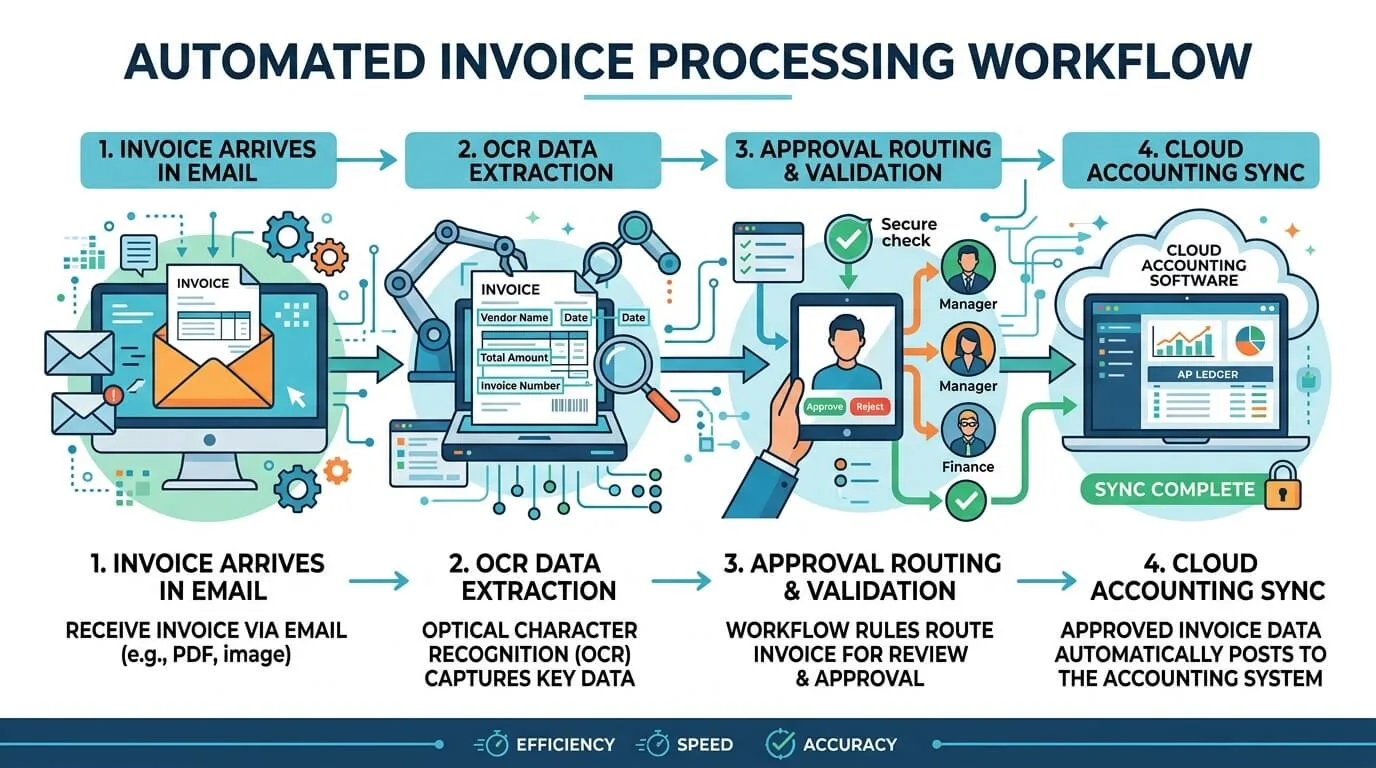
At its core, accounting document management software is a secure, cloud-based system that handles the full lifecycle of your financial documents—capturing them, extracting the data, routing them through approval, and storing them in a way that's searchable, auditable, and compliant.
Think of it as the intelligent backbone behind your financial workflow. Instead of a junior accountant manually keying in invoice details, an AI reads the document and populates the fields automatically. Instead of an approval email getting buried in someone's inbox, the system routes it to the right person and follows up if they go quiet for too long.
The technology driving this is a combination of Optical Character Recognition (OCR), automated workflows, and native integrations with accounting platforms like QuickBooks, Xero, and NetSuite. Together, these capabilities replace a huge amount of the tedious, repetitive work that quietly drains your team's time and energy.
The numbers reflect just how much demand there is for this shift. The accounting practice management software market was valued at $0.8 billion in 2024 and is on track to reach $0.9 billion in 2025—and that's just one slice of a much larger document management industry projected to hit $24 billion by 2032.

Before we dive into solutions, it's worth being honest about the real cost of staying with the status quo. A lot of firms know their current system is messy—but they underestimate how much that messiness is actually costing them.
A manual, paper-based process is essentially a library with no catalog and no librarian. You can have thousands of documents and still spend 45 minutes hunting for one specific receipt. And that's on a good day. On a bad day, you discover it was never filed at all.
Beyond the time sink, there are real financial and legal risks. Documents get lost. Physical files get damaged. Sensitive data sits in unlocked cabinets. Audit preparation becomes a weeks-long scramble. None of this is inevitable—it's just what happens when your document process hasn't kept up with the pace of modern business.
Here's a side-by-side breakdown of what that gap looks like in practice:
| Feature | Traditional Paper System | Accounting Document Management Software |
|---|---|---|
| Document Retrieval | Slow, physical searches through cabinets. High risk of permanent loss. | Instant, keyword-based digital search across the entire database. |
| Data Entry | 100% manual. Highly prone to human error, typos, and duplicate entries. | Automated via AI-powered OCR—extract data from any invoice in seconds. |
| Security & Privacy | Vulnerable to physical theft, fire, flooding, or unauthorized access. | Bank-level encryption, SOC 2 compliance, and granular role-based access. |
| Audit Trails | Labor-intensive tracking. Nearly impossible to prove a clear chain of custody. | Unalterable digital logs capturing every view, edit, and approval with timestamps. |
| Collaboration | Requires physical hand-offs or manual scanning. Creates bottlenecks constantly. | Simultaneous access for remote and in-office teams with real-time visibility. |
| Compliance | Manual retention tracking. Easy to miss regulatory deadlines. | Automated retention policies and instant audit-ready reporting. |
The shift isn't just about convenience. It's about turning your document workflow from a liability into a competitive advantage.
Not every DMS is built the same, and it's easy to get distracted by polished sales demos. Here's what you should actually be evaluating—the features that separate a genuinely useful platform from one that just adds another login to your team's day.
This is the engine that makes everything else possible. A good OCR system doesn't just scan—it understands. When an invoice lands in the system, it should automatically identify the vendor, extract the invoice number, total amount, line items, and due date, then map that data to the right fields in your accounting software without anyone touching a keyboard.
The best platforms go further than that. They learn from your documents over time, getting more accurate the more they process. Some even pull documents directly from vendor portals or your email inbox, so nothing requires manual uploading.
Think about how a typical invoice gets approved in most firms: someone emails it to a manager, the manager gets busy, it sits for three days, then someone has to chase them down. This is a workflow problem, not a people problem.
A proper DMS lets you design automated approval chains that fit your actual business rules. For example:
The result is a document assembly line that runs itself. You get visibility into every stage, and nothing falls through the cracks.
A document management system that doesn't talk to your accounting software is just a slightly fancier folder. The real value comes from a two-way sync with your general ledger.
When an invoice is approved, the data should flow directly into QuickBooks, Xero, or whichever platform you use—creating the bill, categorizing it correctly, and attaching the original document to the transaction. TallyScan now makes it easier than ever to sync invoices to QuickBooks, Xero & Google Drive, ensuring your digital and financial records are always in lockstep.
Look for platforms with pre-built, native integrations. API connectors can work, but they often require technical maintenance and can break when either platform updates.
You're handling your clients' most sensitive financial information. That means security can't be an afterthought. The features you need here are non-negotiable:
Pro Tip: Before you sign any contract, ask the vendor directly for their SOC 2 Type II compliance report. This is a third-party audit developed by the AICPA that confirms their security practices actually hold up—not just on paper, but in operation. Any reputable provider will have this readily available.
Every firm considering a DMS has the same question: is this going to be worth the disruption? The short answer is yes—almost always. But let's walk through exactly where the value shows up.
Think about what audit preparation currently looks like. Weeks of digging through files, verifying transactions, chasing down source documents. With a DMS, every document is already organized, timestamped, and linked to the relevant transaction. An auditor asks for all invoices from a specific vendor over a six-month period? That's a 30-second search, not a two-week project.
The same applies to internal controls. Knowing that every document has a clear, unalterable trail of who touched it and when makes it far easier to spot irregularities before they become serious problems.
This is where the ROI math gets interesting. Start with the obvious savings: less paper, less printer ink, less physical storage space. For larger firms, these costs alone can run into the thousands annually.
But the bigger win is time. Consider how many hours your team currently spends on tasks that don't require human judgment:
A solid DMS puts all of that on autopilot. When you add up those recovered hours and multiply them by your team's hourly rate, most firms find the software pays for itself within the first few months.
If your firm operates with any mix of remote or hybrid staff, you've probably felt the pain of document handoffs. Someone needs a signed document that lives on a specific computer in the office. A partner in one city needs to review a report being prepped in another. Without a central digital hub, these situations create constant friction.
With a cloud-based DMS, geography becomes irrelevant. Everyone is always working from the same, current version of every document. Collaboration happens in real time, not through a chain of emailed attachments.
With dozens of options on the market, narrowing down to the right DMS can feel overwhelming. Here's a practical way to cut through the noise.
Before you even look at a single vendor demo, spend an hour mapping out your current document process from end to end. Where are the bottlenecks? What makes your team groan? Where do documents actually go missing?
Bring your team into this conversation—they'll have insights that don't show up in any management report. Ask them: what's the most tedious part of your day? What task do you wish you never had to do again? Their answers will shape your feature priority list.
Don't just ask "do you integrate with QuickBooks?" Ask how the integration works. Is it a native, bidirectional sync or a one-way export? How does it handle errors? What happens when there's a version update on either end? These details matter enormously in day-to-day use.
A tool that's perfect for your firm today might become a bottleneck in two years if your client base grows. Look at the pricing model carefully: does it charge per user, per document volume, or a flat rate? Make sure the cost structure won't penalize you for being successful.
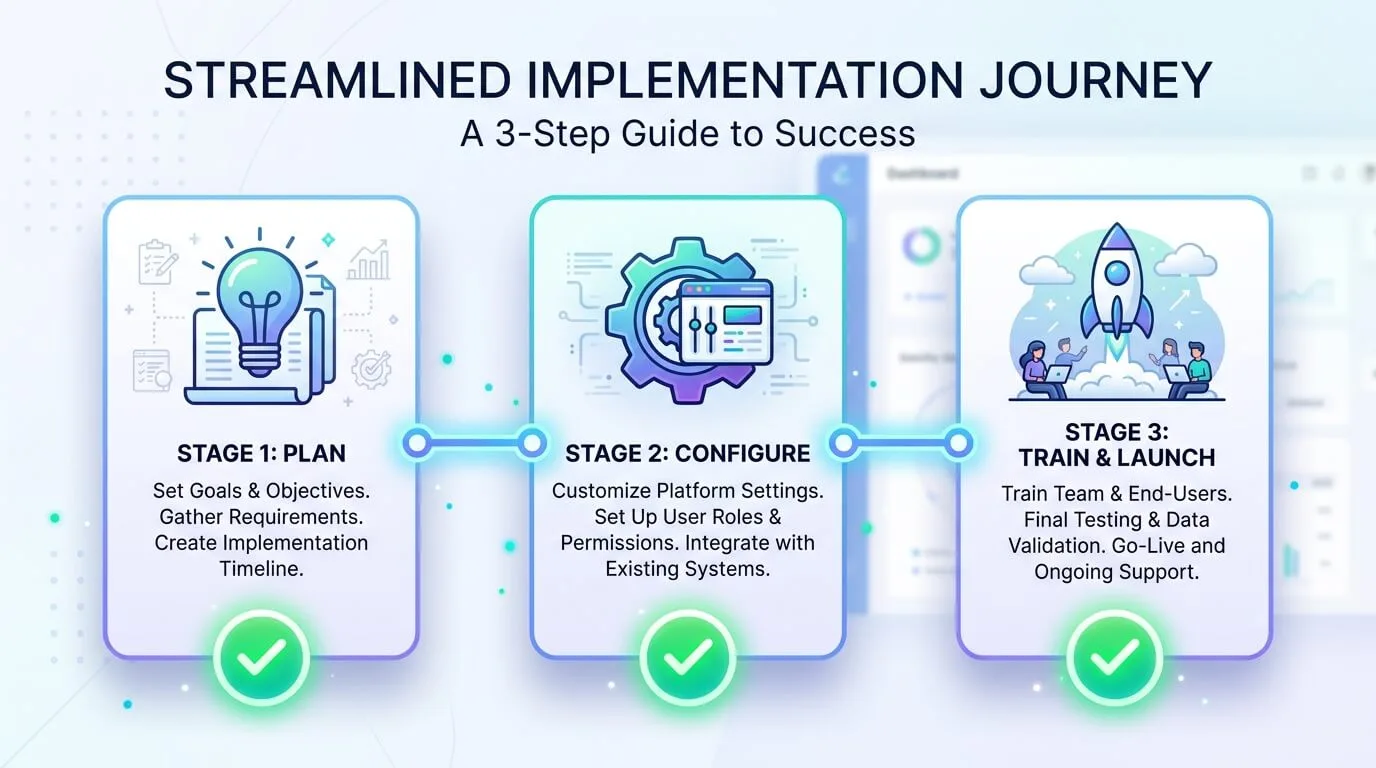
Choosing the software is only half the battle. How you roll it out determines whether it gets adopted enthusiastically or ignored within a month.
"Be more efficient" is not a goal. "Reduce invoice processing time by 50% within 90 days" is a goal. Set concrete targets before you go live so you have something to measure against—and something to celebrate when you hit it.
Spend real time on configuration before anyone else logs in. Get your folder structures and naming conventions locked down. Build out your approval workflows. Assign user roles and permissions carefully. The goal is to make the system feel intuitive and frictionless from day one, so your team's first impression is positive.
For historical documents, most firms find a phased approach works best: start scanning documents for active clients as new work kicks off, rather than trying to digitize everything at once. It reduces the upfront burden considerably.
The most technically perfect DMS can fail if the people using it don't believe in it. Center your training around their frustrations, not the software's features. Show them how it eliminates the tasks they hate. Find two or three enthusiastic early adopters who can act as informal champions and help their colleagues get comfortable.
Don't make training a single event. Plan for follow-up sessions, create short reference guides for common tasks, and make it easy for people to ask questions in the weeks after go-live.
Accounting document management software is a cloud-based platform that automates how financial documents are collected, read, routed for approval, and stored. It connects to your accounting tools to eliminate manual data entry and ensure every document is organized, searchable, and audit-ready.
In almost every case, yes—and often more so than on a local server. Reputable providers invest heavily in security infrastructure: end-to-end encryption, multi-factor authentication, and SOC 2 Type II compliance. That last certification, in particular, means an independent auditor has verified their security practices hold up in real-world conditions.
The best platforms offer native, two-way integrations with major accounting software including QuickBooks, Xero, Sage, and NetSuite. When a document is approved, the data flows directly into your general ledger—creating the transaction and attaching the source document automatically.
Most platforms operate on a per-user monthly subscription, with pricing generally ranging from $15 to $50 per user depending on the feature tier. For a small firm of 5–10 people, you're typically looking at $150–$500 per month. Given the time saved on manual tasks and reduced storage costs, most firms see ROI within three to six months.
For most small-to-mid-sized firms, a basic implementation—including configuration and initial training—can be completed in two to four weeks. More complex setups with custom approval workflows and large-scale historical document migrations can take longer. The key is not to rush the setup phase; a well-configured system makes the team adoption phase dramatically smoother.
Managing financial documents the old-fashioned way isn't just inefficient—it's a liability. Every hour your team spends hunting for files, manually entering data, or chasing approvals is an hour that isn't going toward the work that actually grows your firm.
Accounting document management software won't solve every problem your firm faces. But for the specific, grinding, day-to-day friction that comes from a paper-heavy workflow, it's one of the most direct and measurable investments you can make toward accounting process automation.
Start by auditing where your current process breaks down. Then look for a platform that solves those specific problems with a clean integration into your existing tools. And when you roll it out, bring your team along—because the technology only works if the people using it are on board.
The firms that figured this out a few years ago aren't looking back. The firms that haven't yet are still spending their Tuesday afternoons searching for invoices.
Learn what electronic invoicing is, how it works, the difference from PDF invoices, global compliance mandates by country, e-invoicing formats, and how to implement it for your business.
Ready to stop manual data entry? Learn how to automate bookkeeping workflows, reduce errors, and regain hours of your week with our comprehensive 2026 guide.
Upload invoice PDFs to OneDrive by hand, with the sync client, or via Power Automate, then automate capture-and-file with AI so Microsoft 365 teams stop dragging files every week.