In the digital age of 2026, managing business expenses with a shoebox full of paper receipts is not just outdated. It is a financial risk. Whether you are a freelancer or a CFO, receipt scanning software has become an essential tool for maintaining accurate books, ensuring tax compliance, and reclaiming hours of lost productivity.
The numbers back this up. The global expense management software market was valued at USD 5.45 billion in 2024 and is projected to climb to USD 12.67 billion by 2033, driven by businesses recognizing that manual expense tracking is one of the most expensive inefficiencies in finance. This guide dives deep into how receipt scanning technology works, what features actually matter, and how to choose the right solution for your business.
What is Receipt Scanning Software?
At its core, receipt scanning software is a digital assistant that transforms physical paper receipts into structured, searchable data. It captures the image of a receipt via a mobile app or scanner and uses Optical Character Recognition (OCR) and Artificial Intelligence (AI) to extract key details automatically.
Instead of manually typing "Starbucks - $12.50 - March 10" into a spreadsheet, the software does this for you. But modern solutions go far beyond simple digitization. They act as a central hub for your entire expense management workflow, from capture to categorization to accounting sync.
Receipt OCR vs AI Extraction: Which is Better for Business?
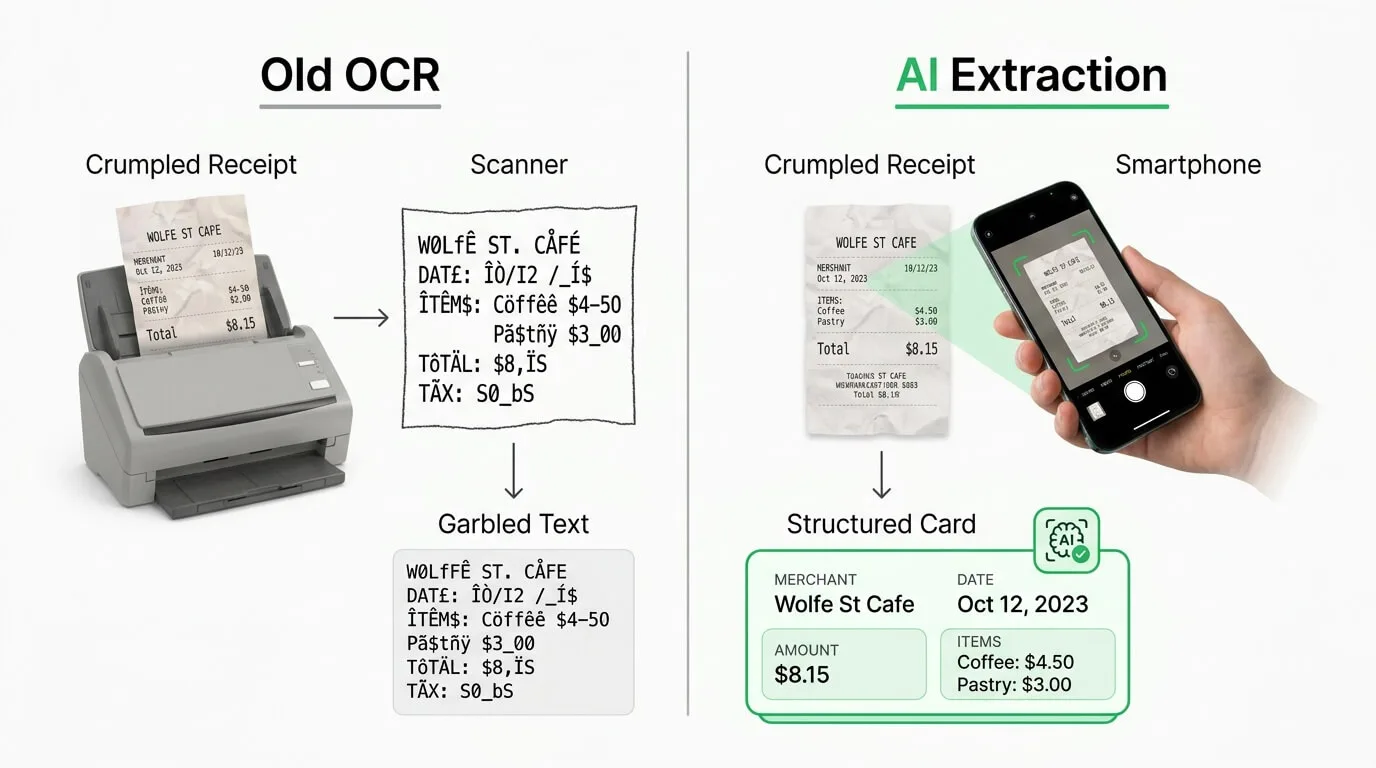
Early versions of receipt scanners relied on basic Optical Character Recognition (OCR), which simply turned an image into text. It often failed with crumpled paper, faded ink, or complex layouts.
Today's AI-driven invoice extraction technology is smarter. It understands context:
- AI Text Recognition: It learns from millions of documents to distinguish between a "Total" and a "Subtotal," even if the layout is unique. Top-tier platforms achieve accuracy rates consistently above 95%, and some exceed 99% after a short learning period.
- Automated Categorization: The system recognizes that a receipt from "Shell" is likely "Fuel/Auto" and one from "Hilton" is "Travel," automatically assigning the correct expense category.
- Cloud Security: Data is encrypted and stored in the cloud, protecting you from physical loss (fire, water damage) and making audits stress-free.
The first month usually involves a short "training" phase where you might correct a few edge cases, teaching the AI your company's specific vendors and spending habits. This upfront investment quickly pays off in dramatically cleaner records.
Business Benefits of Automated Receipt Management
Why should you invest in receipt scanning software? The benefits extend far beyond a tidy desk.
1. Accelerate Expense Reimbursements and Boost Morale
Manual expense reports are a pain for everyone. Employees hate taping receipts to paper, and finance teams hate decoding handwriting.
- Instant Capture: Employees snap a photo the moment they pay. No more lost receipts, no more end-of-month scrambles.
- Faster Approval: Managers can approve expenses on the go, reducing reimbursement time from weeks to days. Faster reimbursements mean employees are no longer acting as interest-free lenders for company costs.
2. Achieve Real-Time Financial Visibility and Cash Flow Control
Waiting until the end of the month to see your expenses is a recipe for budget overruns. Automated scanning provides real-time data, allowing you to:
- Monitor cash flow as it happens.
- Spot spending anomalies immediately.
- Make data-driven decisions without waiting for the monthly close.
3. Automated Fraud Detection and Expense Policy Compliance
Manual reviews often miss duplicate submissions or out-of-policy spending. Modern software automatically flags:
- Duplicate Receipts: Preventing the same receipt from being submitted twice.
- Weekend Spending: Highlighting expenses incurred outside of work hours.
- Suspicious Vendors: Identifying unknown or unapproved merchants.
4. Vendor Negotiation Power
This benefit is often overlooked. When receipt data is aggregated across the entire organization, hidden leverage becomes visible. You might discover you are spending $50,000 per year at a single supplier across 50 employees. That data is a negotiation tool. You can use it to request volume discounts, better payment terms, or consolidate spend to fewer, more strategic vendors.
Key Features of the Best Receipt Scanner Apps
Not all scanning apps are created equal. To truly automate your accounts payable, look for these professional-grade features.
Essential vs. Advanced Receipt Scanning Features
| Feature Category |
Basic Software |
Professional Software |
Enterprise Software |
Business Impact |
| Data Extraction |
Total and date only |
High-accuracy OCR (>95%), line items, tax, multi-language |
AI validation, handwriting recognition, metadata extraction |
Reduces manual entry; improves financial accuracy |
| Categorization |
Manual or rule-based |
AI-powered, learns from user behavior |
Fully automated with custom logic and multi-level approval |
Saves hours on expense coding; ensures consistency |
| Integrations |
CSV export only |
2-way sync with QuickBooks, Xero |
Custom API, ERP integration (NetSuite, SAP), multi-entity |
Eliminates data silos; keeps books current automatically |
| Mobile App |
Camera only |
Offline mode, mileage tracking |
Corporate card sync, per diem management, trip reporting |
Captures data at the source; reduces reimbursement delays |
| Policy and Control |
None |
Automated policy checks, duplicate detection |
Multi-step approvals, fraud detection, budget alerts |
Enhances compliance; controls spending proactively |
| Analytics |
Simple expense list |
Pre-built spending dashboards |
Custom BI dashboards, predictive forecasting |
Provides strategic insight into company spending |
Why Accounting Software Integrations Matter (QuickBooks, Xero)
Your receipt scanner should not be an island. It needs to sync seamlessly with your accounting software. Look for tools that offer direct API connections to platforms like QuickBooks Online, Xero, and Sage. This ensures that when an expense is approved, the transaction is automatically created in your general ledger, complete with the receipt image attached as supporting documentation.
ROI of Receipt Scanning Software: Cost vs Savings
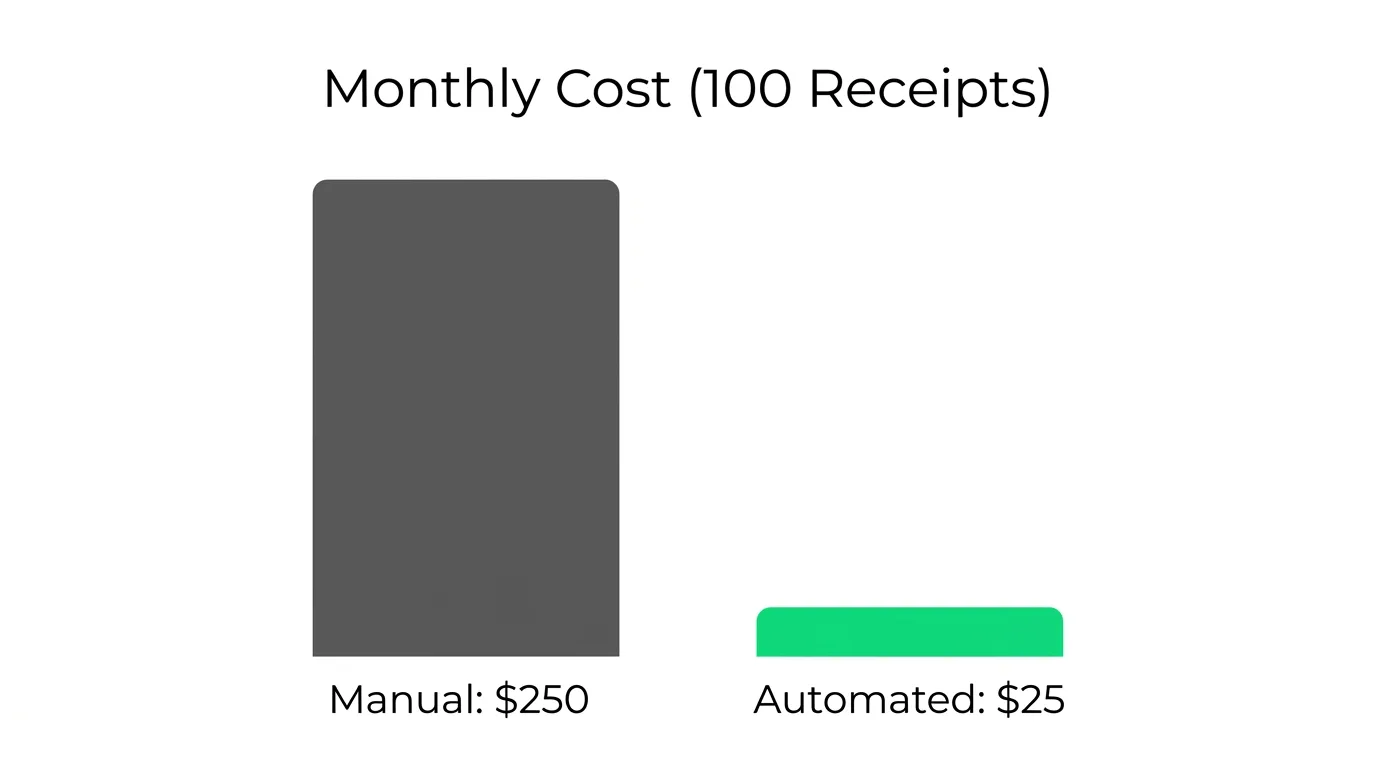
Is the software worth the monthly fee? Let us look at the math for a small business processing just 100 receipts per month.
| Cost Factor |
Manual Process |
Automated (AI) Process |
| Time per Receipt |
5 minutes (entry + filing) |
30 seconds (snap and review) |
| Total Time / Month |
8.3 hours |
0.8 hours |
| Labor Cost (@ $30/hr) |
$250.00 |
$25.00 |
| Storage Cost |
Physical space / Lost docs |
Included in subscription |
| Net Monthly Savings |
|
$225 + 7.5 hours saved |
The software pays for itself in the first week. And this calculation does not account for the value of catching duplicate payments or reclaiming missed VAT/GST deductions.
Data Security and Privacy in AI Receipt Scanning
When you hand over financial data to an AI, trust is essential. Do not just click "Sign Up" without checking these security pillars:
- SOC 2 Type II Compliance: The gold standard. An independent auditor has verified the company's security controls.
- 256-Bit Encryption: Your data should be encrypted both in transit and at rest.
- Data Ownership: Can you export all your data if you leave? Avoid platforms that lock records in proprietary formats.
- Privacy-First Models: Some tools scan your entire email inbox, which creates real privacy exposure. Safer alternatives like TallyScan use a dedicated forwarding address, ensuring only the documents you explicitly send are ever processed.
Implementation Roadmap: How to Adopt Receipt Scanning Software
Adopting new technology requires a strategic plan to ensure adoption and ROI. Here is a structured 4-phase approach, followed by a detailed week-by-week timeline.
Phase 1: Assessment and Requirement Gathering
Before browsing tools, define your "Why."
- Audit Your Current Process: Map out the journey of a receipt from capture to reimbursement. Where does it get stuck?
- Define Success Metrics: Set concrete KPIs. For example: "Reduce reimbursement cycle from 14 days to 3 days" or "Achieve 90% automated categorization accuracy."
- Identify Must-Have Features: Do you need multi-currency support? Mileage tracking? Project-based tagging?
Phase 2: Selection and Stress Testing
Do not just believe the landing page. Put the software through its paces.
- The "Crumple Test": Take your worst receipts (faded thermal paper, coffee-stained slips, handwritten taxi receipts) and scan them. If the AI fails here, it will fail in the real world.
- Integration Verification: Connect the trial version to a sandbox of your accounting software and verify that tax rates and chart of accounts sync correctly.
- Mobile UX Check: Have your least tech-savvy employee try the mobile app. If they cannot figure it out in 2 minutes, adoption will be a struggle.
Phase 3: Pilot Program
Avoid a "Big Bang" launch. Start with a controlled group.
- Select the Pilot Team: Choose a department with high expense volume (Sales or Field Operations work well).
- Configure Policies: Set up your rules (e.g., "Require description for meals over $50," "Flag duplicate receipts").
- Refine Categories: Watch how the AI categorizes expenses during this phase and correct mislabeled vendors. This trains the model for the wider rollout.
Phase 4: Company-Wide Rollout
- WIIFM Training: When training staff, focus on "What's In It For Me?" Emphasize that digital submission means faster reimbursement.
- Sunset the Old Way: Set a hard cutoff date. "Starting May 1st, paper receipts will no longer be accepted for reimbursement."
- Monitor and Optimize: Review uncategorized expenses weekly to identify new vendors that need automation rules.
Week-by-Week Implementation Timeline
| Phase |
Duration |
Key Activities |
Success Metrics |
Common Pitfalls |
| Week 1-2: Planning |
2 weeks |
Define goals, audit current process, assemble team, set budget |
Documented project scope and KPIs |
Underestimating internal process review time |
| Week 3-4: Vendor Selection |
2 weeks |
Demo 3-5 tools, stress test with real receipts, select vendor |
Vendor aligned with budget and technical needs |
Getting distracted by features you do not need |
| Week 5: Configuration |
1 week |
Set up accounts, define categories, configure approval workflows |
System matches your expense policy |
Overly complex approval chains that slow things down |
| Week 6: Integration |
1 week |
Connect to accounting software, map data fields, test sync |
100% successful data sync in testing |
Mismatched chart of accounts or tax codes |
| Week 7: Pilot Program |
1 week |
Train 5-10 pilot users, gather feedback, refine settings |
>90% of test expenses submitted correctly |
Initial resistance from users accustomed to old process |
| Week 8: Full Rollout |
1 week |
Company-wide training, share policy, go live |
>80% user adoption within first month |
Inconsistent submissions due to insufficient training |
| Post-Launch: Optimization |
Ongoing |
Monitor adoption, track KPIs, solicit feedback |
50% reduction in processing time within 3 months |
Failing to check in with users after go-live |
Building Your Connected Financial Ecosystem
The real power of receipt scanning software emerges when it stops being a standalone tool and becomes part of a connected financial ecosystem. Think of it as one instrument in a full orchestra: on its own it captures data, but connected to your other tools it creates a seamless flow of financial information across your entire business.
These connections are built through integrations, which act as automated bridges between your receipt scanner and other software. When an expense is captured, it does not just sit in a silo. It automatically flows into your accounting ledgers, updates project budgets, and gets factored into payroll for reimbursements.
Core Integration Points
Beyond accounting software, a truly connected system links to:
- Payroll Software: To automatically include reimbursements in an employee's next paycheck, eliminating a manual step entirely.
- Banking Applications: For matching captured expenses against actual bank transactions and flagging discrepancies in real time.
- Project Management Tools: To assign costs directly to specific client projects, giving you a live view of project profitability.
- ERP Systems: For businesses using platforms like NetSuite or SAP, native ERP integration ensures receipt data feeds directly into enterprise financial reporting.
Custom Workflows with API and Automation Tools
When a pre-built integration does not exist for a specific tool, APIs and automation platforms like Zapier fill the gap. For example, you can build a workflow that automatically creates a Google Sheet row every time a new expense is logged, sends a Slack notification to a manager when a high-value receipt is submitted, or creates a follow-up task in your project management tool when a client-billable expense is captured. This level of customization means your expense workflow can be tailored precisely to how your business actually operates.
For a deeper look at how these integrations work across the full AP stack, see our guide on accounting software integration.
Future Trends: Turning Receipt Data into Business Intelligence
We are moving well beyond simple record keeping. In 2026, receipt data is a strategic asset. The global smart receipt analytics market was valued at USD 2.7 billion in 2024 and is projected to reach USD 20.5 billion by 2034, reflecting enormous demand for tools that do not just store data but interpret it.
1. Predictive Budgeting
Instead of guessing next quarter's travel budget, AI analyzes historical trends, seasonality, and upcoming calendar events to forecast spend with precision.
Example: "Based on last year's Q3 data, expect a 20% increase in client entertainment costs next month. Consider adjusting the department budget now."
2. Anomaly Detection and Fraud Prevention
Modern platforms act as a financial watchdog, flagging unusual spending patterns that signal a problem before it becomes expensive. Duplicate charges, expenses filed outside work hours, and unusual vendor patterns are surfaced automatically, protecting the business from both accidental errors and intentional fraud.
3. Hyper-Granular Project Tracking
Modern scanning captures individual line items, not just totals. This enables precise job costing.
- Construction: Allocate specific materials from a single Home Depot receipt across multiple active projects automatically.
- Professional Services: Bill clients for the exact meals and travel associated with their account, backed by time-stamped digital receipts.
4. Carbon Footprint Tracking
As ESG reporting becomes a business requirement, receipt data provides the raw material for Scope 3 emissions tracking. The software identifies fuel purchases, airline tickets, and utility bills to estimate the carbon footprint of your operational spend automatically, turning a compliance burden into a data-driven sustainability report.
Pro Tips: Getting High Accuracy from Your Scans
Even the best AI benefits from good inputs. Share these tips with your team:
- Capture Immediately: Thermal paper fades within hours in direct sunlight. Snap the photo as soon as the transaction happens.
- Watch the Edges: Ensure the merchant name and total are clearly visible within the frame. Cropped receipts are the leading cause of extraction errors.
- Annotate Context: Most apps allow a quick note. "Lunch with Client X - Project Y" is far more useful than just "Meal" during an audit.
- Handle Multi-Page Receipts: For long hotel folios, use the multi-page scan mode to keep all pages linked in a single expense entry.
Conclusion: Automate Your Bookkeeping with Receipt Scanning
The transition to receipt scanning software is one of the highest ROI changes you can make in your finance stack. It costs pennies per receipt and saves dollars in labor, tax errors, and missed deductions.
The businesses winning in 2026 are not working harder on their bookkeeping. They are working smarter, letting AI handle the data entry while their finance teams focus on analysis, strategy, and growth.
Ready to streamline your expenses? Try TallyScan today. Our AI captures receipt data with >99% accuracy and integrates directly with QuickBooks and Xero to make bookkeeping effortless.
Frequently Asked Questions About Receipt Scanning Software
Is receipt scanning software IRS/tax compliant?
Yes. In most jurisdictions including the US and UK, digital copies of receipts are fully acceptable for tax purposes, provided they are legible and securely stored. The IRS explicitly accepts electronic records in lieu of paper originals.
Can it read handwriting?
Advanced AI-powered tools like TallyScan can decipher handwritten tips, totals, and notes on receipts with high accuracy. Performance is best when the handwriting is clear, but most modern platforms handle even messy handwriting reliably.
How secure is my financial data?
Top-tier providers use bank-level 256-bit encryption for data in transit and at rest. Look for SOC 2 Type II compliance as the benchmark for rigorous, independently audited security standards.
Does it work for international currencies?
Professional software automatically detects the currency printed on the receipt and can convert it to your base currency using the exchange rate from the date of the transaction, making multi-currency expense reporting seamless.
What is the difference between OCR and AI extraction?
OCR (Optical Character Recognition) converts an image into raw text but does not understand meaning. AI extraction goes further: it understands that "Inv. Date" and "Date" refer to the same field, recognizes structured data like tables, and learns your specific vendors over time. AI consistently outperforms basic OCR, especially on low-quality or unusual receipt formats.
How long does implementation take?
A basic setup connecting to your accounting software and configuring approval rules can be operational in a single afternoon. A full company-wide rollout including integrations, pilot testing, and staff training typically follows the 8-week roadmap outlined above. The most time-consuming element is almost always change management and training, not the software configuration itself.