7 Accounts Payable Automation Best Practices for 2026: The Ultimate Guide
The TallyScan Team
18 min read
#AP Automation Best Practices#Accounts Payable Strategy#Invoice Processing#Finance Automation#CFO Guide
Welcome to the future of finance, where manual data entry and paper-stuffed folders are relics of the past. If your accounts payable (AP) team is still drowning in invoices, chasing approvals, and manually reconciling payments, you're not just losing time. You're leaving money on the table.
The solution is embracing accounts payable automation. But just flipping a switch on new software isn't enough. To truly transform your operations, you need a strategy built on proven accounts payable automation best practices.
This guide breaks down the 7 most impactful strategies that leading companies use to achieve near-perfect accuracy, slash processing times, and gain unprecedented financial control in 2026.
Key Takeaways
Stop Fraud: Automated 3-way matching prevents overpayments and fake invoices.
Save Time: AI-powered OCR eliminates 90% of manual data entry.
Speed Up: Automated workflows reduce approval times from weeks to hours.
Connect: Real-time ERP integration ensures your financial data is always accurate.
1. Implement Automated 3-Way Matching for Fraud Prevention
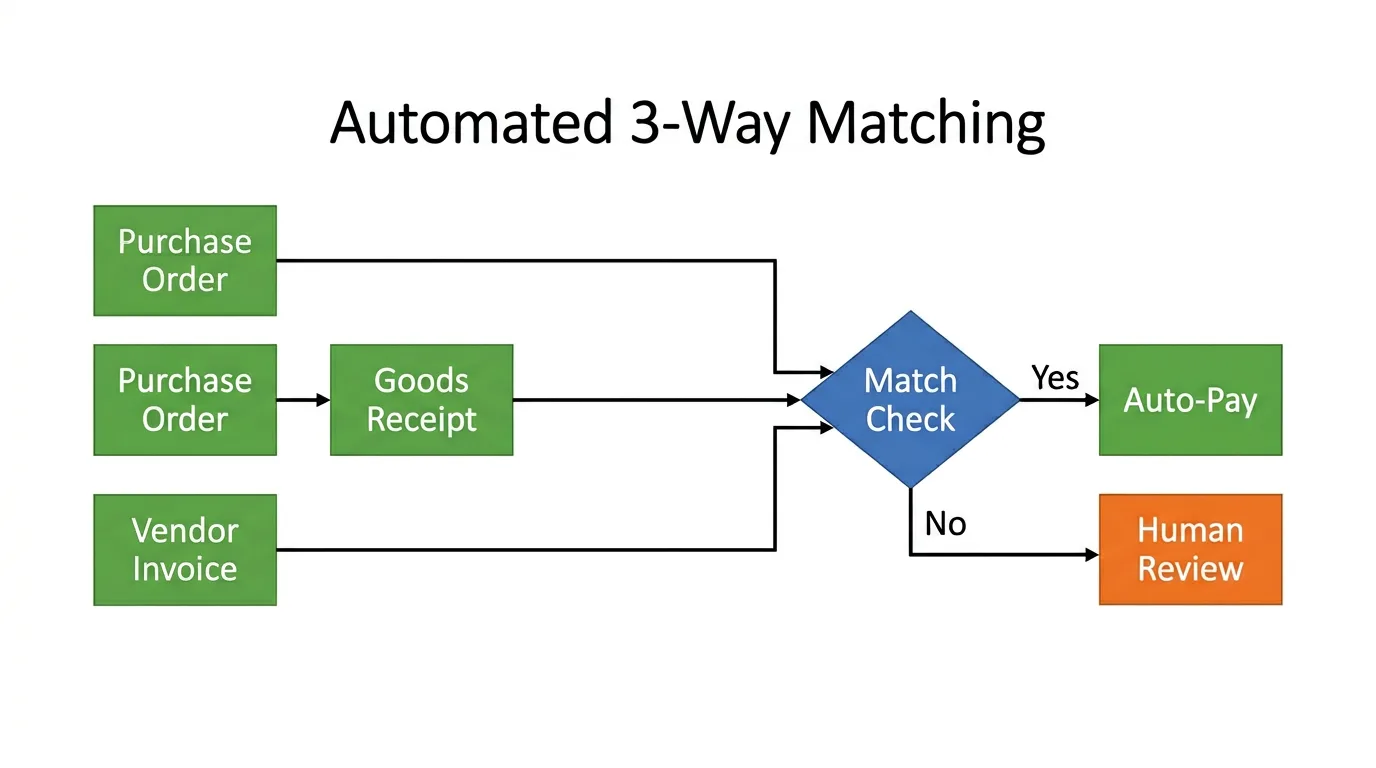
Think of automated 3-way matching as your AP department's sharpest, most reliable gatekeeper. It automatically validates vendor invoices by comparing them against two other critical documents: the initial Purchase Order (PO) and the Goods Receipt Note (GRN). The core question it answers: did we get what we ordered, and are we being billed for what we received?
By leveraging AI and machine learning, modern AP platforms can perform this check in seconds. The system cross-references item descriptions, quantities, and prices across all three documents. If everything aligns, the invoice proceeds to payment automatically. If there's a mismatch, it's instantly flagged for human review, stopping overpayments, duplicate charges, and fraudulent invoices before they cost you money.
Real-World Example: Your warehouse receives 80 widgets, but the vendor invoices you for 100. A manual clerk might miss this discrepancy in a stack of papers. An automated system instantly flags the invoice as "Quantity Mismatch" and blocks payment until the vendor corrects it.
Case Study: General Electric reduced its invoice processing time by 60% after implementing automated 3-way matching across its global procurement network. By configuring smart tolerance levels for minor variances, GE's AP team shifted from manual data checking to managing only genuine exceptions.
Here is a video that explains details about Three-Way Match.
How to Implement 3-Way Matching
Set smart tolerance levels. Not every discrepancy is a red flag. Configure your system to accept minor variances (a few cents due to rounding, or a 1% quantity difference) to prevent unnecessary exceptions and keep clean invoices flowing.
Start with high-volume vendors. Begin your rollout with suppliers who send standardized goods at high frequency. This gives you a controlled environment to fine-tune matching rules before expanding to your entire vendor base.
Train your team for exception handling. Your AP team's role will shift from data entry to strategic exception management. Define who resolves which exception type (e.g., Purchasing Manager for price mismatches, AP Clerk for unknown vendors) and document the process before go-live.
Pro Tip: Apply strict matching rules first to your top 20 suppliers by volume, then roll out to the rest. This high-impact, lower-risk approach builds internal confidence quickly.
2. Deploy AI-Powered OCR for Instant, Accurate Data Capture
Say goodbye to manual data entry. Modern AI-driven invoice extraction goes far beyond traditional OCR (Optical Character Recognition). Traditional OCR reads characters. AI understands context: it knows that a date near the top right is likely the "Invoice Date," regardless of whether it's labeled "Date," "Inv Dt," or just "12/05/2026."
The AI Advantage vs. Legacy OCR
Capability
Legacy OCR
AI Extraction
Layout Handling
Requires fixed templates per vendor
Reads any layout without templates
Line-Item Extraction
Often misses multi-line details
Captures SKUs, unit prices, and totals
Error Recovery
Fails on poor scans; needs manual fix
Reasons about context to recover data
Learning
Static; degrades with format changes
Improves continuously from corrections
Handwritten Notes
Unreliable
Supported with high accuracy
Case Study: Siemens uses AI-powered document processing to handle over 500,000 invoices annually, achieving a 98% straight-through processing rate, meaning 98 out of every 100 invoices move from receipt to payment approval without any human intervention. Coca-Cola European Partners achieved a 70% reduction in invoice processing costs after deploying intelligent document processing.
How to Implement AI-Powered Data Extraction
Test with your "ugliest" invoices first. During vendor evaluation, upload your most challenging documents: crumpled paper, handwritten receipts, multi-language PDFs. If the AI handles these, it'll handle everything else easily.
Set confidence thresholds. Configure the system to flag extractions below a defined confidence score (e.g., 85%) for quick human verification. This creates a reliable safety net without creating manual work for clean invoices.
Feed corrections back into the model. Every time you correct an extraction, that correction should train the AI. Over time, recurring vendors achieve near-zero error rates because the model has learned their specific invoice format.
3. Establish Automated Approval Workflows to Eliminate Bottlenecks
Automated approval workflows are the digital nervous system of your AP process. This core practice eliminates the chaotic email chase for signatures, replacing it with rules-based routing that moves invoices to the right person automatically, based on invoice amount, department, vendor category, or cost center.
Designing Your Approval Hierarchy
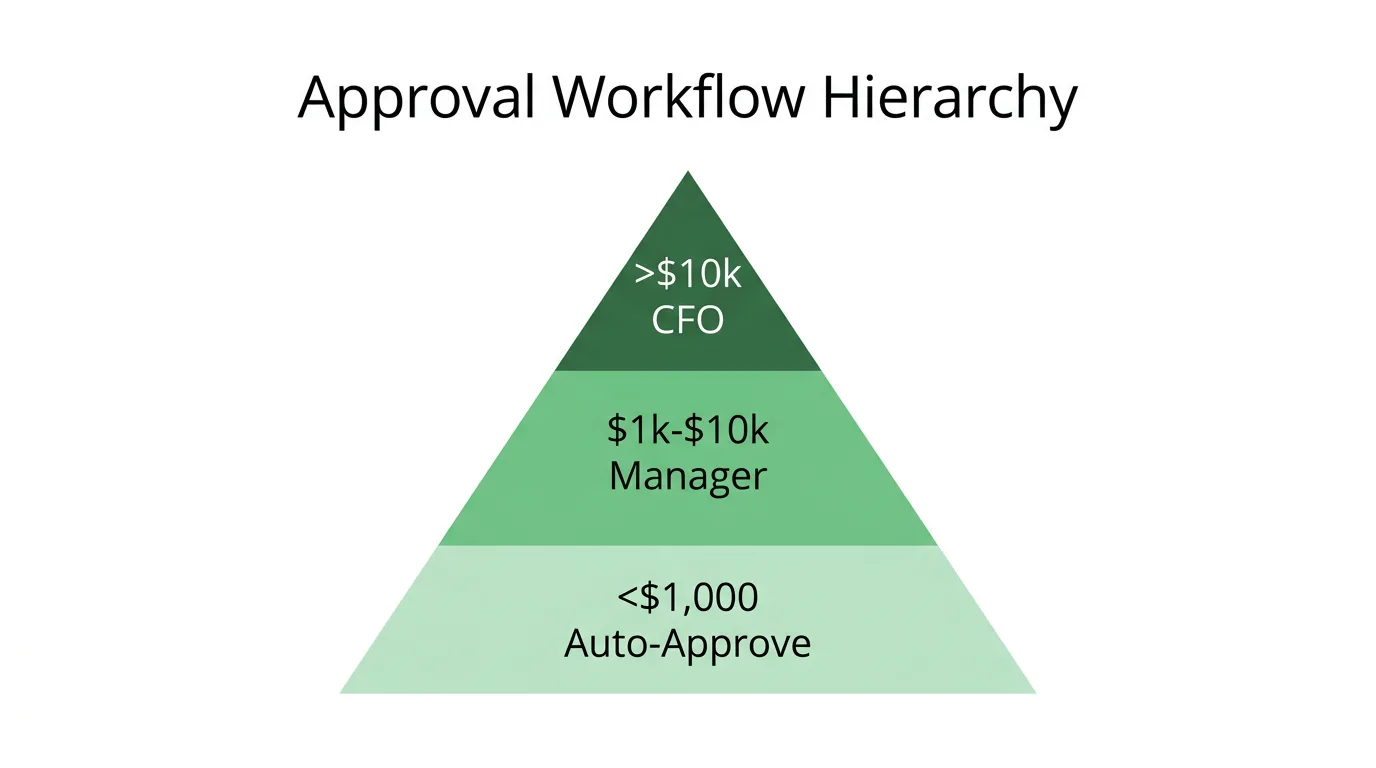
A tiered approval structure handles the majority of invoices without leadership involvement, reserving human judgment for decisions that genuinely warrant it:
Under $500: Auto-approve if PO-matched (no human required)
$500–$5,000: Route to Department Manager (1 approver)
$5,000–$25,000: Route to Finance Director (2-step approval)
Over $25,000: Route to CFO with full documentation
Case Study:Microsoft reduced its average invoice approval time from 7 days to just 2 days by automating workflow routing and enabling mobile approvals for managers. Johnson & Johnson similarly streamlined approvals across 60+ countries using centralized workflow automation, achieving consistent compliance across all operating entities.
How to Implement Approval Workflows
Map your existing process before automating it. Document every approval step currently in use, including informal ones. This exercise usually reveals redundant steps and bottlenecks that you can eliminate in the automated version, rather than just digitizing the old inefficiencies.
Enable mobile approvals. Managers are often traveling or in meetings. A platform with a responsive mobile approval interface can reduce cycle times by 50% simply by removing the dependency on desktop access.
Configure escalation rules. Set automatic reminders after 24 hours of inaction, and escalation to the next level after 48 hours. This prevents invoices from sitting in inboxes over weekends and accumulating late payment fees.
4. Implement Real-Time Exception Management
Exception management is the "traffic controller" of your AP workflow. Instead of letting one problematic invoice stall the entire payment batch, automated systems isolate exceptions (price discrepancies, duplicate invoices, missing POs, unknown vendors) and route them to the right person for immediate resolution.
The key principle: clean invoices should never wait for problem invoices. Straight-through processing (STP) means the 85–95% of invoices that match cleanly flow to payment automatically, while only the exceptions require human attention.
Why Exception Management Changes AP Economics
Without automated exception management, your AP team spends time finding problems. With it, problems find your team, already categorized, prioritized, and pre-loaded with the context needed to resolve them.
Case Study:Shell Oil reduced its exception resolution time by 65% using automated categorization and routing. Instead of AP staff searching for discrepancies, flagged invoices arrived in dedicated queues with the mismatch already identified and the responsible resolver pre-assigned. HP Inc. improved vendor satisfaction scores by 40% as faster exception handling led to more consistent, predictable payment timelines.
How to Implement Exception Management
Define exception categories explicitly. Create named categories: "Price Variance >5%," "Duplicate Invoice Number," "PO Not Found," "Unknown Vendor." Each category should have a documented resolution procedure and a designated owner.
Monitor exception trends weekly. If a particular vendor consistently triggers "Price Mismatch" exceptions, the root cause is almost always a process gap. Either their pricing database is out of sync with yours, or your PO template needs updating. Analytics on exception frequency surfaces these systemic issues.
Set resolution KPIs. Track average time to resolve by exception type and by team member. Target 100% of exceptions resolved within 48 hours. This metric keeps the exception queue from becoming a second inbox nobody manages.
5. Enable Electronic Invoice Receipt and Processing
Create a digital superhighway for your payables. Moving suppliers away from paper mail to electronic submission is the foundational step that enables everything else on this list. You cannot automate what you receive by fax.
Three Channels to Enable (In Priority Order)
1. Dedicated Email Inbox
Set up an alias like bills@yourcompany.com (or a privacy-first forwarding address like bills@fwd.tallyscan.com) and direct all vendor invoices there. This is the fastest supplier onboarding path and handles PDF, Word, and scanned attachments automatically.
2. Supplier Self-Service Portal
For larger vendors, a portal where they upload invoices and track payment status eliminates 70% of "Where is my payment?" inquiries. Self-service portals give suppliers visibility without requiring any work from your AP team.
3. EDI or API Integration
For high-volume strategic suppliers, direct system-to-system integration eliminates even the submission step. Invoices arrive pre-validated and structured, achieving the highest straight-through processing rates.
Case Study:Nestlé achieved 90% electronic invoice adoption across its global supplier base by offering "Fast-Track Payment" terms (Net-15 instead of Net-30) as an incentive for digital submission. Schneider Electric now processes over 1.2 million electronic invoices annually with an average processing time of just 48 hours, down from 12+ days under their paper-based system.
How to Implement Electronic Invoice Receipt
Offer multiple submission options. Small vendors submit PDFs via email; mid-size vendors use the portal; large strategic suppliers connect via API. Meeting suppliers where they are accelerates adoption dramatically.
Provide incentives, not mandates. Promising faster payment for electronic submission is far more effective than threatening to deprioritize paper invoices. Tie digital submission to a tangible benefit suppliers can see in their bank account.
Build a structured onboarding program. Send clear instructions, a short tutorial, and a support contact to every vendor you're migrating to digital submission. Vendors who struggle with onboarding often quietly revert to paper. A dedicated onboarding process prevents this.
6. Integrate Seamlessly with Your ERP (QuickBooks, Xero, NetSuite)
Your AP automation platform must communicate flawlessly with your accounting system. Without integration, you've simply added another data silo. AP staff still manually re-enter approved invoice data into the ERP, defeating the purpose of automation.
True integration means: invoice approved in AP platform → data flows automatically into ERP → General Ledger is updated in real-time → payment is scheduled. No manual transfers, no CSV uploads, no batch syncs.
Integration Essentials
Two-way sync: Your AP tool needs to pull Vendor Master Data and Chart of Accounts from the ERP to ensure accurate GL coding. Changes made in the ERP (new vendor, updated payment terms) should propagate to the AP platform automatically.
Real-time GL posting: Once an invoice is approved, it posts to your General Ledger immediately. This gives finance leadership an accurate, live view of liabilities, not a view that's 3 weeks behind because of monthly batch uploads.
Payment scheduling integration: The AP platform should trigger payment runs in your banking system directly, eliminating the manual step of initiating transfers.
Case Study:Honeywell achieved a 3-day reduction in financial close time by integrating its AP automation solution with SAP across 100+ global locations. 3M's Oracle ERP integration resulted in a 95% straight-through processing rate for invoices. Caterpillar improved cash flow visibility by 50% by connecting its global AP systems for real-time liability reporting.
Map data fields before writing a single line of integration code. Define exactly how "Vendor ID," "Invoice Number," and "GL Code" in your AP platform correspond to fields in your ERP. This mapping prevents data mismatches that are expensive to untangle after go-live.
Run parallel systems for four weeks. Process invoices through both the old manual process and the new integrated system simultaneously. Compare outputs daily. Any discrepancy surfaces an integration gap while you still have time to fix it before full cutover.
Avoid flat-file (CSV) integrations. A CSV export/import process is not an integration. It's scheduled manual work. Insist on API-native, real-time connections. If a vendor can only offer CSV exports, that's a significant limitation worth factoring into your selection decision.
7. Leverage Comprehensive Analytics for Strategic Insight
Don't just pay bills. Analyze them. Modern AP platforms turn transactional data into business intelligence that your finance team can act on. The goal is to move AP from a historical record-keeping function to a forward-looking financial intelligence source.
Key Metrics Every AP Leader Should Track
Metric
What It Measures
Benchmark to Beat
Days Payable Outstanding (DPO)
How long you hold cash before paying
Industry average: 35–45 days
Cost Per Invoice
Total AP spend ÷ invoices processed
Manual: ~$15; Automated target: <$3
Touchless Rate
% of invoices processed without human edits
Top-performing teams: >90%
Early Payment Discount Capture
% of available discounts actually captured
Manual teams: <30%; Automated: >85%
Exception Rate
% of invoices flagged for review
Healthy target: <8%
On-Time Payment Rate
% of invoices paid on or before due date
Target: >98%
Case Study:Marriott International uses sophisticated spend analytics to negotiate more favorable vendor terms, generating annual savings of over 15% on strategic supplier categories. General Motors leverages AP analytics to identify over $50 million in annual savings opportunities by pinpointing consolidation opportunities and maverick spend patterns that manual review would never surface.
How to Implement Analytics and Reporting
Build role-specific dashboards. A CFO needs high-level cash flow forecasts and DPO trends. An AP Manager needs exception queue depth and team throughput. An AP Clerk needs their personal invoice queue and pending approvals. One dashboard for everyone serves no one well.
Set up automated alerts for critical thresholds. Configure notifications when the exception rate exceeds 8%, when a high-value invoice approaches its due date without approval, or when DPO drifts outside your target range. Proactive alerts prevent the reactive scrambles that consume leadership time.
Review spend analytics quarterly with leadership. Vendor consolidation opportunities, pricing anomalies, and category spend trends are all visible in the data, but only if someone is actively looking. A quarterly AP analytics review with the CFO and procurement leadership turns AP data into procurement strategy.
Comparison Matrix: All 7 Best Practices at a Glance
Best Practice
Implementation Complexity
Resource Requirements
Expected Outcome
Ideal For
Key Advantage
3-Way Matching
High – data mapping & rule setup
Moderate – integration & maintenance
Up to 95% error reduction
Manufacturing, retail, inventory-heavy businesses
Prevents fraud; creates audit trail
AI Data Extraction
Low-Moderate – training period
Moderate – AI platform cost
80%+ manual entry eliminated; 95-99% accuracy
All businesses with invoice volume
Handles any format; improves over time
Automated Workflows
Moderate – workflow design
Moderate – ongoing rule updates
50-70% faster approval cycles
Teams with multi-level approvals
Mobile-ready; eliminates email chains
Exception Management
High – rules & categorization
High – dedicated exception review
Reduced delays; improved vendor relations
Complex, high-volume AP environments
Isolates problems; surfaces root causes
Electronic Invoicing
Moderate – supplier onboarding
Moderate – change management
60-80% faster processing
Businesses transitioning from paper
Eliminates mail delays; enables automation
ERP Integration
High – technical & data mapping
High – IT expertise required
Real-time GL accuracy; faster close
All businesses with accounting software
Single source of truth; eliminates reentry
Analytics & Reporting
Moderate – clean data required
Moderate – analytics tooling
Data-driven decisions; cost savings
Organizations focused on optimization
Turns AP data into business intelligence
Putting Your Automated AP Plan into Action
Adopting these accounts payable automation best practices isn't about simply buying new software. It's about fundamentally rethinking how your team manages financial obligations and leverages data.
The Right Order of Implementation
Phase 1 — Foundation (Weeks 1–4):
Start with electronic invoice receipt and AI data extraction. These two changes eliminate the bulk of manual labor and paper handling before you've built anything else. Without clean digital inputs, no downstream automation can function reliably.
Phase 2 — Intelligence (Weeks 5–10):
Layer on 3-way matching and automated approval workflows. With your data capture solved, these tools add the verification and routing logic that enable true touchless processing.
Phase 3 — Integration (Weeks 11–16):
Connect your AP platform to your ERP. This transforms AP from a standalone function into a real-time component of your financial system. The data flowing through your AP platform now automatically updates your books.
Phase 4 — Optimization (Ongoing):
Implement exception management refinement and analytics. Use the data your system is now generating to identify bottlenecks, negotiate better vendor terms, and continuously improve your touchless rate.
Where to Start If You Can't Do Everything at Once
Begin with AI Data Extraction (#2) and Electronic Invoice Receipt (#5). These two changes deliver the highest immediate ROI. They eliminate the most manual work with the least implementation complexity. Everything else builds on top of them.
Frequently Asked Questions About AP Automation Best Practices
Where should I start if I can't implement everything at once?
Start with AI Data Extraction (#2) and Electronic Invoice Receipt (#5). These two practices together eliminate the bulk of manual labor and paper handling, and they form the foundation that all other automation builds on. Most businesses see measurable ROI within the first 60 days of implementing just these two.
How does automation prevent invoice fraud?
Automated 3-way matching (#1) makes fraud structurally difficult: a fake invoice can only be paid if it matches a real PO and a real goods receipt. Combined with vendor bank account change detection (a key fraud signal) and duplicate invoice checking, automated AP creates multiple independent verification layers that manual review cannot consistently replicate.
Is AP automation practical for small businesses?
Yes, and the ROI is often highest for smaller teams. Cloud-based AP tools have eliminated the enterprise cost barrier. A 5-person finance team that automates invoice processing effectively gains the capacity of a much larger team. Most modern platforms offer pricing tiers that work for businesses processing as few as 50 invoices per month.
How secure is digital invoice data?
Look for platforms with SOC 2 Type II compliance, the gold standard for SaaS security, verified by an independent auditor. Also evaluate whether the platform requires full inbox access (higher privacy risk) or supports privacy-first email forwarding (only the documents you send are processed).
Are digital invoices and receipts legally accepted for taxes?
Yes. In the US, the IRS accepts digital copies of receipts and invoices as valid records for tax purposes, provided they are legible, complete, and can be reproduced if requested. Most jurisdictions in the EU and UK have equivalent acceptance of digital records, and many countries now mandate e-invoicing for B2B transactions.
How long does a full AP automation implementation take?
A basic implementation (connecting to your accounting software, setting up invoice capture, and configuring approval rules) can be operational in a single afternoon. A full implementation including ERP integration, 3-way matching configuration, and supplier onboarding typically takes 8–16 weeks. The most time-consuming element is almost always data cleanup and vendor onboarding, not the software itself.
Ready to implement these best practices?Start your TallyScan trial, built on these 7 pillars with AI-powered extraction, automated approval routing, and native QuickBooks and Xero integration.