Guide
Invoice Scanning Software: How to Choose the Right Tool
Five types of invoice scanning software, an honest comparison of 10 tools, and a framework to choose the right one based on your volume and workflow needs.

TallyScan Team
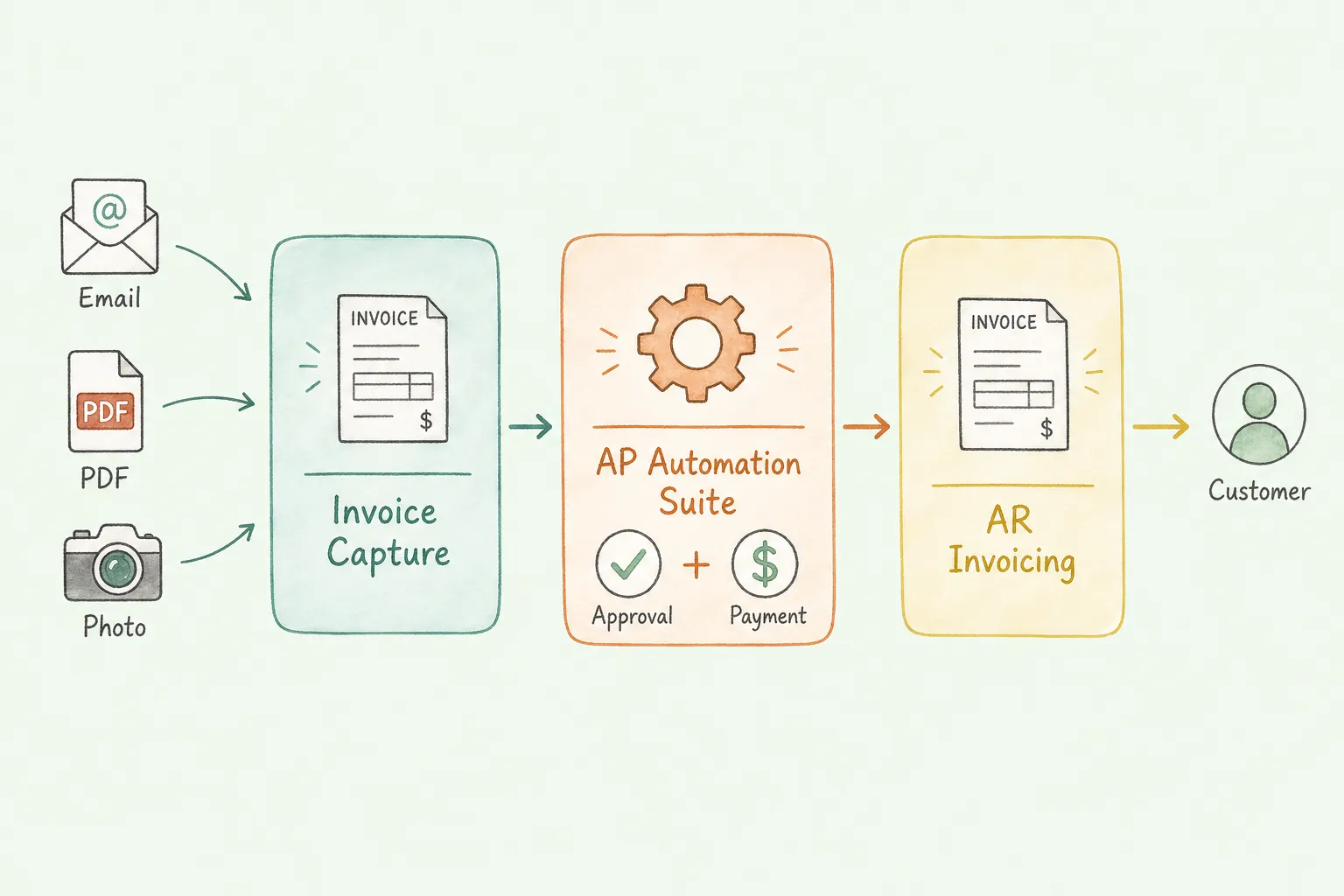
Your AP inbox contains three different invoice formats this week: a PDF from a supplier, a Stripe confirmation email, and a photo of a handwritten receipt your sales rep photographed on their phone. Three invoices. Three completely different capture problems.
Most invoice capture software guides pick a winner and tell you to sign up. What they skip is the part where the winning tool processes PDFs beautifully but silently fails on HTML email receipts, or where the free tier covers ten invoices and nothing else. This guide covers ten tools honestly, including the ones that Tailride and similar comparison sites rarely feature, so you can match the tool to the problem you actually have.
Invoice capture software automatically extracts structured data from incoming invoices and feeds it into your accounting system. The key word is "automatically": the software reads, interprets, and routes. You do not type.
This page is the canonical guide for invoice capture software, invoice data capture software, and automated invoice capture. Older URLs on those topics redirect here so searchers land on one complete resource.
Searchers often use those phrases interchangeably. In practice they point at the same job: turn vendor documents into clean fields your ledger can post. Use the field reference below when a vendor says "we capture invoices" but only means header totals.
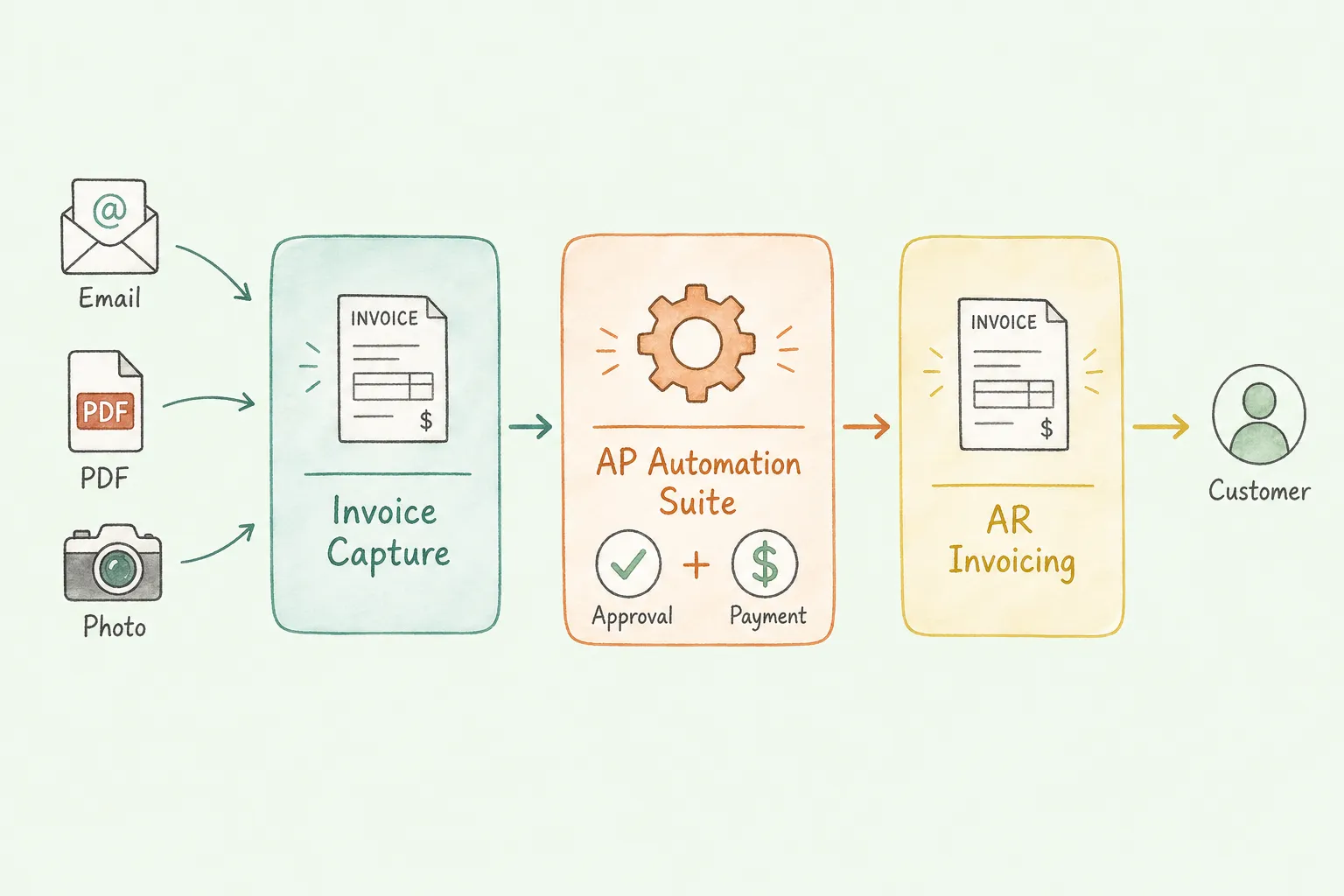
But this category is frequently confused with two adjacent products:
Invoice capture extracts data from bills you receive. It reads a vendor's invoice and pulls vendor name, invoice number, line items, amounts, and due dates into your AP system.
Full AP automation suites (Tipalti, Coupa, SAP Ariba) extend far beyond capture. They add three-way PO matching, global payment processing, supplier onboarding portals, and tax compliance. If you are a 10-person company with straightforward AP, a full AP suite is overkill. You will pay for capabilities you will not touch for years.
AR invoicing tools (FreshBooks, Invoice Ninja, Wave) create and send invoices to your customers. The opposite direction entirely. Many small business owners search for "invoice software" and end up here when they actually needed capture software.
Getting this distinction right before you evaluate a single tool saves weeks.
Pro Tip: Ask yourself this before comparing software: "Am I trying to stop manually typing data from bills I receive, or am I trying to send professional invoices to clients?" Invoice capture solves the first problem. AR tools solve the second. Many buyers mix them up and buy the wrong shape of software.
When vendors promise "invoice data capture," ask which fields they mean. Header-only capture is enough for simple bill pay. Line-item capture is required for three-way matching, job costing, and inventory reconciliation.
| Field | Why it matters |
|---|---|
| Vendor name / address / tax ID | Vendor master matching, 1099 / VAT checks |
| Invoice number and date | Duplicate detection, period posting |
| Due date and payment terms | Scheduling and early-pay discounts |
| PO reference and currency | Matching and multi-currency GL |
| Field | Why it matters |
|---|---|
| Subtotal, tax, shipping, total | Math validation before posting |
| Description, qty, UOM, unit price, line total | Three-way match and spend analytics |
| GL / cost center / project code | Coding rules or AI suggestions |
Confirm whether line-item extraction is included, and how the tool behaves on invoices with 20, 50, or 200 lines.
Before comparing tools, it helps to know what the problem actually costs. Most finance teams underestimate their true cost per invoice because they only count direct labor. The full picture is higher than almost every team expects.
APQC benchmarking research puts the all-in cost for manual invoice processing at $12 to $40 per invoice, with an industry median around $15 to $16. Best-in-class automated organizations process the same invoice for $1 to $5.
| Cost Category | Manual Processing | Automated Processing |
|---|---|---|
| Direct labor (data entry, matching, filing) | $6 to $12 per invoice | $0.50 to $1 per invoice |
| Error correction (4% avg. error rate, ~$53 per fix) | $2 to $4 per invoice | $0.05 to $0.25 per invoice |
| Late payment penalties ($25 to $150 per event) | Frequent | Rare |
| Missed early payment discounts (1 to 3% of value) | Mostly uncaptured | Routinely captured |
| Physical storage and retrieval overhead | $5,000 to $15,000/year | Near zero |
| Total estimated cost per invoice | $12 to $40 | $1 to $5 |
For a company processing 500 invoices per month, the gap between those two ranges is $85,000 to $210,000 per year. That is before factoring in the three-day processing cycle that stretches to 17 days the month your AP specialist is out sick.
The error rate issue is worth focusing on. Manual data entry errors run between 1% and 5% per invoice, according to Resolve's invoice processing research. Each error costs roughly $53 to identify and correct. On 500 invoices per month with a 3% error rate, that is 15 errors at $53 each: $795 per month, $9,540 per year, in correction costs alone. Automated systems reduce error rates to below 0.5%.
Pro Tip: Before evaluating any tool, pull three months of AP data and calculate your actual cost per invoice. Most teams discover their number is at the high end of the range because they have never measured it before.
Before comparing tools, map your actual invoice sources. Most businesses receive invoices in four or five formats simultaneously, and most tools handle some of them better than others.
| Invoice Format | What It Looks Like | Tools That Handle It Well |
|---|---|---|
| PDF attachment | Supplier sends a PDF invoice via email | Almost all tools |
| HTML email body | Stripe, Uber, AWS confirmation emails with inline data | TallyScan, Dext (partially) |
| Image attachment | JPEG/PNG scans, phone photos of paper invoices | Most tools with varying accuracy |
| Vendor billing portal | Amazon Business, Google Workspace, Adobe, telecom invoices locked in a portal | TallyScan, dedicated portal scrapers |
| Paper / physical receipt | Handed to you directly | Mobile-scan apps, Veryfi, Dext |
| EDI / structured feed | Enterprise supplier transactions | Full AP suites, not capture tools |
If 30% of your invoices are inline HTML emails from SaaS subscriptions, a tool that only processes PDF attachments leaves you with a manual workflow for nearly a third of your volume from day one.
The table below is grouped for scanning, not a popularity ranking. Match Best for to your bottleneck first.
| Tool | Best For | Starting Price | Capture Methods | Accounting Integrations |
|---|---|---|---|---|
| Dext | Accountants managing multiple clients | ~$20/mo per client | PDF, image, email (limited body parsing) | QuickBooks, Xero, Sage, FreeAgent |
| Hubdoc | Xero/QBO users wanting a free add-on | Free with Xero/QBO | PDF, image, email forwarding | Xero, QuickBooks Online |
| BILL | SMBs needing capture + payment in one | $45/user/mo | Email upload, PDF | QuickBooks, Xero, NetSuite |
| Stampli | Teams that prioritize AP collaboration | Quote-based | PDF, image, email | 70+ ERPs including SAP, Oracle, D365 |
| Rossum | High-volume enterprise data extraction | Quote-based | PDF, image, EDI | Custom API, most ERPs |
| ABBYY Vantage | Enterprises wanting modular IDP | Quote-based | PDF, image, structured/unstructured | Custom API, 50+ connectors |
| Nanonets | Developers building custom workflows | Pay-as-you-go | PDF, image, email, web | QuickBooks, Xero, custom API |
| Veryfi | Mobile-first teams and field expenses | Free / $25/mo | Mobile OCR, PDF, image | QuickBooks, Xero, FreshBooks, SAP |
| AutoEntry | Sage accounting users | ~$12/mo | PDF, image, email, bank statements | Sage (all versions), QuickBooks, Xero |
| TallyScan | SMBs needing AI capture + sync (email body + PDF) | Free / $39/mo | Email (body + PDF + image), vendor portals | QuickBooks, Xero, Google Sheets, Notion, OneDrive |
Disclosure: TallyScan publishes this page. We list our product with the same limitation callouts as everyone else. For a narrower OCR/IDP bake-off (APIs and enterprise engines), see best invoice OCR software.
TallyScan connects to your email inbox and vendor portals, extracts invoice data using AI, and syncs it directly to your accounting system. It handles the three formats where most tools fall short: HTML email bodies (SaaS receipts, Stripe confirmations), attached PDFs, and image files, all in a single pipeline.
The standout feature for growing businesses is the multi-channel sync: one click to push extracted data to QuickBooks, Xero, Google Sheets, or Notion, with no manual CSV exports. For teams that currently download invoices, re-type them, then manually update a spreadsheet, this removes three separate manual steps simultaneously.
Who it fits: Small and mid-sized businesses receiving invoices from multiple sources (email + vendor portals), accounting teams that want extracted data to flow directly into their GL, and e-commerce businesses managing high volumes of SaaS and supplier invoices.
Honest limitation: TallyScan's strength is in AI extraction and accounting sync. If you need built-in payment execution (paying suppliers directly from the platform), you will need to handle payments separately through your accounting software.
| Feature | Details |
|---|---|
| Capture methods | Email body (HTML), attached PDFs, image files, vendor portals |
| Integrations | QuickBooks, Xero, Google Sheets, Notion, OneDrive, Google Drive |
| Starting price | Free (20 invoices/month); Starter from $39/month |
| Best for | SMBs, accountants, e-commerce businesses |
| Standout | AI extraction from all three email formats + direct accounting sync |
Try TallyScan free and process your first 20 invoices without a credit card.
Most SMB buyers end up comparing these three. Use this to avoid a month of overlapping demos.
| Question | Prefer Hubdoc | Prefer Dext | Prefer TallyScan |
|---|---|---|---|
| Primary stack | Already on Xero (often included) | Accountant multi-client practice | QBO/Xero/Sheets and want AI extraction |
| Who uploads? | You + portal auto-fetch list | Clients must upload/forward reliably | You forward to a dedicated address |
| HTML email receipts (Stripe, Uber) | Weak / attachment-oriented | Often misses body-only receipts | Built for body + PDF + image |
| Privacy model | Portal credentials + uploads | Client collection workflows | No full-inbox OAuth; forward only what you choose |
| Best next step | Turn on fetch for recurring vendors | Standardize client submit habits | Pilot 20 mixed emails and PDFs |
If your pain is practice management across dozens of clients, Dext usually wins. If your pain is Xero-native bill collect on a budget, Hubdoc is rational. If your pain is messy email formats into the ledger without opening the whole inbox, put TallyScan on the bake-off with the same invoice pack you would send Hubdoc/Dext. Full write-ups: Hubdoc alternative, Dext alternative, and Expensify alternative (when the real question is T&E vs vendor AP).
For pure OCR engines and enterprise IDP (Rossum, ABBYY, Textract), use the invoice OCR software guide instead of this capture shortlist.
Dext (formerly Receipt Bank) is one of the most established invoice and receipt capture tools in the accountant ecosystem. It works by having clients upload documents via a mobile app, email forwarding, or drag-and-drop, then extracts data and syncs to QuickBooks, Xero, Sage, or FreeAgent.
Dext's strength is its accountant-facing practice management dashboard. You can see all clients, their upload status, and exception queues in one view. The tool integrates deeply with Xero and QuickBooks workflows, which is why a large portion of bookkeeping firms rely on it.
Who it fits: Accounting practices managing multiple clients, bookkeepers already in the Xero/QuickBooks ecosystem, and clients who can commit to the email forwarding or upload habit.
Honest limitation: Dext depends on clients actively forwarding or uploading documents. It does not automatically pull from email inboxes or vendor portals. If a client forgets to forward an invoice, the workflow stalls. It also struggles with inline HTML email receipts: Stripe and Uber receipts without PDF attachments are frequently missed. Pricing compounds per client, which adds up quickly for practices with 20+ client accounts.
For more on how accountants can structure an efficient multi-client capture workflow, see our guide to accounts payable automation best practices.
Hubdoc captures bills, receipts, and bank statements from over 700 financial institutions and suppliers, then publishes them to Xero or QuickBooks Online. Its main appeal: it is included free with Xero subscriptions, making it a natural starting point for small businesses already on that platform.
The tool connects to supplier portals and financial websites, logging in automatically to download documents. Once collected, it extracts key fields and creates transactions in Xero or QBO, with the original document attached for audit purposes.
Who it fits: Small businesses on Xero or QuickBooks Online who want basic capture without an additional software budget.
Honest limitation: Hubdoc's "auto-fetch" from supplier portals works for a predefined list of supported sites. If your main suppliers are not on that list, you are back to manual uploads. The tool does not parse HTML email bodies at all: it requires document attachments. For businesses where most invoices arrive as inline email receipts, Hubdoc leaves a significant gap. Development and feature updates have slowed since the Xero acquisition.
Veryfi is built around high-speed OCR on a mobile device. Point your phone's camera at a receipt or invoice, and Veryfi extracts the data in two to three seconds using on-device processing. No cloud upload required for the initial extraction, which matters for teams working in areas with unreliable connectivity.
Veryfi has a developer API and SDKs, making it a popular choice for companies embedding receipt capture into their own mobile applications. Its pre-trained models cover receipts, invoices, credit card statements, and W-2 forms.
Who it fits: Field sales teams submitting expense receipts, businesses with paper-heavy receipt workflows, developers building document capture into apps.
Honest limitation: Veryfi excels at mobile and physical document capture. It does not monitor email inboxes for incoming invoices or connect to vendor billing portals. For businesses where invoices arrive by email rather than as physical paper, Veryfi covers only part of the capture problem. The free tier is limited to 50 documents per month.
BILL (formerly Bill.com) handles the full AP cycle: invoice capture, approval routing, and payment execution in one platform. Its OCR reads uploaded or emailed invoices, routes them through configurable approval workflows, and executes payments via ACH, check, virtual card, or wire transfer.
BILL's accountant partner program is one of the largest in the SMB market. Many accounting firms recommend it to clients specifically because the accountant can manage AP and payments from a single portal.
Who it fits: Small and mid-sized US businesses that want capture, approvals, and payments under one subscription. Particularly strong for businesses with complex approval chains or frequent ACH/check payments to suppliers.
Honest limitation: BILL charges per user, which can be expensive for teams that only need occasional approval access. Per-transaction fees on payments accumulate quickly at high volumes. Line-item extraction on complex multi-page invoices is less reliable than dedicated capture tools like Rossum or ABBYY. If you only need data extraction and not payments, you are paying for features you will not use.
Stampli builds its AP workflow around the invoice document itself. All communication, approvals, comments, and history live directly on the invoice in a centralized feed, which eliminates the back-and-forth email chains that typically slow down approval cycles. Its AI assistant, Billy the Bot, handles invoice capture, GL coding suggestions, and routing based on learned approval patterns.
Stampli's ERP coverage is unusually broad: it integrates with over 70 accounting and ERP systems, including SAP, Oracle, Microsoft Dynamics, Sage Intacct, and QuickBooks, with pre-built connectors that typically deploy in days rather than months.
Who it fits: Mid-sized companies with complex multi-department approval requirements, organizations using enterprise ERPs that other capture tools cannot connect to, and teams where AP approval bottlenecks are the primary pain point.
Honest limitation: Pricing is quote-based with no public rates. For small businesses or teams evaluating on budget, the lack of transparent pricing is a real friction point. The platform's strength is in the workflow layer; the capture accuracy is good but not best-in-class for complex unstructured document formats. If your primary problem is data extraction accuracy rather than approval routing, other tools may serve you better.
Rossum's Aurora AI engine is built specifically for document data extraction at scale. Unlike template-based OCR, Aurora understands invoice structure without pre-configured rules: it infers field locations and meaning from context, which means it handles new vendor formats without manual setup.
The human-in-the-loop validation interface lets reviewers correct exceptions quickly, and those corrections are fed back into the model, improving accuracy over time. Rossum is API-first, which means it plugs into existing ERP and workflow systems rather than replacing them.
Who it fits: Enterprises processing thousands of invoices per month across multiple formats and vendors, finance teams where extraction accuracy is the primary constraint, developer-led teams building custom AP workflows.
Honest limitation: Rossum is not a plug-and-play tool for a small business. Initial setup and model configuration require technical resources or professional services. Pricing is enterprise-grade and not publicly disclosed. It is the right choice when OCR accuracy at scale is your specific problem, and the wrong choice when you primarily need a workflow tool or accounting integration.
ABBYY has been in document recognition for over 30 years. Vantage is its current intelligent document processing platform, built around a marketplace of pre-trained "skills" for specific document types: invoices, receipts, purchase orders, contracts. Teams deploy the invoice skill, connect it to their workflow orchestration, and start processing immediately.
The modular architecture means you can add skills as your document types expand, without reconfiguring the entire platform. ABBYY's extraction accuracy on structured and semi-structured documents is among the highest in the market.
Who it fits: Enterprise finance teams with diverse document types, organizations that need modular deployment, and IT teams comfortable with low-code platform configuration.
Honest limitation: Vantage requires a degree of technical comfort that SMBs typically do not have in-house. It is a platform, not a finished product: you configure and assemble the workflow yourself. Implementation without professional services takes longer than vendor materials suggest. The marketplace model is powerful but adds licensing complexity.
Nanonets offers both pre-trained invoice models and the ability to train custom models on your specific document layouts. Its no-code/low-code workflow builder lets you chain together blocks: extract data, validate against a database, route to an approver, export to a spreadsheet. Pay-as-you-go pricing makes it accessible for low-volume use while scaling to high volumes transparently.
The API-first approach means Nanonets can slot into workflows built in Zapier, Make, or custom internal tools, not just standalone AP processes.
Who it fits: Developer-led teams building invoice capture into their own applications, operations teams that need custom extraction logic (non-standard invoice formats, multilingual documents), and businesses that want transparent usage-based pricing.
Honest limitation: Building a reliable workflow in Nanonets requires time and some technical expertise. Unlike a finished AP tool, there is no pre-built approval routing, payment, or multi-client dashboard: you assemble those yourself. For non-technical users, the setup overhead is real.
AutoEntry (now part of Sage) automates the capture of invoices, receipts, and bank statements for businesses using Sage accounting software. It reads documents via mobile app, email, or direct upload, extracts data, and posts it to Sage with minimal configuration. Its coverage extends to Xero and QuickBooks as well, though the Sage integration is the deepest.
Who it fits: Small businesses and bookkeepers already on Sage accounting software, UK and Irish accounting practices where Sage is the dominant platform.
Honest limitation: AutoEntry's depth of integration with non-Sage systems is noticeably thinner. If you are not a Sage user, Dext or Hubdoc offer comparable functionality with more polished integrations for QuickBooks and Xero. Feature development has been quiet since the Sage acquisition, and some users report support response times have lengthened.
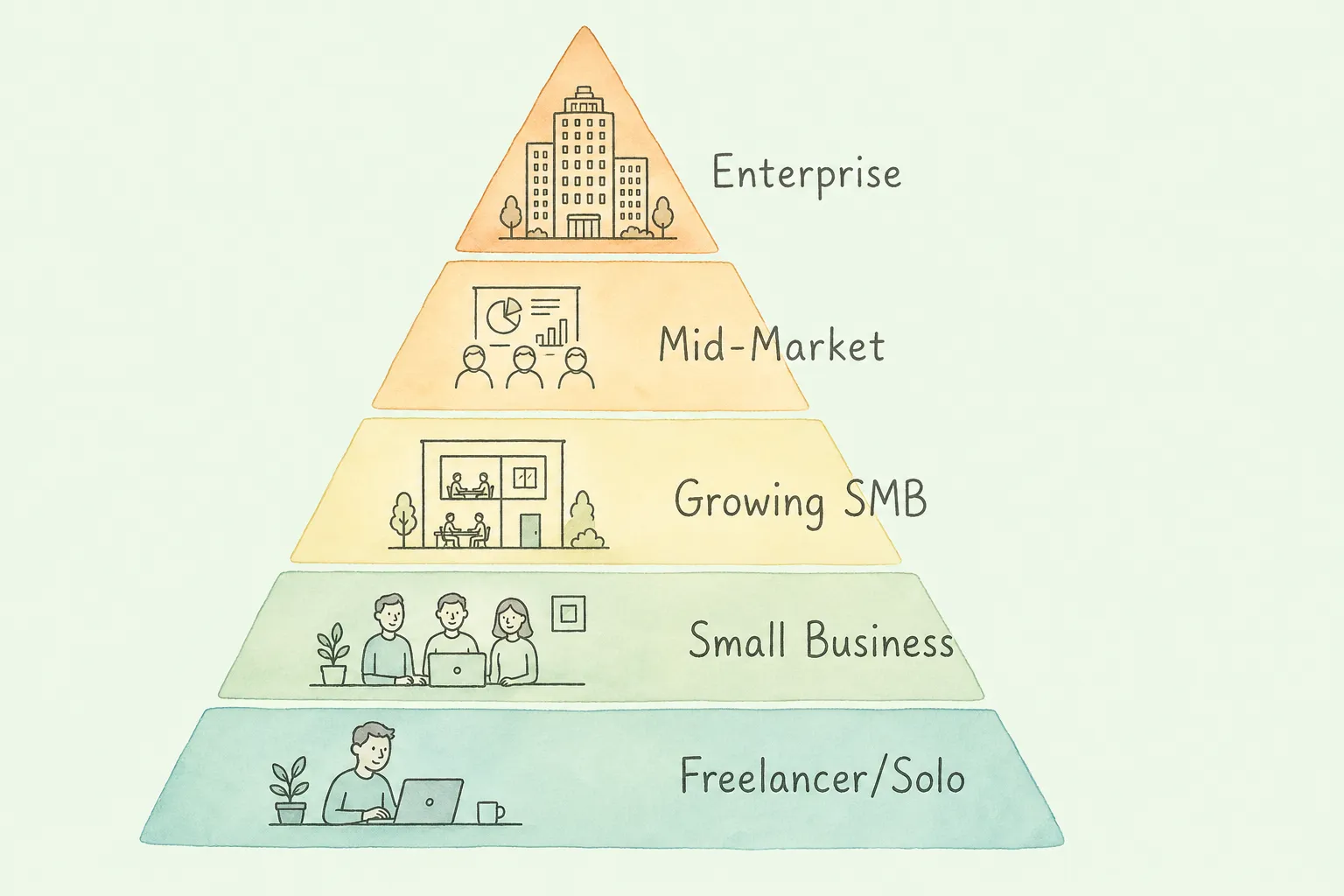
The right capture tool changes significantly based on company size and invoice volume.
| Segment | Monthly Invoice Volume | Best Fit Tools | What to Prioritize |
|---|---|---|---|
| Freelancer / Solo | 1-20 | Hubdoc (free), Veryfi (free tier) | Cost. You need basic capture, not a workflow engine. |
| Small Business | 20-200 | TallyScan, Dext, BILL | Accounting integration quality and email capture |
| Growing SMB | 200-1,000 | TallyScan, BILL, Stampli | Approval routing + multi-format support |
| Mid-Market | 1,000-10,000 | Stampli, Rossum, Nanonets | ERP integration depth + extraction accuracy |
| Enterprise | 10,000+ | Rossum, ABBYY Vantage, Nanonets | Scale, API, custom models |
| Accounting Firm | Varies (multi-client) | Dext, TallyScan, Hubdoc | Multi-client dashboard + client onboarding |
For a deeper look at the AP workflow beyond just capture, see our guide to improving your accounts payable process.
The cost data above tells you why automation matters in general. The ROI calculation tells you whether a specific tool is worth its price for your volume. Here is the formula once you have your actual numbers:
Annual Savings = (Current cost per invoice - Automated cost per invoice) x Annual invoice volume
Add to this:
ROI = ((Annual Savings - Annual Software Cost) / Annual Software Cost) x 100
Worked example for a company processing 400 invoices per month:
| Item | Manual | Automated | Annual Difference |
|---|---|---|---|
| Processing cost per invoice | $15 | $3 | $57,600 saved |
| Error correction (3% rate, $53/error) | $764/month | $76/month | $8,256 saved |
| Late payment penalties | $300/month | $30/month | $3,240 saved |
| Total annual savings | $69,096 | ||
| Software cost (estimate) | $3,600/year | ||
| Net ROI | 1,819% |
Most businesses reach positive ROI within 3 to 6 months. The harder-to-quantify benefit is what your team does with the recovered time. Teams handling 500 invoices per month manually spend roughly 30 to 50 hours per month on data entry alone. That time goes back to exception handling, vendor relationship management, and month-end close work.
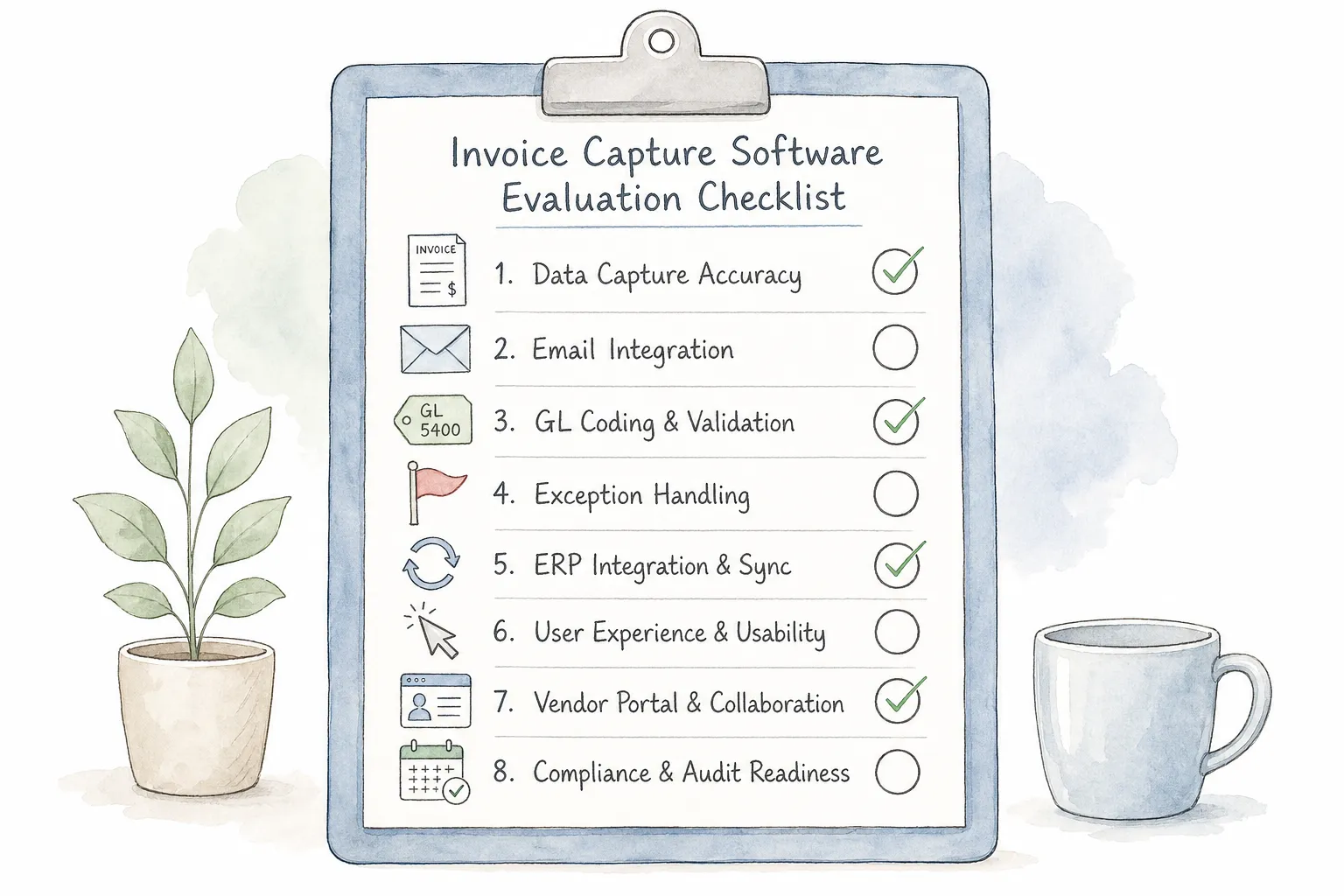
Every vendor will tell you their extraction accuracy is high. The only way to know if it is high on your invoices is to test with your actual documents. Here is an eight-point evaluation checklist:
Pro Tip: Ask the vendor for a list of their top five exception causes (the reasons invoices most often require human review). A vendor that cannot answer this question has not looked at their own error data closely enough.
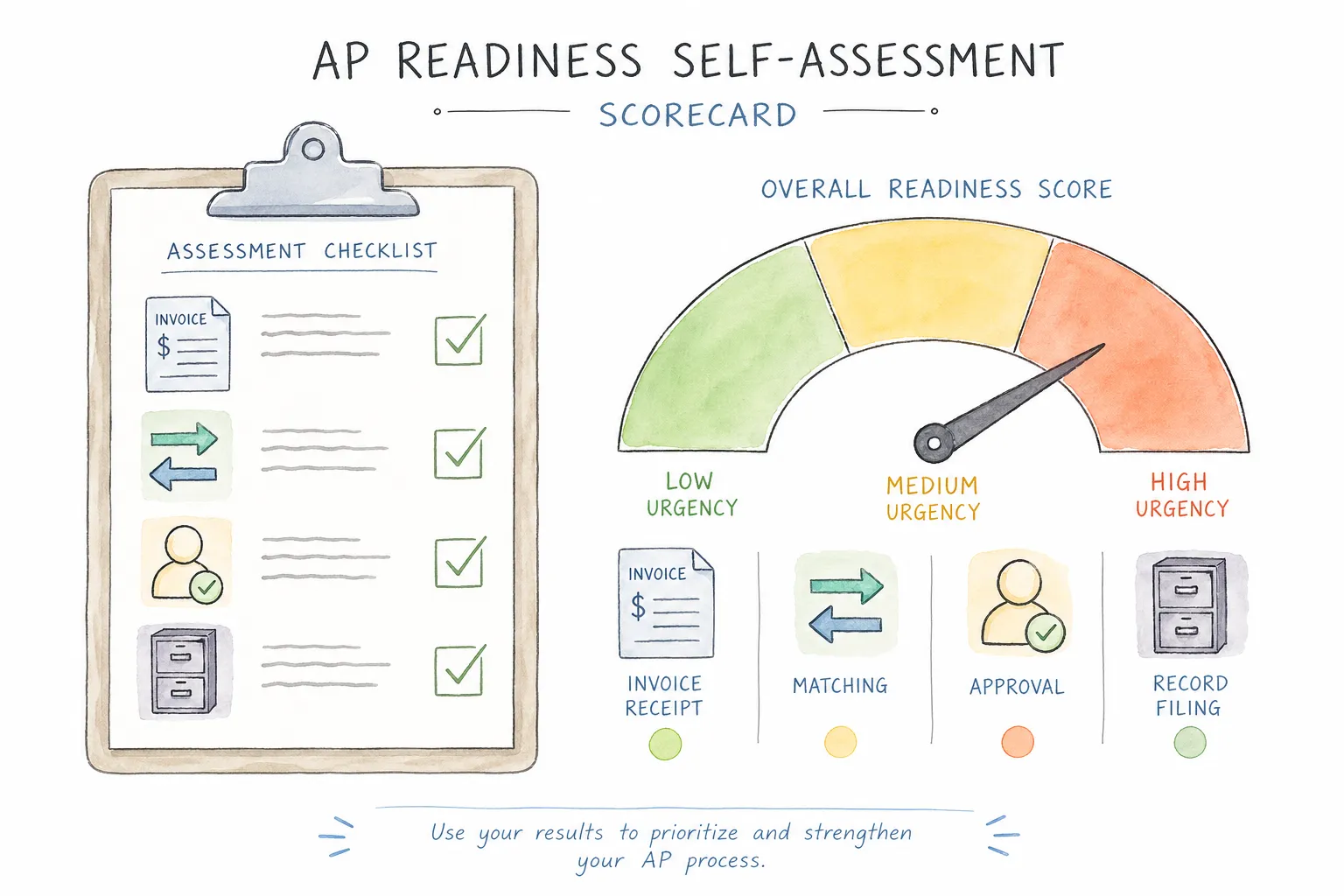
Before selecting any tool, score your current state. Higher scores indicate more urgent automation needs and faster ROI timelines.
| Area | Manual Warning Signs | Score 0-3 | Priority |
|---|---|---|---|
| Invoice capture | Team manually downloads from portals or forwards emails | High | |
| Data entry | Staff types fields from PDFs into accounting system | High | |
| PO matching | Matching done manually in spreadsheets | High | |
| Approval routing | Approvals happen via email with no formal tracking | Medium | |
| Duplicate detection | No systematic check before payment | High | |
| Exception handling | Exceptions resolved by hunting through email chains | Medium | |
| Audit trail | No centralized log of who approved what and when | High | |
| Reporting | AP metrics reported manually from exported data | Low |
Score interpretation:
The comparison table below shows which tools actually handle each invoice format. This is where most buyers are surprised.
| Feature | TallyScan | Dext | Hubdoc | Veryfi | BILL | Stampli | Rossum | Nanonets |
|---|---|---|---|---|---|---|---|---|
| PDF attachment | ✓ | ✓ | ✓ | ✓ | ✓ | ✓ | ✓ | ✓ |
| HTML email body (no PDF) | ✓ | Partial | ✗ | ✗ | ✗ | ✗ | ✗ | ✓ |
| Image / photo (JPEG, PNG) | ✓ | ✓ | ✓ | ✓ | ✓ | ✓ | ✓ | ✓ |
| Vendor billing portal | ✓ | ✗ | Partial | ✗ | ✗ | ✗ | ✗ | Partial |
| Retroactive email scan | ✓ | ✗ | ✗ | ✗ | ✗ | ✗ | ✗ | ✗ |
| Mobile capture | Via email | ✓ | ✓ | ✓ | ✓ | ✓ | ✗ | ✓ |
Two gaps stand out. First, most tools miss HTML email bodies entirely. This matters more than buyers typically realize: SaaS subscriptions, Stripe, PayPal, Uber, and most cloud platform receipts arrive as inline HTML emails, not PDF attachments. A tool that cannot read email bodies misses every one of them.
Second, retroactive email scanning is rare. Most tools only process invoices from the day you connect them forward. Businesses with historical AP gaps, new client onboarding requirements, or audit trails going back multiple years need this capability specifically.
For more on how OCR and AI differ in handling these formats, see our detailed breakdown of what OCR technology actually is.
In buyer language, almost nothing. Invoice capture software is the broader category term; invoice data capture software emphasizes structured field extraction (vendor, amounts, line items) rather than simply scanning a PDF into a folder. If a product only creates searchable images without posting fields to your ledger, it is scanning or OCR archive tooling, not AP capture.
Invoice capture software extracts structured data from incoming invoices and feeds it into your accounting system. AP automation software covers the broader AP lifecycle: capture, three-way PO matching, multi-level approval routing, and payment execution. If you primarily need to stop manually typing data from PDFs and emails, invoice capture software is the right scope. If you also need to automate PO matching, supplier onboarding, and payment runs, you are looking at a full AP automation suite. Most small businesses start with capture and layer automation on later.
AI invoice capture systems running on modern large language models achieve extraction accuracy above 95% on standard invoice formats, and above 99% after training on your specific vendor set. Manual data entry runs a 1 to 5% error rate, with each error costing approximately $53 to identify and correct according to Resolve's AP research. On high volumes, this difference translates directly to measurable cost savings and fewer reconciliation issues at month-end.
Most tools cannot. The majority of invoice capture products process PDF or image attachments only. Tools that parse HTML email bodies (the inline receipt format used by Stripe, Uber, AWS, Zoom, and most SaaS vendors) are a smaller subset. Before committing to any tool, forward a Stripe or Uber receipt into the trial account and verify extraction works on the email body, not just a PDF attachment.
For cloud-based SMB tools, setup typically takes one to three hours: connecting your email account, configuring your accounting system integration, and setting up GL code mappings. Enterprise platforms with ERP integrations (Rossum, ABBYY Vantage) take longer, from a few days to several weeks depending on customization requirements. Vendor demos show the fast path; ask specifically about time to first clean invoice processed, not time to first login.
Accounting firms need multi-client dashboards, client onboarding workflows, and deep integration with professional accounting platforms. Dext is the most established choice in the accountant market. TallyScan adds automated inbox capture (no client forwarding required) and direct sync to QuickBooks, Xero, and Google Sheets. Hubdoc works well for firms on Xero with simple client needs. The right answer depends on whether your bottleneck is client document collection or data extraction quality.
Most mid-tier and enterprise capture tools handle multi-currency extraction. The system reads the currency symbol or code on the invoice, captures the amount, and tags the transaction accordingly. Verify with your specific vendor that their system correctly handles your currency combinations and that the accounting integration maps currencies correctly into your GL. Edge cases around currency conversion and foreign VAT treatment sometimes require manual review.
Compliance varies by vendor. For EU businesses, look for explicit GDPR compliance documentation, EU data residency options, and a current Data Processing Agreement. For US businesses working with enterprise clients, SOC 2 Type II certification is the relevant standard. Both are available from major platforms but not universal. Always request the compliance documentation directly rather than relying on marketing pages, and confirm where invoice data is physically stored.
Pricing ranges widely by segment. SMB-focused tools (TallyScan, Dext, Hubdoc, AutoEntry) start at $12 to $45 per month. Mid-market platforms that include approval workflows (BILL, Stampli) range from $45 to $150+ per month. Enterprise platforms (Rossum, ABBYY Vantage) are custom-priced and typically start at $1,000 per month or more. In almost every case, the software cost is lower than the labor savings generated within the first year, particularly once you factor in the error correction and missed discount costs from the table above.
Every tool in this comparison will tell you it is easy to set up and highly accurate. Most of them are telling the truth, under the right conditions: your invoice mix matches their training data, your ERP integration is one of their primary supported systems, and your volume fits their pricing structure cleanly.
The cases where tools fall short are specific: HTML receipts from SaaS vendors, invoices in unusual languages, multi-entity GL allocations, or vendor portals not on the supported list. These edge cases are normal, not exceptions. Map your actual invoice sources before starting a trial, test specifically against those sources, and you will find the right tool faster than any comparison table can tell you.
TallyScan handles email body extraction, PDF attachments, and image files in one pipeline, syncing to Google Sheets, Notion, Drive, and OneDrive (QuickBooks and Xero sync are Beta on higher plans). Try it free with no credit card required.
Five types of invoice scanning software, an honest comparison of 10 tools, and a framework to choose the right one based on your volume and workflow needs.
Stop hunting SaaS and supplier invoices in your inbox. Compare manual download, forwarding rules, full-inbox OAuth, and a privacy-first dedicated address, then set up automatic extraction with AI.
Upload invoice PDFs to OneDrive by hand, with the sync client, or via Power Automate, then automate capture-and-file with AI so Microsoft 365 teams stop dragging files every week.