Insights
Automated Invoice Capture Software: 10 Tools Compared, Honestly Rated
10 automated invoice capture tools compared honestly. Includes real cost data, ROI calculator, format support matrix, and an 8-point evaluation checklist.

TallyScan Team
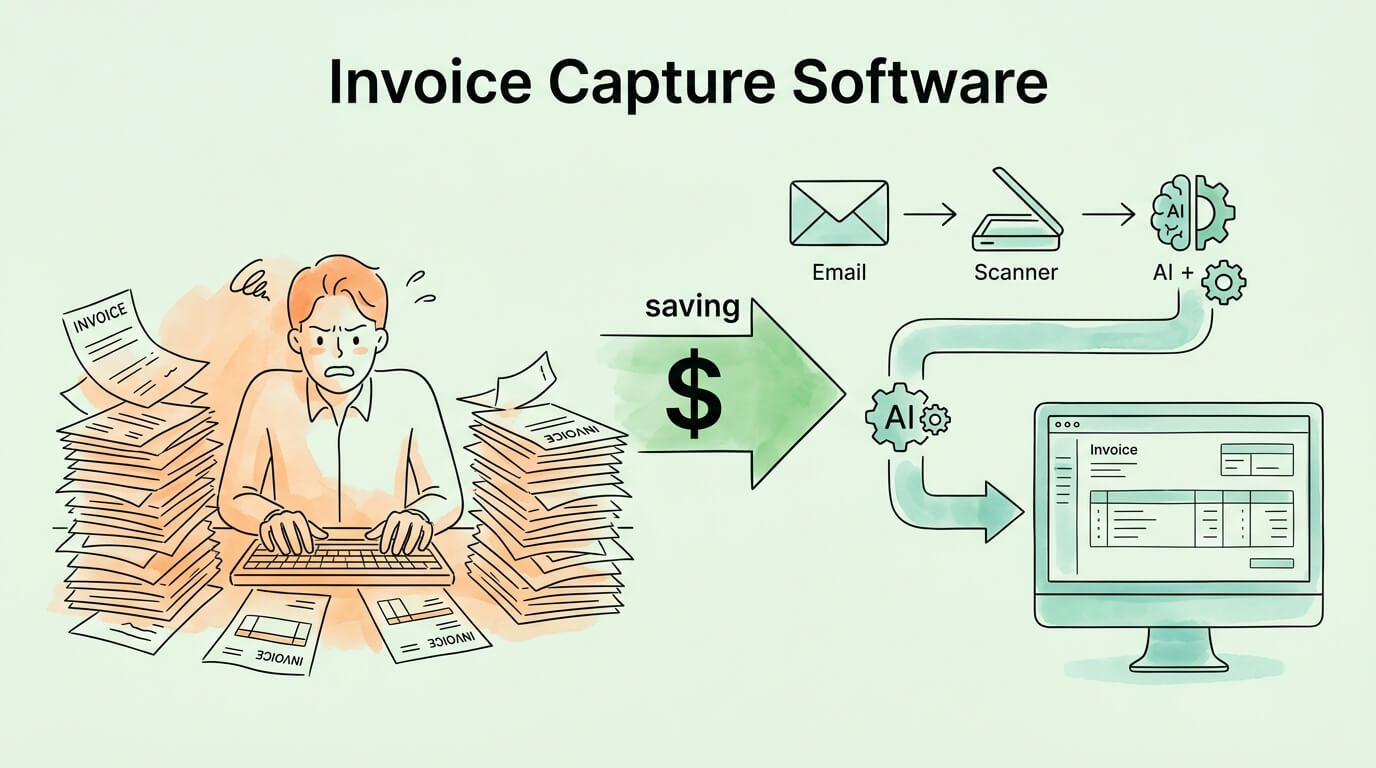
Your accounts payable team is talented. They can analyze vendor contracts, spot cash flow risks, and build supplier relationships. What they should not be doing is typing invoice numbers into a spreadsheet for four hours a day.
Yet that is exactly what 68% of AP teams are still doing, manually keying invoices into ERP systems despite automation technology that can do the same job in seconds at a fraction of the cost. According to IOFM (Institute of Finance and Management), the average manual invoice costs between $12.88 and $19.83 to process from receipt to payment. AI-powered invoice capture brings that figure down to approximately $2.36. On 500 invoices per month, that is a difference of more than $60,000 per year in processing costs alone.
Invoice capture software is the technology that makes that switch possible. It reads incoming invoices from any source, extracts the structured data, validates it, and routes it to your accounting system automatically. No manual keying. No transcription errors. No invoices lost in email inboxes.
This guide explains exactly how invoice capture software works, what to look for when choosing a solution, the real numbers on ROI, how to implement it, and how to measure whether it is working.
Invoice capture software is a category of AP automation technology that automatically reads incoming invoices, extracts structured data fields (vendor name, invoice number, date, line items, amounts, tax, payment terms), validates the extracted data, and passes it to a downstream system for matching, approval, and payment.
The core function is eliminating manual data entry from the invoice intake process. Rather than an AP team member opening a PDF, reading it, and typing its contents into accounting software, invoice capture software does that reading and extraction automatically.
Modern invoice capture platforms go beyond simple OCR (Optical Character Recognition). They combine OCR for image-to-text conversion with AI and machine learning for understanding document structure and context, making them capable of handling any invoice layout without manual template configuration. For a deep dive into the underlying recognition technology, see our guide on what is OCR technology.
The practical result: invoices that previously required 3 to 5 minutes of human data entry are processed in under 30 seconds with significantly higher accuracy.
Before discussing what invoice capture software does, it helps to understand what manual invoice processing actually costs, because most businesses are significantly underestimating it.
Direct costs of manual invoice processing:
| Cost Category | Manual Process | Automated Capture |
|---|---|---|
| Cost per invoice | $12.88 to $19.83 | $2.36 |
| Processing cycle time | 14.6 to 17.4 days average | 3.1 days (best-in-class) |
| Data entry error rate | ~22% of invoices contain errors | Less than 1% |
| Invoices paid after due date | Over 55% of US invoices | Significantly reduced |
| Touchless processing rate | ~6% | Up to 89% |
| Early payment discount capture | Low (slow cycle prevents it) | High (fast cycle enables it) |
Beyond the direct processing cost, manual invoice handling creates hidden financial leakage that rarely shows up in AP cost analyses:
61% of late payments are directly attributed to invoice errors. When your team enters data incorrectly, the resulting discrepancy triggers a dispute, delays payment, potentially incurs late fees, and damages the vendor relationship. Fixing one bad data entry often costs more than the original invoice processing expense.
Duplicate payment rates of 0.5 to 1.5% are common in manual AP environments. On $5 million in annual supplier spend, that represents $25,000 to $75,000 in recoverable overpayments, money that left your account unnecessarily. Ardent Partners' State of ePayables research consistently finds these rates in organizations without automated duplicate detection.
39% of all invoices contain at least one error, most introduced at or before receipt. Manual processing provides no systematic check on these errors before payment.
The business case for invoice capture software is not primarily about saving staff time, though that is real. It is about stopping financial leakage that compounds quietly over months and years.
Understanding the capture process helps you evaluate solutions and anticipate integration requirements.
Invoice capture software must handle invoices from every channel your suppliers use. In practice, this means:
invoices@yourcompany.com) and captures every attachment and inline invoice automatically.The best invoice capture platforms handle all of these channels without requiring separate workflows for each. Every invoice, regardless of source, enters the same processing pipeline.
For non-structured inputs (scanned PDFs, image files, email body text), the software applies OCR to convert image pixels into machine-readable text. Before OCR runs, image pre-processing handles common quality issues: deskewing rotated documents, removing noise and artifacts, adjusting contrast, and segmenting different regions of the page.
OCR quality at this stage is a primary determinant of downstream extraction accuracy. Systems using deep learning-based OCR (rather than rule-based pattern matching) perform significantly better on poor-quality scans, unusual fonts, and complex layouts.
This is where modern invoice capture separates from basic OCR tools. After producing raw text, AI models identify and extract specific fields regardless of where they appear on the invoice:
The critical capability here is layout-agnostic extraction: the system identifies "invoice number" based on contextual understanding of the document, not because the field is always in the top-right corner. This means the same extraction model handles a simple one-page invoice from a freelancer and a complex multi-page invoice from an enterprise supplier without any manual template configuration.
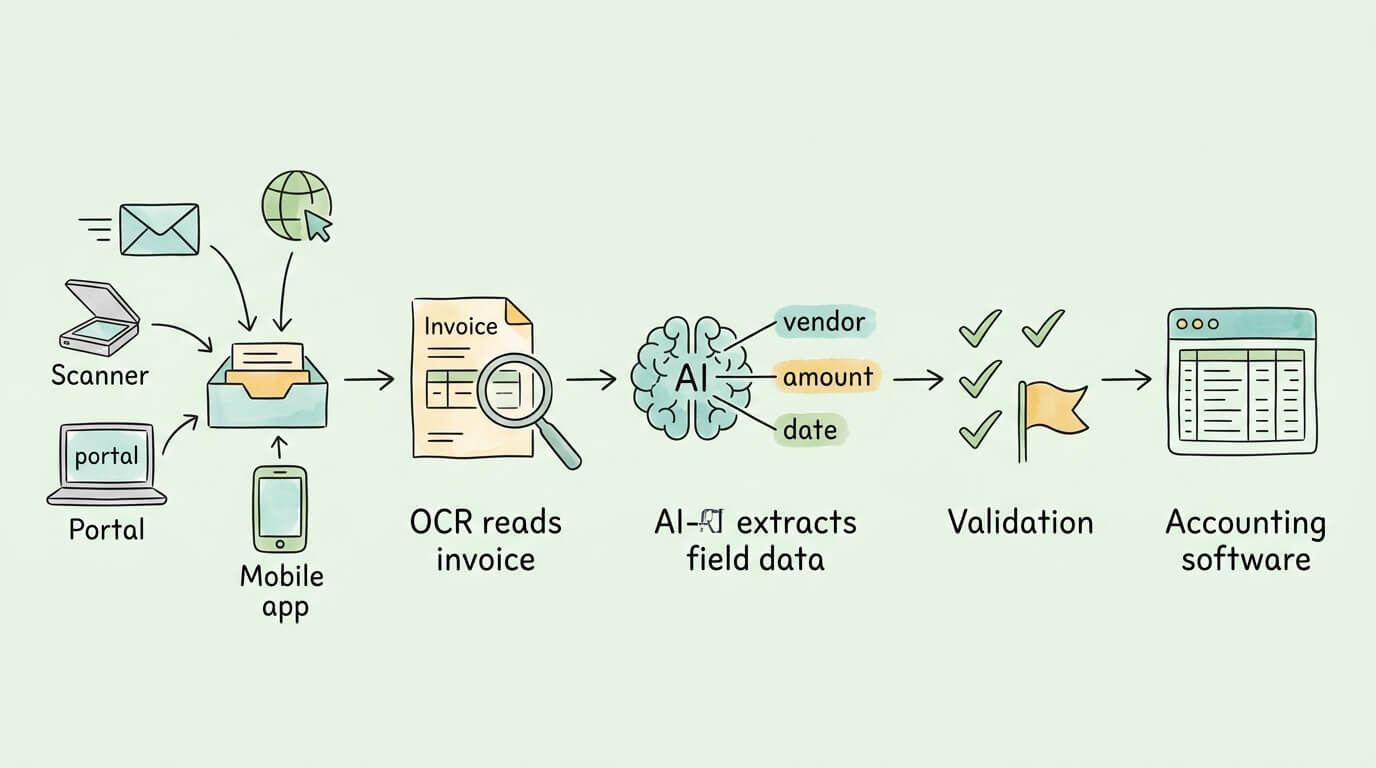
Extracted data is automatically validated before being passed downstream:
Invoices that pass all validation rules flow forward automatically. Those that fail specific checks are routed to the appropriate person for resolution with the relevant context attached.
Validated invoice data is posted to your accounting system or ERP via pre-built integration. This typically creates a draft bill or pending AP entry with all extracted fields pre-populated, ready for final review and approval.
The integration layer is what converts invoice capture from a standalone digitization tool into part of a complete AP automation workflow. Without reliable integration, captured data still requires manual re-entry at the posting step, which eliminates most of the efficiency gain.
For a business processing 300 invoices per month:
| Manual Process | With Invoice Capture | Savings | |
|---|---|---|---|
| Processing cost | $300 × $15 = $4,500/mo | $300 × $2.36 = $708/mo | $3,792/mo |
| Error correction cost | ~66 errors × $25/error = $1,650/mo | ~3 errors × $25 = $75/mo | $1,575/mo |
| Late payment fees | ~$500/mo average | ~$50/mo | $450/mo |
| Total monthly savings | $5,817/mo | ||
| Annual savings | $69,804/yr |
Software cost for a mid-market invoice capture platform typically runs $300 to $1,500 per month for this volume. At $5,817 in monthly savings, payback period is typically 1 to 3 months. That is the reason the global invoice processing software market is growing from $40.52 billion in 2025 toward $94 billion by 2030 at a 17.7 to 21.2% CAGR. The ROI is not marginal. It is transformative. For a complete breakdown of the benefits beyond cost reduction, see our guide on accounts payable automation benefits.
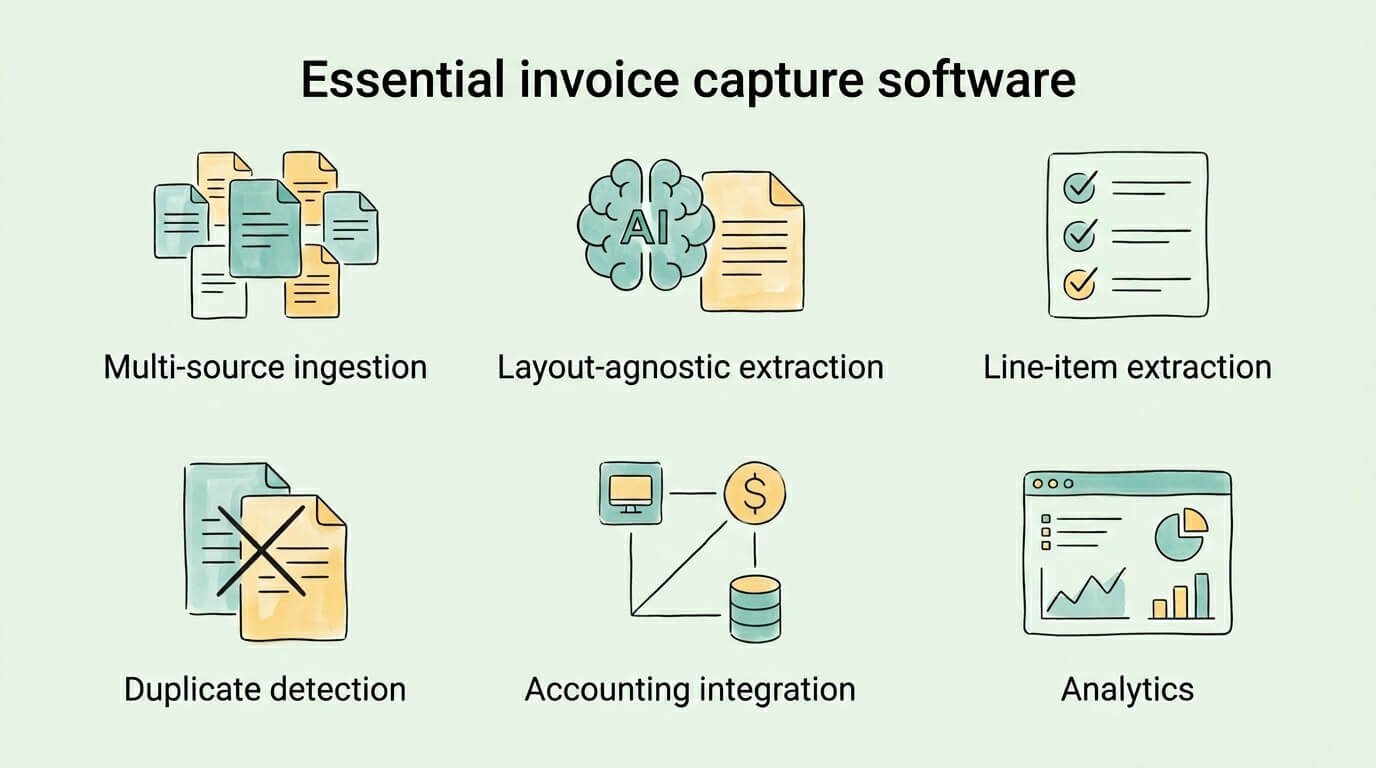
Not all invoice capture platforms are equivalent. When comparing solutions, evaluate these capabilities against your actual requirements.
Multi-source ingestion: The software must capture invoices from email, portals, scanned documents, and manual upload without requiring different workflows for each source. If your suppliers use vendor portals, portal monitoring is non-negotiable.
Layout-agnostic AI extraction: Template-based systems require manual template creation for each new vendor layout. AI-based extraction eliminates this requirement. Given that most businesses receive invoices from dozens or hundreds of different suppliers, template maintenance is a significant ongoing cost that AI extraction eliminates.
Line-item extraction: Header-level extraction (vendor name, total amount) is insufficient for three-way matching and detailed expense coding. The platform must extract individual line items including descriptions, quantities, unit prices, and GL codes.
Duplicate detection: Duplicate payments are a known risk in any AP environment. The capture platform should flag potential duplicates automatically before they reach the payment stage.
Accounting software integration: Pre-built, maintained integrations for your specific accounting system (QuickBooks, Xero, NetSuite, SAP, Dynamics, etc.) are essential. API-based integrations are more reliable than file-based exports.
Confidence scoring and exception routing: The system should quantify its confidence in each extracted field and route low-confidence extractions to human review rather than accepting them silently.
Approval workflow configuration: After capture, the invoice typically needs to route through an approval process. Built-in workflow configuration (threshold-based approval, multi-level chains, out-of-office routing) reduces your dependence on separate workflow tools.
Audit trail: Every action on every invoice, from capture through payment, should be logged with timestamps and user attribution. This is essential for compliance and internal audit purposes.
Vendor portal connectivity: Large suppliers increasingly require invoice retrieval from their own portals. A platform that automates portal login and download eliminates a significant manual burden.
Mobile capture: The ability to photograph a paper invoice with a smartphone and have it enter the capture pipeline immediately is useful for businesses that receive paper invoices at remote locations.
Analytics and reporting: Visibility into capture accuracy, processing volumes, exception rates, and cycle times helps you measure improvement and identify remaining inefficiencies.
The core capability is consistent across industries, but the specific problems it solves vary by context.
The primary challenge in manufacturing is three-way matching at scale: every goods invoice must be compared against a purchase order and a goods receipt before payment. Manual three-way matching on high-volume supply chains is a significant operational bottleneck.
Invoice capture software extracts the PO reference number from each incoming invoice and automatically initiates the match against open POs and goods receipts in the ERP. Invoices that match within tolerance flow to payment automatically. Quantity discrepancies, price variances, and missing receipts are routed to the relevant team for resolution with full context attached.
The result: AP teams that previously spent most of their time manually matching documents shift to managing exceptions, which represent a minority of invoices.
Retail chains and franchise operations face a distribution problem: invoices for local services (cleaning, maintenance, local marketing, utilities) arrive at store level while AP processing is centralized.
Invoice capture software solves this by enabling store managers to capture invoices via mobile or email and have them enter the central AP pipeline automatically. The system codes each invoice to the correct location and GL account, giving finance leadership real-time visibility into payables across every location from a single dashboard.
For agencies, consultancies, and project-based businesses, the challenge is expense-to-project attribution. Every vendor invoice needs to be correctly allocated to the client project it supports before it can be billed through.
Invoice capture software can read project codes and identifiers from incoming vendor invoices and automatically assign them to the correct project in the accounting system. Correct project allocation protects client billing accuracy and project profitability reporting.
Both industries process high volumes of complex documents with strict compliance and retention requirements. Invoice capture software provides the automated audit trail and immutable document archive that regulatory requirements demand, while eliminating the manual data entry burden from high-volume document workflows.
The right solution depends on your invoice volume, the channels through which you receive invoices, your existing tech stack, and your in-house technical capacity.
For small businesses (under 200 invoices/month): Look for a cloud-based solution with a simple monthly subscription and pre-built integration for your accounting software. Setup complexity should be low: email connection, accounting software connection, and a brief configuration of your chart of accounts and vendor list. Implementation should take days, not weeks. TallyScan and similar platforms in this tier are designed for this profile.
For mid-market businesses (200 to 2,000 invoices/month): You need a more capable platform with line-item extraction, multi-level approval workflows, duplicate detection, and ERP integration. Evaluate platforms on their handling of your specific invoice mix: do you receive invoices from many different vendor layouts? Do you have supplier portals that need automated monitoring? Is your three-way matching process a bottleneck?
For enterprise (2,000+ invoices/month): At this volume, touchless processing rate is the critical metric. Look for platforms with demonstrated 70%+ touchless rates on your document types, strong ERP connectors (SAP, Oracle, Dynamics), compliance features for your regulatory environment, and dedicated implementation support.
Evaluation checklist:
| Criterion | Questions to Ask |
|---|---|
| Accuracy | What is the field-level accuracy on documents like yours? Can they provide a proof-of-concept on your own invoices? |
| Sources | Does it handle all the channels you receive invoices from, including portals? |
| Integration | Does it have a maintained connector for your accounting system or ERP? How is data mapped? |
| Line items | Does it extract full line-item detail, or only header-level fields? |
| Exceptions | How are low-confidence extractions handled? Where do exceptions go? |
| Security | Is it SOC 2 certified? How is data encrypted and retained? |
| Pricing | Per-invoice or flat subscription? What happens at higher volumes? |
| Implementation | How long does setup take? What support is included? |
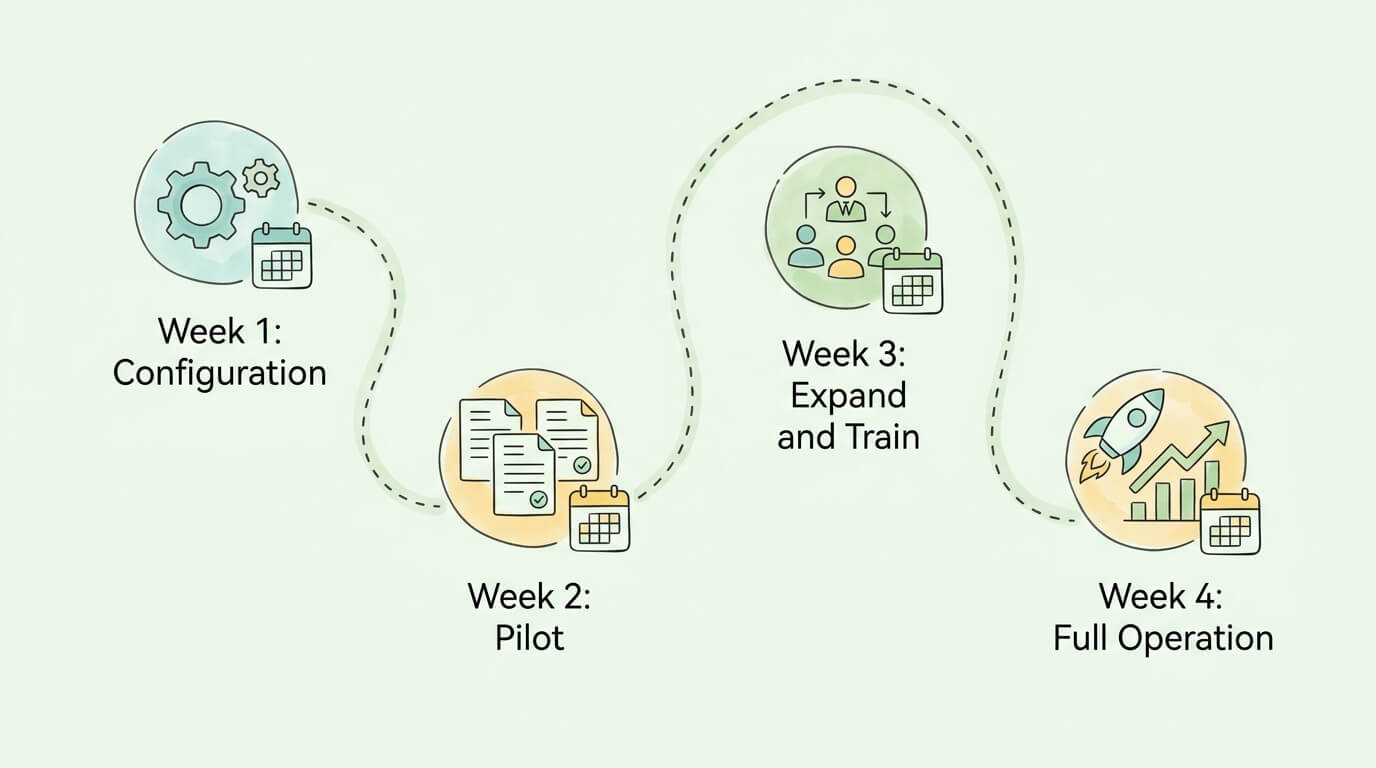
A typical invoice capture implementation follows this timeline for a small to mid-market business:
Week 1: Configuration and connection Set up your dedicated invoice email address. Connect your accounting software or ERP via the platform's integration. Configure your vendor list, chart of accounts mapping, and GL coding rules. Define your tolerance thresholds for automated approval.
Week 2: Pilot with a subset of invoices Route invoices from 5 to 10 vendors through the new system while continuing to process others manually. Review extracted data for accuracy. Correct any GL mapping issues. Identify vendor layouts where extraction accuracy is lower and flag for review.
Week 3: Expand and train your team Bring all invoice sources into the new system. Train AP team members on the exception review interface and the approval workflow. Document your exception handling process. Begin measuring your baseline capture accuracy and exception rate.
Week 4: Full operation and measurement Go fully live. Notify suppliers of your new invoice submission address. Establish your monthly KPI review cadence. Identify the 3 to 5 vendor layouts with the lowest accuracy and work with the provider to improve extraction on those specific documents.
If you cannot measure it, you cannot improve it. These KPIs tell you whether your invoice capture software is performing as expected.
| KPI | What It Measures | Target |
|---|---|---|
| Capture accuracy rate | % of invoices captured with all required fields correctly extracted | 95%+ |
| Touchless processing rate | % of invoices requiring zero human intervention through to posting | 60 to 89% |
| Exception rate | % of invoices flagged for human review | Less than 20% |
| Cost per invoice | Total AP processing cost divided by invoice volume | Under $3 |
| Cycle time | Average days from invoice receipt to payment approval | Under 5 days |
| Duplicate detection rate | % of duplicate invoices caught before payment | 99%+ |
| First-time capture rate | % of invoices captured correctly on the first attempt | 90%+ |
Review these monthly for the first six months after implementation. A capture accuracy rate below 90% typically points to one of three issues: poor document quality from specific vendors, unusual invoice formats that need model improvement, or a pre-processing configuration issue. Each is fixable once identified.
For broader AP performance tracking beyond invoice capture, see our guides on accounts payable tracking, invoice approval automation, streamlining your full invoice processing workflow, and invoice data capture software for a deeper look at the extraction layer specifically.
Invoice capture software automatically reads incoming invoices from any source (email, scanned documents, supplier portals), extracts structured data fields (vendor name, invoice number, amounts, line items, payment terms), validates the extracted data, and passes it to your accounting system for matching, approval, and payment. Its core function is eliminating manual data entry from the invoice intake process. Unlike basic OCR tools that simply convert images to text, modern invoice capture platforms use AI to understand document context and extract specific fields regardless of invoice layout or format.
AI-powered invoice capture typically achieves 95 to 99% field-level accuracy on well-formatted printed invoices under good conditions. In practice, accuracy varies based on document quality (scanned documents with poor resolution perform worse than high-quality PDFs), invoice complexity (simple single-page invoices are captured more accurately than complex multi-page documents with tables), and vendor layout familiarity (frequently-seen layouts achieve higher accuracy than rare or unusual formats). Enterprise-grade platforms that combine AI extraction with confidence scoring and human-in-the-loop review for low-confidence fields achieve effective accuracy above 99% on critical financial fields.
OCR (Optical Character Recognition) converts image pixels into raw text. It can tell you that a document contains the string "INV-2026-001" but not that this string is an invoice number. Invoice capture software uses OCR as its first step, then applies AI and machine learning to identify what each piece of text means in context, extracting and labeling specific fields like vendor name, invoice date, total amount, and line items. The practical difference: OCR produces a text dump; invoice capture software produces structured, labeled data ready to post to your accounting system without additional human processing.
For cloud-based invoice capture software targeting small and mid-market businesses, implementation typically takes 3 to 10 business days from account setup to processing live invoices. The main configuration steps are connecting your invoice email address, integrating your accounting software, mapping your chart of accounts, and configuring your vendor list. More complex implementations involving ERP integration, custom approval workflows, or supplier portal connectivity may take 2 to 6 weeks. The implementation timeline should be a key evaluation criterion: solutions that require weeks of technical work before processing a single invoice carry significant switching cost if the tool does not perform as expected.
Modern invoice capture software handles: PDF invoices (both native digital PDFs and scanned-to-PDF documents), image files (JPEG, PNG, TIFF), invoices embedded in email body text, Microsoft Word and Excel invoices, and structured data formats (XML, EDI, JSON) from e-invoicing networks. Paper invoices can be handled by scanning to PDF or photographing with a mobile app. The key differentiator between platforms is how well they handle variation within and across these formats, particularly for scanned documents with poor image quality or unusual layouts.
Most leading invoice capture platforms offer pre-built integrations for QuickBooks Online, QuickBooks Desktop, Xero, NetSuite, Microsoft Dynamics 365, Sage, and MYOB. Enterprise platforms additionally connect to SAP, Oracle ERP Cloud, and custom ERP systems via API. Before committing to a platform, verify that the integration handles two-way data flow: extracted invoice data posts to your accounting system automatically, and vendor and chart-of-accounts data from your accounting system is available in the capture platform for validation and coding. File-export-based integrations (where the platform exports a CSV that you import manually) are technically integrations but do not deliver the automation value of direct API connections.
Pricing models vary by provider and business size. Entry-level cloud platforms for small businesses typically charge $30 to $150 per month for up to 100 to 200 invoices. Mid-market platforms typically run $300 to $1,500 per month for volumes up to 2,000 invoices, often including approval workflow, multi-user access, and ERP integration. Enterprise pricing is typically based on volume tiers and negotiated annually. Some platforms charge per-invoice (typically $0.10 to $0.50 per invoice for AI capture). When evaluating cost, compare against your current cost per invoice: if you are processing at $15 manual and can move to $2.36 automated, the software cost is almost always recovered in the first 1 to 3 months.
Reputable invoice capture platforms implement enterprise-grade security: TLS encryption for data in transit, AES-256 encryption at rest, SOC 2 Type II certification (independently audited security controls), role-based access controls, and complete audit logs of all user actions. GDPR compliance is standard for platforms operating in Europe. When evaluating a provider, ask specifically about: data residency (where is your data stored?), subprocessor relationships (which third-party services handle your data?), data retention and deletion policies, and their incident response process. SOC 2 Type II certification is the most meaningful security credential for this category, as it requires an independent audit of security controls, not just a self-assessment.
Manual invoice processing is one of the most measurable inefficiencies in finance operations. The data is consistent across every industry benchmark: manual processing costs 5 to 8 times more per invoice than automated capture, takes 5 to 6 times longer, and produces errors at 20 to 40 times the rate. The question for most businesses is not whether to automate but which platform to use and how to implement it without disruption.
TallyScan captures invoices from email, supplier portals, and scanned documents automatically, extracts all required fields using AI, and syncs structured data directly to QuickBooks, Xero, and other accounting platforms. Setup takes minutes, not months, and there are no templates to configure for new vendor layouts.
Ready to see what your AP process looks like without manual data entry? Start your free trial of TallyScan today.
10 automated invoice capture tools compared honestly. Includes real cost data, ROI calculator, format support matrix, and an 8-point evaluation checklist.
Manual AP costs $10-$15 per invoice. This guide maps where your process breaks down, the seven fixes with the best ROI, and the KPIs to track real improvement.