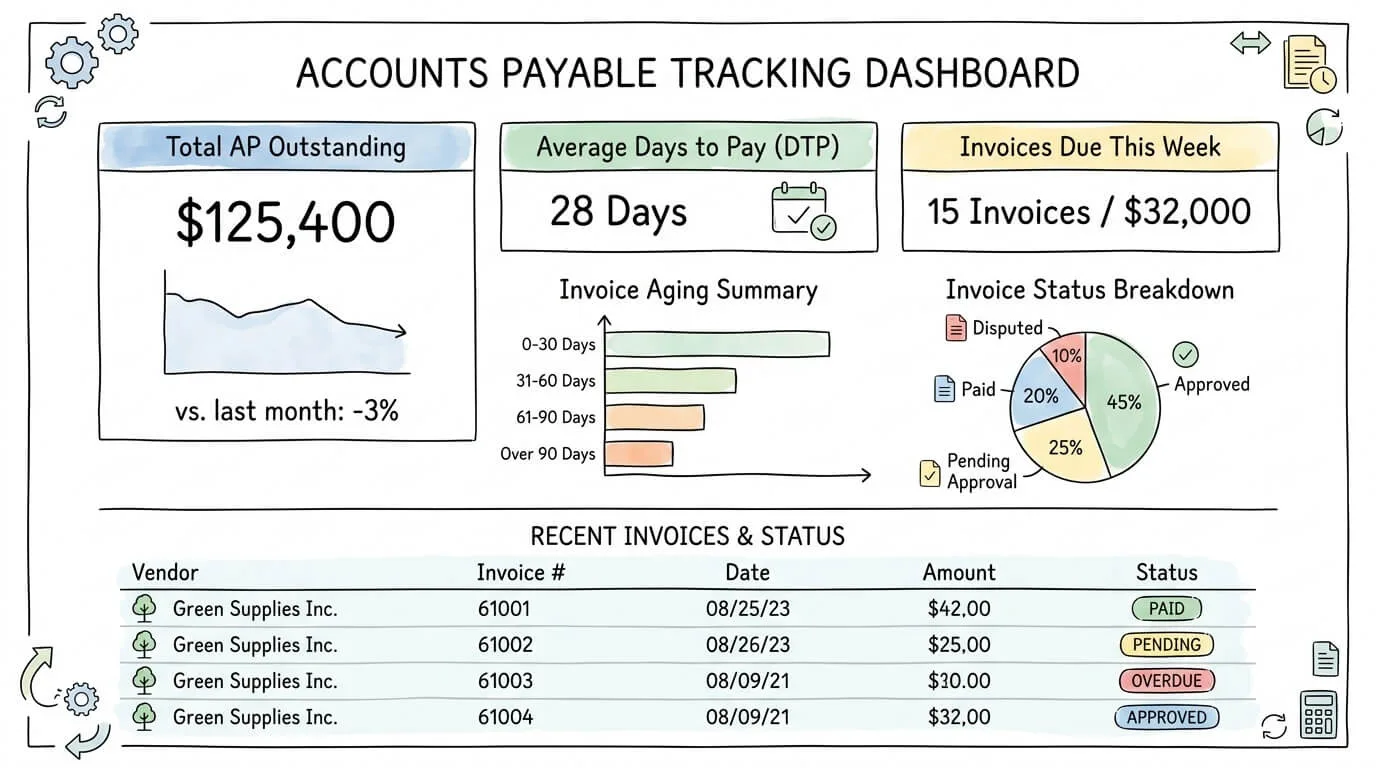
Ask any CFO what keeps them awake at night, and poor visibility into outstanding liabilities almost always makes the list. Accounts payable tracking is the discipline that fixes this. Done well, it gives you a real-time, accurate picture of every dollar your business owes, to whom, and when it is due. Done poorly, it produces late fees, missed early payment discounts, strained vendor relationships, and financial statements that cannot be trusted.
This guide goes beyond the standard "pay your bills on time" advice. You will find the eight KPIs your AP team should measure every month, a framework for reading and acting on your AP aging report, a step-by-step system for building a best-practice tracking process, and a self-assessment table to identify your highest-risk gaps right now.
What Is Accounts Payable Tracking?
Accounts payable tracking is the systematic process of recording, monitoring, and managing all financial obligations your business owes to vendors and suppliers, from the moment an invoice is received through payment confirmation and reconciliation.
It encompasses four core activities: capturing invoice data accurately, validating invoices against purchase orders and delivery receipts, managing the approval workflow, and recording payments in your general ledger with a complete audit trail. When all four are functioning well, you have real-time visibility into your cash commitments and the controls to prevent errors and fraud.
Pro Tip: Accounts payable is classified as a current liability on your balance sheet. Strong AP tracking does not just keep vendors happy; it directly determines the accuracy of your financial statements and the reliability of your cash flow forecasts.
The Real Cost of Weak AP Tracking
Most businesses significantly underestimate the cost of a poorly managed AP function. The losses are distributed across multiple categories and rarely appear as a single line item, which is why they often go unchallenged.
According to the Institute of Finance and Management (IOFM), the industry average cost to process a single invoice manually is $9.40 to $15.00. Best-in-class automated teams bring that down to $2.05 to $2.78. For a business processing 500 invoices per month, the difference is $38,000 to $73,000 per year in direct processing costs alone.
The hidden costs compound this further:
Cost Category
What It Looks Like
Estimated Annual Impact (500 invoices/month)
Duplicate payments
0.1–0.5% of total payments processed twice
$5,000–$25,000 on $5M payables
Late payment fees
Penalties charged by vendors for overdue invoices
$1,500–$8,000 depending on terms
Missed early payment discounts
2% discount lost because invoice sits unapproved
$20,000–$100,000 on $5M payables
Error correction labor
Staff time to investigate and fix data entry mistakes
15–20 hrs/month × average AP salary
Fraud losses
Fake or manipulated invoices that pass through unchecked
Highly variable; often undetected for months
According to IOFM research, 39% of invoices processed manually contain at least one error. Nearly 68% of AP teams still perform significant manual data entry, according to Ardent Partners' State of ePayables report. These are not technology limitations; they are process gaps that a structured accounts payable tracking system directly addresses.
The 8 KPIs Every AP Team Must Track
This section is absent from most AP guides, yet it is the foundation of continuous improvement. You cannot manage what you do not measure. Here are the eight KPIs that give you a complete picture of your AP function's health.
KPI 1: Cost Per Invoice
Formula: Total AP department costs ÷ Total invoices processed in the period.
What it measures: The fully-loaded cost of processing a single invoice, including labor, software, overhead, and error correction.
Benchmarks:
Best-in-class: $2.05–$2.78
Industry average: $9.40–$10.00
Poor performers: $15.00+
KPI 2: Invoice Cycle Time
Formula: Average number of days from invoice receipt to payment approval.
What it measures: How long your process takes from start to finish. Long cycle times signal bottlenecks in your approval workflow or data capture step.
Benchmarks:
Best-in-class: 3.3 days
Industry average: 13.5–15 days
KPI 3: Days Payable Outstanding (DPO)
Formula: (Average Accounts Payable ÷ Cost of Goods Sold) × Number of Days in Period.
What it measures: How long, on average, your business takes to pay its suppliers. Higher DPO means you are holding cash longer (positive for working capital). Too high signals potential vendor relationship problems.
Benchmarks: Industry-specific, but 30–45 days is typical for most SMBs. Compare against your industry peer group, not a universal benchmark.
KPI 4: First-Pass Match Rate
Formula: Invoices that pass automated 2-way or 3-way matching without human intervention ÷ Total invoices × 100.
What it measures: The quality of your purchase order and receiving documentation. A low match rate means something upstream is broken: POs are not being issued, or receiving reports are inconsistent.
Benchmark: Leading organizations achieve 95%+. Below 70% indicates a systemic upstream problem.
KPI 5: Early Payment Discount Capture Rate
Formula: Discounts actually captured ÷ Total available discounts × 100.
What it measures: How consistently you are taking advantage of supplier discount terms (typically 2% for payment within 10 days).
Benchmark: Top-performing teams capture 80–90% of available discounts. Most manual teams capture fewer than 20%.
What it measures: What percentage of your invoices have discrepancies, missing POs, coding errors, or other issues requiring human intervention.
Target: Below 10%. Consistently above 20% indicates poor upstream controls or vendor data quality issues.
KPI 7: Late Payment Rate
Formula: Invoices paid after their due date ÷ Total invoices paid × 100.
What it measures: How reliably you are honoring your payment commitments. Late payments damage supplier relationships, trigger fees, and harm your business credit score.
Target: Below 5%. Above 10% requires immediate process intervention.
KPI 8: Invoices Processed Per FTE
Formula: Total invoices processed annually ÷ Number of full-time AP employees.
What it measures: Team productivity and the degree of automation in your process.
Benchmarks:
Best-in-class: 24,000+ invoices per FTE per year
Industry median: 9,483 invoices per FTE
Manual-heavy teams: 3,000–5,000 invoices per FTE
KPI
Best-in-Class
Industry Average
Track Monthly
Cost per invoice
$2.05–$2.78
$9.40–$10.00
Yes
Invoice cycle time
3.3 days
13.5–15 days
Yes
Days Payable Outstanding
Industry-specific
30–45 days (SMB avg)
Yes
First-pass match rate
95%+
~65%
Yes
Early payment discount capture
80–90%
< 20%
Yes
Invoice exception rate
< 10%
~25%
Yes
Late payment rate
< 5%
~15%
Yes
Invoices per FTE/year
24,000+
9,483
Quarterly
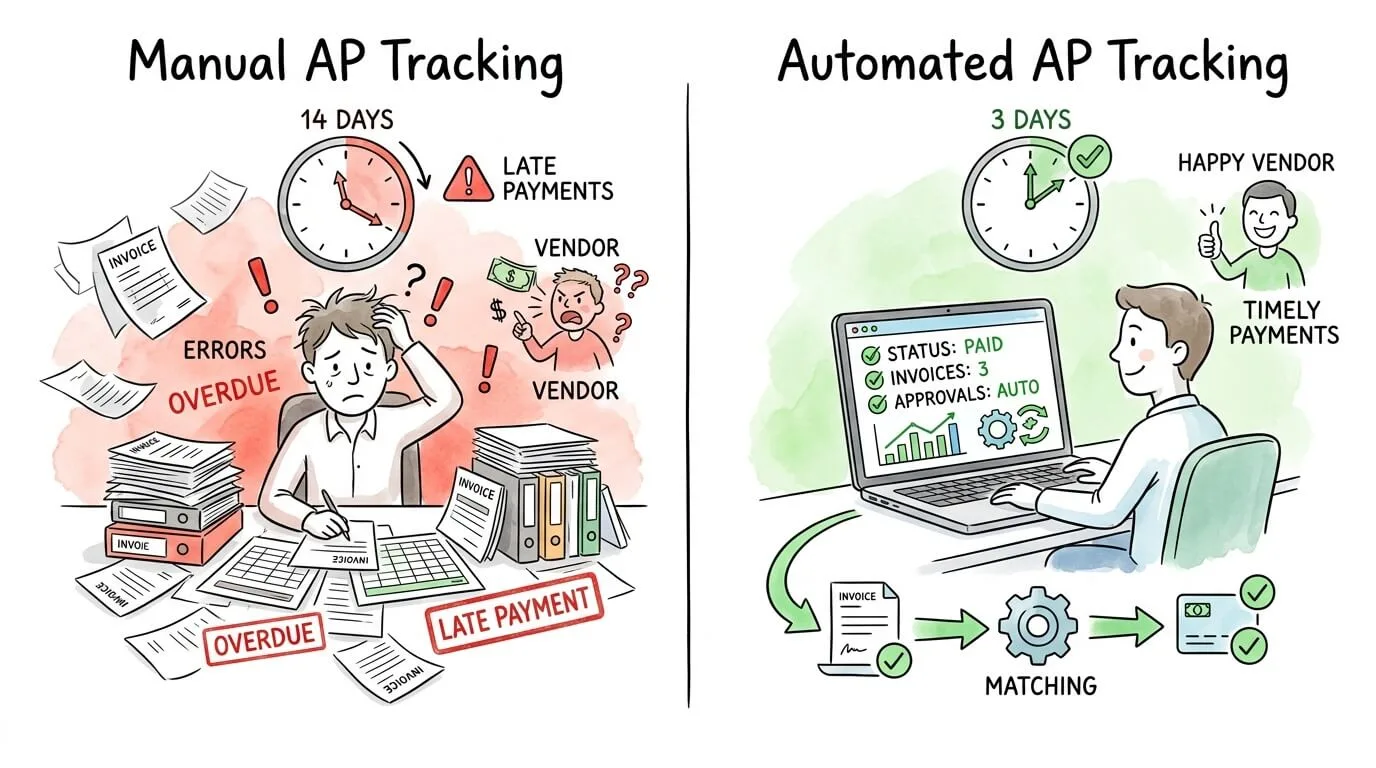
Manual vs. Automated AP Tracking: A Complete Comparison
The choice between manual and automated accounts payable tracking is not just about speed. It affects accuracy, visibility, fraud risk, audit readiness, and your team's capacity for strategic work.
Dimension
Manual Tracking
Automated Tracking
Data entry
Hand-keyed; 39% error rate
AI extraction; < 1% error rate
Invoice cycle time
13.5–15 days average
2–4 days average
Cost per invoice
$9.40–$15.00
$2.05–$2.78
Real-time visibility
None; status requires manual lookup
Live dashboard with every invoice status
Fraud detection
Reactive; errors caught after payment
Proactive; duplicate/anomaly detection before approval
Audit trail
Paper and email records; difficult to reconstruct
Immutable digital log; retrievable in seconds
Approval routing
Manual email; depends on individual memory
Rules-based automatic routing with escalation
ERP/accounting sync
Manual re-entry required
Automatic bidirectional sync
Vendor query resolution
24–48 hours
< 1 hour with portal access
Scalability
Headcount must scale with volume
Volume scales without adding staff
How to Read and Act on Your AP Aging Report
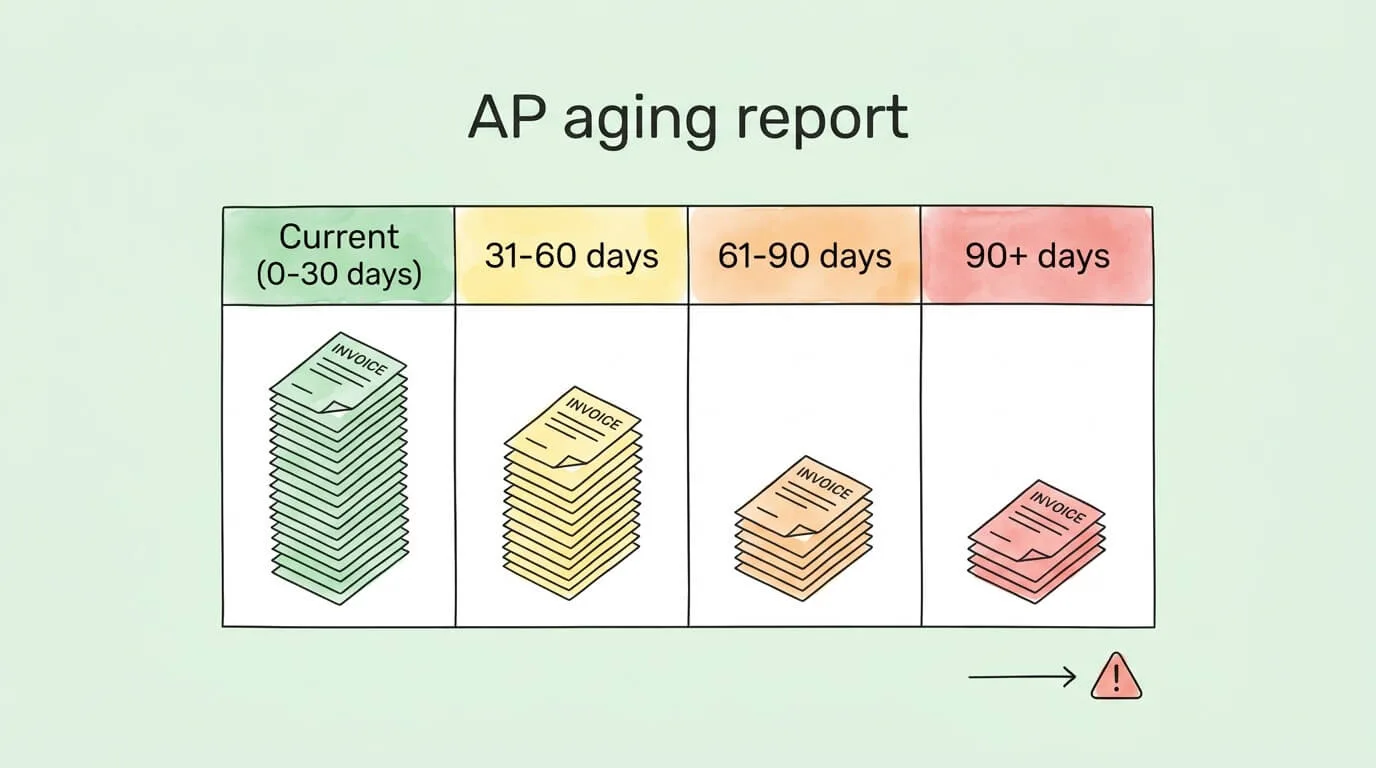
The AP aging report is the single most important output of your accounts payable tracking system, yet many businesses generate it but do not actively use it. This section shows you exactly what to look for and what to do about it.
An AP aging report lists every outstanding vendor invoice categorized by how long it has been unpaid:
Aging Bucket
What It Contains
Priority Action
Current (0–30 days)
Invoices within normal payment terms
Schedule for payment by due date
31–60 days
Invoices approaching or at due date
Review for payment this week
61–90 days
Overdue; potential late fees and vendor friction
Pay immediately; communicate with vendor
91–120 days
Significantly overdue; vendor relationship at risk
Escalate to finance management
120+ days
Critical; may reflect disputes, lost invoices, or cash flow problems
Investigate each line item individually
How to use your AP aging report strategically:
Review it weekly, not monthly. A weekly cadence gives you enough lead time to act before invoices become overdue.
Look for concentration risk: if more than 30% of your outstanding payables are with a single vendor, a payment delay could cause a serious relationship crisis.
Cross-reference with cash position: use the aging report alongside your cash flow forecast to decide which invoices to accelerate (for discounts) and which to defer to a due date (to preserve cash).
Investigate the 90+ day bucket: every invoice in this bucket has a story. Either it is disputed, it was lost in your process, or your business has a cash flow problem. Each case requires a different response.
Use it as a fraud detection tool: invoices from unfamiliar vendors appearing in the aging report are a warning sign that requires verification before payment.
For a complete framework on managing your cash position alongside your payables, see our guide on how to improve cash flow.
6 Best Practices for a World-Class AP Tracking System
Practice 1: Centralize Every Invoice Through a Single Intake Point
Invoices should never arrive through multiple unmonitored channels. Designate a single, dedicated email address (e.g., ap@yourcompany.com) and configure your vendor portal to route all submissions there. All paper invoices should be scanned and submitted to the same channel on day of receipt.
This single step eliminates the "lost invoice" problem entirely. Every invoice that enters your system is logged from the moment of receipt, with a timestamp and source record.
Practice 2: Implement a Documented Approval Matrix
Every business has an approval hierarchy. Most businesses have not written it down. Document exactly who must approve invoices at each dollar threshold, for each department or cost center. This document becomes the configuration blueprint for your automation system.
Practice 3: Perform Three-Way Matching on Every PO-Based Invoice
Three-way matching (purchase order + goods receipt + vendor invoice) is the most effective single control for preventing overpayment and invoice fraud. It verifies three things simultaneously: that you ordered the goods, that you received them, and that the invoice matches both.
Automate this check wherever possible. Modern AP platforms perform three-way matching in seconds. Manual three-way matching on high-volume AP is a bottleneck that drives up cycle time.
Practice 4: Reconcile Your AP Ledger Monthly
Your AP sub-ledger and general ledger must be reconciled at least monthly. Discrepancies between the two indicate data entry errors, missing invoices, or timing differences that need to be resolved before they compound into larger problems. For a practical reconciliation workflow, see our bank reconciliation tips guide and how to reconcile invoices.
Practice 5: Track DPO and Optimize Your Payment Timing
Days Payable Outstanding is a lever, not just a metric. Paying too early leaves cash on the table. Paying too late damages vendor relationships and triggers fees.
The optimal strategy:
Pay early only when a discount makes it financially worthwhile. A 2/10 NET 30 discount (2% for payment within 10 days) equates to an annualized return of approximately 36% on the cash deployed. Almost always worth capturing.
Pay all other invoices as close to their due date as possible. This maximizes your working capital without triggering late fees.
Negotiate extended terms with strategic vendors. Moving from NET 30 to NET 60 on $50,000 in monthly spend frees $50,000 in working capital permanently.
Practice 6: Automate the Repeatable Steps
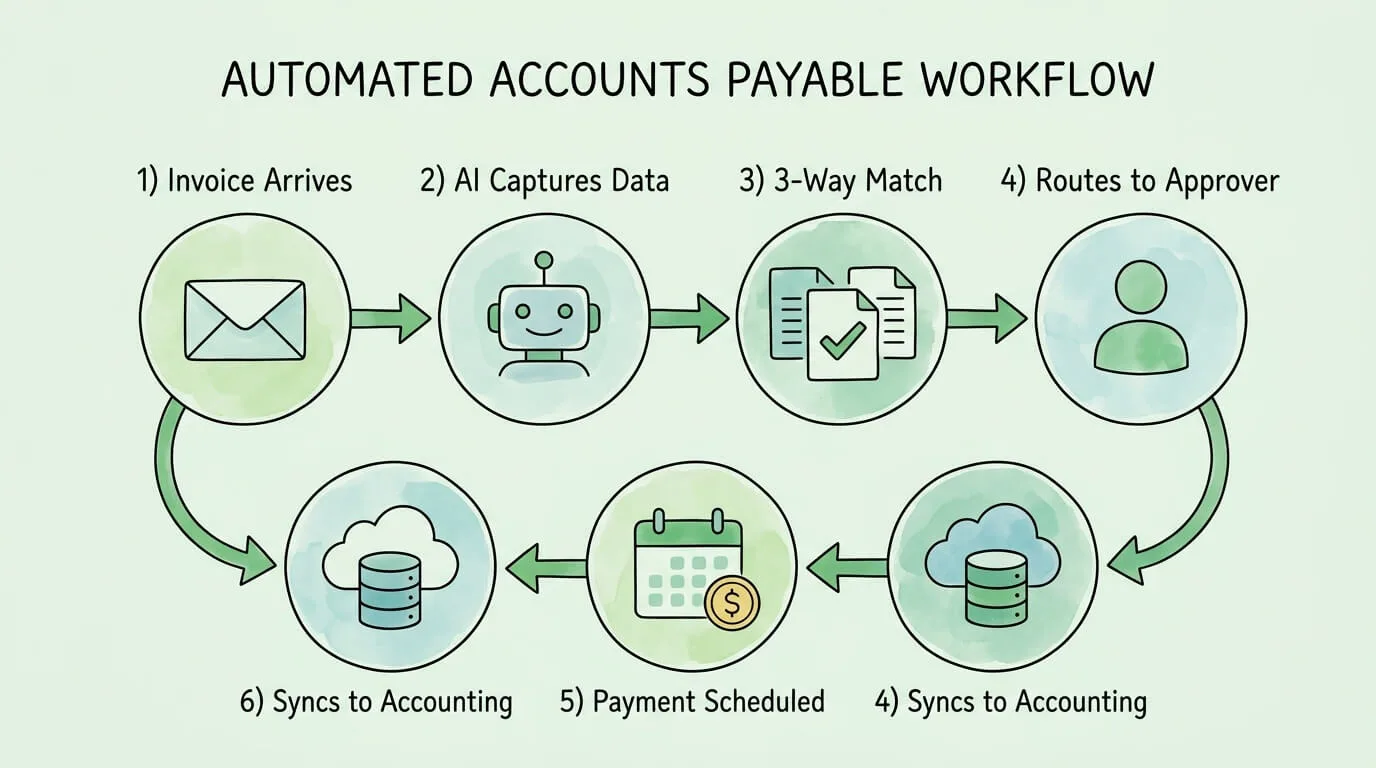
Every step in your AP workflow that follows a predictable rule is a candidate for automation: data capture, PO matching, approval routing, payment scheduling, and accounting sync. Automating these steps does not reduce control; it enforces your controls consistently, without depending on individual execution.
Platforms like TallyScan automate the entire workflow from inbox to accounting sync, processing invoices with AI extraction and routing them automatically through your approval matrix. For a full overview of what AP automation delivers, see our guide on automating accounts payable.
How to Choose the Right AP Tracking Software
The right platform for your business depends on invoice volume, team size, existing accounting software, and your specific bottlenecks. Use this feature checklist to evaluate candidates systematically.
Feature
Why It Matters
Must-Have
AI/OCR invoice extraction
Eliminates manual data entry; reduces error rate to < 1%
AP Tracking Self-Assessment: Score Your Current Process
Use this diagnostic table to identify your weakest areas and prioritize improvements. Score each row based on your current state.
Area
Strong (3 pts)
Developing (1 pt)
Weak (0 pts)
Your Score
Invoice intake
Single intake channel; all invoices logged on receipt
Multiple channels; mostly captured
Invoices arrive through email, mail, and verbal requests
—
Data capture accuracy
Automated extraction; < 1% error rate
Mix of manual and automated; ~15% error rate
Fully manual; frequent errors
—
Approval workflow
Documented matrix; automated routing
Some documentation; mostly email-based
Ad hoc; approvals depend on individual memory
—
PO matching
Automated 3-way match on 90%+ of PO invoices
Manual 3-way match; takes 1-2 days
No systematic matching process
—
AP aging visibility
Weekly aging report reviewed and acted on
Monthly review; limited action taken
No regular aging report review
—
KPI measurement
5+ KPIs tracked monthly with benchmarks
1-2 metrics tracked informally
No KPI tracking
—
GL reconciliation
AP sub-ledger reconciled monthly
Quarterly reconciliation
Rarely or never reconciled
—
DPO optimization
Payment timing actively managed for discounts and cash flow
Some attention to early payment discounts
Pay invoices as they come; no optimization
—
Fraud controls
Duplicate detection + vendor verification active
Some manual checks
No systematic fraud controls
—
Audit trail
Complete, searchable digital trail for all invoices
Partial digital trail
Paper files and email threads
—
Score Guide: 25–30 = Excellent. 15–24 = Good; focus on red areas. Below 15 = High risk; begin immediately with the highest-scoring-impact items.
Frequently Asked Questions
What is accounts payable tracking?
Accounts payable tracking is the process of recording, monitoring, and managing all money a business owes to its vendors and suppliers. It covers the complete invoice lifecycle: from receipt and data capture, through validation and approval, to payment execution and reconciliation. Effective AP tracking gives finance teams real-time visibility into outstanding liabilities, enables accurate cash flow forecasting, and creates an audit trail that supports compliance and fraud prevention.
What is an AP aging report and how do I use it?
An AP aging report is a financial statement that lists all outstanding vendor invoices organized by how long they have been unpaid, typically in buckets of 0–30 days, 31–60 days, 61–90 days, and 90+ days. It is the most important output of your AP tracking system. Use it weekly to identify overdue invoices before they trigger late fees, to prioritize payments that qualify for early payment discounts, and to investigate any invoices in the 90+ day bucket, which may indicate disputes, lost documents, or cash flow problems.
What is Days Payable Outstanding (DPO) and why does it matter?
Days Payable Outstanding (DPO) measures the average number of days your business takes to pay its suppliers. The formula is: (Average Accounts Payable ÷ Cost of Goods Sold) × Number of Days. A higher DPO means you are holding cash longer before paying vendors, which improves your working capital position. However, DPO that is too high relative to your industry norm can strain vendor relationships and result in less favorable payment terms. Most SMBs target a DPO of 30–45 days, optimized by capturing early payment discounts when cash is available and deferring standard invoices to their due date.
How does accounts payable tracking affect my business credit score?
Accounts payable payment behavior is one of the primary factors Dun & Bradstreet and other business credit bureaus use to calculate your business credit score. Consistent on-time vendor payments build a strong payment history, which signals to lenders and partners that your business is a low-risk customer. Late payments, even by a few days, are reported and drag down your score, potentially affecting your ability to secure favorable loan terms, credit lines, or supplier payment terms in the future.
What is three-way matching in accounts payable?
Three-way matching is an internal control process that compares three documents before approving an invoice for payment: the original purchase order (what you agreed to buy), the goods receipt note (what you actually received), and the vendor invoice (what you are being billed for). If all three documents match on quantities, prices, and item descriptions, the invoice proceeds to payment. Any discrepancy triggers an exception for human review. Three-way matching is one of the most effective controls for preventing overpayments, duplicate payments, and invoice fraud.
When should a small business start using AP tracking software?
You should evaluate AP automation software when any of the following apply: your team spends more than five hours per week on manual invoice data entry; you have experienced a duplicate payment or missed an early payment discount in the past six months; you cannot answer "how much do we owe right now?" within two minutes; your average invoice cycle time exceeds 10 days; or you are processing more than 50 invoices per month. At that volume, the time savings from automation typically deliver full payback within 3 to 6 months.
What is the difference between accounts payable and accounts receivable?
Accounts payable (AP) represents money your business owes to suppliers for goods and services already received. It is a current liability on your balance sheet. Accounts receivable (AR) represents money owed to your business by customers for goods and services already delivered. It is a current asset. AP tracking focuses on managing your outgoing payment obligations. AR management focuses on collecting incoming payments. Both directly affect your cash flow position: optimizing AP helps you hold cash longer without damaging vendor relationships, while optimizing AR accelerates cash inflows.
Build an AP Tracking System That Works Year-Round
The businesses with the healthiest cash positions do not manage accounts payable reactively. They have systems: a single intake channel that captures every invoice, an automated match that validates it, a documented approval matrix that routes it, and a live dashboard that shows its status at all times.
Start with the self-assessment table above. If your score is below 15, the highest-impact first step is almost always centralized invoice capture combined with automated approval routing. These two changes alone eliminate the majority of lost invoices, late fees, and approval bottlenecks.
If you are ready to move from spreadsheets and email threads to a system where invoices process themselves, TallyScan automates your entire AP workflow: inbox capture, AI extraction, 3-way matching, approval routing, and accounting sync. Explore the full benefits of accounts payable automation to see what a fully automated AP function delivers in practice.