Invoice Matching Process: Why 40% of AP Teams Get It Wrong and How to Fix It
The TallyScan Team
19 min read
#invoice matching process#3 way matching#accounts payable#invoice processing#ap automation#two way matching#four way matching
Think about the last time you checked a restaurant bill before paying it. You scanned the items, confirmed the prices, and made sure nothing unexpected appeared. You did not hand over your card blindly because even a small error matters when it is your money.
The invoice matching process is that same instinct, applied systematically to every vendor payment your business makes. And the stakes are considerably higher than a restaurant tab.
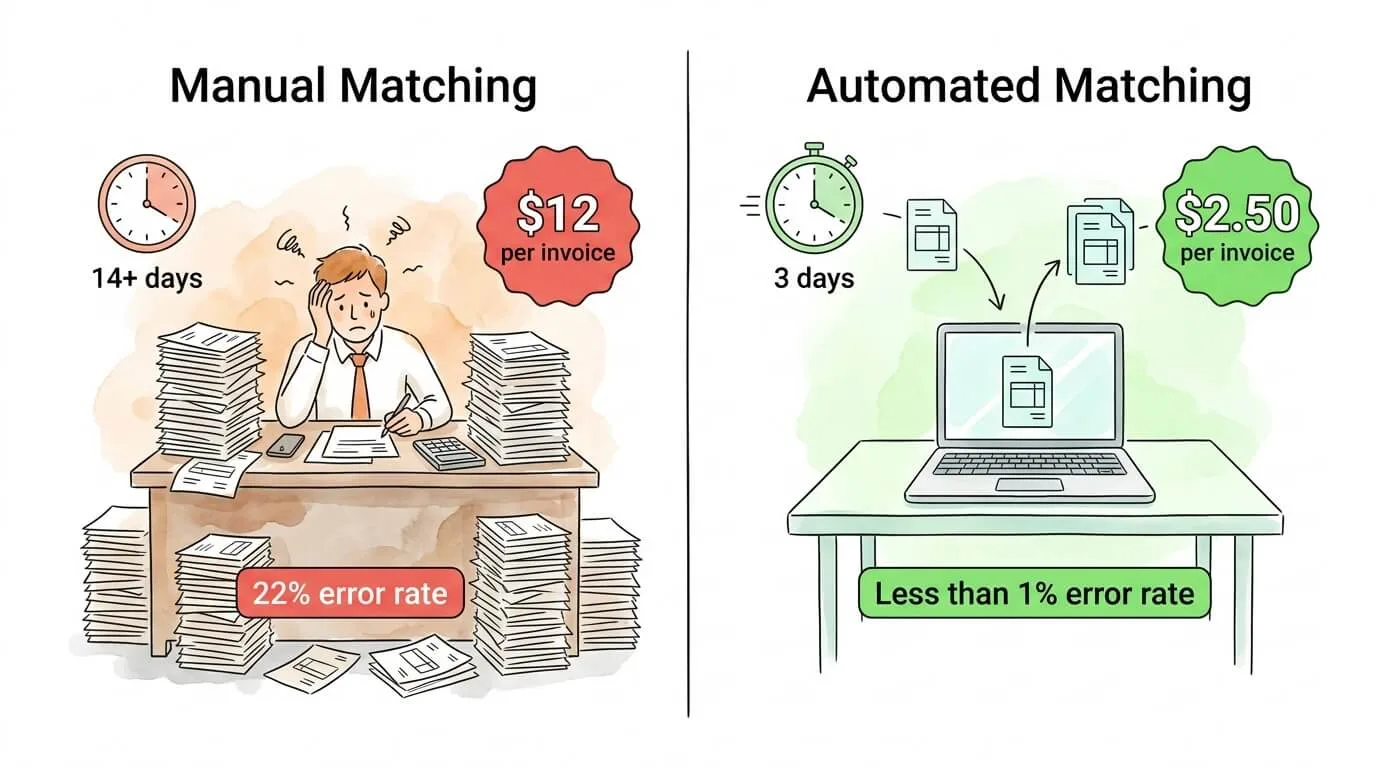
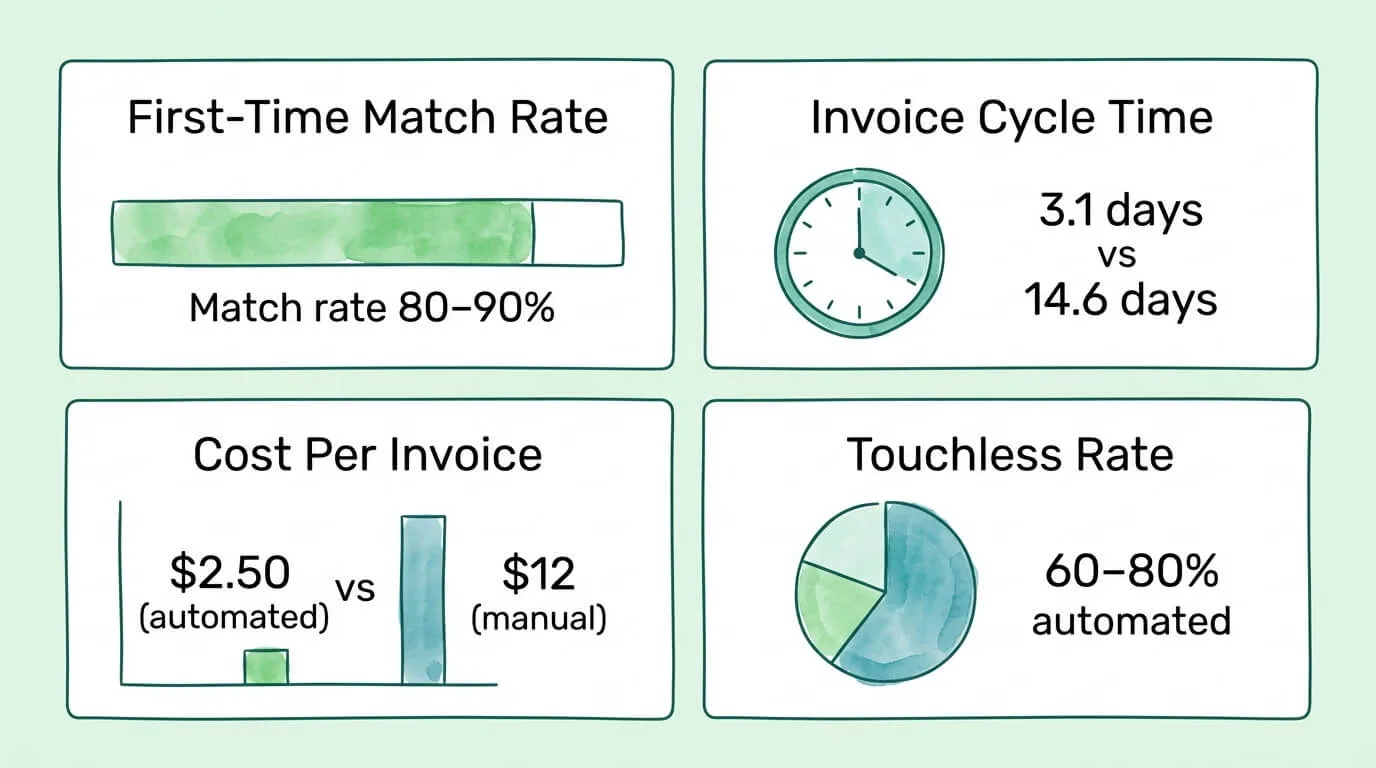
Over 40% of business leaders report struggling with errors during invoice matching. According to the AFP Payments Fraud & Control Survey, 79% of organizations experienced attempted or actual payment fraud in 2024. Manual invoice processing costs between $9.40 and $15.00 per invoice according to IOFM benchmarks, while best-in-class automated teams handle the same invoice for $2.00 to $3.00. The average manual processing cycle is 14.6 days; high-performing automated teams close it in 3.1 days.
These numbers explain why invoice matching is not an administrative chore. It is a financial control with a direct impact on cash flow, fraud exposure, vendor relationships, and the cost of running your AP function.
This guide covers everything you need: the four types of invoice matching, a step-by-step walkthrough of three-way matching, a framework for choosing the right method, how to handle the seven most common exceptions, tolerance threshold design, and an automation implementation roadmap.
What Is the Invoice Matching Process?
Invoice matching is the accounts payable control process that verifies a vendor's invoice against your company's own records before approving payment. It confirms that what you are being charged for matches what you ordered, what you received, and what you agreed to pay.
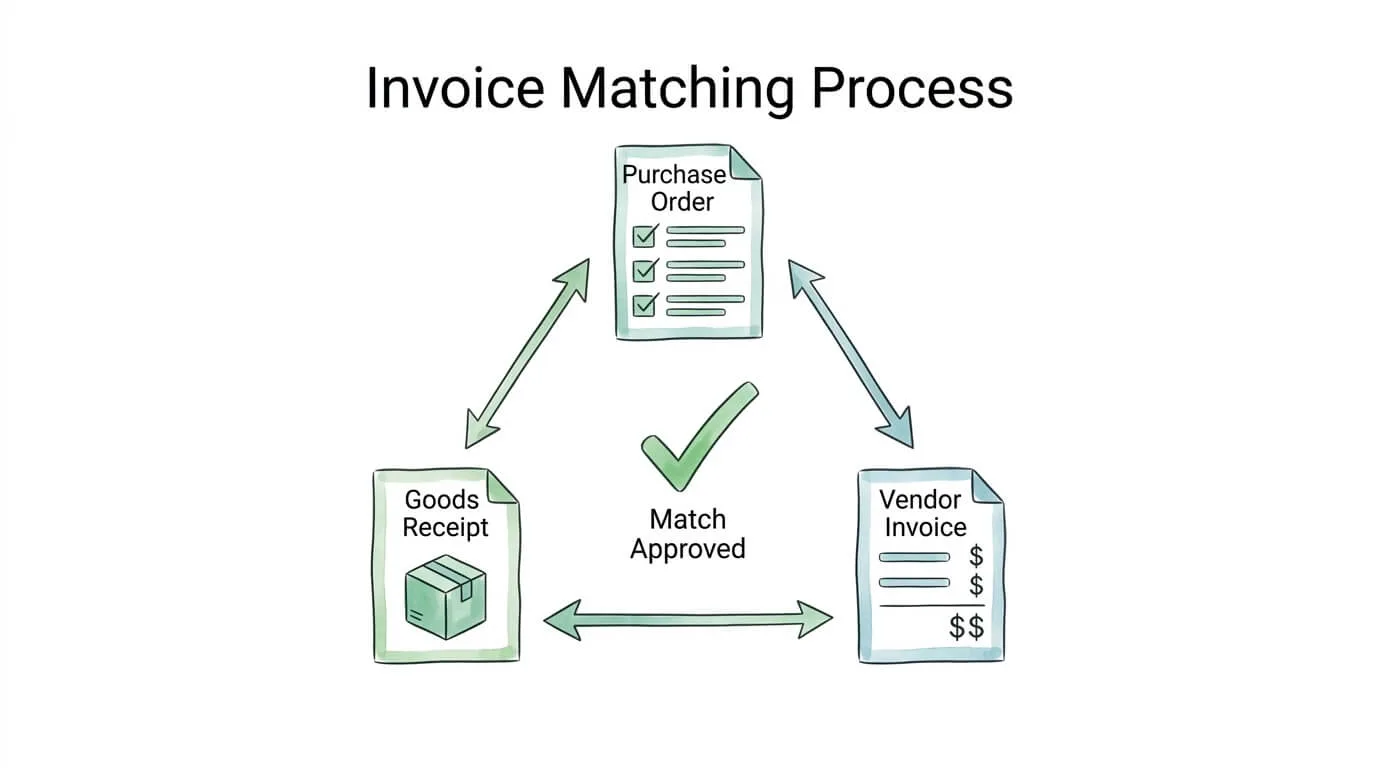
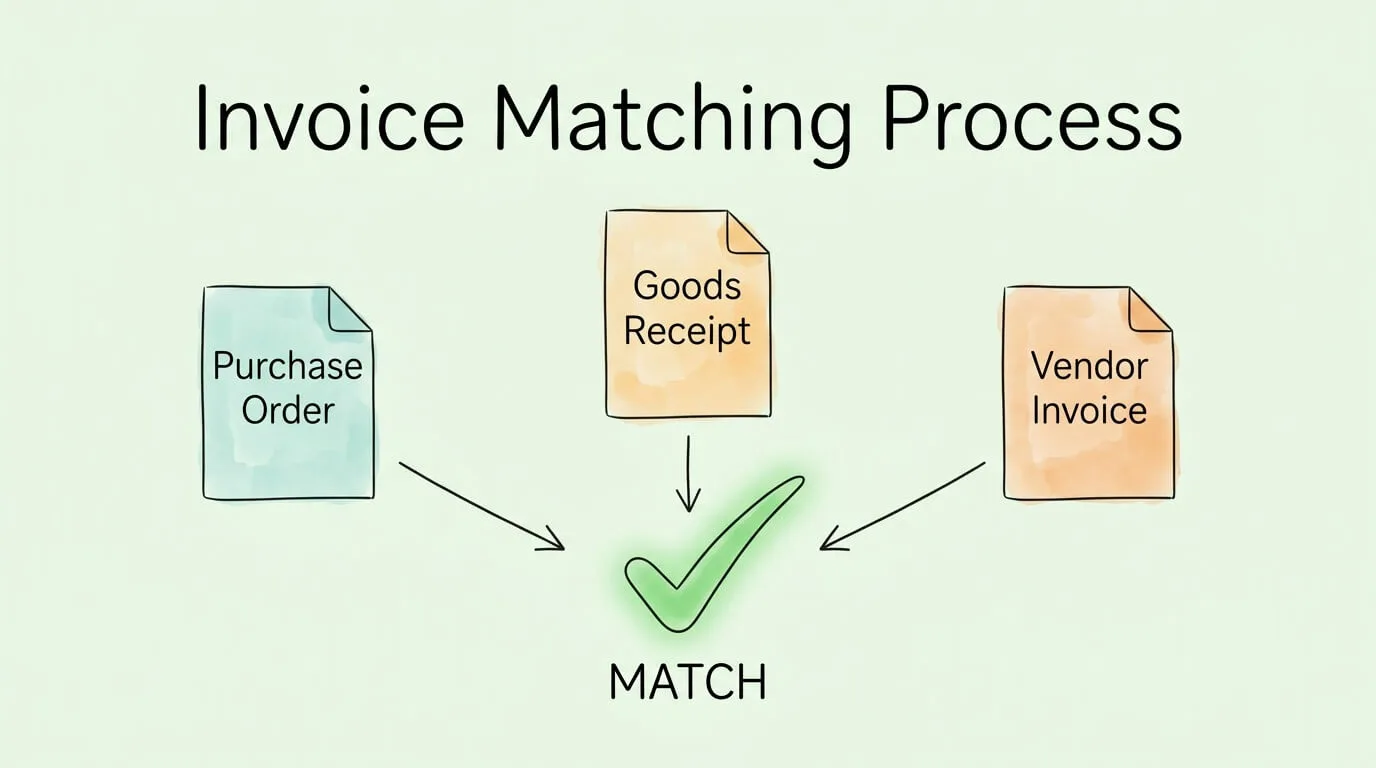
The process is built on comparing documents across three organizational functions:
Procurement generates the purchase order (PO) when goods or services are requested
Receiving / Operations generates the goods receipt when delivery occurs
Accounts Payable receives the vendor invoice and performs the match
When all documents tell the same story, payment is approved. When they diverge, a discrepancy is flagged and investigated before any money leaves the business.
This verification step is the primary defense against overpayments, duplicate payments, billing errors, and vendor fraud. It also creates the audit trail that supports financial compliance and internal controls.
The 4 Types of Invoice Matching
Not all transactions carry the same risk or complexity. The invoice matching process scales to match the level of scrutiny each purchase requires.
Matching Type
Documents Compared
Best For
Verification Level
2-Way Matching
Invoice + Purchase Order
Services, subscriptions, recurring charges
Basic: price and quantity agreed
3-Way Matching
Invoice + PO + Goods Receipt
Physical goods, most standard purchases
Standard: ordered, received, and billed align
4-Way Matching
Invoice + PO + Goods Receipt + Inspection Report
High-value, quality-critical, or regulated goods
Maximum: quality and specifications verified
Non-PO Matching
Invoice + Contract or GL Code + Approver
Emergency purchases, low-value spend, professional services without PO
Manual: human approval replaces document match
2-Way Matching
Two-way matching compares the vendor invoice directly against the purchase order. It answers two questions: Did we authorize this purchase? Are the prices and quantities what we agreed to?
This method is appropriate for transactions where physical delivery verification is not required or not meaningful. Software subscriptions, cloud service invoices, professional retainers, and recurring utility charges are natural fits. The process is fast and the risk profile is lower because you are typically dealing with predictable, contract-governed charges.
Limitation: Two-way matching cannot detect shortfalls in delivery. If a vendor invoices for 100 units but only shipped 75, two-way matching will pass the invoice unless you catch the discrepancy through other means.
3-Way Matching
Three-way matching is the industry standard for any transaction involving physical goods. It adds the goods receipt (or delivery note) to the PO-invoice comparison, confirming that what was ordered was also received before approving payment.
This single addition catches one of the most expensive and common AP problems: paying for goods that were never delivered, partially delivered, or delivered damaged. For most businesses, three-way matching should be the default process for all purchase-order-based supplier invoices.
4-Way Matching
Four-way matching adds a fourth document: an inspection or quality acceptance report. This is used when the business needs to confirm not only that goods arrived, but that they meet specific quality standards or contractual specifications before releasing payment.
Custom-manufactured components, pharmaceutical supplies, laboratory equipment, construction materials with grading requirements, and food-grade ingredients are common candidates. The additional step takes more time and requires coordination with the quality or operations team, but for high-value or safety-critical purchases the protection is warranted.
Non-PO Invoice Matching
A significant percentage of business invoices arrive without a corresponding purchase order. Professional services engaged without a formal PO, emergency repairs, employee expense reimbursements, and low-value purchases that fall below the PO threshold all create non-PO invoices.
These require a different control approach: routing the invoice to the appropriate budget holder or department manager for review and approval, and matching against a contract or standing agreement if one exists. Non-PO invoices carry higher fraud and unauthorized-spend risk because they bypass the standard procurement control. Establishing a clear approval workflow for non-PO invoices is essential even if document matching is not possible.
Step-by-Step: How 3-Way Matching Actually Works
Understanding the principle is useful. Seeing it applied to a real transaction is more useful.
Scenario: Your company orders 50 laptops from a hardware supplier. The PO is $1,200 per unit, total $60,000, Net 30 payment terms.
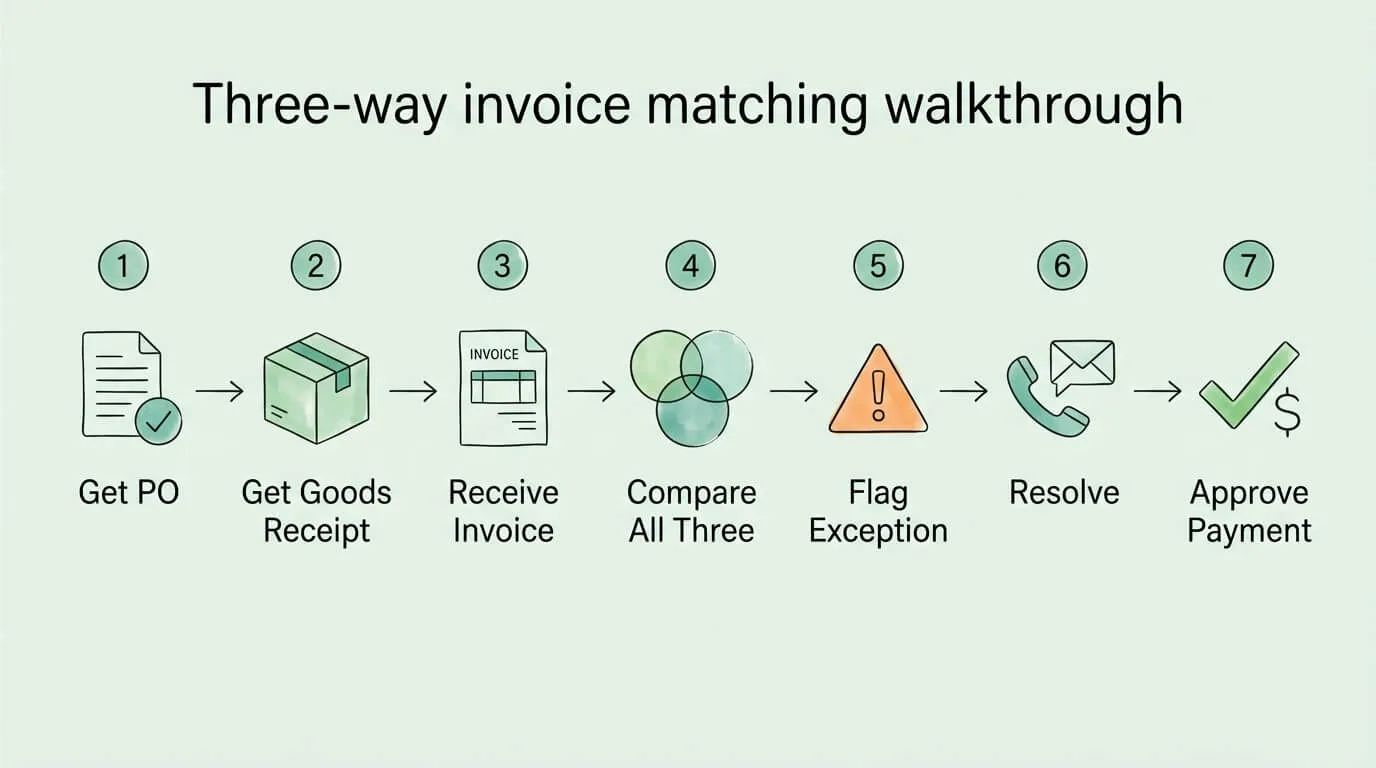
Step 1: Retrieve the purchase order.
Pull PO #47291. Confirm: 50 units, Dell Latitude 5540, $1,200 each, delivery to warehouse Building B, Net 30 terms. This is your baseline document.
Step 2: Retrieve the goods receipt.
The warehouse team logged receipt of 48 units on March 10. Note: 48 received, not 50. The GRN shows condition: acceptable.
Step 3: Receive and log the vendor invoice.
The supplier sends Invoice #INV-8834 on March 12: 50 units at $1,200 = $60,000.
Step 4: Perform the three-way comparison.
Check
PO Says
GRN Says
Invoice Says
Status
Quantity
50 units
48 received
50 billed
Mismatch
Unit price
$1,200
N/A
$1,200
Match
Item description
Dell Latitude 5540
Dell Latitude 5540
Dell Latitude 5540
Match
Payment terms
Net 30
N/A
Net 30
Match
Step 5: Flag the exception.
Quantity billed (50) exceeds quantity received (48). Do not approve payment. Flag for exception handling.
Step 6: Resolve the exception.
Contact the supplier. Confirm: 2 units are on backorder, shipping in 5 days. Request a revised invoice for 48 units ($57,600) or a credit memo for 2 units ($2,400) to hold until delivery.
Step 7: Approve and pay the correct amount.
Once corrected invoice is received and confirmed, approve payment of $57,600 on Net 30 terms. Document the remaining $2,400 as a pending liability until the remaining 2 units arrive and are matched.
This single example demonstrates why three-way matching is worth the process investment. Paying the original invoice would have released $2,400 for goods not yet received.
How to Choose the Right Matching Method
The decision depends on four factors: transaction type, risk level, volume, and administrative capacity.
If...
Use...
Transaction involves physical goods with predictable delivery
3-Way Matching
Transaction is a service, subscription, or recurring charge
2-Way Matching
Goods are high-value, custom-made, or quality-critical
4-Way Matching
Invoice arrived without a PO
Non-PO approval workflow
Transaction is below your PO threshold (e.g., under $500)
Expense management workflow
Vendor is a regulated supplier (pharma, food, aerospace)
4-Way Matching
Most businesses benefit from applying three-way matching as the default for all PO-backed purchases, two-way matching for services and subscriptions, and a documented non-PO approval process for everything else. Four-way matching should be reserved for the specific categories where quality verification adds genuine risk reduction.
The 7 Most Common Invoice Matching Exceptions
Exceptions are not failures. They are the invoice matching process working correctly. What matters is having a resolution path for each type rather than letting exceptions stall in an unresolved queue.
Exception Type
Description
Resolution
Price variance
Invoice unit price differs from PO price
Contact vendor for corrected invoice; or get procurement to confirm any agreed price change and update PO
Quantity overbilling
Invoice quantity exceeds goods receipt quantity
Hold overage; request credit memo or revised invoice for received quantity only
Quantity underbilling
Invoice quantity less than GRN (vendor billed less than delivered)
Confirm with vendor; process payment for invoiced amount; request correction for remainder
Duplicate invoice
Same invoice number, amount, and vendor already processed
Block payment; confirm with vendor whether this is a re-send or a new charge
Missing goods receipt
Invoice received but GRN not yet recorded
Check with warehouse; hold invoice pending GRN confirmation; do not pay without delivery verification
Missing PO reference
Invoice arrived without a valid PO number
Route to the requesting department for retroactive PO creation or non-PO approval
Quality rejection
Goods received but rejected by inspection (4-way matching)
Do not pay; notify vendor; document rejection and initiate return or replacement process
Pro Tip: Set an exception aging policy before you need it. Any exception unresolved after 5 business days should auto-escalate to a supervisor. Unresolved exceptions are the primary cause of late payments, missed early-pay discounts, and damaged vendor relationships.
Tolerance Thresholds: How to Set Them
Not every discrepancy requires a full investigation. A $0.03 rounding difference on a $15,000 invoice is not a material error. Setting tolerance thresholds allows minor variances to pass automatically while flagging significant discrepancies for review.
Common tolerance structures:
Variance Type
Conservative Threshold
Standard Threshold
Liberal Threshold
Price variance
0% (any price difference flagged)
±1% or $10, whichever is lower
±2% or $25
Quantity variance
0 units
±1 unit or 2%
±2 units or 5%
Tax/shipping variance
$0
±$5
±$25
Design principles for your tolerance policy:
Base thresholds on invoice value, not flat amounts. A $10 tolerance is meaningful on a $500 invoice but trivial on a $50,000 one. Consider percentage-based thresholds for high-value invoices.
Set tighter tolerances for high-risk vendors. New vendors, vendors with a history of billing errors, or vendors in fraud-prone categories should have tighter thresholds or zero tolerance.
Document and communicate thresholds clearly. Every AP team member should know what passes automatically and what gets flagged. Inconsistent application creates gaps.
Review thresholds quarterly. As your vendor base and transaction mix evolves, tolerance levels that made sense at implementation may need adjustment.
Most businesses find that setting a 2% price variance threshold and a 1-unit quantity threshold eliminates the bulk of trivial exception handling while still catching material errors.
Manual vs Automated Invoice Matching: The Real Numbers
The business case for automation is straightforward when you put the numbers side by side.
Metric
Manual Process
Automated Process
Cost per invoice
$9.40 to $15.00
$2.00 to $3.00
Average cycle time
14.6 to 17.4 days
3.1 days
Data entry error rate
~22%
Less than 1%
Touchless processing rate
~30%
49 to 80%
Duplicate detection
Unreliable
95%+ caught before payment
Exception rate
30 to 40% of invoices
10 to 20% of invoices
Early payment discount capture
Low (slow cycle time)
High (fast approval)
Fraud detection
Weak (human-dependent)
Strong (pattern recognition at scale)
For a business processing 500 invoices per month, the difference between $12 per invoice (manual) and $2.50 per invoice (automated) is $4,750 per month, or $57,000 per year, in processing cost savings alone. That calculation does not include the value of recovered overpayments, captured early-pay discounts, or reduced fraud losses.
How to Automate Invoice Matching: A Practical Roadmap
Automation does not require replacing your entire AP stack at once. A phased approach lets you demonstrate ROI at each stage before committing to the next.
Phase 1: Centralize invoice intake (Weeks 1 to 4)
Before automation can work, all invoices need to arrive in one place. Set up a dedicated email address (invoices@yourcompany.com) and configure all suppliers to use it. Route any invoices that arrive via other channels (postal mail, individual email inboxes, supplier portals) to this address. This single change eliminates the most common matching failure: invoices that never enter the process.
Phase 2: Automate data capture (Weeks 5 to 8)
Implement OCR and AI extraction to read incoming invoices and populate your AP system with structured data. This eliminates manual keying and the 22% error rate that comes with it. For a full explanation of how OCR works in document processing, see our guide on what is OCR technology. Most modern AP platforms or tools like TallyScan handle this step, extracting vendor name, invoice number, date, line items, amounts, and PO reference automatically.
Phase 3: Connect matching to your PO and GRN data (Weeks 9 to 12)
Integrate your AP platform with your ERP or procurement system so that extracted invoice data can be automatically compared against open POs and goods receipts. Configure your tolerance thresholds. At this stage, invoices that match within tolerance flow to payment approval automatically (touchless processing). Only exceptions reach a human reviewer.
Phase 4: Build exception workflows (Weeks 13 to 16)
Configure automated exception routing so that flagged invoices go directly to the right person for resolution, with the relevant context attached. A price variance routes to procurement. A missing GRN routes to the warehouse. A duplicate flags to the AP manager. Response time drops from days to hours.
Phase 5: Measure and optimize (Ongoing)
Track your KPIs monthly. Identify the most frequent exception types and address their root causes (vendor data quality, PO process gaps, receiving delays). Each improvement raises your touchless rate and lowers your cost per invoice. For more on building a full AP automation workflow, see our guides on invoice capture software, invoice approval automation, and how to streamline invoice processing.
Measuring Invoice Matching Performance: KPIs
If you cannot measure your matching process, you cannot improve it.
KPI
What It Measures
Target (Best-in-Class)
First-time match rate
Invoices matched automatically without exception
80 to 90%
Exception rate
Invoices requiring manual intervention
Less than 20%
Exception resolution time
Average days to resolve a flagged invoice
Less than 3 days
Invoice cycle time
Receipt to payment approval
3 to 5 days
Cost per invoice
Fully-loaded processing cost
$2 to $3
Duplicate payment rate
Invoices paid more than once
Less than 0.05%
Touchless processing rate
Invoices processed with zero human intervention
60 to 80%
Track these monthly and trend them over time. A falling first-time match rate signals deteriorating vendor data quality or process drift. A rising exception resolution time signals understaffing or unclear ownership. For broader AP performance benchmarking, see our accounts payable tracking guide.
Frequently Asked Questions
What is the difference between 2-way, 3-way, and 4-way invoice matching?
The difference is the number of documents compared and the level of verification provided. Two-way matching compares the invoice against the purchase order only, confirming that the price and quantity match what was ordered. Three-way matching adds the goods receipt, confirming that goods were actually received before payment is approved. Four-way matching adds an inspection report, confirming that received goods also meet quality specifications. Most businesses use three-way matching as their default for physical goods and two-way matching for services and subscriptions.
What happens when an invoice does not match the purchase order?
When a discrepancy is detected, the invoice should be held and the exception investigated before any payment is approved. The resolution path depends on the type of discrepancy: a price variance typically requires contacting the vendor for a corrected invoice or getting procurement to confirm an agreed price change; a quantity mismatch requires verifying the goods receipt and requesting a partial payment or credit memo. Every exception should be documented in your audit trail regardless of how it is resolved.
What is a non-PO invoice and how should it be handled?
A non-PO invoice is an invoice that arrives without a corresponding purchase order in your system. This can happen with emergency purchases, services engaged directly by a department, or spend below your PO creation threshold. Because there is no PO to match against, these invoices require a manual approval workflow: routing the invoice to the budget holder or department manager who authorized the expense, matching against a contract if one exists, and applying a GL code before approving. Non-PO invoices carry higher fraud risk and should be monitored separately from PO-backed invoices.
How do tolerance thresholds work in invoice matching?
Tolerance thresholds define the acceptable range of variance between an invoice and its matching documents before an exception is flagged. For example, a price tolerance of 2% means that if the invoice price is within 2% of the PO price, the invoice passes automatically without human review. Thresholds reduce unnecessary exception handling for minor rounding differences while still catching material discrepancies. Most businesses set separate thresholds for price, quantity, and tax or shipping variances, and apply tighter thresholds for higher-value invoices or higher-risk vendors.
How long does invoice matching take?
Manual invoice matching takes an average of 14.6 to 17.4 days from receipt to payment approval, depending on exception frequency and team capacity. Automated invoice matching with AI-powered data extraction and system-integrated three-way matching reduces this to an average of 3.1 days for best-in-class teams. The difference in cycle time directly affects your ability to capture early-payment discounts and maintain positive vendor relationships.
Can invoice matching be fully automated?
Modern AP automation platforms can fully automate the data capture, document matching, tolerance checking, and exception routing steps of the invoice matching process. Invoices that match within tolerance flow to payment approval without human intervention, a state called touchless processing. Best-in-class organizations achieve 60 to 80% touchless processing rates. The remaining 10 to 20% of invoices that require human review are automatically routed to the appropriate person with full context attached, making resolution faster even when human judgment is needed.
What is the biggest cause of invoice matching failures?
The most common root cause of matching failures is missing or inconsistent reference data. Invoices that arrive without a PO number, suppliers using their own item codes instead of your part numbers, goods receipts that are not recorded promptly in the system, and vendor master records with inconsistent naming all prevent automatic matching. Requiring suppliers to include your PO number on every invoice and maintaining clean vendor master data eliminates a large share of preventable exceptions before they occur.
How does invoice matching prevent fraud?
Invoice matching is a primary control against several common fraud types. Three-way matching prevents payment for goods never received, catching both accidental billing errors and deliberate ghost-delivery fraud. Duplicate invoice detection flags invoices that have been submitted more than once, a common tactic in billing fraud. Vendor validation during matching catches invoices from unapproved or fictitious vendors. Automated audit trails record every action and approval, making it significantly harder for internal bad actors to manipulate the process without detection.
Build an Invoice Matching Process That Holds Up Under Pressure
Most invoice matching problems are not technology problems. They are process and data quality problems. The businesses with the highest first-time match rates have established clear rules for how invoices enter the system, maintained clean vendor and PO data, set documented tolerance policies, and built explicit exception workflows before exceptions occur.
Start with your first-time match rate. If it is below 60%, the highest-impact improvements are usually:
Requiring your PO number on all incoming invoices
Ensuring goods receipts are recorded in your system within 24 hours of delivery
Cleaning up duplicate or inconsistent vendor records in your ERP
Once your process is clean, automation compounds the benefit. TallyScan captures invoices from email and vendor portals, extracts all required fields automatically, matches them against your PO and GRN data, and routes exceptions to the right approver, all without manual data entry. Combined with the reconciliation process, it creates a complete, auditable AP workflow from invoice receipt to payment confirmation.