The average business processes an invoice manually for somewhere between $10 and $25 in total cost, according to industry benchmarks from Ardent Partners. Multiply that by 500 invoices a month and you have a $5,000 to $12,500 monthly expense just to move money from your bank account to your suppliers. None of that cost creates any business value. It is pure friction.
Streamlining invoice processing means reducing that friction systematically: fewer manual touchpoints, faster cycle times, fewer errors, and better visibility into what you owe and when it is due. Done well, it typically reduces per-invoice processing costs by 60 to 80%, as detailed in our analysis of accounts payable automation benefits, cuts approval cycle time from days to hours, and makes early-payment discounts consistently accessible.
The good news is that you do not need a six-month ERP implementation project to get there. Most organizations can achieve meaningful improvements in 4 to 8 weeks with the right sequence of changes.
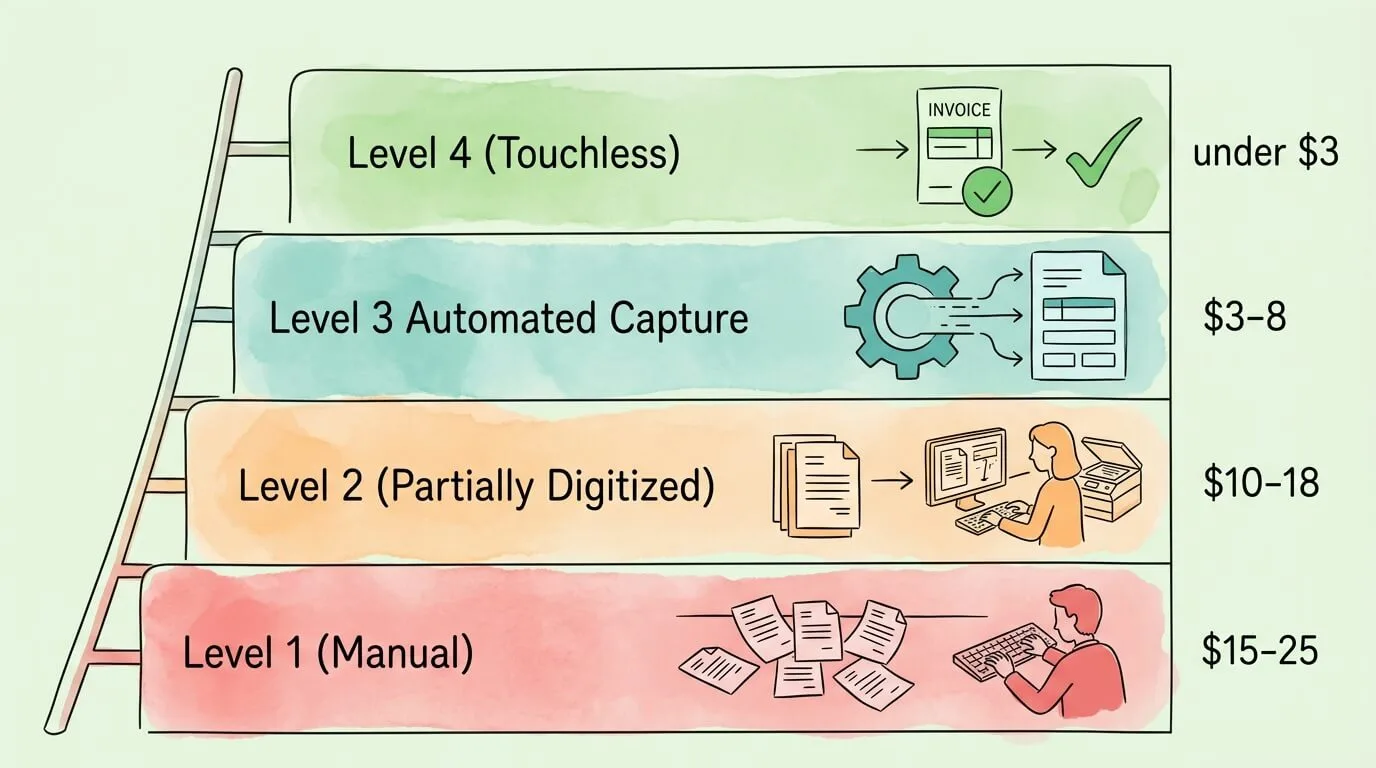
What "Streamlined" Actually Looks Like: Four Levels of AP Maturity
Before outlining the steps, it helps to understand the spectrum. Invoice processing maturity exists on a continuum, and the right next step depends entirely on where you are now.
Level 1 — Manual: Paper invoices, email attachments processed one at a time, data entered manually into accounting software. If you are still in this stage, you might find our guide on how to organize invoices a helpful starting point. Approval happens via email chain or in-person. No systematic tracking of outstanding invoices. Cost per invoice: $15 to $25.
Level 2 — Partially digitized: Invoices are scanned or received digitally, but data entry is still manual. Some invoices are tracked in a spreadsheet. Approval emails are sent, but routing is not automated. Cost per invoice: $10 to $18.
Level 3 — Automated capture and workflow: OCR and AI invoice extraction identify fields automatically. Rule-based approval routing sends invoices to the right approver without human intervention. Integration pushes approved invoices directly to accounting software. Cost per invoice: $3 to $8.
Level 4 — Touchless processing: The majority of invoices flow from receipt to payment without human intervention. Three-way matching validates invoices against purchase orders and goods receipts automatically. Exceptions are intelligently flagged and handled. Analytics surface spending patterns and optimization opportunities. Cost per invoice: under $3.
Most organizations reading this are at Level 1 or 2. The goal of streamlining is to reach Level 3 as quickly as practical, with a clear path toward Level 4.
The 7-Step Playbook to Streamline Invoice Processing
Step 1: Centralize Invoice Intake
The first bottleneck in most invoice processes is where invoices arrive. If your organization receives invoices via multiple email addresses, a front-desk fax machine, postal mail, individual team members' inboxes, and several supplier portals, no amount of downstream automation can create a coherent process.
What to do: Establish a single, dedicated invoice submission channel: one email address (invoices@yourcompany.com is standard), one physical mailing address for paper invoices that feeds into a scanning process, and a defined method for each supplier portal you use. Communicate these channels to all vendors. Update your purchase order template to include your preferred invoice submission instructions.
What this achieves: Every invoice arrives in a known, monitored location. Automation can monitor this location and trigger the next step without human involvement.
Time required: 1 to 2 weeks to communicate to vendors and set up monitoring. Most vendors adapt within one to two billing cycles.
Step 2: Automate Data Capture
Once invoices arrive in a centralized location, the next step is replacing manual data entry with automated extraction using invoice capture software.
Modern AI-powered data capture combines OCR (which converts image-based documents to text) with machine learning models trained to identify and label invoice fields regardless of layout. The result: vendor name, invoice number, invoice date, due date, line items, amounts, and PO references are extracted and structured automatically, without templates for each vendor.
Key capabilities to look for:
- Extraction from PDF, image (JPG, PNG), Word documents, and email body text
- Line-item capture, not just header totals
- Confidence scoring, with automatic routing to human review for low-confidence fields
- Continuous learning, where the model improves from corrections over time
Accuracy targets: Well-configured AI extraction achieves 90 to 97% field-level accuracy on standard invoices. Combined with confidence-based human review routing, effective accuracy on critical fields exceeds 99.5%.
What this achieves: An invoice that previously required 5 to 10 minutes of manual entry takes seconds. Data quality becomes systematic rather than dependent on individual care.
For a detailed breakdown of extraction technology and field coverage, see our guide on invoice data capture software.
Step 3: Implement Three-Way Matching
For organizations that issue purchase orders, three-way matching is the single highest-value control you can add to your invoice process. It automatically validates that every invoiced item was actually ordered and received before the invoice is approved for payment.
How it works:
| Document |
What It Contains |
| Purchase Order (PO) |
What you agreed to buy, at what price, in what quantity |
| Goods Receipt Note (GRN) |
What was actually delivered and accepted |
| Vendor Invoice |
What the vendor is charging you for |
The system cross-references all three documents. If the invoiced quantity exceeds what was ordered, or the unit price differs from the PO, or items are billed that were not received, the invoice is automatically flagged before anyone approves it.
What this catches:
- Overcharges and billing at incorrect prices
- Invoiced quantities exceeding delivered quantities
- Duplicate invoices (same invoice number, same vendor)
- Invoices referencing invalid or closed purchase orders
- Charges for items not covered by any PO
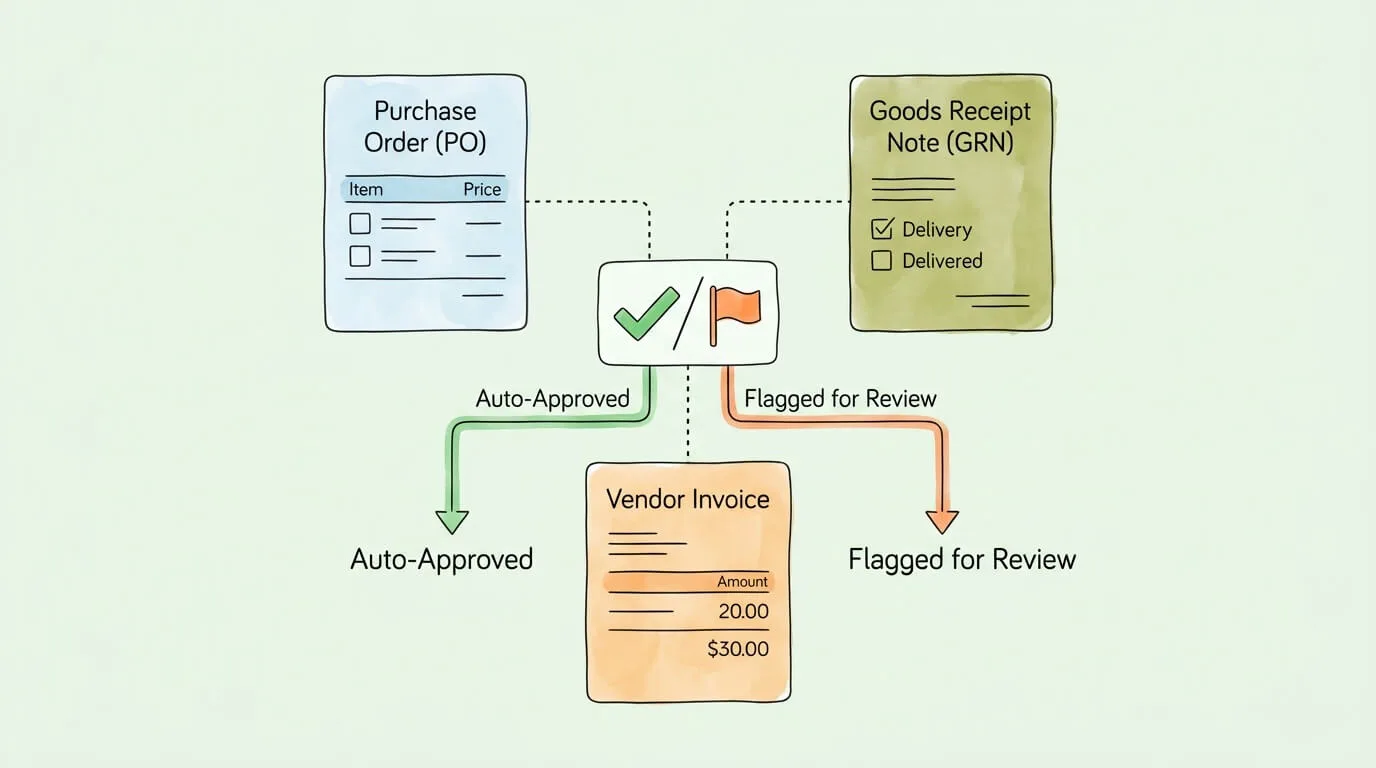
Tolerance thresholds: Most organizations configure a tolerance band (typically 1 to 3%) to avoid flagging trivial rounding differences while still catching meaningful discrepancies. Configure this based on your actual invoice mix.
What this achieves: Automated three-way matching typically catches 5 to 10% of invoices with discrepancies before payment. In organizations processing significant invoice volumes, this prevents tens of thousands of dollars in overpayments annually. It also creates a clean audit trail showing that every payment was validated against an authorized purchase.
Step 4: Build Rule-Based Approval Workflows
Manual approval processes are one of the largest contributors to long invoice cycle times. Invoice approval automation eliminates this uncertainty. Invoices sit in approvers' inboxes, get forwarded to the wrong person, or wait for someone on vacation. A rule-based approval workflow eliminates this uncertainty.
Routing logic examples:
| Condition |
Routing Rule |
| Invoice total under $500 |
Auto-approve |
| Invoice total $500 to $5,000 |
Route to department manager |
| Invoice total over $5,000 |
Route to CFO |
| Vendor category = IT / Software |
Route to Head of Technology first |
| Invoice category = Marketing |
Route to Marketing Director |
| Invoice missing PO number |
Flag and hold for purchasing review |
| New vendor not in approved list |
Route to compliance review |
Escalation rules: Configure automatic escalation if an invoice is not actioned within a defined period (e.g., 2 business days). Escalation should notify the approver's manager and, eventually, redirect to a backup approver to prevent invoices from stalling indefinitely.
Mobile approval: Approvers should be able to review and approve invoices from a mobile device with the relevant context (invoice image, extracted data, PO match status, vendor payment history) visible. Approval workflows that require logging into a desktop application have dramatically lower compliance rates.
What this achieves: Invoice cycle time typically drops from 14 to 17 days (manual) to 2 to 4 days (automated routing). Early payment discount capture rates, which can improve cash flow, improve significantly because invoices reach approval quickly enough to act on discount windows.
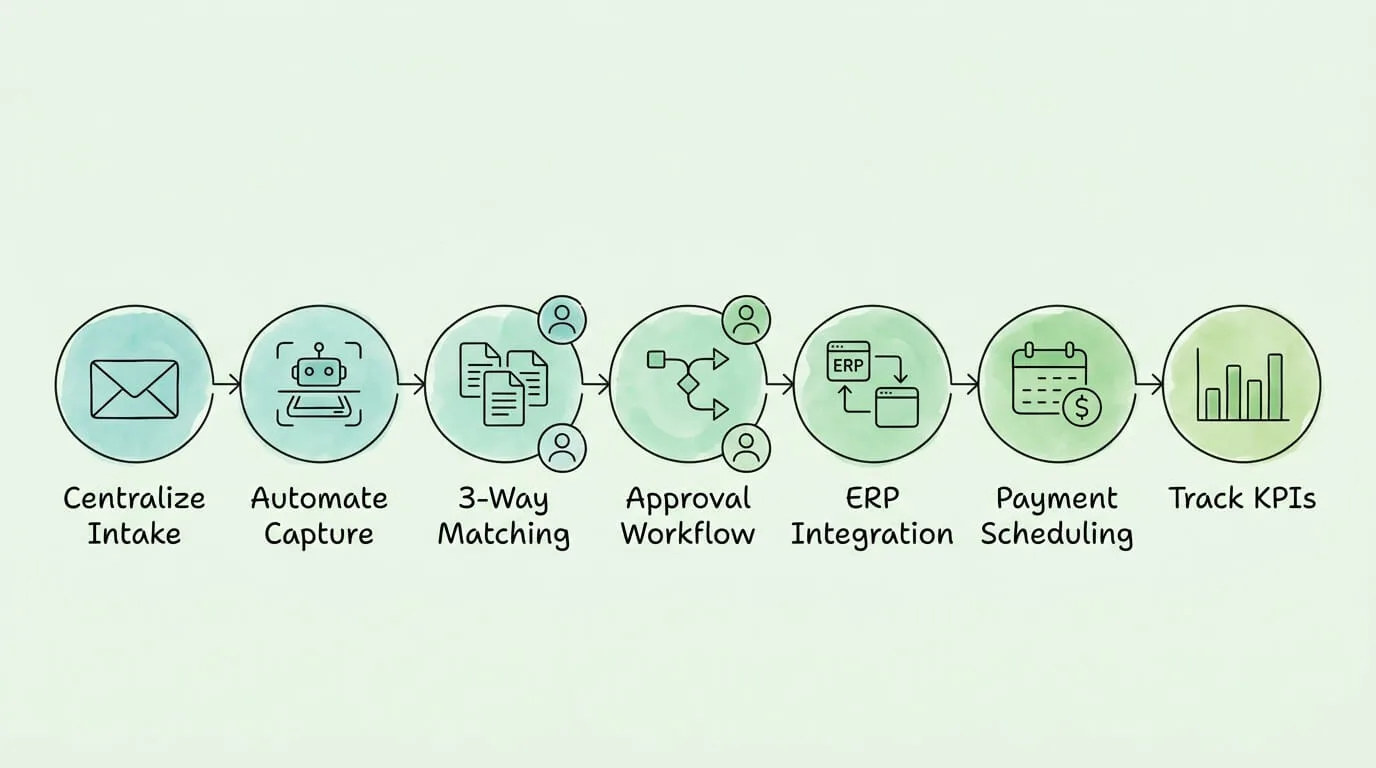
Step 5: Integrate with Your Accounting System or ERP
An invoice processing system that does not connect to your accounting software creates a new manual step: exporting data and re-entering it. Every manual step reintroduces the errors and delays you eliminated upstream. You need a solution that can sync invoices to QuickBooks, Xero, and other platforms automatically.
What a proper integration achieves:
- Approved invoices post to the correct GL accounts automatically
- Vendor records sync between systems (no duplicate vendor management)
- Payment scheduling is driven by due dates captured from invoices
- Real-time AP aging data is available without manual reconciliation
- An immutable audit trail is created for every transaction.
Integration options:
- Native connectors: Pre-built integrations for QuickBooks, Xero, Sage, NetSuite, and other major platforms. Configuration takes minutes. For most small and mid-market organizations, this is the right choice.
- API integration: For organizations using custom or less common ERP systems, API access allows developers to build a tailored connection. More flexible but requires technical resources.
- Flat file export: A fallback option when API integration is not possible. Structured CSV or XML exports scheduled to run automatically reduce manual effort while not fully eliminating it.
GL coding: Configure rules to automatically assign GL codes to invoices based on vendor category, invoice description, or line item content. Well-configured GL coding rules eliminate the need for AP staff to manually determine cost center allocations for recurring invoice types.
Step 6: Automate Payment Scheduling
The final step in the core invoice processing workflow is payment. Most organizations separate the approval decision (does this invoice get paid?) from the payment execution (when does the money go out?), and this separation is sensible from a controls perspective.
Payment scheduling best practices:
- Capture payment terms at extraction: Due dates and discount deadlines should be extracted from every invoice and stored in the system.
- Prioritize early-payment discounts: A 2/10 Net 30 term (2% discount if paid within 10 days) is worth approximately 36% annualized. For high-value invoices, this discount is often worth accelerating payment regardless of cash flow constraints.
- Batch payment runs: Schedule payment runs 2 to 3 times per week rather than processing individually. This reduces transaction overhead while still paying on time.
- Hold controls: Flag any invoice for payment hold automatically if matching fails, if the vendor is under compliance review, or if the invoice disputes are unresolved.
Step 7: Track KPIs and Continuously Optimize
Streamlining invoice processing is not a one-time project. It is an ongoing optimization process. Tracking the right accounts payable KPIs is essential.
| KPI |
What It Measures |
Target |
| Invoice Cycle Time |
Days from receipt to payment approval |
Under 5 days |
| Cost Per Invoice |
Total AP operating cost / invoice count |
Under $5 (target under $3) |
| On-Time Payment Rate |
% invoices paid by due date |
Over 95% |
| Early Payment Discount Capture Rate |
% of available discounts captured |
Over 80% |
| First-Pass Match Rate |
% invoices approved without exception handling |
Over 85% |
| Exception Rate |
% invoices requiring manual intervention |
Under 15% |
| Touchless Processing Rate |
% invoices with zero human touchpoints |
60 to 80% (mature) |
| Duplicate Invoice Rate |
Duplicates caught / total invoices |
99%+ caught |
Review these monthly. When a KPI trends in the wrong direction, trace it to a specific point in the workflow. A rising exception rate often points to new vendor layouts, changed invoice formats, or tolerance thresholds that need adjustment. A rising cycle time often points to an approval routing rule that has become out of date as your organization has changed.
What Makes Invoice Processing Hard to Streamline (And How to Overcome It)
Even with the right technology, invoice processing improvements frequently stall due to common accounting process bottlenecks.
Invoice format diversity. Your suppliers use dozens of different invoice layouts, languages, and formats. Template-based systems require configuration for each vendor and break whenever a vendor updates their format. AI-based extraction handles layout variation without templates, but it still requires a ramp-up period to achieve peak accuracy on your specific vendor base. Solution: Budget 4 to 6 weeks for the extraction model to stabilize on your invoice population before measuring final accuracy metrics.
Incomplete purchase order coverage. Three-way matching is only possible for invoices that reference a PO. Organizations where purchasing happens informally (verbal approvals, direct purchases without PO) cannot match a significant portion of their invoices. Solution: Enforce PO requirements for all purchases above a defined threshold ($500 is a common starting point). Invoices without a valid PO reference should be held automatically until a PO is created retroactively.
Approval workflow non-compliance. If approvers ignore approval requests, log in sporadically, or override rules because the system is inconvenient, the workflow loses its value. Solution: Make approval as frictionless as possible (mobile, single-click). Configure escalation rules so that non-responsive approvers do not become a permanent bottleneck.
Siloed invoice sources. If invoices continue to arrive outside the designated channel (directly to individual employees' email addresses, through supplier portals that are not integrated), they will be processed outside the automated workflow. Solution: The vendor communication step is non-negotiable. Every vendor must know the correct submission channel, and internal employees must redirect misdirected invoices rather than processing them ad hoc.
Change management resistance. AP staff who have processed invoices manually for years may resist automation if it feels like their job is being eliminated rather than improved. Solution: Frame the change as eliminating the worst parts of the role (repetitive data entry, status chasing) and creating capacity for higher-value work (vendor relationship management, exception analysis, strategic reporting).
Building the Business Case for Streamlining Invoice Processing
If you need to justify the investment internally, here is a straightforward ROI framework:
Current state costs (calculate for your organization):
| Cost Category |
Calculation |
| Labor cost |
AP staff hours/month × hourly rate |
| Error correction |
Error rate × invoices/month × average correction time × hourly rate |
| Late payment fees |
Average late fee × invoices paid late per month |
| Missed early-pay discounts |
Average discount value × invoices where discount was missed |
| Total monthly cost |
Sum of above |
Post-automation savings:
Typical outcomes after full implementation:
- Labor cost reduction: 60 to 75% of current AP processing labor
- Error rate reduction: from 5 to 20% (manual) to under 1% (automated)
- Late payment fees: near zero with automated payment scheduling
- Early-pay discount capture: increase from typical 20 to 30% capture rate to 70 to 85%
According to IOFM (Institute of Finance & Management), top-performing AP departments process nearly 10 times as many invoices per FTE as bottom-performing ones.
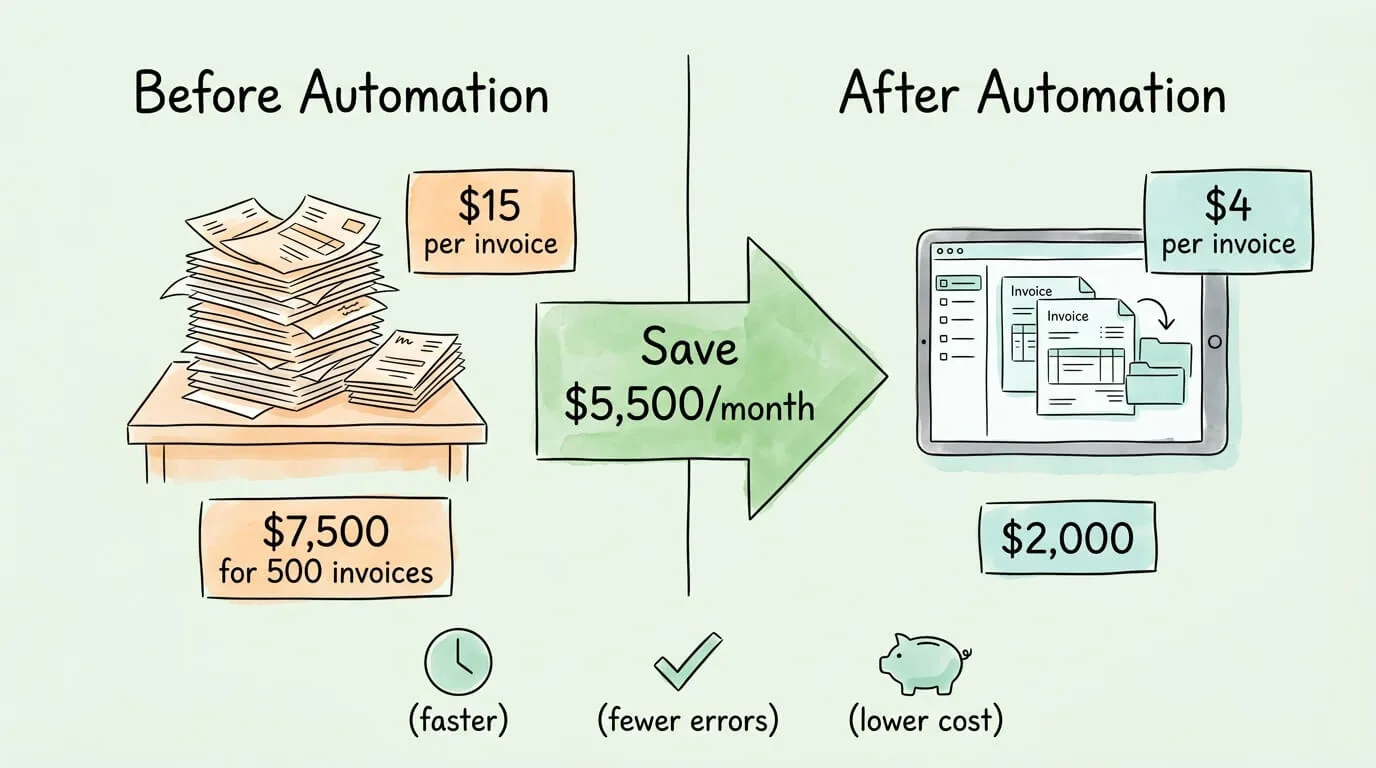
Example calculation for a mid-market organization:
|
Before |
After |
| Monthly invoice volume |
500 |
500 |
| Cost per invoice |
$15 |
$4 |
| Monthly processing cost |
$7,500 |
$2,000 |
| Monthly savings |
|
$5,500 |
| Annual savings |
|
$66,000 |
For most organizations, implementation costs are recovered within 2 to 4 months.
Global E-Invoicing Compliance: What It Means for Your AP Process
If your organization works with suppliers or customers in multiple countries, compliance requirements add an additional layer to invoice processing. Governments worldwide are mandating electronic invoicing via networks like Peppol to reduce tax fraud.
Key mandate models:
Clearance model (used in many Latin American countries, Saudi Arabia, Turkey): Invoices must be submitted to and approved by the government tax authority before they are legally valid. The tax authority issues a digital stamp that must appear on the invoice. An invoice without this stamp cannot be processed for payment or used as a tax deduction.
Post-audit model (historically common in the US and EU): Invoices do not require pre-approval but must be issued and stored in compliant formats, available for tax authority inspection. The EU's VAT Directive and the shift toward mandatory B2B e-invoicing in Germany, France, and other EU countries is gradually moving this model toward clearance requirements.
Peppol network (EU and beyond): A standardized network for exchanging electronic invoices between businesses and governments, particularly for B2G (business-to-government) transactions. Peppol BIS Billing 3.0 is the most widely adopted format.
Practical implication for AP: If you receive invoices from suppliers in clearance-mandate countries, your AP system must be able to validate the digital stamp and reject invoices that have not received government pre-approval. Processing a non-cleared invoice in these countries can result in the payment being disallowed as a deductible expense.
For a detailed guide to e-invoicing formats and country-specific mandates, see our article on what is electronic invoicing.
Frequently Asked Questions
What does it mean to streamline invoice processing?
Streamlining invoice processing means reducing the manual effort, time, and errors involved in receiving, validating, approving, and paying supplier invoices. A streamlined process typically involves: centralizing where invoices arrive, using automated data capture (OCR + AI) to extract invoice data without manual entry, implementing rule-based validation (including three-way matching), routing invoices to approvers automatically based on predefined rules, integrating with accounting software to eliminate re-entry, and tracking KPIs to continuously improve. The goal is to move as many invoices as possible through the entire process without any human touchpoint, while routing exceptions intelligently for efficient resolution.
How long does it take to streamline invoice processing?
For cloud-based AP automation solutions, initial setup takes 1 to 3 weeks. The extraction model typically needs 4 to 6 weeks processing your actual invoice population to reach peak accuracy. Approval workflow configuration, GL coding rules, and accounting integration take 1 to 2 weeks of configuration. A full rollout covering all invoice sources, all vendors, and all approval chains typically takes 4 to 8 weeks. Touchless processing rates of 60 to 80% are typically achievable within 3 months. Complex deployments involving on-premise ERP integration or highly customized approval hierarchies take longer.
How much does streamlining invoice processing save?
The typical savings range from 60 to 80% of current processing costs. For an organization spending $15 per invoice manually, automation brings this to $3 to $6. At 500 invoices per month, this is $4,500 to $6,000 in monthly savings from labor cost reduction alone. Additional savings come from eliminating late payment fees, capturing early-payment discounts that were previously missed, and preventing duplicate payments and overcharges through automated validation. Most implementations pay back their cost within 2 to 4 months.
What is three-way matching in invoice processing?
Three-way matching is an automated validation that cross-references a vendor invoice against two other documents: the purchase order (PO) that authorized the purchase and the goods receipt note (GRN) that confirms delivery. Before any invoice is approved for payment, the system checks that the invoiced items, quantities, and prices align with what was ordered and what was received. Discrepancies trigger an exception flag for human review rather than automatic payment. Three-way matching is one of the most effective controls against overpayment, fraud, and billing errors.
What is touchless invoice processing?
Touchless invoice processing refers to invoices that flow from receipt through to payment approval without any human intervention. The invoice arrives, data is extracted automatically, matching and validation rules pass, approval routing completes without issue, and the invoice is scheduled for payment, all without a person touching it. Typical touchless rates in mature AP automation implementations are 60 to 80% of invoice volume. The remaining 20 to 40% require some human handling, primarily for exceptions (matching failures, new vendor formats, missing data) and high-value approvals that require human judgment. The goal of ongoing optimization is to steadily increase the touchless rate while ensuring exceptions are handled efficiently.
How do I get my vendors to submit invoices correctly?
Vendor compliance with your invoice submission process requires clear communication and, ideally, a straightforward submission method. Steps that work: update your purchase order template to include your invoice submission email address and any format requirements; send a one-time communication to all active vendors explaining the new process; set up an auto-reply on your invoice submission email acknowledging receipt (this confirms to vendors that their invoice was received); for high-volume vendors, consider setting up a supplier portal where they can submit invoices and check payment status. Expect a 4 to 8 week transition period during which some invoices will still arrive through old channels. Configure your team to redirect these rather than processing them outside the system.
Can small businesses benefit from streamlining invoice processing?
Yes, though the approach scales with business size. A sole proprietor processing 20 invoices per month gets meaningful value from a simple cloud invoicing platform with automated reminders and basic categorization. A business processing 100+ supplier invoices per month gets measurable ROI from AI data extraction and automated approval workflows. The break-even point where dedicated AP automation software pays for itself is typically around 50 to 100 invoices per month, depending on current processing cost and the software pricing. Below that threshold, accounting software with built-in AP features (QuickBooks, Xero) provides adequate automation at lower cost.
What are the most important KPIs for measuring invoice processing improvement?
The four most important KPIs are: Invoice Cycle Time (how long from receipt to payment approval, target under 5 days), Cost Per Invoice (total AP operating cost divided by invoice count, target under $5), On-Time Payment Rate (percentage of invoices paid by their due date, target over 95%), and First-Pass Match Rate (percentage of invoices that pass validation and approval without exception handling, target over 85%). As your process matures, add Early Payment Discount Capture Rate and Touchless Processing Rate to measure how well you are extracting maximum value from the automated workflow. Review all KPIs monthly and connect changes in metrics to specific process changes to understand what is actually driving improvement.
Streamlining invoice processing is one of the highest-return operational improvements available to finance teams. The technology is mature, the implementation timelines are short, and the savings are quantifiable within months.
TallyScan automates the most labor-intensive steps: capturing invoice data from email and other sources, extracting all fields including line items, validating against your vendor records, and delivering structured data to QuickBooks, Xero, and other accounting systems. If your current process is at Level 1 or 2 and you want a clear path to Level 3, start your free trial.
For related reading, see our guides on invoice capture software, accounts payable automation benefits, and invoice matching process.