Organizing Business Receipts: How to Stop Losing Tax Deductions Every Month
The TallyScan Team
22 min read
#organizing business receipts#receipt management#small business bookkeeping#expense tracking#tax compliance#business receipt organization#IRS receipt rules#digital receipt management#expense categorization#receipt retention period#receipt scanning for taxes#small business tax deductions
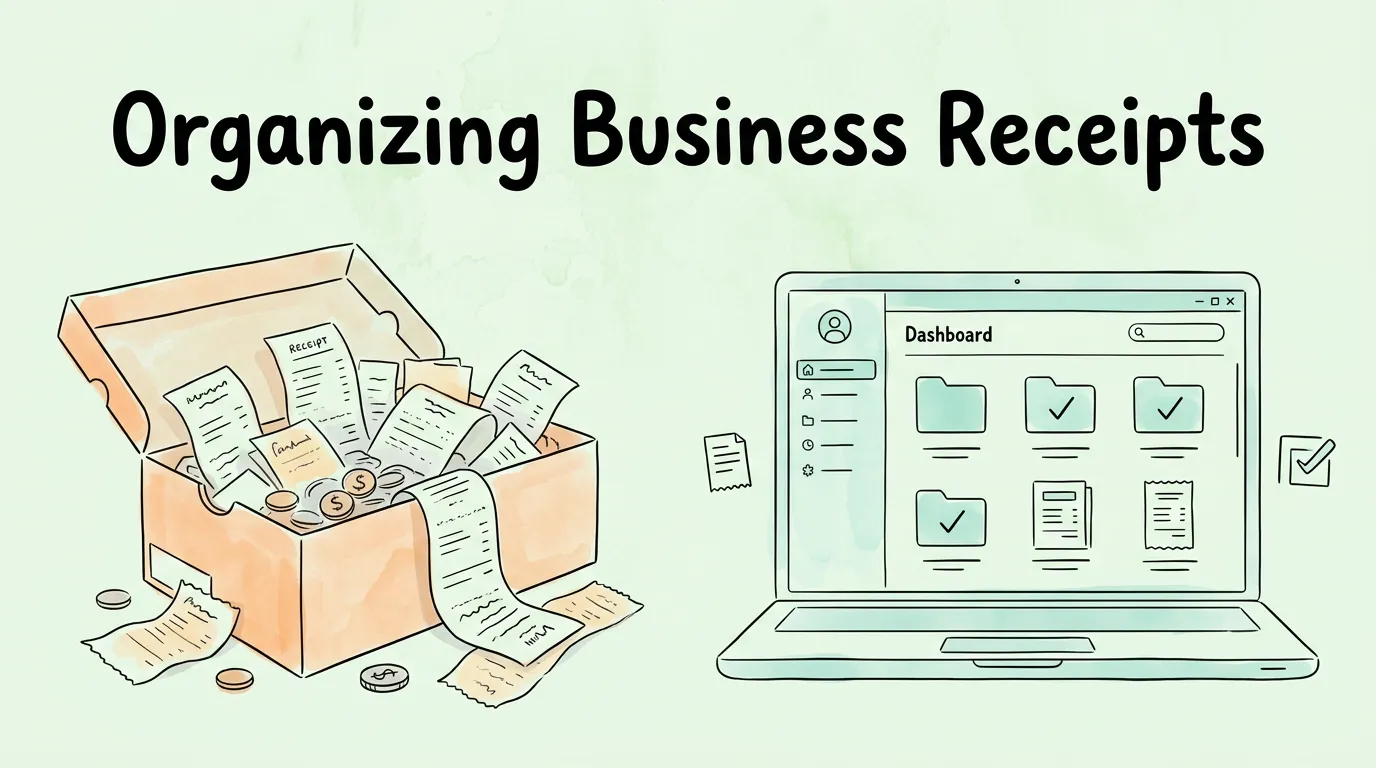
The average freelancer loses $2,000 in legitimate tax deductions every year. Not because the expenses did not happen, but because the receipts are gone. They are in a coat pocket that went through the wash, faded into illegibility on thermal paper, or buried somewhere in a camera roll between vacation photos and screenshots. For a small business owner, that is not a paperwork problem. That is real money walking out the door every single month.
Organizing business receipts consistently is one of the highest-return habits any business owner can build. It is not glamorous, but the payoff, in deductions claimed, audits survived, and time saved at tax time, is concrete and measurable. This guide gives you a system that works whether you are a solo freelancer or managing a team of ten.
Why Do Disorganized Receipts Cost More Than You Think?
Most business owners know they should keep receipts. Fewer appreciate exactly what it costs when they do not. The impact goes beyond a stressful few weeks in April.
Lost Receipts Equal Lost Deductions
The IRS rule is simple: if you cannot prove the expense with documentation, you cannot deduct it. A receipt does not need to be elaborate, but it needs to exist and show the vendor, date, amount, and business purpose. A missing receipt for a $200 software subscription or a $350 client dinner is not a minor clerical issue. It is a $200 or $350 reduction in your deductible expenses, which translates to real additional tax liability depending on your bracket.
Multiply that across 12 months of imperfect receipt capture and the number compounds quickly. Businesses that move from manual to organized digital receipt systems routinely discover they have been leaving hundreds to thousands of dollars in valid deductions on the table every year.
Failed Audits Are Preventable
The IRS consistently flags poor recordkeeping as a primary issue in small business audits, as detailed in their official recordkeeping guidelines for small businesses. When an auditor asks for documentation and you cannot produce it, the expense is disallowed. You pay tax on income you already spent. Then you pay penalties and interest on top of that.
A documented, organized receipt system does not just help you find records. It signals to auditors that your books are well-maintained, which tends to shorten the review process considerably.
The Time Cost Nobody Measures
Small business owners spend an average of eight or more hours per year sorting receipts at tax time, and that estimate is optimistic for businesses without a system. An organized digital receipt process cuts that figure to under an hour. The rest of that time compounds back into the business, or into your life.
Problem
Consequence
With a Good System
Lost paper receipts
Missed deductions, audit exposure
Every receipt captured on the day it happens
Thermal paper fading
Unreadable records in 6 months
Digital copies preserved indefinitely
Manual data entry
Errors, hours wasted
OCR extracts data automatically
No IRS-aligned categories
Incorrect deductions, compliance risk
Pre-mapped to standard expense types
No backup
Single point of failure
Redundant cloud backup automatic
Tax-season scramble
8+ hours of chaos each year
Ongoing 10-min weekly reviews
Digital vs. Paper Receipts: Which System Holds Up?
The answer is not actually a matter of preference. It is a matter of which system survives real business conditions over three to seven years, which is the IRS retention window.
Paper receipts made from thermal paper, the kind most retailers use, start fading within six months. By the time an IRS audit notice arrives (often 18 months to three years after filing), those receipts may be completely blank. Digital receipts do not fade, cannot be lost in a move, and cannot be destroyed by water damage or fire.
The IRS explicitly accepts digital copies of receipts as valid documentation, as confirmed in IRS Publication 583 (Starting a Business and Keeping Records), provided the digital copies are legible, complete, and accurately reproduce the original.
Factor
Paper Receipts
Digital Receipts
Durability
Fades within 6 months (thermal paper)
Preserved indefinitely
Searchability
Manual, time-consuming
Instant keyword or date search
Loss risk
High (wallet, desk, wash cycle)
Near-zero with cloud backup
Data entry
Manual typing required
OCR extracts data automatically
Backup
Manual scanning or copying
Automatic cloud sync
IRS acceptability
Yes, if legible
Yes, if legible and complete
Audit readiness
Poor (fading, disorganized)
Excellent (searchable, timestamped)
Accounting integration
None without scanning
Direct sync to QuickBooks, Xero, etc.
The transition to digital receipts does not require abandoning paper entirely. It means scanning paper receipts the same day you receive them, before the thermal ink begins to degrade, and treating the digital copy as your primary record.
How Do You Build a Business Receipt Organization System?
A good system does not need to be complex. The goal is a set of habits so simple you will actually follow them under deadline pressure, while traveling, and during your busiest months.
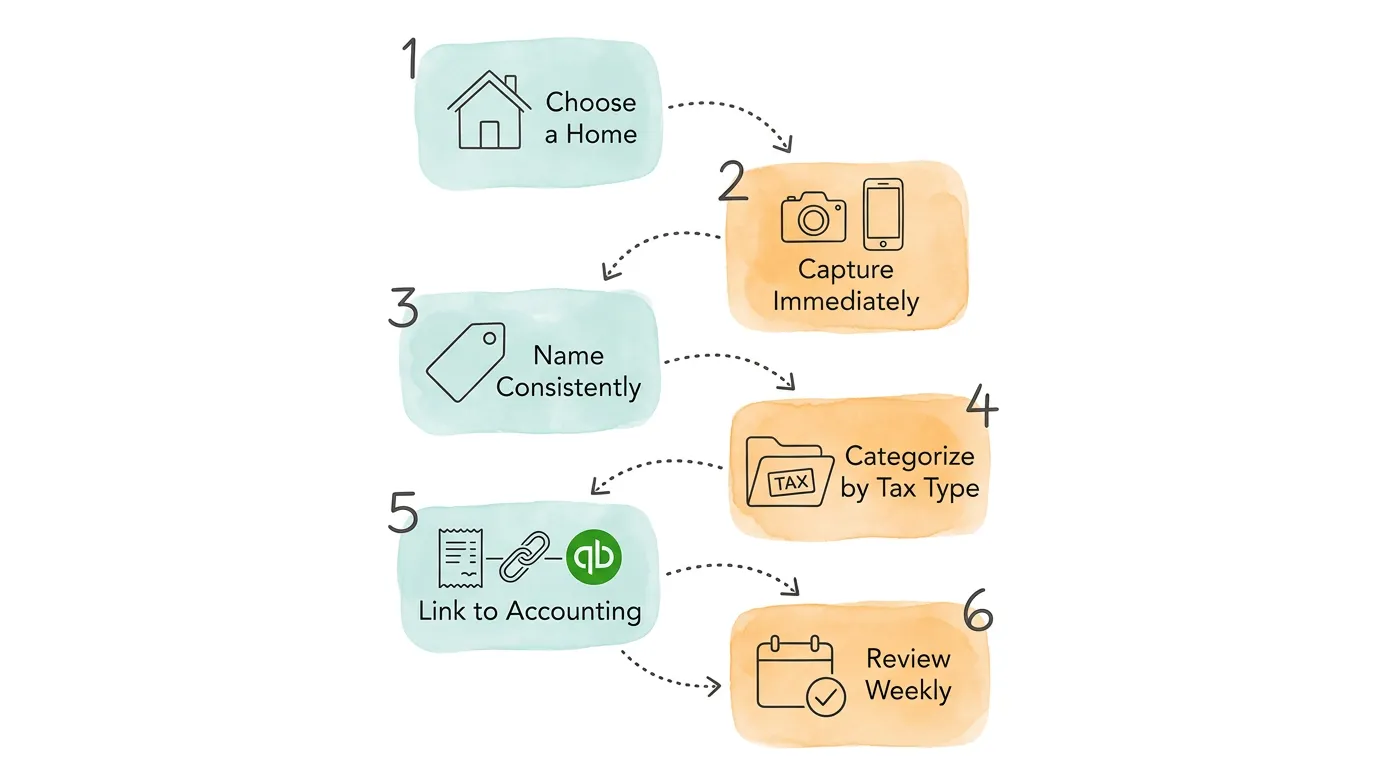
Step 1: Choose One Central Receipt Home. Pick a single place where every receipt lives. This could be a dedicated receipt scanning app, a specific folder in Google Drive or Dropbox, or a feature built into your accounting software. The choice matters less than the consistency. Two systems is the same as no system.
Step 2: Capture Every Receipt Immediately. The moment a purchase happens, capture the receipt. For paper, open your phone app and snap a photo before leaving the register. For digital receipts delivered by email, forward them to your receipt system right away. Receipts that "I'll deal with later" are the ones that disappear.
Step 3: Use a Consistent File Naming Convention. Even the best cloud storage becomes unsearchable without consistent naming. Use the format YYYY-MM-DD_Vendor_Amount. A coffee shop receipt from April 14, 2026 for $18.50 becomes 2026-04-14_BlueStoneCafe_18.50. This makes files sort chronologically, searchable by vendor, and filterable by amount without any additional tagging.
Step 4: Categorize by IRS Expense Type. Every receipt belongs in one of the standard IRS expense categories. Assign the category at the time of capture, while the purchase is fresh in your memory. Modern receipt apps can suggest or auto-assign categories based on vendor patterns, which makes this step take seconds rather than minutes.
Step 5: Link Your Receipt System to Your Accounting Software. A receipt stored in isolation is useful. A receipt that automatically creates a draft expense in QuickBooks or Xero, coded to the right account, is a game-changer. This connection is where accounting software integration turns receipt management from a bookkeeping task into a near-automatic process.
Step 6: Review Weekly for 10 Minutes, Reconcile Monthly. Set a standing 10-minute block once a week to scan your receipt queue: check for anything missed, verify categories, and flag anything unusual. At month-end, reconcile your receipts against your bank and credit card statements. Catching a missing receipt a week after the purchase is easy. Catching it eight months later is not.
Pro Tip: A dedicated business credit card is the single most powerful receipt organization tool that costs nothing to implement. Every business purchase on one card creates a clean audit trail, eliminates personal/business mixing, and gives you a second independent record of every transaction.
Which IRS Expense Categories Should You Use for Tax Deductions?
Capturing receipts is only half the job. Categorizing them correctly is what actually maximizes your deductions and keeps your books audit-ready. The following categories align with standard IRS Schedule C expense lines, which is what your accountant uses and what the IRS expects to see.
Expense Category
Common Examples
Tax Deductibility
Notes
Office Supplies
Printer ink, paper, pens, staples, planners
100%
Keep receipts even for small purchases
Software & Subscriptions
Adobe, Slack, Dropbox, domain names, SaaS tools
100%
Recurring monthly fees count
Travel
Flights, hotels, rental cars, Uber/Lyft for business
100%
Must be primarily for business
Meals (Business)
Client lunches, team dinners
50%
Must document who attended and business purpose
Vehicle / Mileage
Gas, parking, tolls, maintenance (business use %)
Varies
Track miles with a mileage log; 70 cents/mile (2025 IRS rate)
Professional Services
Accountant, lawyer, consultant, freelancer fees
100%
Keep both invoice and payment receipt
Marketing & Advertising
Google Ads, business cards, social media tools
100%
Screenshots of digital ad spend count
Utilities (Business %)
Internet, phone bill (business portion)
Proportional
Calculate the % used for business
Equipment
Laptop, camera, monitor, tools
100% (or depreciated)
Items over $2,500 may require depreciation
Home Office
Rent/mortgage %, utilities %
Proportional
Requires dedicated workspace; see IRS Form 8829
Training & Education
Courses, books, conferences related to your work
100%
Must maintain or improve current skills
Insurance
Business liability, E&O, property insurance
100%
Health insurance deductible separately
The IRS $75 Receipt Rule (And What It Actually Means)
The IRS does not require a receipt for business expenses under $75, except for lodging. This does not mean you should skip capturing small receipts. It means if you lose one, you are not automatically disqualified from the deduction. You can support the expense with a bank statement, a calendar entry, or a written record noting the date, vendor, amount, and business purpose.
That said, the safest practice is to capture everything regardless of amount. A receipt scanning app makes this frictionless enough that the $75 threshold is mostly irrelevant in practice.
How to Handle Mixed Personal and Business Receipts
Mixed receipts are common and manageable, but they require an extra step. If you buy office supplies and personal items in the same transaction, you cannot deduct the full receipt amount.
The correct approach: before scanning, circle the business items and note the business subtotal directly on the receipt. When entering the expense, record only the business portion and add a memo such as "Business supplies only, personal items excluded." This creates a clear record that withstands scrutiny and accurately reflects your deductible expense.
Knowing the right retention timeline prevents two problems: throwing records away too early (audit exposure) and keeping everything forever (unnecessary burden). The IRS provides specific guidance based on your situation.
Situation
Required Retention Period
Reasoning
Standard business expenses
3 years from filing date
Standard IRS audit window
Income underreported by 25%+
6 years from filing date
Extended audit window
Bad debt or worthless securities
7 years from filing date
Loss carryforward rules
Employment tax records
4 years from tax due or paid date
Employment tax audit window
Property basis records
As long as you own + 3 years
Needed for depreciation and sale calculations
No return filed or fraudulent return
Indefinitely
No statute of limitations
The practical recommendation most accountants give: adopt the seven-year rule for everything. Digital storage is cheap enough that there is no meaningful cost to keeping records longer. The protection against an unexpected audit notice arriving five years after filing is worth it.
State-Level Requirements to Know
Federal IRS rules are a floor, not a ceiling. Many states have longer audit windows and require longer record retention. Some states extend to four or five years for income tax records, and certain regulated industries (healthcare, government contracting, financial services) have sector-specific retention requirements that exceed IRS minimums.
Check your state's department of revenue for the specific rules that apply to your business. When in doubt, keep records for the longer of the federal or state requirement.
Building a Bulletproof Backup Strategy
Your primary digital storage should never be your only copy. A single cloud service can have outages, account compromises, or (rarely) data loss. A simple redundancy strategy eliminates this risk.
The best approach: your primary receipt app with automatic cloud backup, plus a monthly export to a second location (a different cloud service, an encrypted external drive, or both). Most purpose-built receipt scanning apps handle this automatically. If you are using a manual folder system in Google Drive, set up an automated monthly sync to Dropbox or SharePoint as your secondary backup.
How Do You Manage Receipt Organization for Teams and Employees?
Solo business owners have one set of challenges. Businesses with employees or contractors face a different problem: multiple people making purchases in multiple locations, submitting receipts through multiple channels, at different times, with inconsistent categorization.
Centralizing Team Receipt Management
The answer is a centralized submission system. Every employee, contractor, or team member uses the same tool and the same process. Instead of receipts arriving by text message, email attachment, Slack photo, and paper envelope, everything flows into one queue for review and approval.
A centralized system also creates a natural approval layer: submitted receipts go to a manager for review before they are posted to the books. This is the foundation of a proper expense management process and a key internal control for preventing both errors and fraud.
Setting a Receipt Submission Policy
A written policy takes the guesswork out of what counts as a reimbursable expense and how quickly receipts must be submitted. Effective policies typically specify:
Submission timeline: receipts must be submitted within 5-7 business days of the purchase
Required information: vendor, amount, date, and a brief note on business purpose
Approved categories: a defined list of reimbursable expense types
Personal/business separation: guidelines for how to handle mixed expenses
Receipt threshold: whether receipts are required for all amounts or only above a specified threshold
The policy does not need to be long. A one-page document that answers the five most common questions from employees is enough to create consistency across the team.
What Should You Do If You Have Already Lost Receipts?
Maybe you are reading this having just realized that your records for the past year are incomplete. This is fixable, though it requires some effort.
Reconstructing Missing Records
Several types of supporting documentation can substitute for a missing receipt:
Bank or credit card statements: show vendor, date, and amount, though not itemized details
Vendor invoices or order confirmations: email receipts from the merchant serve the same purpose as paper receipts
Calendar entries or travel records: can corroborate the business purpose of a meal or travel expense
Written contemporaneous records: a note you create describing the date, vendor, amount, and business purpose, while not ideal, is better than no documentation
The IRS acknowledges that records can be lost, stolen, or destroyed, and that in such cases "reconstructed records" may be acceptable. The key is to document the reconstruction process and have corroborating evidence wherever possible.
When to Ask Your Accountant
If you have significant gaps in your records for a year that is still within the IRS audit window, a conversation with your accountant is worth having before you file. They can advise on what documentation is sufficient for your specific situation and help you reconstruct records in a way that is defensible. For a broader look at audit preparation, see our guide on how to prepare for an audit.
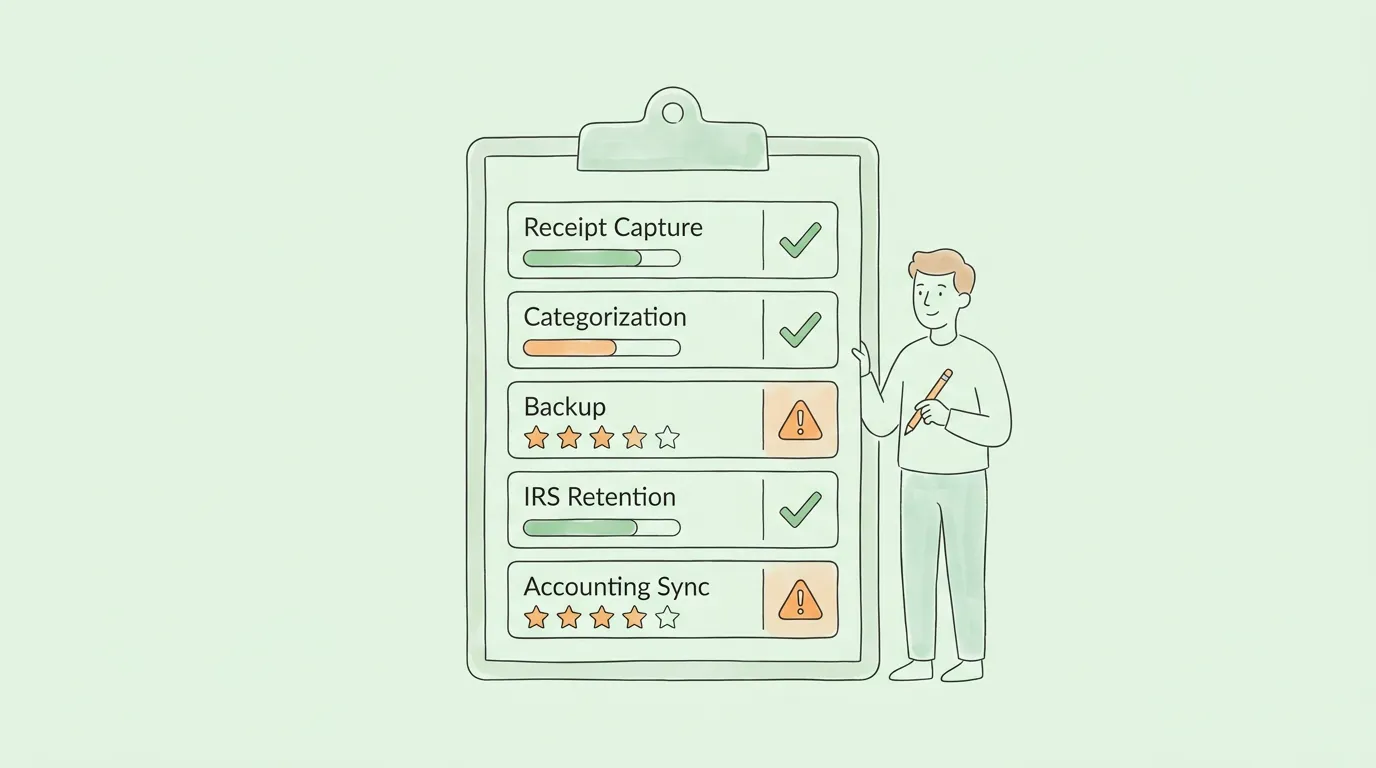
How Audit-Ready Is Your Receipt Organization System?
Before investing in new tools or overhauling your process, it helps to understand where your current system stands. Score each area from 1 (not in place) to 5 (working well), then prioritize the lowest-scoring areas first.
Area
Signs of Score 1-2
Signs of Score 4-5
Your Score
Receipt Capture
Receipts accumulate in wallet/desk; many are lost
Every receipt captured digitally on the day of purchase
__ / 5
Consistency
Different systems for different months or trips
One system, used every time, no exceptions
__ / 5
Categorization
Receipts uncategorized until tax season
Categories assigned at time of capture
__ / 5
IRS Alignment
Custom categories that do not match tax forms
Categories mapped to Schedule C line items
__ / 5
Retention Period
Unsure how long to keep records
Seven-year rule applied consistently
__ / 5
Backup
One copy, on one device
At least two copies in separate locations
__ / 5
Accounting Integration
Manual re-entry from receipts to accounting software
Receipts sync automatically to QuickBooks or Xero
__ / 5
Mixed Receipt Handling
Full amount claimed without separating business/personal
Business portion clearly noted, only business amount entered
__ / 5
Team Submission
Receipts arrive by text, email, paper, inconsistently
Centralized submission tool, policy documented
__ / 5
Weekly Review Habit
Receipts reviewed only at tax time
10-minute weekly review scheduled and followed
__ / 5
Scoring: 40-50 points indicates a mature, audit-ready process. 25-39 suggests meaningful gaps worth addressing. Below 25 means a full system reset will save you significant money and stress. The sections above map directly to each row.
What Are 6 Mistakes That Cost Business Owners Money?
Even well-intentioned small business owners fall into the same traps. Recognizing them is the first step to fixing them.
Mistake 1: The "I'll scan it later" habit. Receipts that are not captured immediately are receipts that disappear. Thermal paper starts degrading within weeks, and physical receipts go through pockets, wallets, and laundry cycles. Scan at the point of purchase, without exception.
Mistake 2: Using your phone's camera roll as a filing system. A receipt photo buried between 400 other photos is not organized. It is hidden. A dedicated receipt app with OCR, search, and categorization is the minimum viable system for anything beyond five receipts a month.
Mistake 3: Mixing business and personal expenses. This is the single most common source of bookkeeping errors and the most common red flag in audits. A dedicated business credit card eliminates this problem at the source. If you cannot use one, at minimum annotate every receipt at the time of capture.
Mistake 4: Relying solely on bank statements. A credit card statement showing "$287 from Amazon" tells the IRS nothing about what you bought or why it was a business expense. The receipt or order confirmation with itemized detail is the required documentation.
Mistake 5: Ignoring small purchases. Those $8 parking fees, $12 coffee meetings, and $22 office supply runs add up. A year's worth of ignored small purchases can represent $300 to $500 in missed deductions that would have taken three minutes to capture.
Mistake 6: No backup whatsoever. One device failure or one accidental folder deletion should not eliminate years of financial records. Automatic cloud backup is not optional; it is the minimum standard for any digital receipt system.
How Does OCR Technology Make Receipt Organization Effortless?
The reason a good digital receipt system barely takes any time is Optical Character Recognition (OCR). OCR software reads the visual content of a photo or PDF and converts it into structured, searchable data. In a receipt context, that means: you snap a photo, and the system automatically extracts the vendor name, date, total amount, tax, and sometimes individual line items, with no manual typing required.
Modern AI-powered OCR goes well beyond the template-matching systems that existed a decade ago. It handles handwriting, rotated images, non-standard layouts, and receipts in foreign languages or currencies. For a deeper look at how this technology works, see our guide on OCR technology for receipts and invoices.
The practical result: capturing and categorizing a receipt goes from a 3-minute manual task to a 15-second tap-and-confirm, every time.
Frequently Asked Questions
How long should I keep business receipts for taxes?
The IRS standard retention period for most business expense receipts is three years from the date you file the related tax return. However, specific situations extend this window: six years if you underreport income by more than 25%, and seven years for losses from bad debt or worthless securities. Most accountants recommend adopting the seven-year rule for all records. With digital storage, the cost of keeping records longer is negligible and the protection is meaningful.
Are digital copies of receipts valid for an IRS audit?
Yes. The IRS has accepted digital copies of receipts for many years, as confirmed in IRS Publication 583. The requirement is that the digital copy is legible, complete, and accurately reproduces all the information in the original: vendor name, date, amount, and items purchased. A clear photo taken immediately after purchase satisfies this standard. Scanned copies made months later, when the thermal paper is already fading, may not.
What information does a business receipt need to show?
For IRS purposes, a valid receipt must show: the vendor or merchant name, the transaction date, the total amount paid, and ideally a description of what was purchased. For meal and entertainment expenses, you additionally need to document who attended and the business purpose of the meeting. Your notes field in a receipt app is the right place to record the business purpose at the time of capture.
What should I do if I lose a business receipt?
Request a duplicate receipt from the vendor (most can reprint or email one). If that is not possible, use your bank or credit card statement as supporting documentation and create a written record describing the date, vendor, amount, and business purpose. A calendar entry or email correspondence related to the meeting or trip can also serve as corroborating evidence. The IRS allows reconstructed records when original documentation is unavailable, though original receipts are always preferred.
Do I need receipts if I have credit card statements?
Yes. Credit card statements alone are generally not sufficient for IRS purposes because they lack itemized detail. A statement entry showing "$430 at Office Depot" does not prove what you bought or that it was a business expense. The receipt (or order confirmation for online purchases) provides the specific documentation required to substantiate the deduction.
How should I organize receipts for my employees or contractors?
Implement a centralized submission system where everyone uses the same tool and process. Require receipts to be submitted within five to seven business days of purchase, with the vendor, amount, date, and a brief business purpose note. All submissions should flow into a single queue for manager review and approval before being posted to the books. This both prevents errors and creates the internal control structure needed for an audit-ready accounts payable process. For a deeper look at AP best practices, see our guide on accounts payable automation best practices.
Can I throw away paper receipts after I scan them?
For most purposes, yes. Once you have a clear, complete digital copy, the paper original has served its purpose. The exception is for very high-value transactions or any receipt that may be subject to extended retention requirements (property purchases, for example). Some accountants prefer to keep paper originals for at least 90 days as a buffer in case the digital copy needs to be verified. After that, well-backed-up digital copies are considered equivalent to the originals for IRS purposes.
How Do You Build a Receipt Habit That Pays Off Every Year?
Organizing business receipts is one of those things that pays compound returns. The first month of building the system takes some effort. Every month after that, the captures are automatic, the categories are consistent, and the tax season review is a formality rather than an ordeal.
The businesses that handle audits confidently, claim every legitimate deduction, and close their books quickly each month are not doing anything extraordinary. They just have a system that runs consistently, month after month, without requiring willpower or memory.
TallyScan captures receipts and invoices automatically from your email and uploads, extracts every key field with AI-powered OCR, and syncs the data directly to QuickBooks, Xero, and your other accounting tools. No manual entry. No lost receipts. No guessing about categories.