AI
Invoice Process Automation for Smarter Payments
How invoice process automation works, real ROI calculations, a 6-point tool selection framework, 5 implementation phases, pitfalls to avoid, and 8 FAQs.

TallyScan Team
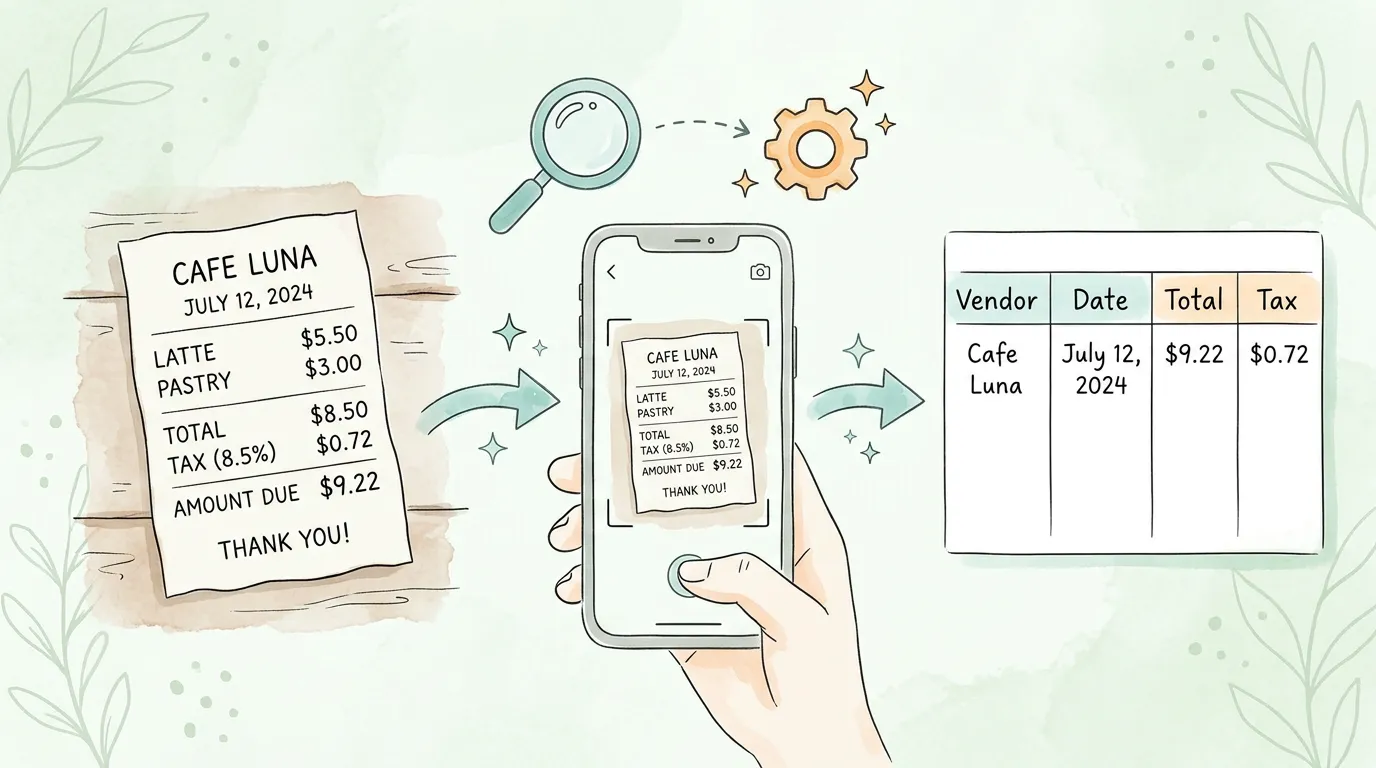
Every finance team has a version of the same story. A sales rep returns from a business trip with 23 crumpled receipts stuffed in a jacket pocket. An accountant spends two hours manually entering vendor names, dates, and totals. A $47.50 receipt is misread as $147.50. The CFO reviews a monthly expense report that reflects spending from six weeks ago. None of this has to happen.
Receipt scanning OCR (Optical Character Recognition) is the technology that converts a photograph of a paper receipt into structured, usable financial data automatically. It reads the vendor name, date, line items, taxes, and total, then delivers that data directly into your accounting software, your expense management platform, or a spreadsheet, in seconds and with accuracy rates that routinely exceed 98%.
This guide covers how receipt scanning OCR actually works under the hood, what separates good software from great software, how to calculate your ROI before you buy, and answers to the questions finance teams ask most. Whether you manage expenses for a three-person startup or a 500-person organization, you will find the information you need to make the right decision.
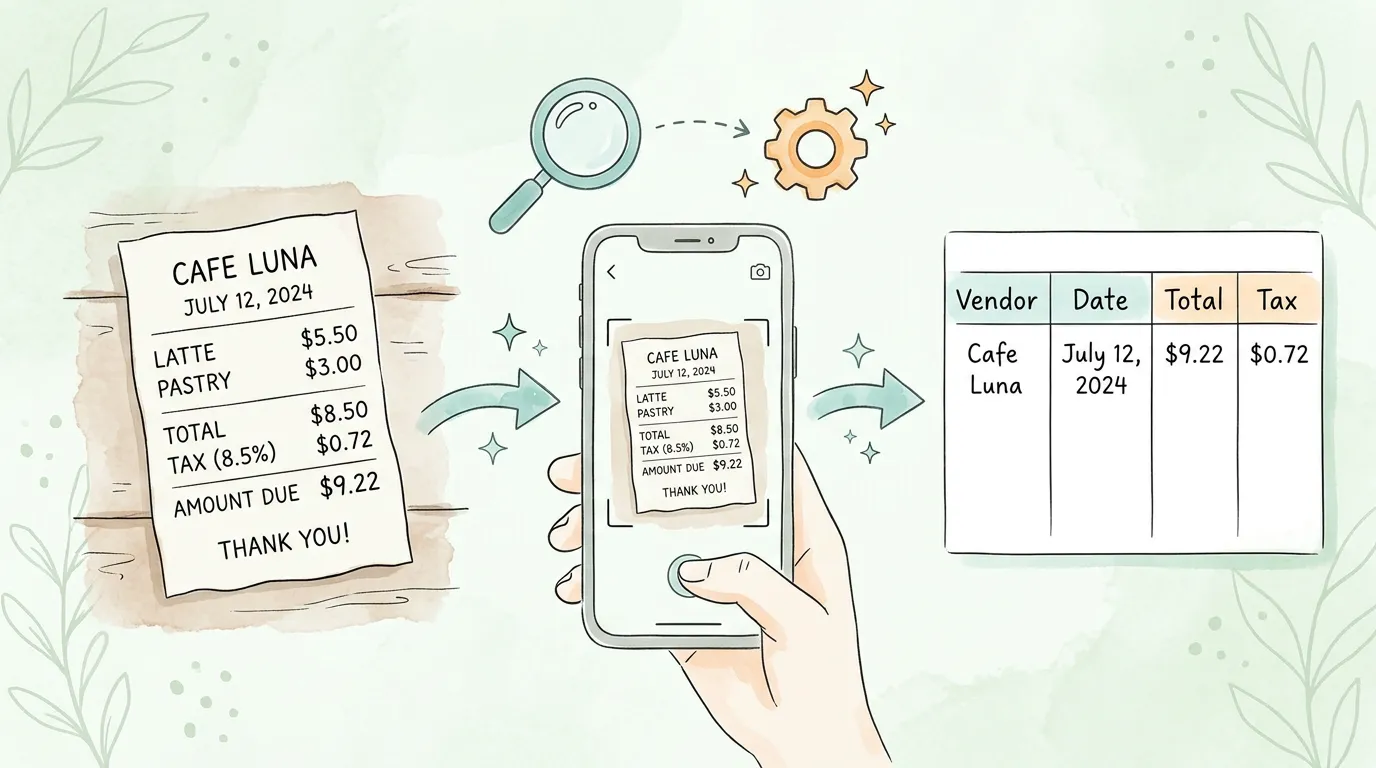
Receipt scanning OCR is the automated process of using Optical Character Recognition technology, combined with artificial intelligence, to extract data from receipt images. Unlike a simple image scan, which produces a static picture, OCR converts the visual content of a receipt into machine-readable, searchable text and structured data fields.
A modern receipt scanning OCR system does not just read characters. It understands context. It knows that a number appearing near a currency symbol and positioned in the bottom-right corner of a document is likely the total amount. It recognizes that a string matching the pattern MM/DD/YYYY or DD-MM-YYYY is a date. It identifies merchant names, tax amounts, payment methods, and individual line items, even when the receipt format has never been seen before.
This contextual intelligence is what separates modern AI-powered receipt OCR from earlier rule-based systems. For a deeper technical foundation, see our guide on what is OCR technology.
Key Stat: The global receipt scanner market was valued at $1.2 billion in 2024 and is projected to reach $3.1 billion by 2033, growing at a CAGR of 11.2%, driven by the accelerating shift away from manual expense processing across every industry.
Understanding the technical process helps you evaluate software claims accurately and set the right expectations for your team. Modern receipt scanning OCR works in four stages.
The process begins the moment a receipt image is captured, whether from a smartphone camera, a flatbed scanner, an email attachment, or a supplier portal. Raw images are rarely perfect: thermal paper fades, receipts get wrinkled, lighting conditions vary, and camera angles create distortion. Before any character recognition can happen, the image must be preprocessed.
Preprocessing steps include:
The quality of preprocessing is one of the most significant factors separating high-accuracy OCR systems from lower-accuracy ones. Systems that skip or oversimplify preprocessing show dramatically higher Character Error Rates (CER) on real-world receipt inputs.
With a clean image, the OCR engine analyzes each character individually, comparing the shape of each letter and digit against a trained library of character patterns. This matching process identifies every character on the receipt, line by line.
Traditional OCR systems use pattern matching and feature detection, which is why they delivered only 60-75% accuracy on real-world receipts five years ago. Modern systems add neural network models (particularly convolutional neural networks and transformer architectures) that learn to recognize characters even when fonts vary, printing is inconsistent, or characters are partially damaged. The accuracy leap has been significant: leading AI-powered OCR systems now achieve field-level accuracy above 99% on standard receipt formats, a near-complete elimination of the extraction errors that made earlier tools impractical for serious financial use.
Key accuracy metrics to understand when evaluating vendors:
| Metric | What It Measures | What "Good" Looks Like |
|---|---|---|
| Character Error Rate (CER) | Percentage of individual characters extracted incorrectly | Under 1% for top-tier systems |
| Word Error Rate (WER) | Percentage of words extracted with any error | Under 2% for production-grade systems |
| Field Accuracy Rate | Percentage of key fields (vendor, date, total) extracted correctly | 98%+ for AI-powered systems |
| End-to-End Match Rate | Percentage of receipts where all extracted fields match ground truth | 95%+ for AI-powered, 70-80% for traditional OCR |
Reading characters is only the first part. The more complex challenge is understanding what those characters mean in the context of a receipt. This is where AI and machine learning transform raw OCR output into structured data.
The AI model understands receipt layout semantics. It recognizes that:
Critically, the model handles the enormous variety of receipt formats, from a simple coffee shop slip to a 10-line hardware store receipt, without requiring manual templates. It learns from millions of receipts and continuously improves as it processes more data from your specific vendor set.
For businesses that receive invoices rather than physical receipts, this same AI layer powers invoice capture software and invoice data capture platforms.
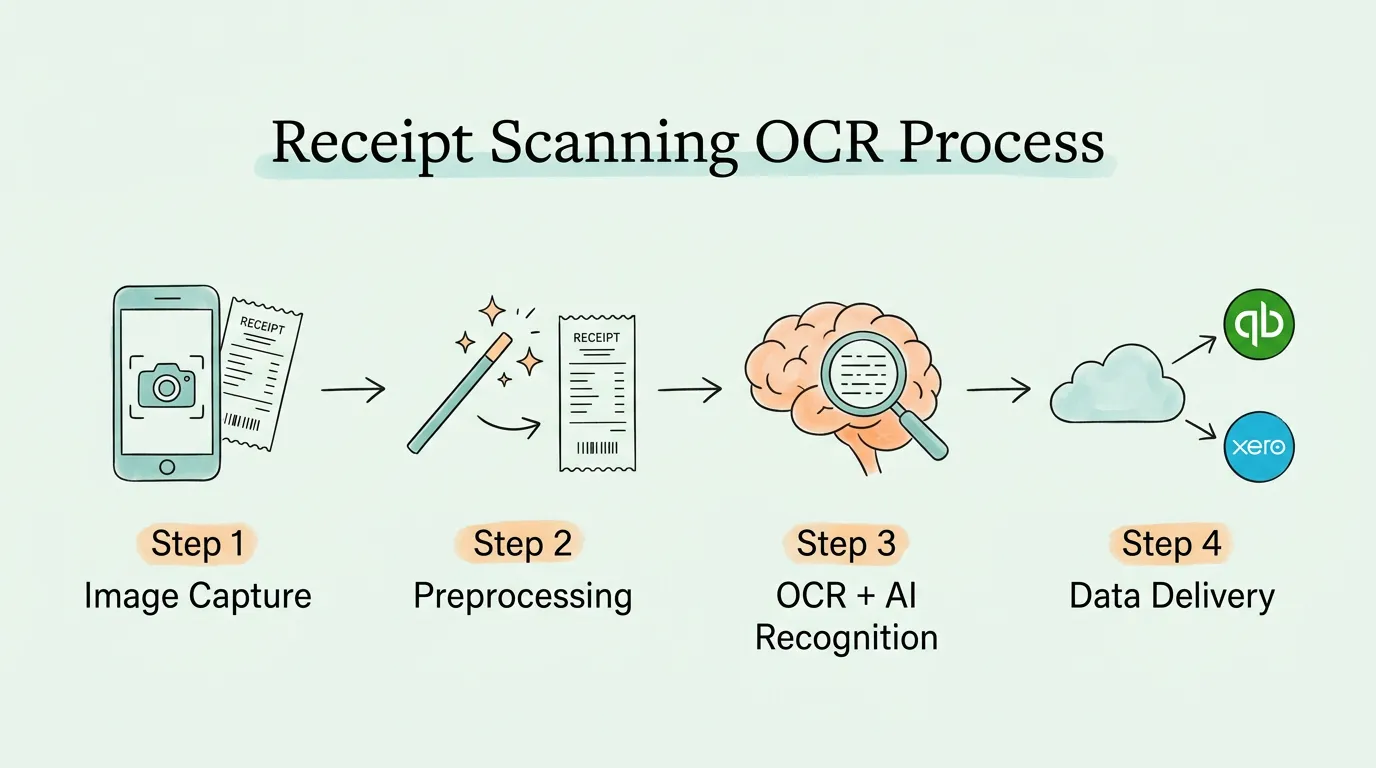
The final stage takes the recognized and classified data and delivers it in a structured format to your destination system. This means:
The critical quality factor at this stage is integration depth. A shallow integration sends a flat CSV file that requires manual import. A deep integration writes directly to the correct account codes, applies your expense categories, and triggers your approval workflow, all automatically.
The numbers are more stark than most finance teams expect. According to research from the Global Business Travel Association (GBTA), the average expense report costs $58 to process manually. Receipts collected late, errors that need chasing, approval cycles that span weeks. OCR-based systems bring that figure down to under $10. For a 500-person company submitting 1,000 expense reports a year, that gap represents roughly $48,000 in recoverable processing costs.
Beyond the per-report cost, the hidden expense is distributed across salaries, error correction time, and delayed reporting rather than appearing as a single line item.
| Metric | Manual Processing | Receipt Scanning OCR | Improvement |
|---|---|---|---|
| Time per receipt | 4-8 minutes (entry + review + filing) | Under 30 seconds (capture + auto-extract) | -90% |
| Field accuracy rate | 75-85% (human error on fatigue) | 98-99%+ (AI-powered) | +15-20 pts |
| Processing cost per receipt | $4.00-$8.00 (fully loaded labor cost) | $0.10-$0.50 (software cost) | -85 to -95% |
| Data availability | Days to weeks after expense is incurred | Real-time or within minutes | Near-instant |
| Audit trail completeness | Depends on paper filing discipline | 100% digital, searchable, timestamped | Complete |
| Compliance risk | High (lost receipts, faded thermal paper) | Low (digital backup of every receipt) | Significantly reduced |
| Employee satisfaction | Low (tedious, time-consuming) | High (submit in under 30 seconds) | Dramatically improved |
For a business processing 500 receipts per month, switching from manual entry to OCR at a time savings of 5 minutes per receipt recovers 41+ hours of staff time per month, every month. At a blended labor cost of $35 per hour, that is $1,470 in monthly savings from time alone, before counting error correction costs and delayed reporting.
Manual data entry errors on receipts are not rare. Studies consistently show human transcription error rates of 1-4% for routine data entry, and higher when staff are fatigued or processing under time pressure. On financial data, a single misread digit (4 vs. 9, 1 vs. 7) changes a number and creates a discrepancy that requires time to trace and correct.
Top-tier receipt scanning OCR systems post field accuracy rates above 98%, and the best AI-powered systems exceed 99% on common receipt formats. The improvement is not marginal. At 500 receipts per month, reducing error rate from 3% to 0.5% means 12.5 fewer errors to investigate each month.
Every scanned receipt creates a permanent digital record: the original image, the extracted data, the processing timestamp, and the accounting system entry. This chain of evidence is exactly what auditors look for. It is tamper-evident, instantly retrievable, and immune to the physical deterioration that makes thermal receipts unreadable within 2-3 years.
When an auditor requests documentation for a specific expense, you can retrieve the original receipt image and the associated transaction in seconds, not hours. For a full guide to building an audit-ready financial workflow, see our audit readiness checklist.
Manual expense reporting creates a structural time lag. Receipts are collected for days or weeks, then submitted in batches, then reviewed, then entered. By the time a manager can see department spending, the data is a month old. Budget overruns cannot be caught early because the data does not exist early.
Receipt scanning OCR eliminates this lag. Employees submit receipts immediately on a mobile app. Data appears in the finance dashboard within minutes. Budget owners can see spending as it happens, flag anomalies early, and redirect resources before a small overage becomes a large problem.
The IRS Publication 583 (Starting a Business and Keeping Records) requires businesses to maintain records supporting all income and deductions. For expense receipts, this means preserving adequate documentation for every claimed deduction: amount, date, business purpose, and vendor.
Digital receipt records produced by OCR systems meet IRS requirements for electronic records under Revenue Procedure 98-25, provided the system captures the original image and maintains the linkage between the image and the accounting entry. Thermal paper receipts fade and become illegible within 1-3 years. A digital OCR system creates a permanent, IRS-compliant record from day one. For best practices on organizing and retaining business receipts throughout the year, see our guide on how to organize receipts for taxes.
AI-powered receipt OCR systems do more than extract data. They apply your expense policy automatically:
Policy violations caught by software before reimbursement cost far less to resolve than policy violations discovered during an annual audit.
A common misconception is that receipt scanning OCR only works well on standard printed receipts. Modern AI-powered systems handle a much wider range of document types:
| Receipt Type | OCR Capability | Notes |
|---|---|---|
| Thermal paper receipts | Excellent | Best practices: capture fresh, avoid direct sunlight |
| Inkjet / laser-printed receipts | Excellent | Standard format, highest accuracy |
| Handwritten receipts | Good to Fair | Handwriting recognition requires specific AI training |
| Email receipts (PDF / HTML) | Excellent | Best format for highest accuracy |
| E-receipts from portals | Excellent | Structured data makes extraction very reliable |
| Restaurant receipts with tips | Good | Tip fields present parsing challenges on some platforms |
| Multi-page receipts / invoices | Good | Requires page-sequencing capability |
| Foreign language receipts | Good | Support varies by platform; verify for your specific languages |
| Faded or damaged receipts | Fair | Quality preprocessing significantly helps |
For businesses that also receive formal supplier invoices alongside physical receipts, the same underlying technology powers accounts payable automation at scale.
Not all receipt OCR tools deliver the same depth of capability. This evaluation framework helps you separate genuine automation platforms from tools that only partially solve the problem.
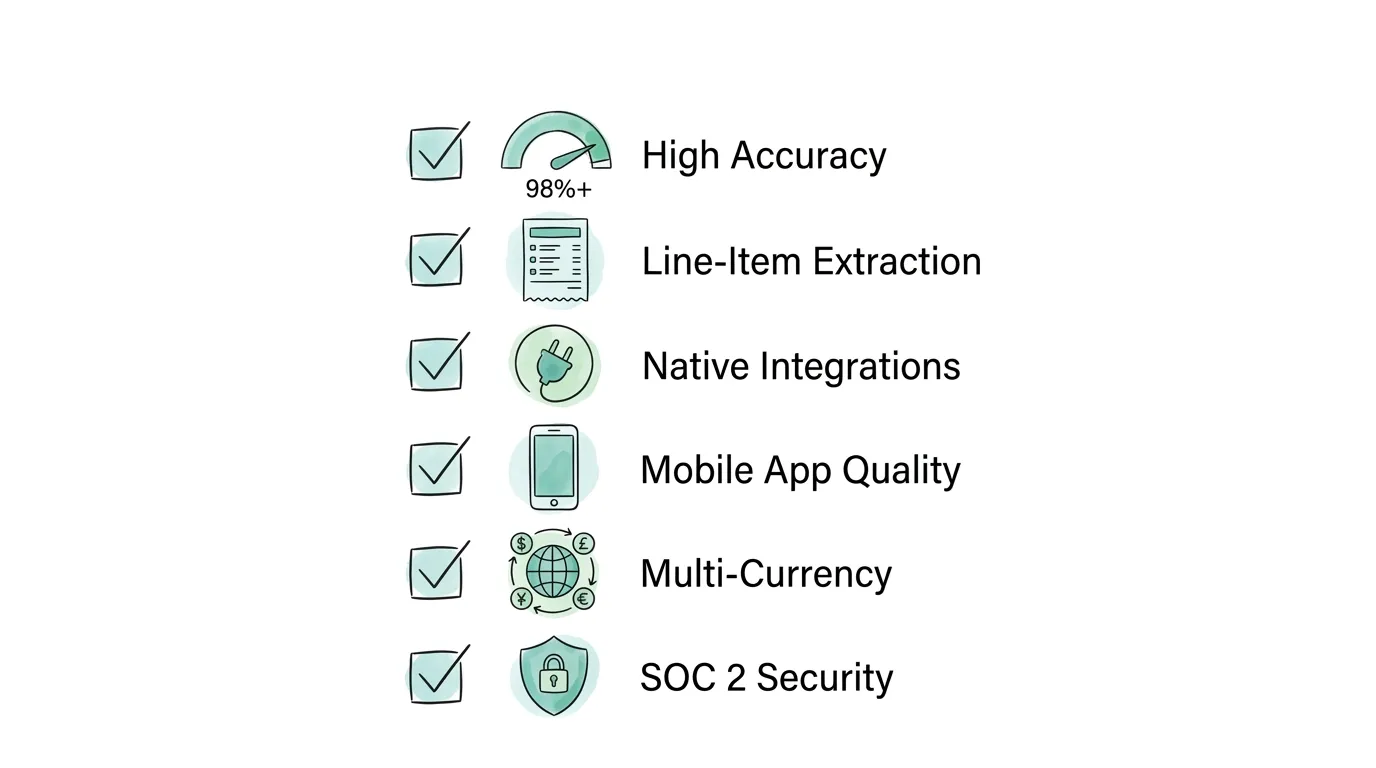
| Feature | Why It Matters | What to Verify |
|---|---|---|
| Field accuracy 95%+ | Anything lower creates more correction work than it saves | Ask for benchmark data on your specific receipt types; request a trial with your real receipts |
| Line-item extraction | Total-only extraction is insufficient for proper bookkeeping and job costing | Test with multi-item receipts; verify individual items appear in the accounting entry |
| Native accounting integrations | CSV import/export creates manual steps and error opportunities | Confirm direct API connection to your specific accounting software version |
| Original image preservation | Required for IRS compliance and audit support | Verify images are stored alongside the data entry, not discarded after processing |
| Real-time processing | Batch processing delays negate the speed advantage | Check average processing time: minutes, not hours |
Mobile app quality: The mobile capture experience is where most expense data is collected. If the app is slow, hard to navigate, or requires too many steps, adoption will fail. The ideal flow is: open app, photograph receipt, confirm auto-extracted data if confidence is flagged, submit. Under 30 seconds total.
Multi-currency support: For businesses with international operations or employees who travel internationally, automatic currency recognition and exchange rate conversion at the transaction date is essential. Without it, international receipts require manual conversion before entry.
Custom approval workflows: The ability to route receipts based on amount, category, department, or vendor to different approvers is what transforms OCR from a capture tool into a complete expense management workflow.
AI learning and improvement: The best systems learn from your corrections. When a reviewer corrects an extracted field, the model updates to handle that receipt format more accurately in the future. Over time, your specific vendor set is handled with near-perfect accuracy.
Security certifications: Financial data requires enterprise-grade security. Look for SOC 2 Type II certification, end-to-end encryption, and compliance with GDPR if you handle EU employee data.
Retroactive scanning: The ability to scan historical receipts, pulling prior months or years into the system, is valuable when onboarding. It ensures your complete expense history is digitized rather than leaving historical gaps.
For a broader look at how OCR technology works across document types beyond receipts, see our in-depth guide on what is OCR technology.
Before committing to a platform, calculate the return on your specific volume. The numbers are often more compelling than finance teams expect.
Step 1: Calculate your current manual processing cost.
Step 2: Estimate error correction costs.
Step 3: Compare against OCR platform cost.
Example for a 50-employee company processing 500 receipts/month:
| Cost Category | Manual Processing | OCR Automation | Annual Savings |
|---|---|---|---|
| Staff time (500 receipts × 5 min × $40/hr) | $20,000/year | $1,800/year | $18,200 |
| Error correction (3% error rate) | $3,780/year | $360/year | $3,420 |
| Late-filing compliance risk | Unquantified | Near-zero | Significant |
| Total | $23,780/year | $2,160/year | $21,620 |
Most organizations see payback within 30 to 60 days of implementation.
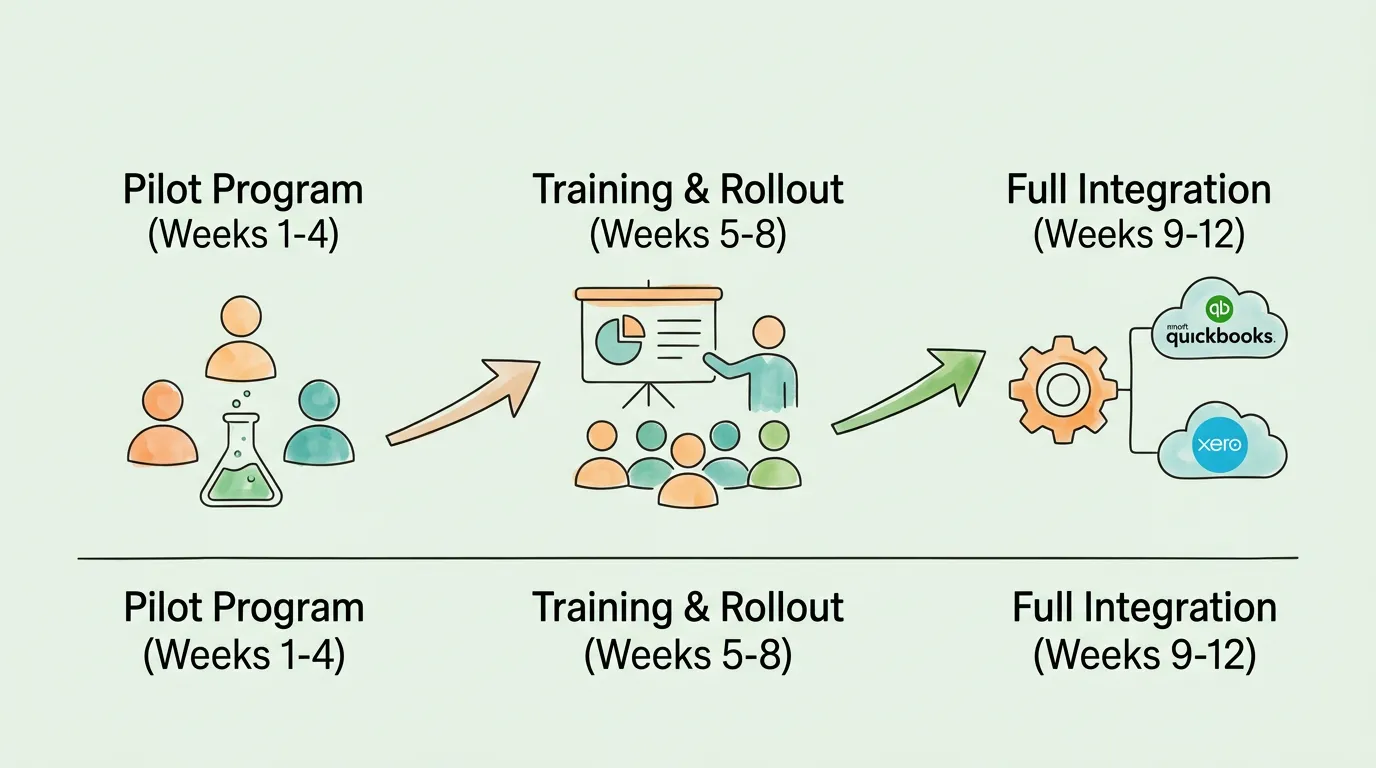
Start with a single department of 5 to 10 employees who generate consistent receipt volume. Choose participants who are generally open to trying new tools. This group serves as your testing environment before company-wide rollout.
During the pilot, measure:
Use pilot findings to configure custom expense categories, set up approval routing rules, and connect the integration to your accounting software.
Effective training focuses on personal benefits, not technical features. Show employees what changes for them: no more batch expense reports, faster reimbursements, no more chasing a missing receipt three weeks after a trip.
Practical best practices for employees:
For finance team:
With the team trained and the pilot data refined, complete the accounting system integration. This is the step that closes the loop: approved expenses post directly to your general ledger with correct account codes, no manual re-entry.
Review the OCR system's performance data monthly for the first quarter. Accuracy typically improves over the first 30 to 60 days as the AI learns from any corrections made by your team. By month 3, most businesses see touchless processing rates above 85% for their regular vendor set. For broader guidance on optimizing your end-to-end financial document workflow, see our guide on how to streamline invoice processing.
Sales teams consistently generate the highest receipt volume: client dinners, travel, accommodation, ride-shares, and incidental expenses. These expenses are also the most time-sensitive for cash flow and the most important to attribute correctly to specific clients or campaigns.
With mobile OCR, a sales rep can photograph a restaurant receipt before leaving the table. The expense is extracted, categorized, tagged to the correct client or project, and submitted for approval in under 30 seconds. Managers see the cost attributed correctly in their dashboard immediately. Reimbursements process within days, not weeks.
For finance teams, receipt OCR eliminates the bottleneck of batch processing at month-end. Receipts arrive continuously throughout the month, are processed immediately, and are available in the accounting system in real time. Month-end close is faster because most receipts are already entered, reviewed, and approved by the time the close begins.
OCR also eliminates the labor-intensive step of reconciling employee expense claims against credit card statements. When both the receipt and the card transaction are in the system, they can be matched automatically, the same way AP automation performs invoice matching against purchase orders.
For freelancers, receipt organization is a year-round challenge with a concentrated tax-time payoff. Every unclaimed business expense is money left on the table. A freelance consultant with $15,000 in annual business expenses at a 25% tax rate has a $3,750 stake in getting every receipt captured correctly.
A mobile receipt OCR app converts that year-round anxiety into a simple daily habit: photograph every business receipt the moment it is received. When tax season arrives, every deductible expense is already categorized, totaled, and linked to a digital image. The accountant gets a clean, organized file instead of a shoebox. For a full framework on receipt organization specifically for tax purposes, see our guide on how to organize receipts for taxes.
Companies with field operations (construction, delivery, logistics, field service) generate enormous receipt volume across distributed teams. Drivers accumulate fuel receipts, toll receipts, and maintenance receipts across hundreds of vehicles. Before OCR, collecting and processing these receipts created a significant administrative burden.
With a mobile OCR app, drivers submit receipts at the point of transaction. Fleet managers see fuel and maintenance costs in real time, enabling immediate budget oversight and anomaly detection. A single driver submitting a duplicated fuel receipt is flagged automatically rather than slipping through at month-end.
A regular scanner produces a static image of a receipt, like a photograph. Receipt scanning OCR goes further: it analyzes that image using Optical Character Recognition and artificial intelligence to extract the data within the image, specifically the vendor name, date, individual line items, tax amount, and total, then delivers that data as structured, editable, searchable text to your accounting or expense management system. A scanner preserves the appearance of a document. OCR converts it into usable financial data.
Modern AI-powered receipt OCR systems achieve field accuracy rates above 98% on standard receipt formats, with the best systems exceeding 99% on high-frequency vendor receipts. Accuracy is measured by Character Error Rate (CER) and Field Accuracy Rate. Accuracy decreases for heavily damaged receipts, handwritten entries, or unusual formats, but preprocessing algorithms significantly improve performance on degraded inputs. Most vendors offer a free trial period; test with your actual receipt population before committing.
Almost all modern receipt OCR platforms offer native integrations with QuickBooks Online, Xero, NetSuite, Sage, and Microsoft Business Central. Native integrations write data directly to the correct account codes and attach the receipt image to the transaction, without requiring manual CSV exports. If you use a less common accounting system, verify native integration availability before purchase; some platforms offer an API for custom connections.
Reputable platforms treat financial data security as a core requirement, not an optional feature. Look for SOC 2 Type II certification (which requires annual third-party security audits), end-to-end encryption for data in transit and at rest, and GDPR compliance if you handle EU employee data. Cloud hosting on AWS, Microsoft Azure, or Google Cloud provides infrastructure-level security. Your digital receipt archive is typically far more secure than a paper filing cabinet or a shared network folder.
The IRS requires businesses to retain records supporting income and deductions for a minimum of 3 years from the filing date, with longer requirements for certain categories. A standard 7-year digital retention policy satisfies IRS requirements and protects against most audit scenarios. Digital receipt records produced by OCR systems are fully IRS-compliant as electronic records, provided the original image and its associated transaction data are preserved together.
Yes, most enterprise-grade platforms support multi-currency receipts and can process receipts in multiple languages. The system recognizes the currency symbol or code, retrieves the exchange rate for the transaction date, and converts to your base currency automatically. Language support varies by platform; verify coverage for your specific international markets. Receipt formats vary significantly by country, particularly in regions where electronic receipts (e-receipts) are more common than paper.
Receipt scanning OCR is a specific technology (the data extraction layer) within the broader category of expense management software. Expense management software may or may not use OCR. Basic expense tools allow manual entry with optional receipt image attachment. OCR-powered expense tools automate the data entry step entirely, using image recognition to pre-populate all fields from the receipt photograph. When evaluating platforms, look for AI-powered OCR specifically, not just "receipt scanning," as terminology varies. For a broader comparison of receipt scanning platforms, see our guide on receipt scanning software.
Cloud-based receipt OCR platforms typically process a receipt and return structured data within 10 to 30 seconds of capture. Processing time depends on image complexity, document length, and the platform's infrastructure. Receipt processing should be near-instantaneous for standard receipts. Multi-page receipts or low-quality images requiring extensive preprocessing may take slightly longer. Batch processing of historical receipts (retroactive scanning) typically runs faster per document because images are queued and processed in parallel.
Manual receipt entry is one of the most expensive, error-prone, and morale-draining tasks in finance. Receipt scanning OCR eliminates it at the source, converting paper receipts into accurate, structured financial data in real time, with accuracy rates that match or exceed careful human entry at a fraction of the cost.
The technology is mature, pricing is accessible at every business size, and the ROI is typically visible within the first billing period. The question is not whether to automate, it is which platform fits your specific receipt types, volume, accounting system, and team structure.
TallyScan captures both receipts and invoices from any source, including email inboxes, portals, and mobile capture, extracting data with AI-powered OCR and syncing directly to your accounting software. Explore our guide on accounts payable tracking to see how automated receipt capture fits into a complete financial operations workflow.
Ready to eliminate manual receipt entry from your finance process? Start your free trial of TallyScan today and see your first receipts processed automatically within minutes.
How invoice process automation works, real ROI calculations, a 6-point tool selection framework, 5 implementation phases, pitfalls to avoid, and 8 FAQs.
A no-hype guide to accounting AI with 6 real use cases, verified ROI data, key limitations, a software selection framework, and practical FAQs.
OCR technology converts images of text into machine-readable data. Learn how it works, how accurate it is, the difference between traditional and AI OCR, and how businesses use it to eliminate manual data entry.