AI
Accounting AI: What It Does, What It Doesn't, and Why Finance Teams Move Fast
A no-hype guide to accounting AI with 6 real use cases, verified ROI data, key limitations, a software selection framework, and practical FAQs.

TallyScan Team
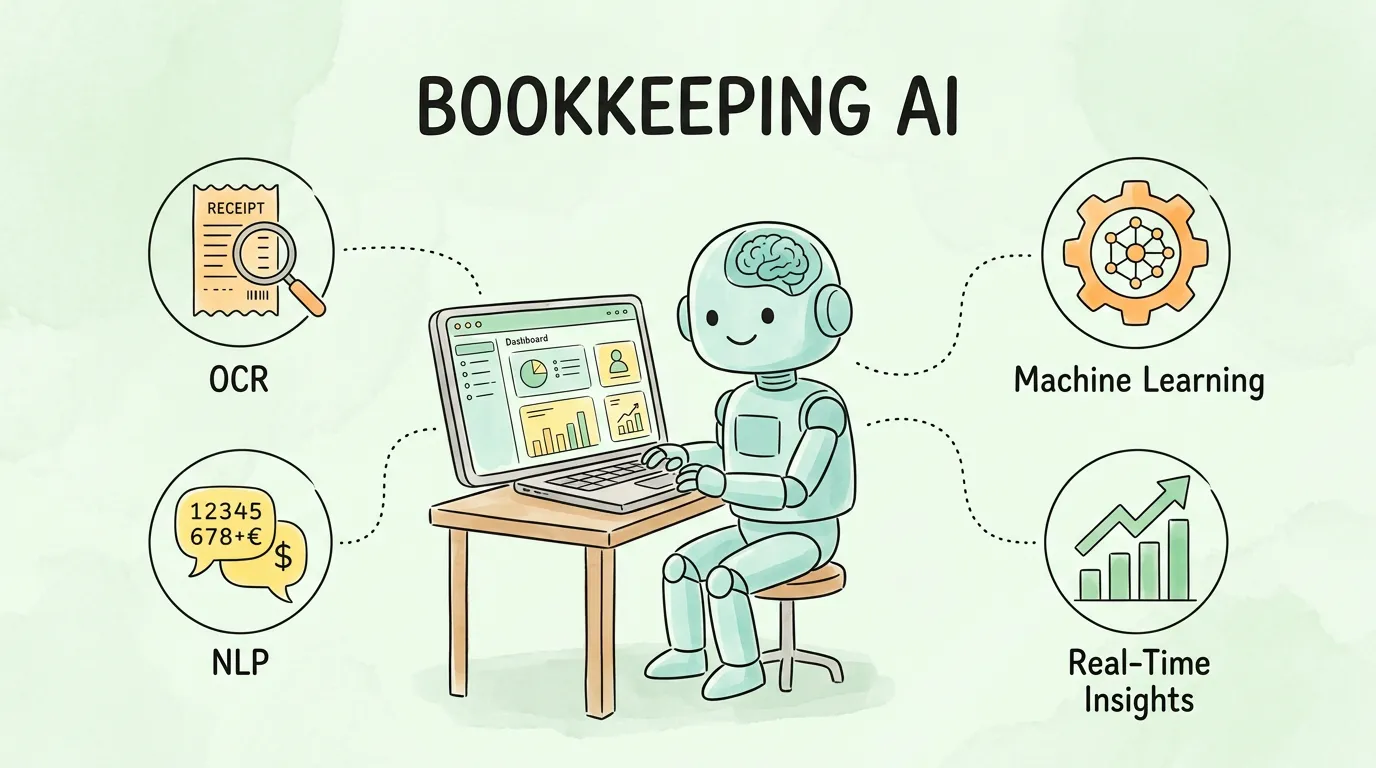
There is a version of bookkeeping AI that vendors sell and a version that actually runs inside real businesses. The gap between them is smaller than skeptics expect and larger than enthusiasts admit. The technology genuinely eliminates most manual data entry. It does not, on its own, replace the judgment a good accountant brings to interpreting those numbers.
This guide explains both sides: what bookkeeping AI is, the three technologies that make it work, where it delivers in practice, where its limits are, and how to choose and implement the right tool for your specific business. No hype in either direction.
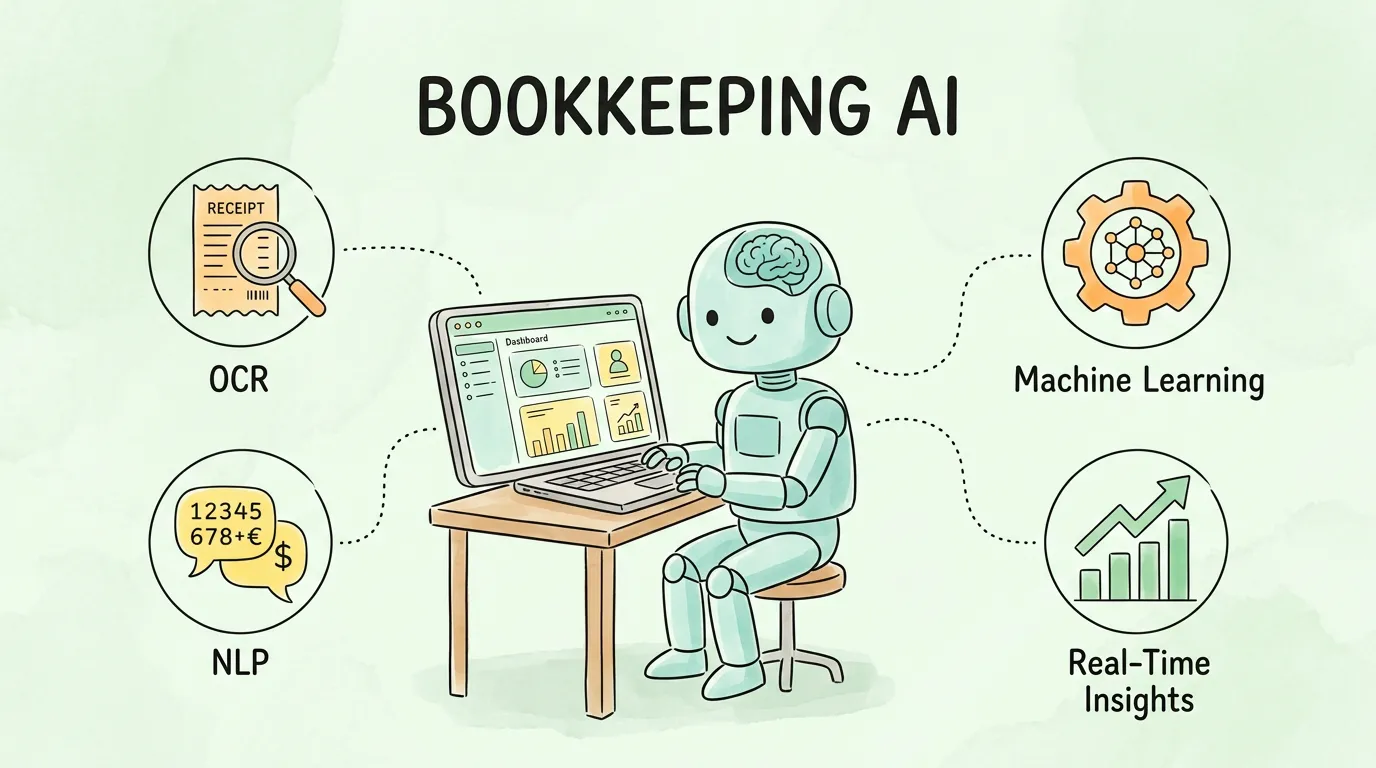
Bookkeeping AI refers to software that uses artificial intelligence to perform the repetitive, rule-based tasks traditionally done by a bookkeeper: categorizing transactions, reconciling bank statements, matching receipts to expenses, processing invoices, and generating financial reports. The defining characteristic is autonomy — the system executes these tasks continuously without waiting for a human to initiate each action.
It is different from traditional accounting software in one critical way. A standard accounting platform like QuickBooks or Xero is a structured database. You put data in; it stores and reports on that data. Bookkeeping AI connects to the sources of financial data (bank feeds, email inboxes, payment processors, receipt apps) and processes that data according to learned patterns, running in the background whether you are logged in or not.
The global AI in accounting market reflects how rapidly this is becoming standard practice. According to Grand View Research, the market is projected to reach USD 96.69 billion by 2033, growing at a CAGR of 39.6% from 2025. That growth is not driven by large enterprises alone — the majority of new adoption is happening among small and mid-size businesses that previously could not afford dedicated bookkeeping staff.
| Dimension | Traditional Bookkeeping | Bookkeeping AI |
|---|---|---|
| Data entry | Manual keying of every transaction | Automated import from bank feeds, invoices, receipts |
| Categorization | Human assigns GL code per transaction | AI categorizes based on vendor, description, and learned patterns |
| Speed | Hours to days for monthly reconciliation | Continuous processing; reconciliation in minutes |
| Error rate | 3–5% for manual data entry | Under 1% with AI extraction and validation |
| Financial visibility | Historical reports, often weeks old | Real-time dashboard updated per transaction |
| Fraud detection | Reactive; discovered during audit or review | Proactive; anomaly flagging before payment clears |
| Tax preparation | Frantic month-end scramble | Audit-ready records generated automatically |
| Cost structure | High labor cost; error correction adds more | Lower operating cost; scales with volume, not headcount |
| Accountant's role | Data entry and record keeping | Analysis, strategy, and advisory |
The shift from the left column to the right is not incremental. It changes the entire rhythm of how your finance function operates — from reactive to proactive, from historical to live. For a broader look at how AI is reshaping the accounting profession, see our guide on accounting AI.
Every bookkeeping AI platform — regardless of what it calls its features — runs on three foundational technologies working in sequence. Understanding them helps you ask better questions when evaluating tools.
Optical Character Recognition (OCR) is the intake layer. It converts visual content — a photograph of a paper receipt, a scanned invoice, a PDF attachment — into machine-readable text that the system can process.
Modern OCR goes beyond simple character recognition. It handles multiple fonts, varying image quality, rotated or skewed documents, handwritten annotations, and documents in dozens of languages. The output is raw structured text: vendor name, line items, amounts, dates, payment terms, extracted from wherever they appear in the document.
Without OCR, any bookkeeping AI system would be limited to electronic data sources (bank feeds, payment processor exports). OCR extends the input surface to every financial document that exists in any format. For a deep technical explanation of how OCR works in financial document processing, see our guide on what is OCR technology.
Natural Language Processing (NLP) interprets the raw text OCR produced. OCR gives you "Staples — $74.32 — 14 Mar — Printer Paper." NLP understands that "Staples" is the vendor, "$74.32" is the total, "14 Mar" is the transaction date, and "Printer Paper" is an expense that should be categorized under "Office Supplies."
This context-understanding function is what allows bookkeeping AI to handle the variability in how different vendors describe the same type of expense. "Adobe Systems," "Adobe Inc.," and "ADOBE*CREATIVE" in your bank feed all refer to the same vendor. NLP resolves these variations to a consistent internal record.
NLP also enables more sophisticated capabilities: extracting multi-line item tables from invoices, interpreting handwritten notes attached to receipts, reading contract terms from vendor agreements to identify payment obligations, and understanding industry-specific terminology. The more varied your document types and vendors, the more important the NLP layer becomes.
Machine Learning (ML) is what transforms bookkeeping AI from a rule-following tool into an adaptive system. Rule-based automation follows explicit instructions: "if vendor name contains 'Amazon', categorize as 'Marketplace Fees'." ML learns patterns from data and applies them to new situations without explicit programming.
The learning loop works like this:
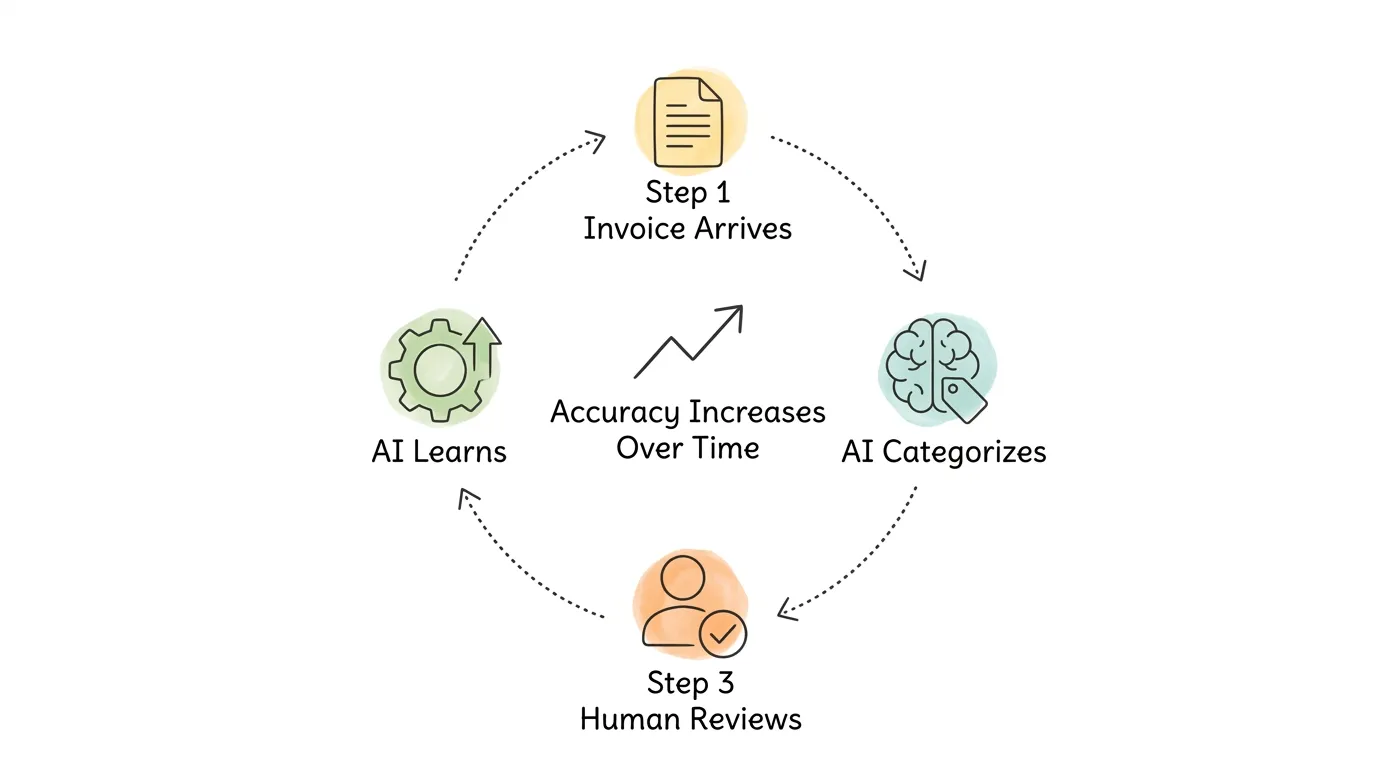
Every transaction the AI categorizes that a human subsequently approves without correction reinforces the model's confidence in that categorization pattern. Every correction a human makes teaches the model that its initial categorization was wrong and how to do it differently. After processing several months of your transactions, the ML model knows your vendors, your expense categories, your GL structure, and your spending patterns well enough that the exception rate — the percentage of transactions requiring human correction — drops below 2% for most businesses.
This compounding accuracy improvement is the sleeper benefit of bookkeeping AI. The system does not perform the same regardless of how long you use it. It gets meaningfully better the longer it runs on your data. A new employee, by contrast, reaches their performance ceiling within weeks and stays there. For a broader perspective on how AI agents in finance apply these capabilities, see our guide on AI agent for accounting.
The headline benefit (saves time) undersells the actual impact. Here is what changes in practice.
Manual bookkeeping has a structural error rate. Research consistently shows 3-5% error rates in manually entered financial data. On a business processing 300 transactions per month, that is 9-15 errors. Some are caught in reconciliation. Others are not discovered until an audit, a disputed vendor payment, or a tax filing that does not match the actual numbers.
Bookkeeping AI eliminates the manual entry step entirely for the majority of transactions. Error rates fall below 1%. More importantly, the errors that remain are random (unusual edge cases) rather than systematic (a specific category being consistently miscoded). Random errors are caught easily during exception review. Systematic errors are much harder to detect and often persist for months.
For businesses in regulated industries or those that carry debt covenants requiring accurate financial reporting, this reliability is not a convenience — it is a compliance requirement. Accurate, consistently coded books mean cleaner audits, smoother loan renewals, and financial statements you can present to investors without caveats.
Traditional bookkeeping produces a financial picture from the past. You see where money went after the period closes, often one to three weeks after the transactions occurred. Bookkeeping AI processes transactions as they arrive, which means your financial dashboard reflects your actual current position rather than where you were two weeks ago.
The practical impact:
This shift from reactive reporting to proactive visibility changes the quality of decisions your business can make. For guidance on using that visibility to improve cash flow specifically, see our guide on improve cash flow.
The accounting talent market is tighter than it has been in decades. AICPA workforce data shows accountant unemployment near 2% while the pipeline of new CPAs is shrinking as experienced practitioners retire. This means your accountant's time is more expensive and harder to replace than it was five years ago.
When bookkeeping AI handles data entry, categorization, and reconciliation — which typically account for 40-60% of a bookkeeper's hours — your accountant's time is freed for work that actually requires judgment: tax planning, financial forecasting, debt structuring, and advisory on major business decisions. The same talent pool produces more strategic value. For a deeper look at this shift, see our guide on accounting process automation.
| Cost Factor | Manual Process | With Bookkeeping AI | Annual Impact (200 transactions/month) |
|---|---|---|---|
| Data entry labor | 8–12 hours/month | Under 1 hour/month (exception review) | 84–132 hours saved |
| Error correction | 9–15 errors/month at 30 min each | 2–4 errors/month | ~60–100 hours saved/year |
| Month-end close | 3–5 days | 4–8 hours | 30–50+ hours saved/year |
| Tax prep scramble | 2–4 weeks of intensive work | Continuous; 2–3 day final review | 60–120+ hours saved/year |
| Software cost | Bookkeeper salary + accounting software | AI platform $30–$200/month + accounting software | Net positive ROI within 3–6 months |
Most small businesses processing more than 100 transactions per month achieve positive ROI within three to six months. The larger the current manual workload, the faster the payback.
The technology is the same across tools, but how it delivers value depends heavily on your business model.
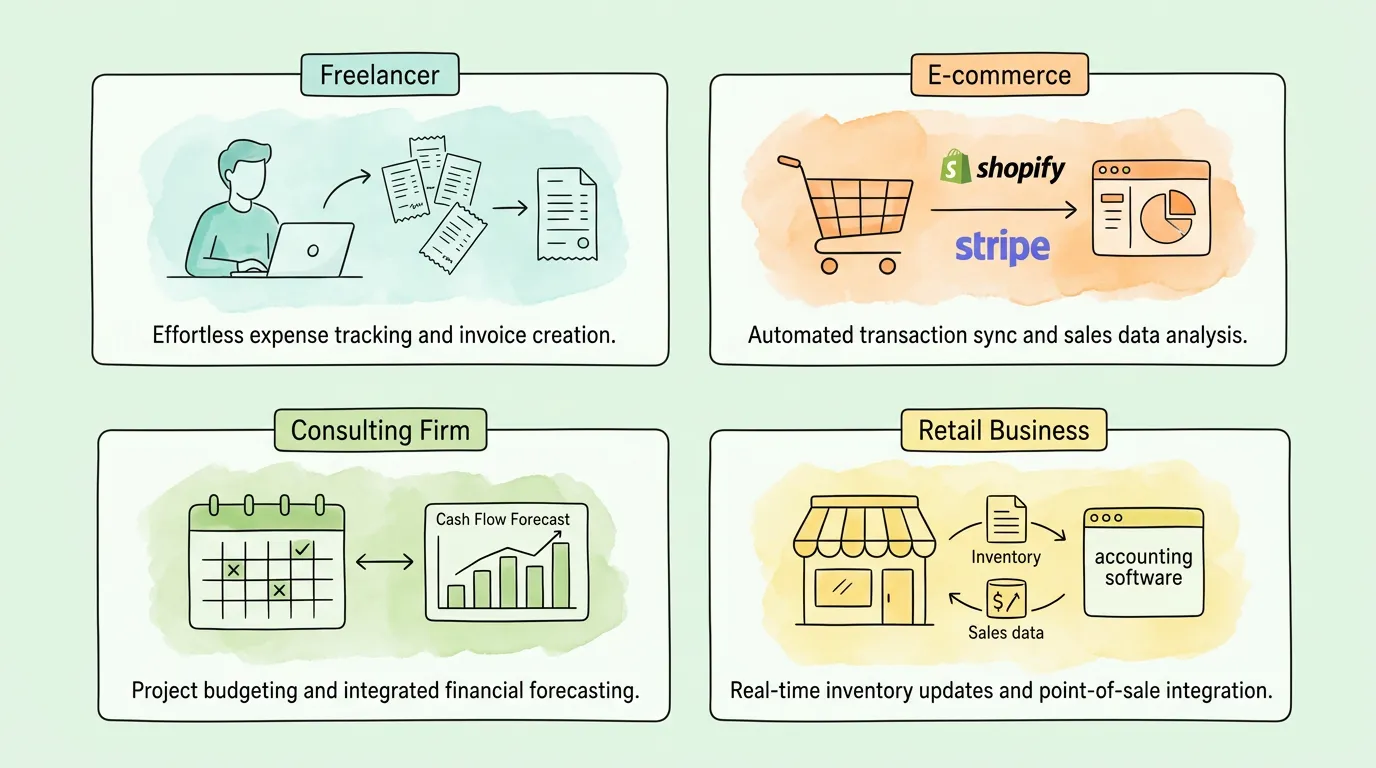
The challenge: income arrives from multiple clients on irregular schedules. Expenses mix professional and personal. Tax categorization requires careful attention. The typical pain point is spending two to four hours per month sorting bank statements and preparing for quarterly tax estimates.
Bookkeeping AI connects to your bank feed and credit card, automatically categorizes every transaction based on vendor and description, and separates business from personal (or flags mixed transactions for review). By tax time, your books are already organized. The preparation work is reviewing exceptions, not starting from scratch.
The most important feature for freelancers: mobile receipt capture with automatic OCR, so paper receipts are digitized and categorized immediately rather than accumulating in a drawer. For a practical guide to getting your receipts organized whether or not you use AI, see organizing business receipts.
The challenge: high transaction volume across multiple platforms (Shopify, Etsy, Amazon), multiple payment processors (Stripe, PayPal, Square), platform fees subtracted from settlements, returns and refunds reversing previous entries. Manual reconciliation of a busy e-commerce store can take a full working day each month.
Bookkeeping AI connects directly to each platform via API, imports every transaction (sale, fee, refund, chargeback), and reconciles them against bank deposits automatically. Real-time dashboards show net revenue after platform fees, gross margin by product category, and cash position based on actual settlements rather than gross sales. For sellers on multiple channels, this visibility is operationally essential, not just a nice-to-have.
The challenge: project-based income creates irregular cash flow. Invoices are tied to milestones. Some clients pay promptly; others stretch to 60 or 90 days. Making reliable decisions about hiring or investment requires knowing when money will actually arrive, not just when invoices are due.
Bookkeeping AI learns your clients' payment behavior from historical data. A client who consistently pays on day 45 despite net-30 terms gets modeled as a 45-day payer in cash flow forecasts. Combined with automated invoice generation from logged billable hours, this gives consulting firms the cash flow visibility they need to make confident growth decisions. For guidance on running better invoice approval workflows alongside AI bookkeeping, see invoice approval process.
The challenge: point-of-sale transactions from physical and online channels, inventory cost-of-goods-sold calculations, supplier invoice management, payroll integration, and sales tax collection across different jurisdictions. The bookkeeping complexity is high; the resources available for it are low.
Bookkeeping AI integrates with your POS system (Square, Clover, Lightspeed), syncs sales data into the correct revenue accounts automatically, imports supplier invoices for cost-of-goods-sold tracking, and handles sales tax categorization by jurisdiction. For retail businesses that have been managing this manually, the time saving from automation is often eight to fifteen hours per month. For a broader set of bookkeeping fundamentals that complement your AI setup, see small business bookkeeping tips.
Most articles about bookkeeping AI stop at benefits. These limitations matter when setting expectations and designing your implementation.
Bookkeeping AI reduces human involvement in routine transactions; it does not eliminate it. Every platform has an exception rate — transactions it cannot categorize with sufficient confidence. A well-configured AI running on a mature dataset might reach a 1-2% exception rate, meaning on 300 transactions per month you still review 3-6 manually. A new implementation in its first month may have a 15-20% exception rate while the model learns your patterns.
This is still a massive improvement over 100% manual entry, but it means the "set it and forget it" expectation is unrealistic. You need a weekly or monthly exception review process as part of your financial routine.
Bookkeeping AI handles transactional accounting well. It handles structural accounting decisions poorly without configuration. If you have multiple entities, intercompany transfers, equity transactions, or complex revenue recognition requirements, you need a knowledgeable accountant to set up the chart of accounts, configure the routing rules, and review the output regularly. The AI will follow the structure you give it — but building the right structure requires human expertise first.
One-off transactions (an unusual vendor, a complex asset purchase, a settlement payment, a grant received) will almost always be flagged as exceptions. The AI has no historical pattern to match them against. This is appropriate behavior — you do not want the system guessing on unusual transactions — but it means your accountant still needs to review and code anything outside the pattern of normal business operations.
If your bookkeeping AI does not have a native integration with a tool in your stack — a specific POS system, an industry-specific invoicing platform, a niche payroll provider — you may need to export CSV files and import them manually. These manual transfer points defeat the purpose of automation. Always verify that integrations are native API connections (not Zapier bridges) and test the actual data flow before committing to a platform. For a guide on what good accounting software integration looks like, see integration with QuickBooks Online.
The right platform depends on your business model, transaction volume, existing software stack, and the specific tasks currently consuming the most time.
| Feature | Why It Cannot Be Optional |
|---|---|
| Bank feed integration | Without real-time transaction import, you still have manual entry |
| AI categorization with learning | Rule-based tools break; ML-based tools improve |
| Mobile receipt capture | Paper receipts exist in every business; they need a capture path |
| QuickBooks or Xero sync | Your accountant works in one of these; the sync must be reliable and bidirectional |
| Audit trail | Every categorization and correction logged with timestamp for compliance |
| Exception handling UX | You will review exceptions regularly; the interface for doing so matters |
| Feature | When It Becomes Important |
|---|---|
| Multi-user access controls | As soon as a second person needs to submit expenses or review transactions |
| Multi-currency support | When you pay international vendors or receive foreign currency |
| ERP integration | When you outgrow QuickBooks or Xero and move to NetSuite or Sage Intacct |
| Custom reporting | When generic dashboards no longer answer your specific management questions |
| Approval workflows | When transactions above certain thresholds need a second set of eyes |
| Feature | Why It Matters | Your Priority |
|---|---|---|
| Automatic bank transaction import | Core time-saver; eliminates manual entry | High |
| AI categorization with ML learning | Accuracy improves over time | High |
| Mobile receipt/invoice capture | Handles paper documents and on-the-go expenses | High |
| Native accounting software sync | Clean data flow to where your accountant works | High |
| Exception handling dashboard | You need an efficient way to review what AI missed | High |
| Approval workflows | Prevents unauthorized spending; creates audit trail | Medium-High |
| Multi-currency support | Required for international vendors | Medium (varies) |
| Cash flow forecasting | Proactive visibility, not just historical reporting | Medium |
| Customizable chart of accounts | Matches your GL structure, not a generic template | Medium |
| Security certifications (SOC 2) | Assurance your financial data is protected | High |
| Customer support quality | When you need help, response time and competence matter | Medium-High |
Connect your primary bank accounts and credit cards to activate the bank feed. Connect your accounting software (QuickBooks, Xero, or equivalent) and verify the bidirectional sync works correctly. Upload a batch of recent invoices or receipts to test extraction accuracy. Configure your chart of accounts mapping so the AI's categories align with your GL structure. Designate who on your team is responsible for weekly exception review.
Run the system in parallel with your existing process for at least two to four weeks. Use exception review sessions (15-30 minutes weekly) to correct miscategorizations. Pay particular attention to recurring vendors — get those coded correctly early and the ML model will handle them automatically going forward. Compare the AI's output against your manual records for the same period to verify accuracy before fully switching over.
Establish your baseline KPIs: exception rate, time spent on monthly review, time to close month-end books, and accountant hours freed per month. Identify the two or three transaction types still generating the most exceptions and add custom rules to address them. Review your cash flow dashboard and assess whether the real-time visibility is changing how you make spending and investment decisions. Schedule a 90-day review with your accountant to verify GL coding accuracy and compliance.
For a practical guide to building clean bookkeeping habits that support your AI implementation, see automate bookkeeping.
Answer these questions to assess whether bookkeeping AI will deliver clear value for your business right now, or whether you should invest in foundational systems first.
| Question | If Yes | If No |
|---|---|---|
| Do you spend more than 3 hours/month on manual data entry? | Strong ROI case for AI | May not justify the cost yet |
| Do you receive more than 50 transactions/month? | Clear automation candidate | Basic tool may suffice |
| Do you have a consistent chart of accounts already configured? | AI can map to it from day one | Set up your COA first |
| Does your accounting software support API integration? | Native sync is available | Check compatibility before buying |
| Do you receive invoices or receipts in more than one format? | AI handles format diversity well | Simple bank feed import may be enough |
| Do you have someone who can do a weekly 20-minute exception review? | Sustainable implementation | Unreviewed exceptions will accumulate |
| Have you experienced errors in financial reports that affected decisions? | Pain is real; ROI is clear | Consider it a preventive investment |
| Is your current bookkeeper or accountant doing primarily data entry? | AI frees them for strategic work | Implementation will change their role; plan for it |
Scoring: If you answered "Yes" to five or more questions, bookkeeping AI will very likely deliver positive ROI within six months. Three to four "Yes" answers suggests you are a good candidate but should start with a focused pilot. Fewer than three suggests your current volume or system maturity may not yet justify the switch. For a comprehensive view of all the bookkeeping fundamentals worth having in place before or alongside your AI implementation, see small business bookkeeping tips.
Bookkeeping AI automates the transactional layer of bookkeeping: importing bank and credit card transactions, categorizing expenses and income by GL code, processing invoices and receipts with OCR extraction, reconciling bank statements against ledger entries, generating standard financial reports (P&L, balance sheet, cash flow), sending payment reminders for outstanding invoices, and flagging anomalies that may indicate errors or fraud. It does not automate financial judgment: interpreting complex transactions, advising on tax strategy, making decisions about how unusual items should be classified, or analyzing what the numbers mean for your business.
For routine, recurring transactions from known vendors, modern AI achieves 95-99% field-level accuracy. For unusual transactions, new vendors, or non-standard document formats, accuracy is lower and human review is expected. The key is that accuracy improves over time as the ML model learns your specific patterns. Most businesses find that after 60-90 days of use, exception rates fall to 1-3% of total transactions — meaning 97%+ of bookkeeping happens without any human touch. You should always maintain a regular exception review process; the tools that eliminate this are overstating their capabilities.
No. Bookkeeping AI automates data entry and categorization — the work that consumes accountant time without requiring accountant expertise. What your accountant does that AI cannot: apply professional judgment to complex transactions, advise on tax minimization strategies, interpret financial trends in the context of your business model, represent you in audits, and make recommendations about financial structure and growth strategy. What changes is how your accountant's time is allocated. Less time on data entry; more time on the work that actually requires their credentials and judgment. This makes their engagement more valuable, not redundant.
Reputable platforms use bank-grade encryption (AES-256) for data at rest and in transit, SOC 2 Type II certification (which verifies security controls through independent audit), role-based access controls, multi-factor authentication, and read-only connections to bank accounts (the AI can see transactions but cannot move money). This level of security exceeds what most small businesses could implement on their own local infrastructure. The key questions to verify with any vendor: Are you SOC 2 certified? Where is data stored (region matters for GDPR compliance)? What is your breach notification policy? Any credible vendor will answer these specifically and provide documentation.
Most platforms show meaningful accuracy improvements within the first 30-60 days as the ML model processes your transaction history and incorporates your corrections. The initial setup period (first two weeks) typically has a higher exception rate — expect 10-20% of transactions to need review. By month two, most businesses see exception rates fall to 3-8%. By month three to four, 1-3% is achievable for businesses with a consistent vendor set. Businesses with highly variable vendor lists (like event-based businesses or those in rapid growth) may see the calibration period extend to six months.
A traditional bookkeeping service provides a human bookkeeper (full-time, part-time, or fractional) who manually processes your transactions, reconciles accounts, and produces financial reports. The cost is labor-based (typically $15-50/hour or $200-1,000+/month depending on volume and complexity). Bookkeeping AI is software that automates the same transactional tasks for a flat monthly subscription fee ($30-200/month for most small businesses). The AI does not provide strategic advice; a bookkeeper often does. Most businesses use both: AI for the transactional automation layer and a human accountant or bookkeeper for the review, judgment, and advisory layer. Together, they cost less and produce better results than a traditional bookkeeping service alone. For a comparison of the broader software category, see our guide on accounting automation software.
Most bookkeeping AI platforms integrate natively with QuickBooks Online, Xero, and Sage. Some also integrate with FreshBooks, Wave, and Zoho Books. Less common accounting platforms may require CSV export/import workarounds. Before purchasing any bookkeeping AI tool, verify: Is the integration with your specific platform native (direct API) or via a connector like Zapier? Does data flow bidirectionally (changes in either system sync to the other)? Are there known field-mapping limitations that would require manual workarounds? Testing the full data flow — transaction in bookkeeping AI, approved, synced to accounting software, visible with correct GL codes — before committing to a platform is strongly recommended.
Bookkeeping AI is not magic, and it is not a replacement for financial expertise. What it is: a reliable, improving-over-time system that handles the mechanical layer of bookkeeping so that the humans involved can focus on the work that actually requires human judgment.
The businesses that get the most from it are not the ones who bought the most sophisticated platform. They are the ones who started with a clear diagnosis of their highest-pain manual processes, chose a tool that addressed those specific problems, maintained a consistent exception review habit, and used the time they got back to actually improve how they manage their finances.
TallyScan captures invoices and receipts from your email inbox and vendor portals automatically, extracts every key field with AI-powered OCR, categorizes transactions based on your learned patterns, and syncs approved data to QuickBooks and Xero in real time. Your books stay current without manual entry, so your accountant can spend your time together on the work that actually moves your business forward.
Start your free trial — see your first month of transactions categorized automatically.
Related reading: Accounting AI | AI Agent for Accounting | Automate Bookkeeping | Accounting Process Automation | Small Business Bookkeeping Tips | Accounting Automation Software
A no-hype guide to accounting AI with 6 real use cases, verified ROI data, key limitations, a software selection framework, and practical FAQs.
Learn what an AI agent for accounting does, how it works, and which use cases deliver the biggest ROI for your finance team.
Upload invoice PDFs to OneDrive by hand, with the sync client, or via Power Automate, then automate capture-and-file with AI so Microsoft 365 teams stop dragging files every week.