Accounting AI: What It Does, What It Doesn't, and Why Finance Teams Move Fast
The TallyScan Team
23 min read
#accounting AI#AI in accounting#automated accounting#finance AI#bookkeeping AI#AI accounting software#artificial intelligence accounting#machine learning in accounting#AI accounts payable#accounting automation
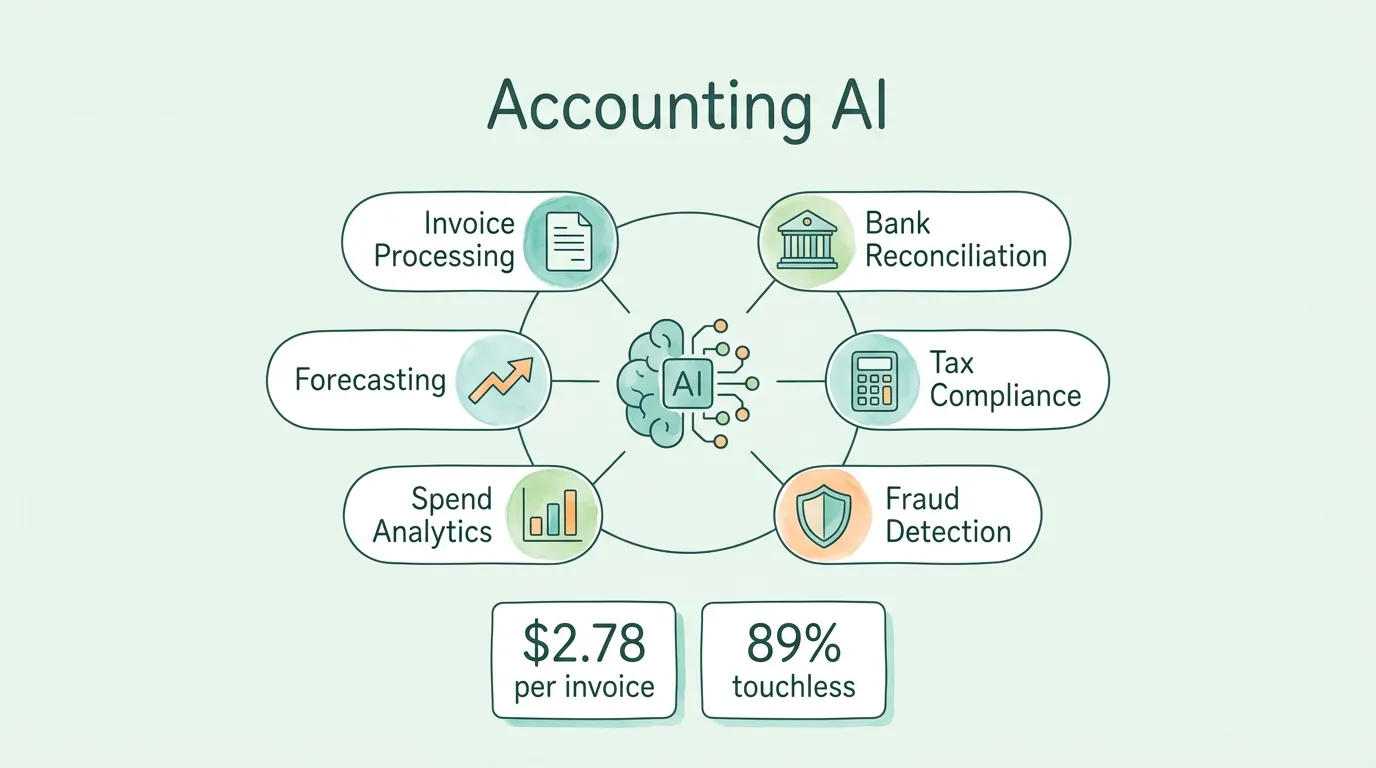
The global AI in accounting market was valued at $5.48 billion in 2024 and is projected to reach $53.41 billion by 2034, growing at a compound annual growth rate of 25.6%, according to industry research. That growth rate is not driven by hype. It is driven by a simple operational reality: the average accounts payable team still processes invoices manually at a cost of $12.88 per document in 17.4 days, while AI-powered teams process the same invoice for $2.78 in 3.1 days.
Accounting AI is not a single product or a uniform capability. It is a category of technology, ranging from narrow tools that automate one specific task to broad platforms that reshape entire finance workflows. This guide covers what accounting AI actually does, where it creates the most measurable value, what it still cannot do, and how to evaluate whether it fits your organization.
What Is Accounting AI?
Accounting AI refers to software that applies artificial intelligence techniques, primarily machine learning, natural language processing, and robotic process automation, to financial data capture, processing, analysis, and reporting tasks.
The key distinction from earlier-generation accounting software is the difference between rule-following and pattern-learning. Legacy software executes explicit instructions: if an invoice total exceeds $5,000, route it to the VP for approval. It cannot handle a vendor invoice format it has never seen before.
AI-powered accounting software learns from data. Shown thousands of invoices across hundreds of vendor formats, it develops the ability to extract correct field values from a document it has never seen, because it has learned what invoice data looks like in context, not just in a specific layout.
The three core technologies driving accounting AI:
Machine Learning (ML): Learns patterns from large datasets and applies those patterns to new inputs. In accounting, ML powers expense categorization (this receipt from AWS should be "Cloud Infrastructure"), duplicate invoice detection (these two invoices have matching amounts and dates from the same vendor), and anomaly detection (this vendor's payment amount is 340% above their 12-month average).
Natural Language Processing (NLP): Enables AI to read and extract structured data from unstructured text, including PDF invoices, email body billing notifications, scanned receipts, and contract documents. NLP is why an AI system can process an invoice embedded in an HTML email from Stripe with the same accuracy as a structured PDF from a traditional supplier.
Robotic Process Automation (RPA): Handles rules-based digital tasks: logging into vendor portals to download statements, moving data between systems, triggering notification emails when exceptions are flagged. RPA is the "execution layer" that connects AI decisions to system actions.
These three technologies work together. NLP reads the document. ML classifies and validates the data. RPA executes the resulting action in your accounting system.
Which 6 Accounting AI Use Cases Create the Most Measurable Value?
1. Intelligent Invoice and Receipt Processing
This is where most organizations see their first measurable AI return, because it is the highest-volume, most manual, and most error-prone task in the average AP department.
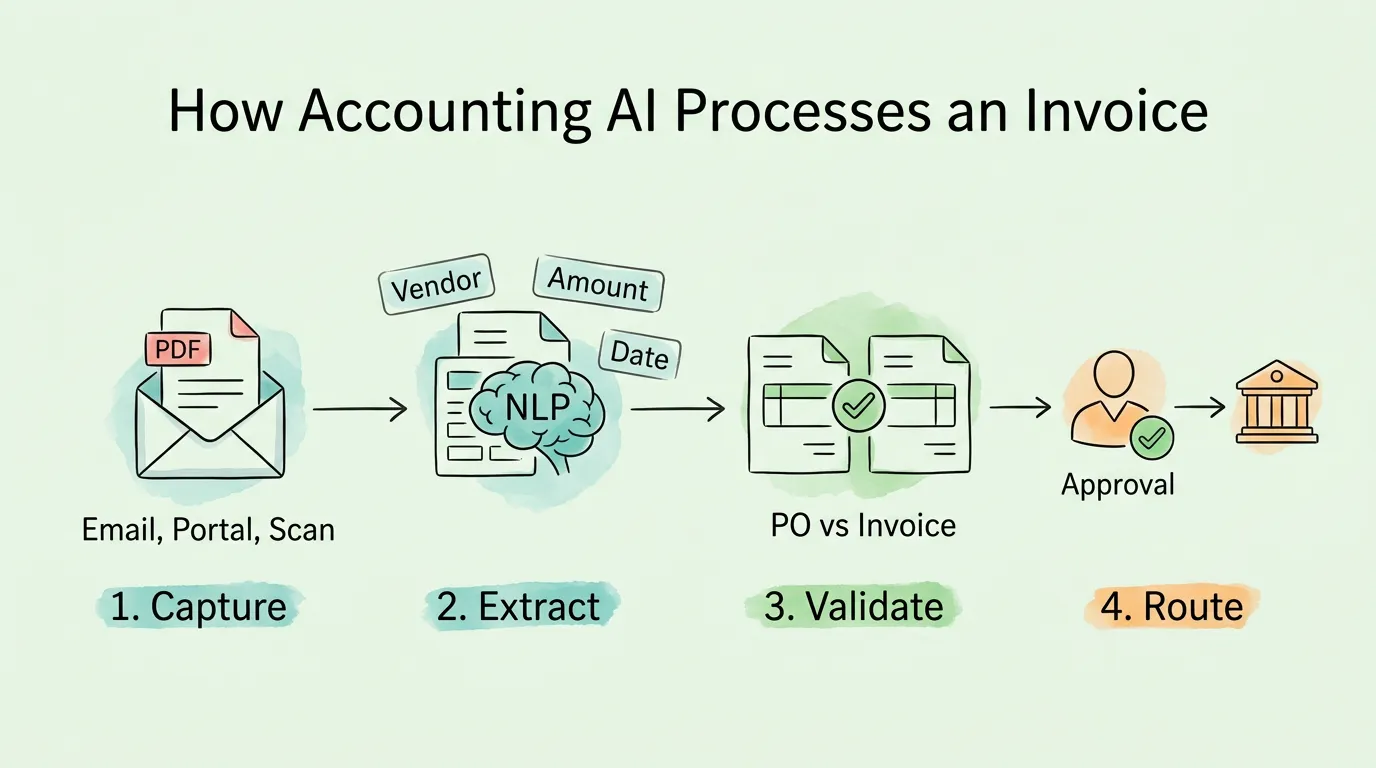
An AI-powered invoice processing system connects to your email inbox, vendor portals, and document management system. It captures invoices regardless of format (PDF attachment, HTML email body, image scan, XML e-invoice), extracts all relevant fields using NLP, validates the extracted data against purchase orders and vendor master records using ML, and routes the result for approval or flags it as an exception.
What this replaces: 8 to 15 minutes of manual data entry per invoice, review of vendor format variations, manual PO matching, and manual GL coding.
Measured outcome: According to Ardent Partners, organizations using AI-powered invoice processing achieve a touchless processing rate of 89%, meaning 89 out of every 100 invoices are processed, validated, and routed without any human intervention. The industry average without AI is 38%.
Bank reconciliation, matching every transaction in your accounting system against your bank statement, is one of the most time-consuming and error-sensitive tasks in month-end close. Manual reconciliation at a mid-market company with 500 to 2,000 monthly transactions typically takes 2 to 4 days. AI reduces that to hours.
AI-powered reconciliation works by:
Importing bank transactions automatically via direct bank connection or statement upload
Matching bank transactions to posted accounting entries using ML-based matching rules that handle date offsets, partial payments, combined payments, and description variations
Flagging unmatched items for human review with suggested matches ranked by confidence score
Learning from reconciler corrections over time to improve match accuracy
The compounding benefit: Organizations that reconcile accounts monthly rather than annually close their books in an average of 5 to 7 business days. Teams relying on manual annual reconciliation average 14 to 20 business days for the same process. AI makes monthly reconciliation practical for teams that previously found it too time-consuming.
Tax preparation in accounting AI does not mean filing your taxes automatically. It means eliminating the manual data assembly work that consumes most of the time a finance team spends on tax preparation.
Where accounting AI helps with tax:
Automatically categorizing every transaction to the correct tax-relevant account throughout the year, rather than requiring manual reclassification at year-end
Flagging deductible expenses that have been miscategorized or missed
Generating transaction-level reports organized by tax line item for accountant or CPA review
Identifying transactions that require supporting documentation (receipts, contracts, mileage logs) and flagging gaps before filing
The IRS requires businesses to retain records supporting income and deductions for a minimum of 3 to 7 years depending on the situation. AI-powered systems that maintain a complete, searchable transaction archive throughout the year make document retrieval for tax or audit purposes a minutes-long task rather than a multi-day project.
What AI cannot yet do: AI cannot exercise the professional judgment required for complex tax positions, entity structure decisions, or jurisdiction-specific tax elections. Human CPA judgment remains essential for anything beyond data assembly and categorization.
4. Fraud Detection and Anomaly Monitoring
Traditional fraud detection in accounting relies on periodic audits: reviewing a sample of transactions after the fact, hoping to catch problems that may have occurred months earlier. AI-powered anomaly detection is continuous and operates on every transaction in real time.
ML models trained on your historical transaction data learn what "normal" looks like for your business: the typical payment amount to each vendor, the usual payment timing, the expected invoice frequency. Any transaction that deviates significantly from established patterns is flagged for review before payment is released.
Common fraud patterns that AI catches:
Duplicate invoices: same vendor, same amount, different reference number
Business email compromise: vendor banking details changed shortly before a large payment
Ghost vendor invoices: invoices from vendors with no prior transaction history and no associated purchase order
Sequential fraud: multiple small transactions just below approval thresholds from the same vendor in a short period
Employee expense fraud: reimbursement claims significantly above the employee's historical pattern or submitted for non-business merchant categories
According to the Association of Certified Fraud Examiners (ACFE), organizations lose an estimated 5% of annual revenue to fraud, with a median loss of $130,000 per incident for billing and vendor fraud specifically. AI-powered continuous monitoring catches these schemes at the point of transaction rather than months later during an audit.
5. Spend Analytics and Vendor Intelligence
Most organizations have limited visibility into where their money actually goes at a granular level. AI-powered spend analytics changes this by automatically categorizing every transaction, identifying spending patterns, and surfacing insights that would require weeks of manual analysis to generate.
Practical spend analytics outputs:
Category-level spend breakdown updated in real time (not at month-end)
Vendor concentration analysis: which vendors represent your highest spend, and which categories are sourced from a single vendor creating concentration risk
Price benchmarking: comparing your unit prices against market benchmarks for common categories
Contract compliance monitoring: flagging invoices where the billed rate exceeds the contracted rate
Duplicate spend detection: identifying overlapping SaaS subscriptions that serve the same function across departments
For finance teams, this means moving from a reactive cost-reporting function to a proactive cost-management capability without adding headcount.
6. Financial Forecasting and Scenario Planning
AI-powered forecasting uses historical financial data, seasonal patterns, and current pipeline information to generate cash flow projections, revenue forecasts, and budget variance predictions with significantly higher accuracy than static spreadsheet models.
Where AI forecasting outperforms spreadsheet models:
Handles large transaction datasets that are impractical to model manually
Updates automatically as new data arrives, rather than requiring manual refresh
Identifies seasonal patterns and cyclical trends in cash flow that are difficult to detect in year-over-year comparisons
Runs multiple "what-if" scenarios simultaneously (e.g., what does our cash position look like in 90 days if receivables collection slips by 15 days, and our largest vendor raises prices by 8%?)
For the cash flow management context that AI forecasting connects to, see our guide on how to improve cash flow.
What Does the Real ROI of Accounting AI Look Like in Data?
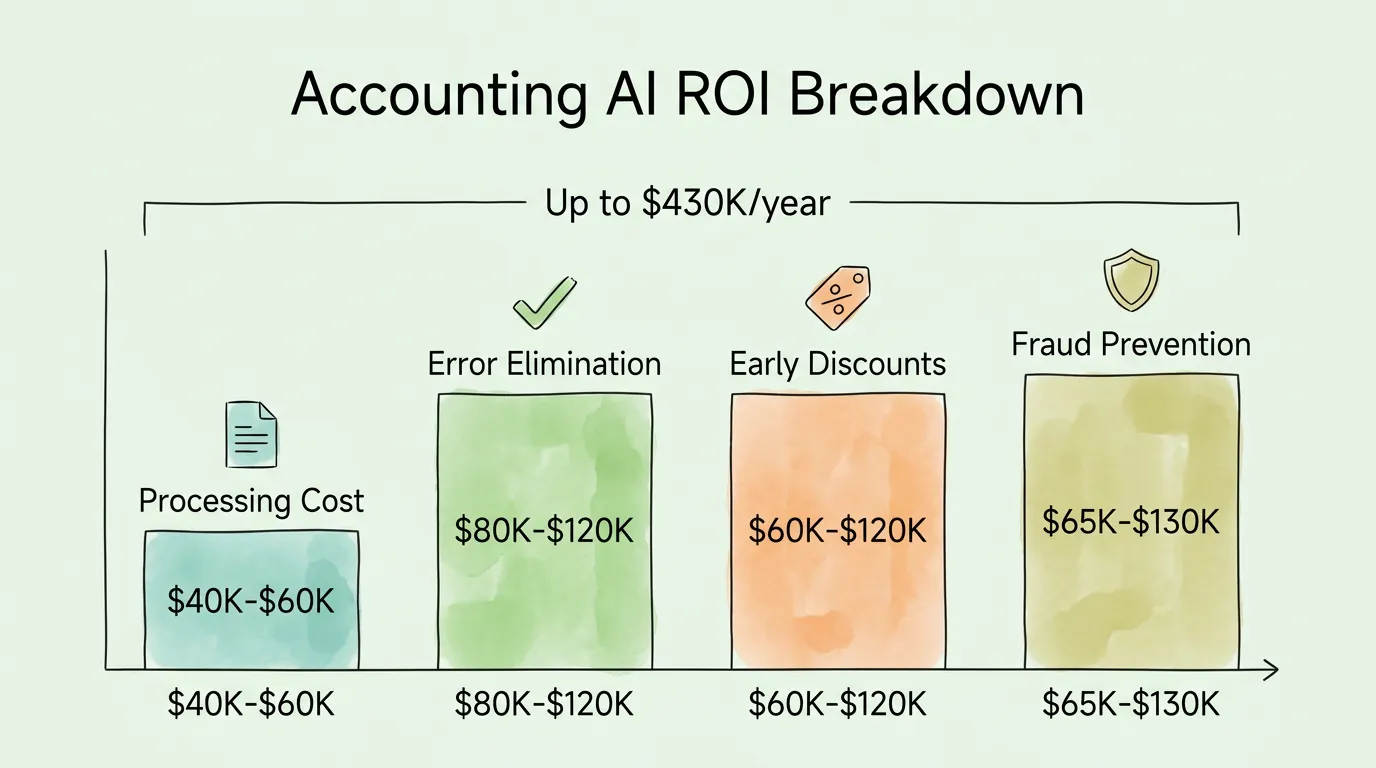
The ROI case for accounting AI rests on four measurable categories of return:
1. Direct labor cost reduction
At the industry-average cost of $12.88 per invoice manually processed, an organization handling 500 invoices per month spends $6,440 per month in processing labor. Achieving the best-in-class rate of $2.78 per invoice saves $5,050 per month, or $60,600 annually. For an organization at 2,000 invoices per month, that becomes $242,400 in annual savings from invoice processing alone, according to IOFM benchmarking data.
2. Error correction cost elimination
IOFM research indicates that approximately 39% of manually processed invoices contain at least one data entry error, costing an average of $52 per error to investigate and correct. At 500 invoices per month with a 39% error rate, that is 195 errors per month at $52 each: $10,140 in monthly error-correction costs, in addition to the direct processing cost.
3. Early payment discount capture
Best-in-class AP teams capture 92% of available early payment discounts, versus 41% for average teams. For an organization where suppliers offer 2/10 NET 30 terms on $1 million in monthly payables, closing that 51-percentage-point gap is worth approximately $10,200 per month in captured discounts.
4. Fraud prevention
Given a median fraud loss of $130,000 per incident and an ACFE-reported average detection lag of 12 months for traditional manual auditing, the financial protection value of real-time AI anomaly detection is significant even if it prevents one incident per year.
ROI Category
Conservative Estimate
High Estimate
Processing cost reduction (500 inv/mo)
$40,000/year
$60,000/year
Error correction elimination
$80,000/year
$120,000/year
Early payment discounts
$60,000/year
$120,000/year
Fraud prevention value
$65,000/year
$130,000/year
Total
~$245,000/year
~$430,000/year
What Can Accounting AI Not Do Yet?
This is the section most guides avoid writing. The AI tools available in 2026 are powerful within well-defined domains, but their limitations are real and commercially important to understand.
Accounting AI cannot exercise professional judgment. Tax elections, complex revenue recognition questions, entity structuring decisions, and materiality assessments require human professional judgment that current AI systems cannot replicate. AI can assemble the data and flag the question; a CPA or CFO must answer it.
Accounting AI cannot handle novel situations reliably. ML models perform well on patterns they have seen in training data. A genuinely unusual transaction type, a new business line, or a regulatory change can degrade AI accuracy significantly until the model has seen enough new examples to adapt.
Accounting AI cannot replace human oversight of its own outputs. The "set it and forget it" assumption is the most common implementation failure. AI-processed data requires periodic human review to catch systematic errors, especially in the early months after implementation when the model is still learning your specific business context.
Accounting AI cannot ensure compliance on its own. AI tools can flag potential compliance issues and assist with document organization, but compliance responsibility remains with the humans in the organization. An AI categorizing a transaction incorrectly does not transfer legal responsibility away from the business.
Accounting AI cannot manage vendor relationships. Dispute resolution, payment term negotiation, and supplier relationship management require human communication and judgment.
Understanding these limitations before implementation prevents the most common source of accounting AI disappointment: expecting the system to operate without oversight and being surprised when it produces systematic errors in edge cases.
How Do You Choose Accounting AI Software? (Evaluation Framework)
The accounting AI market includes hundreds of products, ranging from narrow tools that automate a single task to full AP automation platforms. Evaluating them without a framework leads to purchasing decisions based on demo polish rather than operational fit.
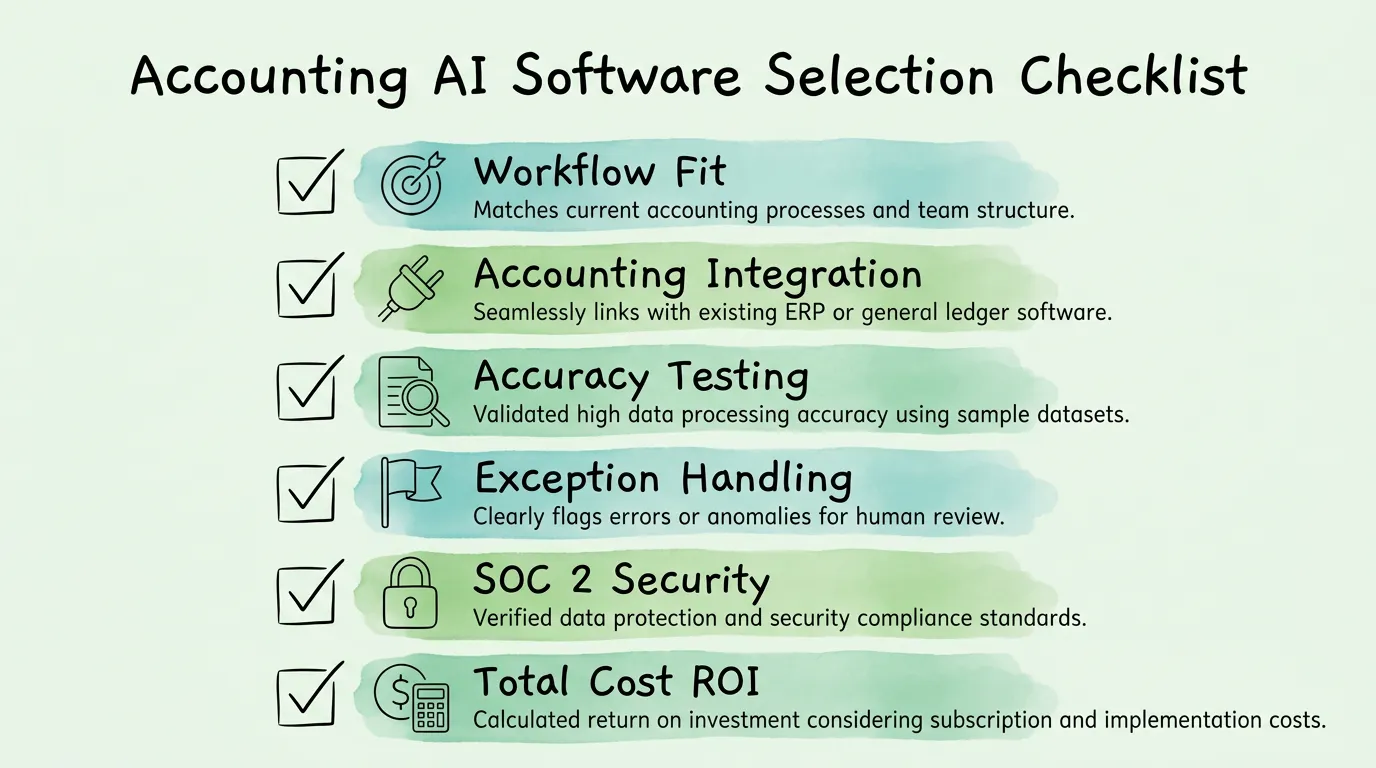
Step 1: Define the specific workflow you are automating first
Do not buy a platform before deciding which process you are addressing. The three highest-ROI starting points for most organizations are: (a) AP invoice processing, (b) expense report and receipt management, and (c) bank reconciliation. Choose one, validate the ROI, then expand.
An AI tool that does not integrate with your accounting system creates a data export/import problem that can consume the time savings the AI generates. Before any other evaluation criteria, confirm that the tool integrates directly with your general ledger or ERP (QuickBooks, Xero, NetSuite, Sage, SAP, etc.). Direct API integration is preferable to CSV export.
Step 3: Evaluate accuracy with your own documents
Request a proof of concept using your actual invoices or receipts, not the vendor's demo data. Measure field extraction accuracy (what percentage of fields are extracted correctly without correction) on a sample of 50 to 100 documents. Best-in-class systems achieve 98%+ on standard invoice formats. Any system below 95% on your specific document types will generate more correction work than it saves.
Step 4: Assess the exception handling workflow
Every AI system produces exceptions: documents it cannot process with confidence. The quality of the exception handling workflow, how clearly it presents the issue, how easily a human can correct it, and whether it learns from corrections, determines whether exceptions become a manageable queue or a daily frustration.
Step 5: Verify security and compliance certifications
For financial data, the baseline expectation is SOC 2 Type II certification, end-to-end encryption in transit and at rest, and role-based access controls. Ask for the SOC 2 report directly. A vendor unable or unwilling to provide it is not a viable option for financial data. For more on compliance standards, see our audit readiness checklist.
Step 6: Calculate the all-in cost including implementation
List price is rarely the total cost. Factor in: subscription fee, implementation and configuration cost, staff training time, data migration effort, and ongoing administration. Compare this against your baseline processing cost (current invoices per month × current cost per invoice) to calculate a realistic payback period.
What Does a 4-Phase Accounting AI Implementation Look Like?
Phase 1: Baseline and selection (weeks 1-4)
Document your current process: how many invoices/receipts/transactions per month, current processing time, current error rate, current cost per document
Identify your highest-volume, highest-pain workflows as the initial automation target
Select your AI tool based on the evaluation framework above
Clean vendor master data before go-live (duplicates and stale records create immediate problems)
Phase 2: Pilot (weeks 5-10)
Go live with a limited scope: one document type, one vendor category, or one department
Measure accuracy daily for the first two weeks: track extraction accuracy, exception rate, and processing time
Correct exceptions and verify the system learns from corrections
Do not expand scope until accuracy exceeds 95% on pilot documents
Phase 3: Full rollout (weeks 11-20)
Expand to full invoice volume with exception-handling workflow fully operational
Train your team on the exception queue, not the full AI system: most staff will only interact with flagged documents
Communicate to vendors the preferred submission format to maximize straight-through processing rates
Begin tracking KPIs monthly: cost per invoice, cycle time, touchless rate, exception rate
Phase 4: Optimization and expansion (month 6+)
Use KPI data to identify remaining bottlenecks and configure the AI tool's matching rules accordingly
Expand to adjacent workflows (bank reconciliation, expense reports, or spend analytics)
Review the AI model's categorization accuracy quarterly and retrain on any systematic errors
Add fraud detection monitoring once the core processing workflow is stable
How Should You Evaluate Data Security and Compliance for Accounting AI?
Financial data is among the most sensitive data a business holds. Before connecting any AI system to your accounting records, verify the following:
SOC 2 Type II certification: This is the baseline security standard for SaaS tools handling financial data. SOC 2 Type II means the vendor's security controls have been independently audited over an extended period (typically 6 to 12 months), not just assessed at a point in time. Always request the actual SOC 2 report, not a summary. More information on this standard is available from the AICPA.
Encryption standards: Data should be encrypted at rest (AES-256) and in transit (TLS 1.2 or higher). Ask specifically about encryption key management: who holds the keys, and under what circumstances can the vendor access your data?
Access controls: The system should support role-based access (AP processors see different data than CFOs) and single sign-on (SSO) integration with your identity provider.
Data residency: For organizations with EU or UK operations, verify that data processing and storage locations comply with GDPR data residency requirements. For EU-specific guidance, the GDPR compliance framework specifies requirements for data controllers using third-party processors.
Audit trail: Every action in the system should be logged with a user ID, timestamp, and action description. This log must be immutable and retrievable for audit purposes. For organizations subject to financial audits, this log is a primary evidence source.
How Should You Apply Accounting AI by Business Size?
Small businesses (under $5M revenue, under 50 invoices/month):
The highest-value starting point is receipt scanning and expense categorization. Manually processing 50 invoices per month is not the primary pain point at this scale; the bigger issue is receipts and expense documentation for tax preparation. AI receipt scanning tools with direct accounting system integration solve this with minimal setup complexity. For more, see our guide on receipt scanning OCR.
Mid-market businesses ($5M-$100M revenue, 100-2,000 invoices/month):
At this scale, AP invoice processing becomes the primary ROI driver. The volume is high enough that manual processing costs are significant, but the organization may not have the resources for a full ERP implementation. Cloud-based AP automation tools with AI extraction and approval workflow automation provide the highest ROI at this size. For guidance on AP performance tracking, see our accounts payable tracking guide.
Enterprise ($100M+ revenue, 2,000+ invoices/month):
At enterprise scale, the priority shifts from process automation to system integration and governance. AI must integrate with complex ERP environments (SAP, Oracle, NetSuite), handle multi-entity and multi-currency operations, and support sophisticated approval hierarchies and compliance reporting. The ROI is highest in the fraud detection and spend analytics categories at this scale, where the dollar amounts involved make even marginal percentage improvements significant.
Frequently Asked Questions
Will accounting AI replace human accountants?
No. Accounting AI automates high-volume, rule-applicable tasks: data entry, document classification, pattern-based matching, and anomaly flagging. It does not replace the professional judgment, client advisory work, complex tax analysis, or strategic financial planning that constitute the most valuable parts of accounting work. According to the AICPA-CIMA, approximately 61% of accounting professionals view AI as a positive development that allows them to focus on higher-value work rather than as a job threat. The realistic impact is that AI handles the repetitive task layer, which accounts for a large fraction of junior accounting work, while human accountants focus on analysis, judgment, and client service.
How accurate is accounting AI at extracting invoice data?
Best-in-class AI invoice extraction systems achieve 98% to 99%+ field accuracy on standard invoice formats from established suppliers. Accuracy is lower on handwritten documents, very poor image quality scans, or highly unusual document layouts. In practice, this means 1 to 2 fields per 100 require human correction on average, compared to a 3% to 5% keystroke error rate for manual data entry. Accuracy improves over time as the system processes more of your specific vendor formats. Always test accuracy on your own documents during vendor evaluation, not on vendor-provided demo invoices.
Is accounting AI secure enough for sensitive financial data?
Reputable accounting AI providers implement security standards equivalent to those used by financial institutions: SOC 2 Type II certification, AES-256 encryption at rest, TLS encryption in transit, and role-based access controls. The security question to ask is not whether AI is inherently secure or insecure, but whether a specific vendor meets these baseline standards. Request the SOC 2 Type II report before signing any contract. A vendor unwilling to provide this document is not an appropriate custodian for financial data.
How long does accounting AI implementation take?
A focused implementation targeting one workflow (AP invoice processing or receipt capture) typically takes 6 to 12 weeks from contract signing to full production: 2 to 4 weeks for configuration and data preparation, 2 to 4 weeks for a limited pilot, and 2 to 4 weeks for full rollout and team training. Enterprise implementations integrating with complex ERP environments can take 3 to 6 months. The most common reason implementations take longer than expected is inadequate data preparation before go-live: vendor master duplicates, inconsistent GL code structures, and missing historical data all extend the timeline.
What is the minimum invoice volume where accounting AI makes financial sense?
AI AP automation starts generating positive ROI at roughly 100 to 200 invoices per month for cloud-based tools. Below that volume, the subscription cost of an AI tool may approach or exceed the labor savings it generates, unless the quality improvement (accuracy, audit trail, faster close) carries additional value for your organization. For organizations processing fewer than 100 invoices per month, the better starting point for accounting AI is receipt scanning and expense categorization, which addresses a different pain point at lower volume.
Can accounting AI handle international invoices in multiple currencies?
Yes, with caveats. Leading AI extraction systems support multi-currency invoice processing and can extract amounts and currency codes from documents in multiple languages. The AI layer handles extraction; your accounting system handles the exchange rate conversion and multi-currency GL posting. The practical requirements are: your accounting software must support multi-currency (QuickBooks, Xero, NetSuite all do), the AI tool must be configured to extract currency codes alongside amounts, and your chart of accounts must be structured to handle multi-currency postings. For an overview of international e-invoicing compliance requirements that intersect with this, see our guide on what is electronic invoicing.
How does accounting AI handle invoice formats it has never seen before?
Modern AI invoice extraction is format-agnostic, not template-dependent. Rather than requiring a template for each vendor's invoice layout, it uses NLP to understand the semantic content of the document: vendor name, date, amount, tax number, and line items can be identified by their content and position context even on completely new layouts. Accuracy on new formats is slightly lower than on familiar formats (typically 95% vs. 98-99%), but the system learns from any corrections made during review and improves on subsequent documents from the same vendor. This is a fundamental improvement over template-based OCR systems, which require manual template creation for each new vendor format. For more on how OCR and AI extraction differ technically, see our guide on what is OCR technology.
What is the difference between accounting AI and accounting automation?
Accounting automation refers to rules-based software that executes predefined instructions without learning. Examples include auto-applying recurring payment rules, scheduled bank statement imports, and fixed approval routing trees. Accounting AI adds a learning layer on top of automation: it handles variation, improves with data, and can process unstructured inputs like PDF documents or email body text. In practice, most modern accounting AI tools combine both: an AI layer for data extraction and classification, and an automation layer for executing the resulting workflow actions in your accounting system. The distinction matters when evaluating vendors: ask specifically whether their extraction is AI-based (format-agnostic, learns from corrections) or template-based (requires manual template creation for each vendor).
Accounting AI is not a future technology. It is a current capability with documented ROI in invoice processing, bank reconciliation, fraud detection, and financial forecasting. The finance teams moving fastest are not those with the largest technology budgets; they are those that identified one specific high-cost, high-volume process, validated a tool against their own data, and expanded from there.
TallyScan applies AI-powered extraction to invoices and receipts across email, vendor portals, and uploaded documents, with direct sync to QuickBooks and Xero. It is the starting point for finance teams that want to validate accounting AI ROI against their own invoice volume before expanding to broader workflow automation.