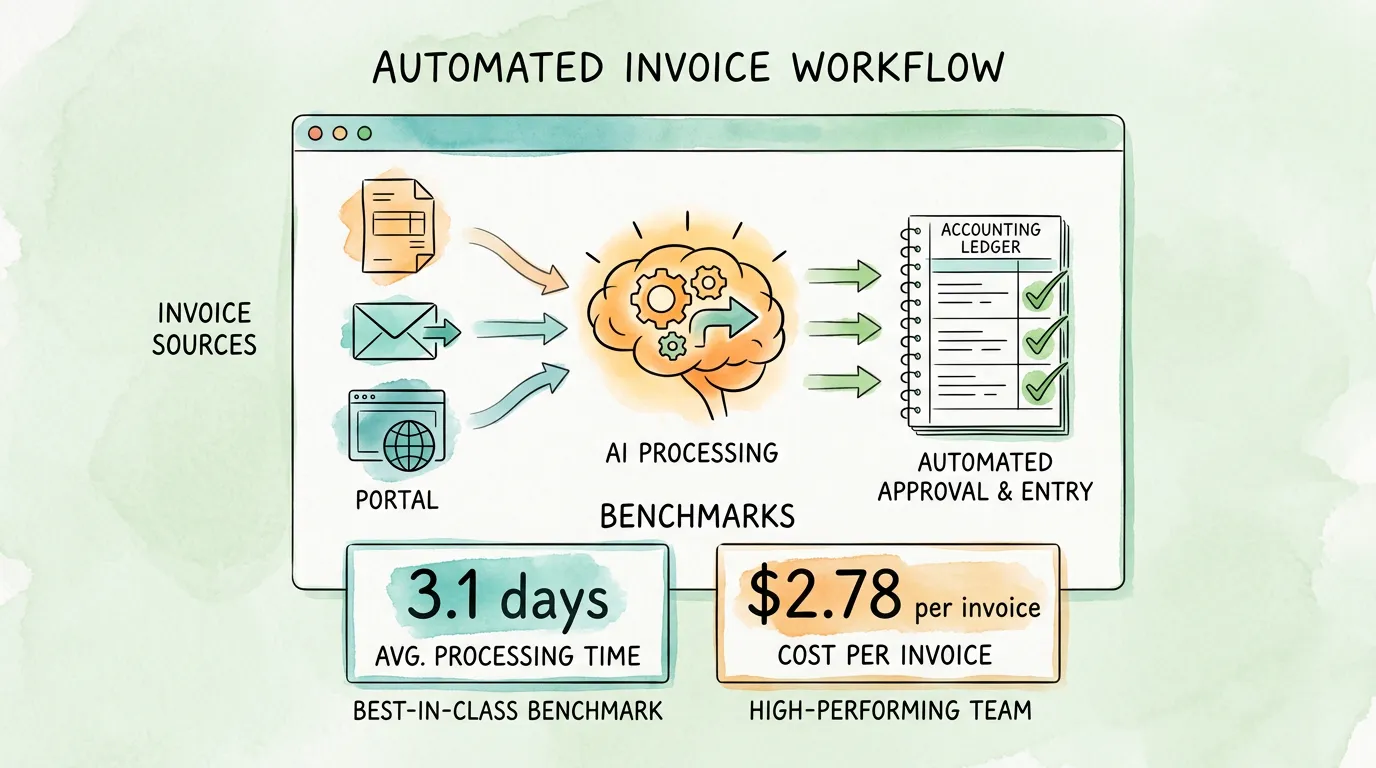
Here is what separates high-performing finance teams from the rest: they do not manage invoices. They manage the system that handles invoices.
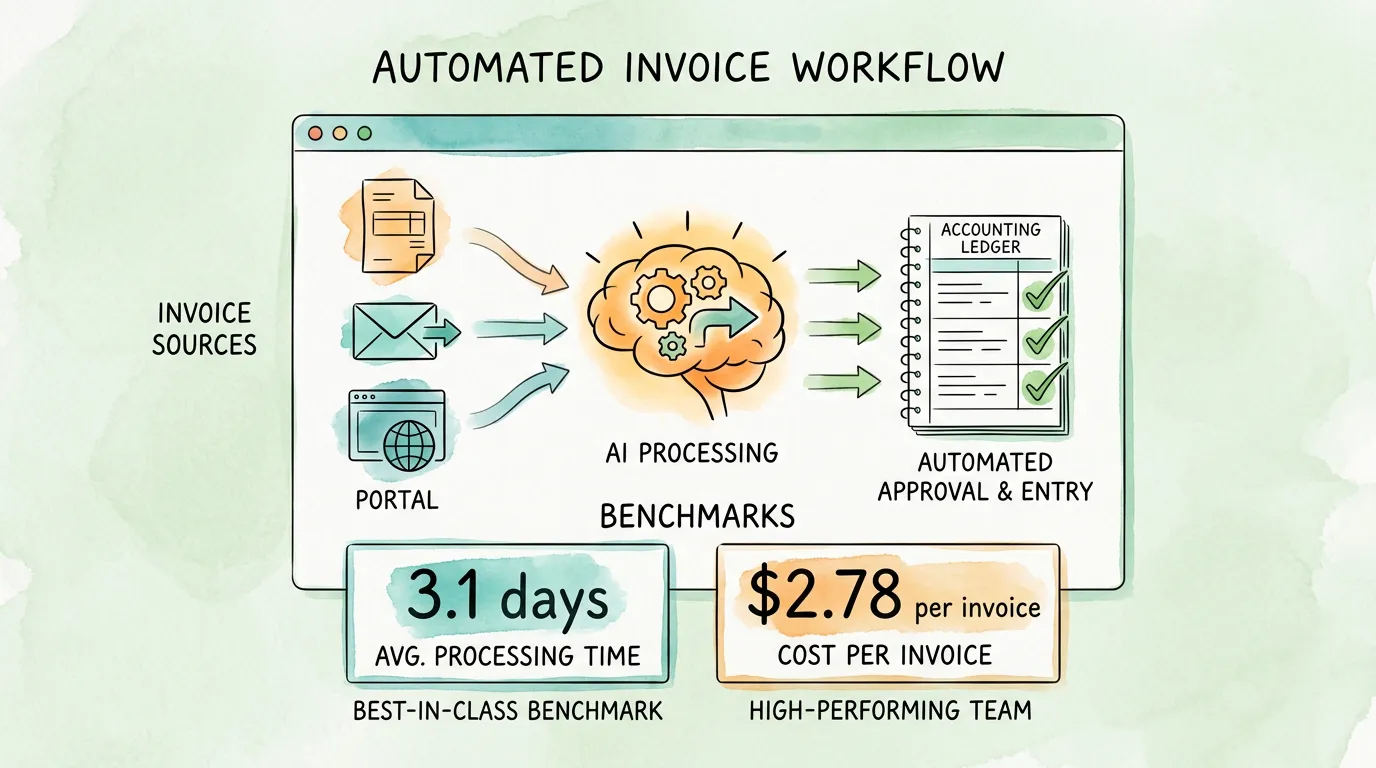
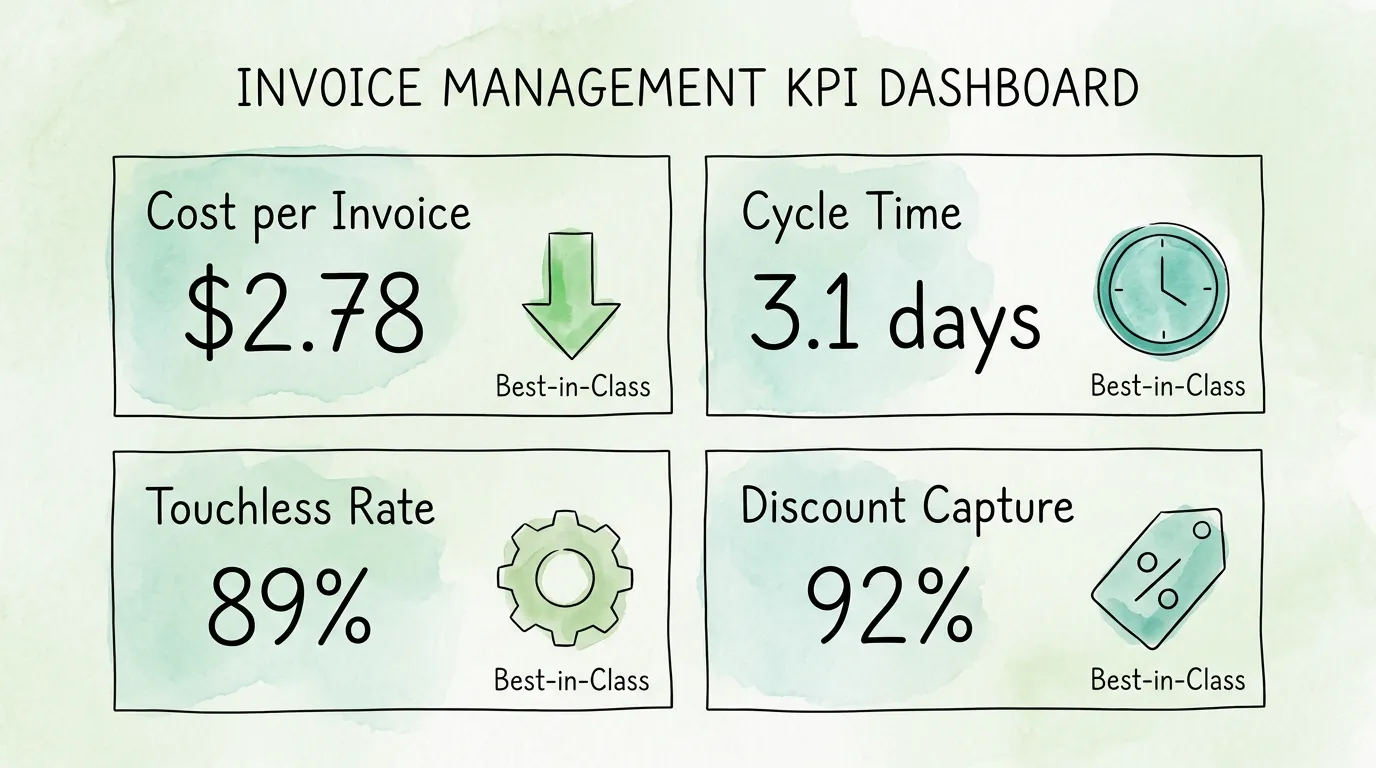
The average accounts payable team processes an invoice in 17.4 days at a cost of $12.88 per document, according to Ardent Partners' State of ePayables research. Best-in-class teams process the same invoice in 3.1 days at $2.78. That gap, 80% faster and 78% cheaper, is not the result of more headcount or better-paid staff. It is the result of better invoice management practices: smarter intake, tighter controls, earlier automation, and a compliance posture that is built in rather than bolted on before audit season.
This guide covers the 10 invoice management best practices that create that performance gap, with real benchmarks, a self-assessment you can run today, and the KPIs you should track every month.
Best Practice 1: Build a Centralized Invoice Intake System
The first and most consequential invoice management failure is fragmented intake. Invoices arrive from a dozen different channels: email attachments, email body text (from vendors like Stripe, AWS, or Uber that embed billing data in HTML rather than attaching a PDF), supplier portals, EDI connections, postal mail, and messaging apps. When each channel delivers invoices to a different person, inbox, or folder, the result is a chaotic, incomplete AP ledger before any processing has even begun.
What best-in-class intake looks like:
- A single, monitored AP inbox or system that receives invoices from all channels
- Automated capture from email attachments and inline HTML billing emails (not just PDFs)
- Direct portal connections that pull invoices from vendor platforms on a schedule, without manual login
- A unified dashboard where every invoice, regardless of source format, lands in one queue
The intake self-assessment: How many separate places do invoices currently arrive before reaching your accounting system? If the honest answer is more than two, you have an intake problem. Every additional entry point is a potential gap in your AP ledger and a future audit risk.
For a full look at the technology behind automated invoice intake, see our guide on invoice capture software. For AP-specific performance benchmarks, our accounts payable tracking guide covers the KPIs that measure intake effectiveness.
Best Practice 2: Automate Data Extraction with AI-Powered OCR
Manual data entry is the most expensive step in the invoice lifecycle. At an industry average of $12.88 per invoice, the majority of that cost is human labor: opening the document, reading it, typing the data into the accounting system, and reviewing for errors. The Institute of Finance and Management (IOFM) reports that approximately 39% of manually processed invoices contain at least one data entry error, and each error costs an average of $52 to investigate and correct.
AI-powered OCR (Optical Character Recognition) eliminates manual entry entirely for the majority of invoices. A well-implemented system extracts every field automatically: vendor name, invoice number, date, due date, line items with descriptions and quantities, subtotal, tax amount, and total. Field accuracy rates for leading AI-powered systems exceed 98% on standard invoice formats.
The critical distinction is between basic OCR (which reads characters) and AI-powered extraction (which understands context). A context-aware system knows that a number in the bottom-right corner of a vendor document is likely the total amount, not a reference number. It handles layout variation across thousands of different vendor formats without requiring manual templates for each one.
For a technical breakdown of how AI extraction works across invoice types, see our guide on invoice data capture software.
|
Manual Data Entry |
AI-Powered OCR |
| Processing time |
8-15 minutes per invoice |
Under 30 seconds |
| Field accuracy |
97-99% (human, non-fatigued) |
98-99%+ |
| Error cost |
$52 per error to investigate |
Near zero |
| Scalability |
Linear: double volume = double headcount |
Non-linear: 10x volume = same cost |
| Audit trail |
Depends on discipline |
Automatic, timestamped |
Best Practice 3: Implement Three-Way Matching Before Every Payment
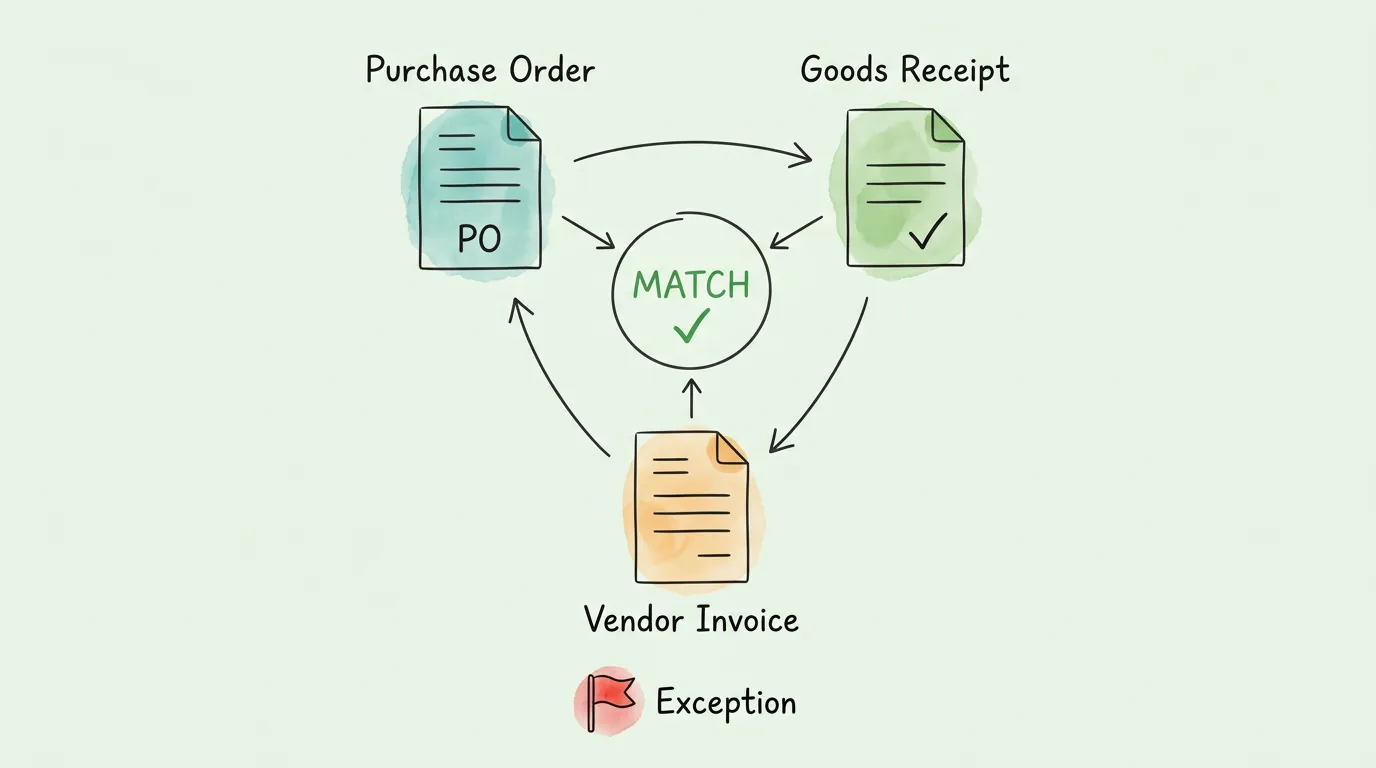
Three-way matching is the practice of verifying three documents before approving any invoice for payment: the original purchase order (PO), the goods receipt note (GRN) confirming delivery, and the vendor invoice. Any discrepancy between these three triggers a hold, not a payment.
This single practice prevents the most common and costly AP errors:
- Billing errors: Vendors occasionally invoice at prices above the agreed PO price
- Quantity discrepancies: Billing for 100 units when only 87 were delivered
- Duplicate invoices: The same invoice submitted twice (intentionally or by mistake)
- Unauthorized purchases: Invoices for goods or services never ordered via a PO
According to Ardent Partners, best-in-class AP organizations process 89% of invoices touchlessly using automated matching. The industry average is only 38%. That 51-percentage-point gap represents tens of thousands of dollars in annual overpayments and error-correction labor at mid-market companies.
Matching standards by business type:
| Match Type |
Documents Compared |
Best For |
| 2-Way Match |
Invoice + Purchase Order |
Service businesses, recurring vendors |
| 3-Way Match |
Invoice + PO + Goods Receipt |
Businesses purchasing physical goods |
| 4-Way Match |
Invoice + PO + GRN + Inspection Report |
Manufacturing, regulated industries |
For a detailed breakdown of how each matching type works in practice, including exception handling workflows, see our invoice matching process guide.
Best Practice 4: Standardize Your Invoice Approval Workflow
An ad-hoc approval process, where invoices are forwarded by email, approved via a Slack message, or passed between desks, creates three problems simultaneously. First, it is invisible to auditors: an email approval chain is not tamper-evident and cannot demonstrate that controls operated consistently. Second, it is unenforceable: when no one knows the rules explicitly, the rules are applied inconsistently. Third, it creates bottlenecks: invoices sit in approver inboxes while due dates pass and early payment discounts expire.
A documented approval matrix specifies:
- Dollar thresholds for each approval level (e.g., under $1,000: auto-approve with PO match; $1,000-$10,000: department manager; above $10,000: VP and CFO)
- Department-specific approvers for each cost center
- Vendor categories requiring additional compliance review (new vendors, related parties, international vendors)
- Rules for PO-less invoices, which require a separate exception workflow
- Escalation triggers when an approver does not act within a defined window
When approval rules are encoded in your AP system rather than documented in a policy manual no one reads, they are enforced automatically. Every approval is timestamped. Every exception is logged. Every escalation is traceable. That is the difference between a paper control and a real control.
For a detailed guide to building and implementing an automated approval workflow, see our guide on invoice approval automation.
Pro Tip: Audit your current approval cycle time before implementing automation. If the average invoice takes more than 5 business days to receive approval, the root cause is almost always bottleneck in a specific approver tier, not a volume problem. Identifying that bottleneck first makes your automation configuration much more targeted.
Best Practice 5: Reconcile Accounts Payable Monthly, Not at Year-End
Month-end AP reconciliation is one of the most consistently neglected invoice management best practices, and one of the most consequential. When reconciliation happens annually (typically because of audit pressure), errors that could have been corrected in days compound over months into discrepancies that take weeks to untangle.
Monthly AP reconciliation should verify:
- AP subledger balance matches the general ledger control account
- All received-not-invoiced (RNI) items have been accrued
- All invoiced-not-received items have been reviewed and aged appropriately
- Vendor statement reconciliations have been performed for key suppliers
- All credit notes and adjustments have been applied correctly
- No invoices are outstanding beyond agreed payment terms without a documented reason
The organizational benefit of monthly reconciliation extends beyond compliance. It provides an accurate, real-time view of your outstanding liabilities, which directly improves cash flow forecasting. Finance teams that reconcile monthly close their books in an average of 5 to 7 business days. Teams that reconcile quarterly or annually average 14 to 20 days for the same process.
For a step-by-step guide to the reconciliation process, see our guides on how to reconcile invoices and bank reconciliation tips.
Best Practice 6: Optimize Payment Terms to Protect Cash Flow
Payment terms are one of the most valuable and most underutilized tools in accounts payable. Most organizations accept whatever terms vendors propose at contract signing and never revisit them. This passivity has a measurable cash flow cost.
On the payables side (AP), extending terms frees working capital:
- Shifting from NET 30 to NET 45 on $500,000 in monthly payables gives you an additional 15 days to deploy $500,000. At a 5% cost of capital, that is approximately $1,027 in monthly value, or $12,328 annually, from a single conversation.
On the receivables side (AR), early payment discounts accelerate collections:
- Offering 2/10 NET 30 (2% discount for payment within 10 days) to clients incentivizes early payment and reduces Days Sales Outstanding (DSO). The effective annualized cost of the 2% discount is approximately 36%, but the cash flow benefit of collecting 20 days earlier often exceeds that cost for businesses carrying receivables on a line of credit.
Best practices for payment term management:
- Negotiate extended terms with key suppliers at contract renewal, not mid-cycle
- Capture early payment discounts systematically: according to Ardent Partners, best-in-class AP teams capture 92% of available early payment discounts, while the industry average is only 41%
- Use dynamic discounting tools to offer suppliers early payment at a variable discount rate when you have excess cash
- Document agreed payment terms in your vendor master record so your AP system enforces them automatically
For a broader framework on how payment term management connects to overall business financial health, see our guide on how to improve cash flow.
Best Practice 7: Recover and Archive Historical Invoices for Audit Compliance
Many businesses discover their invoice archive gaps during an audit, which is the worst possible time to discover them. The IRS Publication 583 requires businesses to retain records supporting all income and deductions, with most expense records required for a minimum of 3 to 7 years depending on the situation. EU member states under the VAT Directive require invoice retention for a minimum of 5 years, with some jurisdictions requiring longer periods for certain asset categories.
What an audit-ready invoice archive requires:
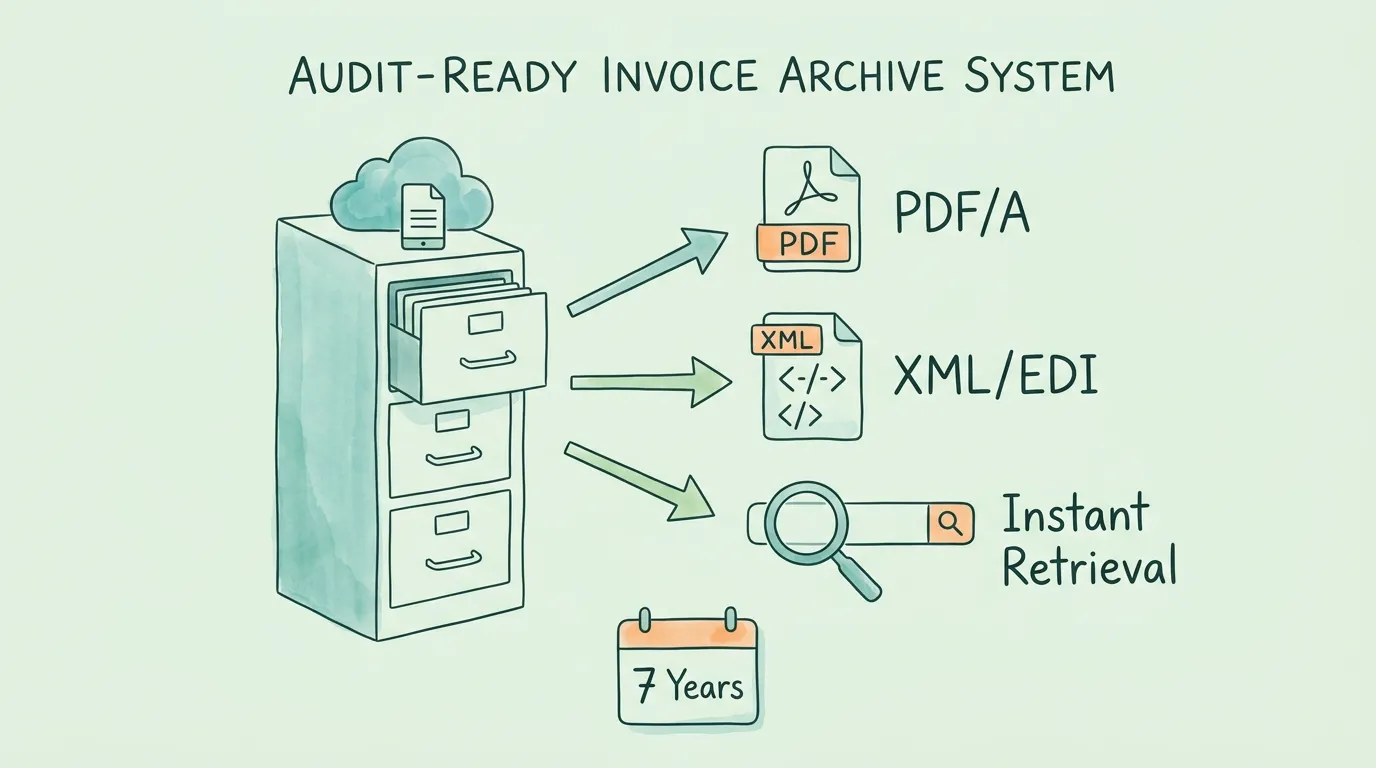
- Structured metadata: Each invoice record must include vendor name, invoice number, date, amount, tax ID, currency, and GL code as searchable, indexed fields, not just as text within a scanned image
- Original document preservation: The original PDF, image, or electronic file must be retained alongside the extracted data
- Immutable storage: Archives should not allow deletion or modification of posted invoice records
- Retrieval speed: Any invoice should be producible within minutes of an auditor request, not hours
- Format compliance: In jurisdictions requiring machine-readable tax records (Germany, France, Italy, Mexico), invoices must be available in XML formats such as ZUGFeRD, Factur-X, or CFDI
For businesses that lack complete historical archives, retroactive invoice retrieval, scanning past email history to recover invoices that were received but never properly filed, can reconstruct years of missing records before an audit begins.
For full guidance on building an audit-ready AP environment, see our audit readiness checklist and our guide on how to prepare for an audit.
Best Practice 8: Handle International and Multi-Currency Invoices Systematically
For businesses with international suppliers or operations in multiple countries, invoice management complexity increases substantially. Common failure points include:
- Currency conversion: Invoices denominated in foreign currencies must be converted to the base currency at the transaction date exchange rate, not the payment date rate
- VAT/GST handling: Tax rates, tax identification number requirements, and reclaim procedures vary significantly by country
- Format compliance: Many countries now mandate specific electronic invoice formats for B2B transactions. Mexico requires CFDI XML. Italy requires FatturaPA. France, Germany, and other EU countries are phasing in mandatory e-invoicing under the EU VAT Directive
- Vendor master data: International vendors may have different bank account structures, tax IDs (VAT number vs. EIN vs. GST number), and address formats that create matching errors
Best practices for international invoice management:
- Maintain a vendor master record that captures country, tax ID type, currency, and applicable VAT/GST registration number
- Configure your AP system to apply the correct exchange rate at invoice date automatically, with manual override capability for disputed rates
- Understand your e-invoicing compliance obligations in each country where you operate or have suppliers. For a country-by-country overview of e-invoicing mandates, see our guide on what is electronic invoicing
- Ensure your invoice archive can export in country-required formats (PDF/A for most; XML for e-invoicing mandates)
Best Practice 9: Track the KPIs That Actually Measure AP Performance
You cannot manage what you do not measure. Most AP teams track invoice volume and payment status. Best-in-class teams track the metrics that reveal whether their processes are improving or degrading.
AP Performance Benchmarks (Ardent Partners 2025)
| KPI |
Best-in-Class |
Industry Average |
What It Reveals |
| Cost per invoice processed |
$2.78 |
$12.88 |
Overall process efficiency |
| Invoice cycle time |
3.1 days |
17.4 days |
End-to-end processing speed |
| Touchless processing rate |
89% |
38% |
Automation maturity |
| Early payment discount capture |
92% |
41% |
Payment term management quality |
| Exception rate |
4.3% |
23.6% |
Data quality and matching accuracy |
| Duplicate payment rate |
Near 0% |
0.5-1.5% |
Duplicate detection effectiveness |
| Vendor query resolution time |
Under 4 hours |
24-48 hours |
Audit trail completeness |
How to use these benchmarks: Do not try to improve every metric simultaneously. Identify your largest gap against the industry average and focus there for 90 days. If your touchless processing rate is 25%, that is your highest-impact improvement opportunity. If your exception rate is 28%, data quality or vendor master accuracy is your priority.
Review these metrics monthly. A rising exception rate often signals a vendor master data problem or a recent system change. A rising cycle time often signals an approval bottleneck. The metric tells you where to look; the process investigation tells you what to fix.
For a complete guide to AP KPI tracking, dashboards, and reporting cadences, see our accounts payable tracking guide.
Best Practice 10: Build Invoice Management Into Your Month-End Close Process
Invoice management is not a separate function from financial reporting. The quality of your AP records directly determines the accuracy of your financial statements. Accrued liabilities, period-end cutoffs, and expense recognition all depend on whether your invoice records are complete, accurate, and timely.
The invoice management tasks that must complete before month-end close:
- All vendor invoices received by the last business day of the month must be processed and posted
- Received-not-invoiced accruals must be estimated and recorded for all goods and services received but not yet invoiced
- All credit notes must be applied to the correct vendor account
- AP aging must be reviewed and approved by the AP manager, with all items over 90 days either paid, disputed, or written off with authorization
- Bank reconciliation must be completed with all outstanding checks and ACH transactions identified
Teams that complete these tasks consistently each month close their books faster, present auditors with cleaner records, and have more reliable cash flow forecasts. Teams that treat these as audit-prep tasks rather than monthly operating standards experience longer closes, more audit queries, and higher correction costs.
For a complete month-end close framework that integrates invoice management with broader financial reporting, see our guide on how to streamline invoice processing.
Invoice Management Self-Assessment: Where Does Your Team Stand?
Score each area: 3 = Strong (fully implemented, consistently operating), 1 = Moderate (partially implemented or inconsistently applied), 0 = Weak (not implemented or not functioning).
| Best Practice |
Strong (3) |
Moderate (1) |
Weak (0) |
Your Score |
| Centralized intake |
All invoices arrive in one system automatically |
Most channels covered, 1-2 manual gaps |
Invoices scattered across multiple inboxes/folders |
|
| Automated data extraction |
AI OCR with 98%+ accuracy, no manual entry for standard invoices |
OCR in use but significant manual correction required |
Manual data entry for most invoices |
|
| Three-way matching |
Automated 3-way match, exception queue for discrepancies |
Manual matching performed, some invoices bypass |
No formal matching process |
|
| Approval workflow |
Documented matrix, system-enforced, timestamped log |
Rules exist but email-based, inconsistently applied |
Ad-hoc approval, no audit trail |
|
| Monthly reconciliation |
AP closes within 5 business days of month end |
Reconciles quarterly |
Annual or audit-triggered only |
|
| Payment terms |
Terms negotiated, discounts captured, documented in vendor master |
Some optimization, discounts often missed |
Default terms accepted, no systematic management |
|
| Invoice archive |
7-year digital archive, searchable metadata, instant retrieval |
Mixed digital/paper, partial metadata |
Paper-based or incomplete digital records |
|
| KPI tracking |
Monthly dashboard with 5+ metrics reviewed by leadership |
Basic volume tracking only |
No formal measurement |
|
Scoring guide: 21-24 is best-in-class. 13-20 has targeted improvement opportunities. Below 13 requires systematic process redesign before the next audit.
Frequently Asked Questions
What are the most important invoice management best practices for small businesses?
For small businesses (under 50 employees), the three highest-impact practices are: first, centralized invoice intake (ensuring every invoice reaches your accounting system, regardless of how it arrives); second, automated data extraction to eliminate manual entry errors; and third, a documented approval workflow, even a simple two-person approval chain, that creates an auditable record. These three practices solve the most common small business AP problems: missing invoices, data entry errors, and inability to produce documentation during an audit.
How long should invoices be retained for tax and audit purposes?
Retention requirements vary by jurisdiction and invoice type. In the United States, the IRS requires businesses to retain records supporting income and deductions for a minimum of 3 years from the filing date, extended to 6 years if you underreported income by more than 25%, and indefinitely for fraudulent returns. Most businesses adopt a 7-year digital retention policy as a conservative standard that satisfies all common scenarios. In the EU, the VAT Directive requires invoice retention for a minimum of 5 years, with some member states requiring longer. Digital archives that preserve the original document and its extracted data fields are fully compliant in all major tax jurisdictions.
What is three-way matching and why does it matter?
Three-way matching is the process of verifying that the vendor invoice matches both the original purchase order and the goods receipt note before approving payment. It catches billing errors (invoicing at a price higher than the agreed PO), quantity discrepancies (billing for more than was delivered), and duplicate invoices. According to Ardent Partners, organizations using automated three-way matching process 89% of invoices without any manual intervention, compared to 38% for organizations without matching automation. That gap represents a significant difference in processing cost, error rate, and fraud exposure.
How do I build an audit-ready invoice management system?
An audit-ready system has four components: a complete invoice archive (every invoice received is captured and stored, with no gaps in the record), structured metadata (each invoice has vendor, date, amount, and GL code as searchable fields), an approval audit trail (every invoice has a timestamped record of who approved it and when), and fast retrieval (any invoice must be producible within minutes of a request). Achieving this requires automated invoice capture, a digital archive system, and an AP workflow that creates approval records automatically. For a step-by-step framework, see our audit readiness checklist.
What is the average cost to process an invoice manually vs. with automation?
Manual invoice processing costs between $9.40 and $15.00 per invoice in fully loaded labor costs (data entry, review, error correction, filing, and audit support), according to IOFM benchmarking research. Automated AP processing reduces that cost to $2.00 to $3.00 per invoice. For an organization processing 500 invoices per month, that difference translates to $5,700 to $7,500 in monthly savings ($68,400 to $90,000 annually), before counting the cost of errors caught by automation that manual processing would have missed.
How do I handle invoices from vendors who send billing data in email body text rather than as PDF attachments?
Many SaaS vendors (AWS, Stripe, Uber, Google Workspace, and others) embed billing information directly in the email body as HTML rather than attaching a PDF. Standard email-based AP tools that only capture PDF attachments miss these entirely. An AP system with AI-powered email body extraction can read invoice data directly from HTML email content, regardless of whether an attachment is present. This closes a significant gap in automated invoice capture for businesses that use multiple SaaS services. For a technical overview of the extraction technology, see our guide on invoice data capture software.
What KPIs should I track to measure invoice management performance?
The seven most important AP KPIs are: Cost per Invoice Processed (efficiency), Invoice Cycle Time (processing speed), Touchless Processing Rate (automation maturity), Early Payment Discount Capture Rate (payment term management), Exception Rate (data quality and matching accuracy), Duplicate Payment Rate (control effectiveness), and Vendor Query Resolution Time (audit trail completeness). Review these monthly. Industry benchmarks from Ardent Partners show best-in-class organizations achieving $2.78 cost per invoice and 3.1-day cycle time. These benchmarks provide the performance targets to work toward. For a complete measurement framework, see our accounts payable tracking guide.
How do I manage invoice compliance across multiple countries?
Multi-jurisdiction invoice management requires: a vendor master record that captures each supplier's country, currency, tax ID type, and applicable e-invoicing format; an AP system that applies the correct exchange rate at the invoice date automatically; an archive that can export in country-required formats (PDF/A for most; XML for countries with e-invoicing mandates); and a monitoring process to track evolving e-invoicing mandates by country. Several major economies, including France, Germany, Poland, and Malaysia, have introduced or are introducing mandatory B2B e-invoicing between 2024 and 2026. For a country-by-country overview of e-invoicing requirements, see our guide on what is electronic invoicing. For guidance on organizing business receipts across jurisdictions, see our receipt organization guide.
The performance gap between best-in-class AP teams and average ones is not a technology gap. It is a practice gap. The organizations processing invoices in 3.1 days at $2.78 each are using the same invoice types as everyone else. The difference is that they built the intake, matching, approval, reconciliation, and archiving practices described in this guide into their standard operating rhythm rather than treating them as audit-season projects.
TallyScan automates the core of this workflow: AI-powered capture from email and portals, data extraction with field accuracy above 98%, and direct sync to your accounting system, creating the complete, timestamped audit trail that best-in-class AP performance requires.
Ready to close the performance gap? Start your free trial of TallyScan today and process your first invoices automatically within the hour.