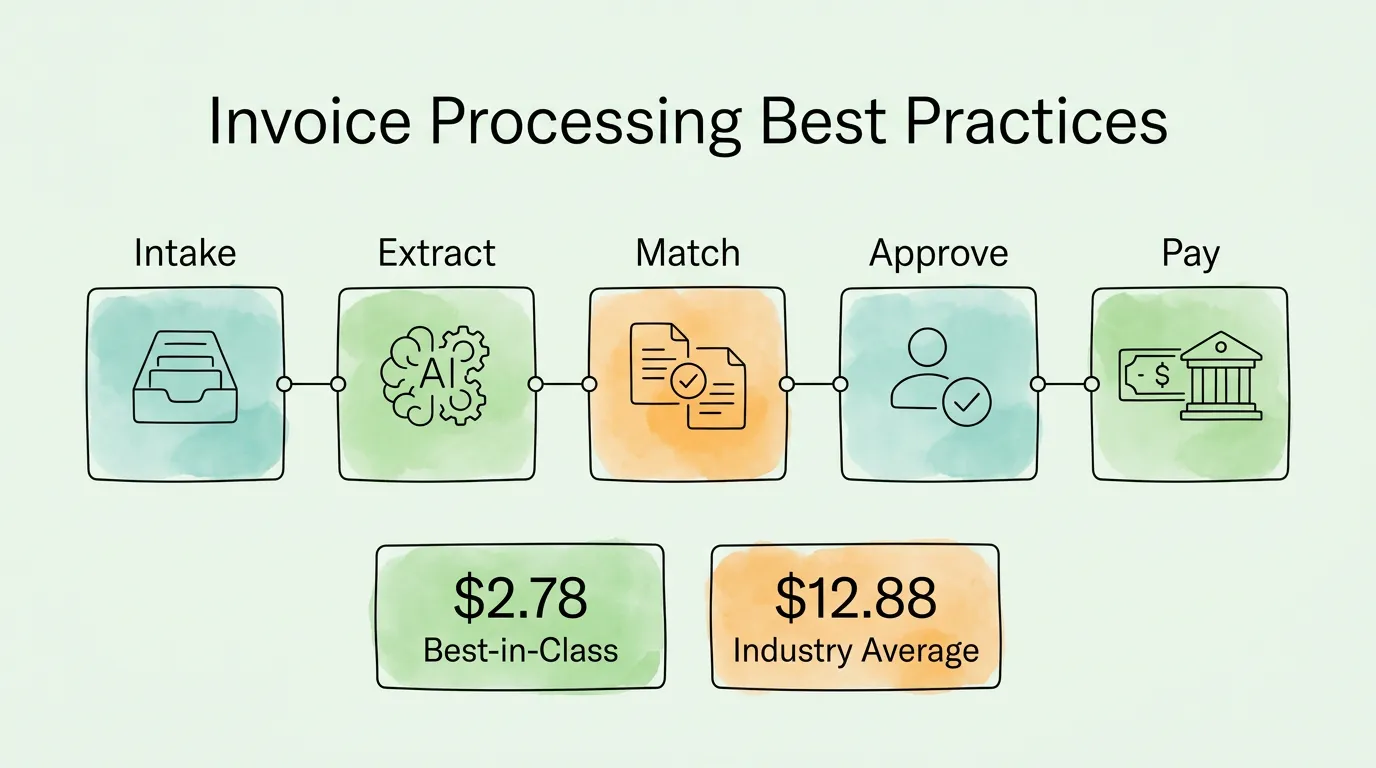
Every invoice your team touches manually costs between $9.40 and $15.00 in fully loaded labor costs. That is data entry, error correction, approval chasing, filing, and audit support, adding up every time a human picks up a document and types something into a system.
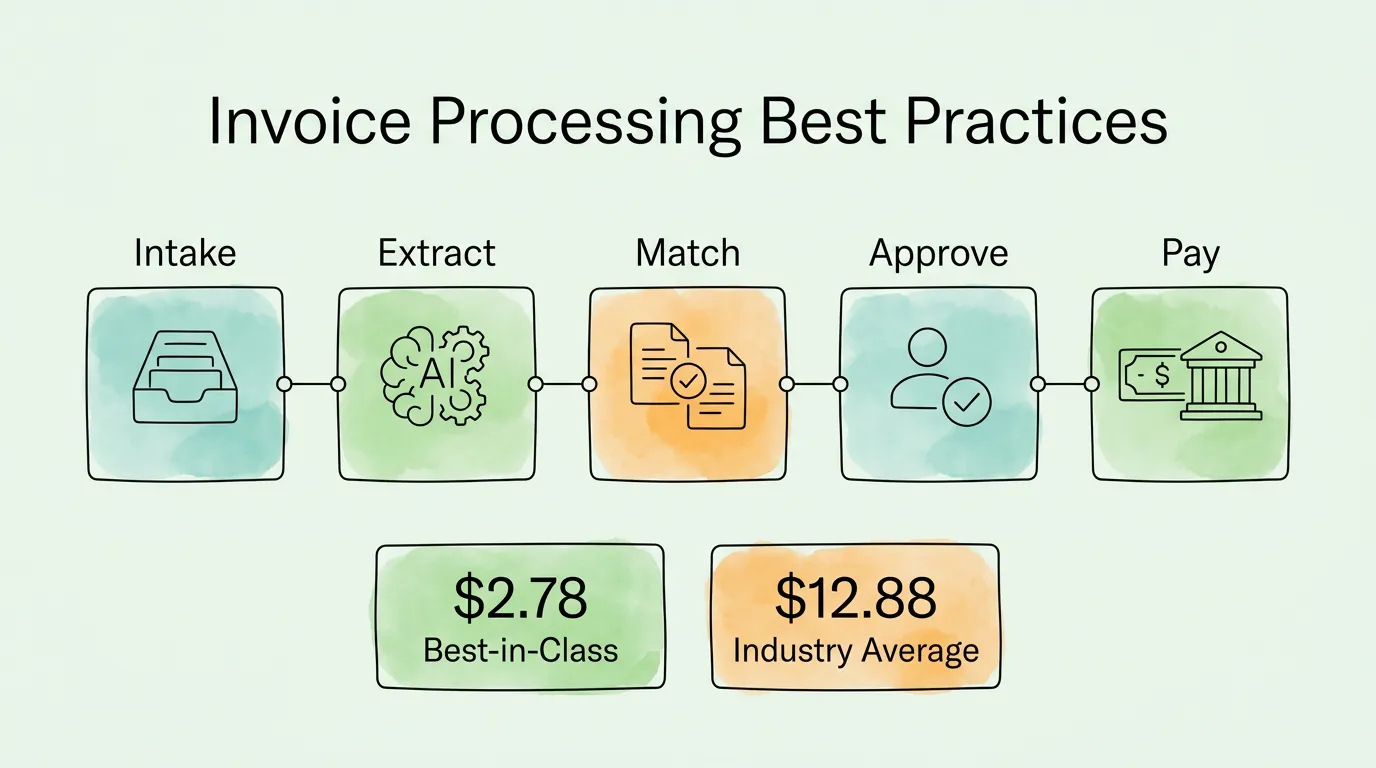
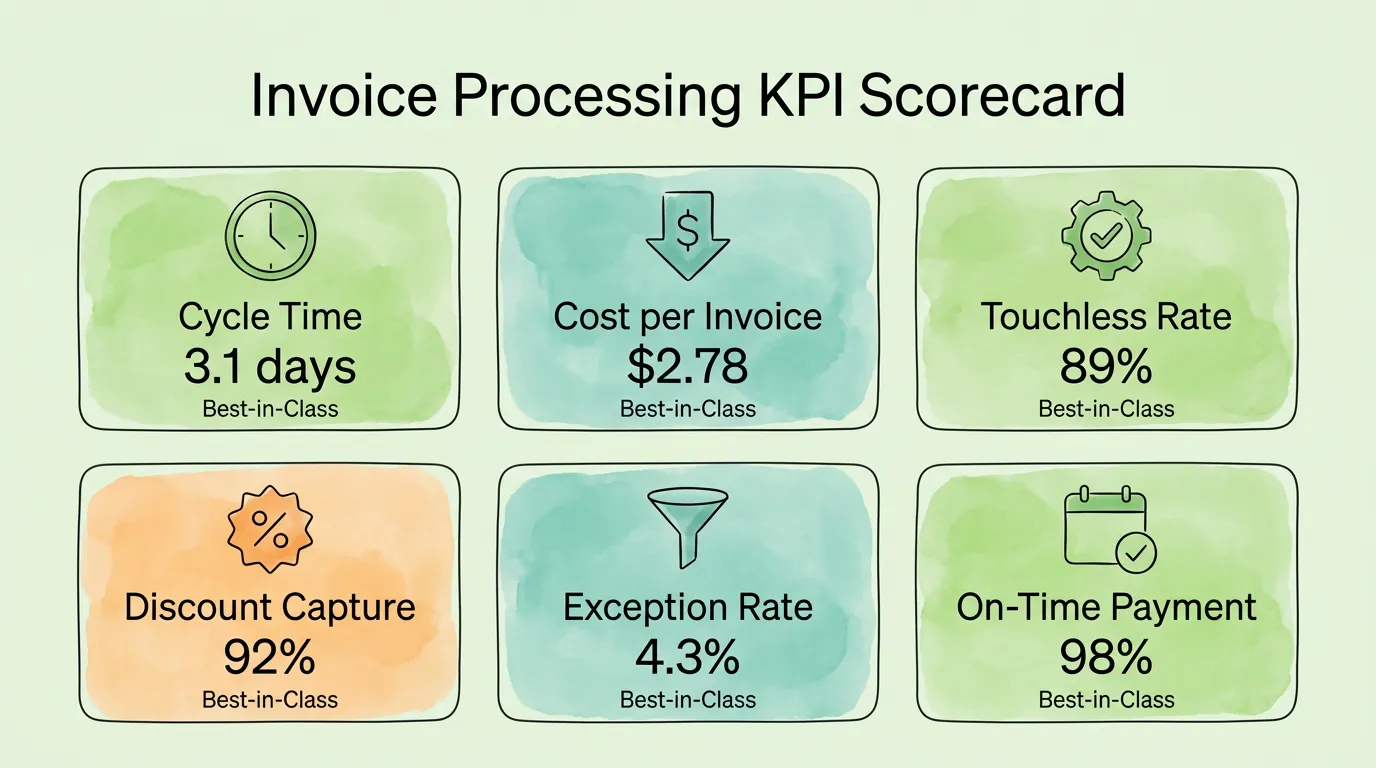
According to Ardent Partners' State of ePayables research, the industry average cost per invoice is $12.88, and the average processing time is 17.4 days. Best-in-class teams process the same invoice for $2.78 in 3.1 days. The companies at the top of that benchmark did not get there by hiring better accountants. They got there by eliminating the manual steps where the cost accumulates.
This guide covers the 10 invoice processing best practices that create that performance gap, with concrete implementation steps, ROI benchmarks, a fraud prevention framework, and a self-assessment you can use today.
Best Practice 1: Centralize All Invoice Intake Into One System
The most expensive invoice processing problem is not slow approval. It is fragmented intake. When invoices arrive through six different channels — email attachments, email body text, supplier portals, EDI connections, postal mail, and messaging threads — and land in six different places, the AP ledger is incomplete before processing has even started.
Common intake failure points:
- Personal employee inboxes receiving vendor invoices instead of a monitored AP address
- SaaS vendors (AWS, Stripe, Uber, Google) embedding billing data in HTML email bodies rather than attaching PDFs — these are missed by systems that only capture attachments
- Portal-only vendors requiring manual login to download invoices one at a time
- Invoices submitted to purchasing or department heads instead of AP
What centralized intake looks like:
- A single, monitored AP inbox that receives all invoice submissions by email
- Automated capture from email attachments AND inline HTML billing content
- Scheduled portal connections that pull invoices from vendor platforms without manual login
- A unified processing queue where every invoice, regardless of source format, lands in one place
The intake diagnostic: Count how many separate places invoices arrive before reaching your accounting system. If the honest answer is more than two, every additional entry point is a gap in your AP ledger and a future audit risk.
For the technology behind multi-channel invoice capture, see our guide on invoice capture software. For the AP KPIs that measure intake completeness, see our accounts payable tracking guide.
Best Practice 2: Automate Data Extraction with AI-Powered OCR
Manual data entry is the single most expensive step in the invoice processing lifecycle, and the most avoidable. An AP team member manually entering an invoice takes 8 to 15 minutes per document. An AI-powered extraction system processes the same invoice in under 30 seconds at a cost that rounds to zero.
The Institute of Finance and Management (IOFM) reports that approximately 39% of manually processed invoices contain at least one data entry error, and each error costs an average of $52 to investigate and correct. For an organization processing 500 invoices per month with a 39% error rate, that is 195 errors per month at $52 each — $10,140 in monthly error-correction costs, before accounting for the late payments and vendor disputes those errors generate.
What AI-powered extraction does that basic OCR cannot:
- Understands invoice layout context (a number in the bottom-right corner is likely a total, not a reference number)
- Handles thousands of vendor format variations without requiring manual templates for each one
- Extracts line-item data (description, quantity, unit price) in addition to header fields
- Processes invoices in multiple languages and currencies
- Achieves field accuracy rates above 98% on standard invoice formats
|
Manual Entry |
Basic OCR |
AI-Powered OCR |
| Time per invoice |
8-15 min |
2-5 min + correction |
Under 30 seconds |
| Field accuracy |
~97% (non-fatigued) |
85-92% |
98-99%+ |
| Line-item extraction |
Yes (slow) |
Limited |
Yes (automated) |
| Vendor format handling |
Any (manual) |
Template-dependent |
Format-agnostic |
| Scalability |
Linear to headcount |
Partial |
Non-linear |
For a technical breakdown of how AI data extraction differs from template-based OCR across invoice formats, see our guide on invoice data capture software.
Best Practice 3: Implement Three-Way Matching Before Every Payment
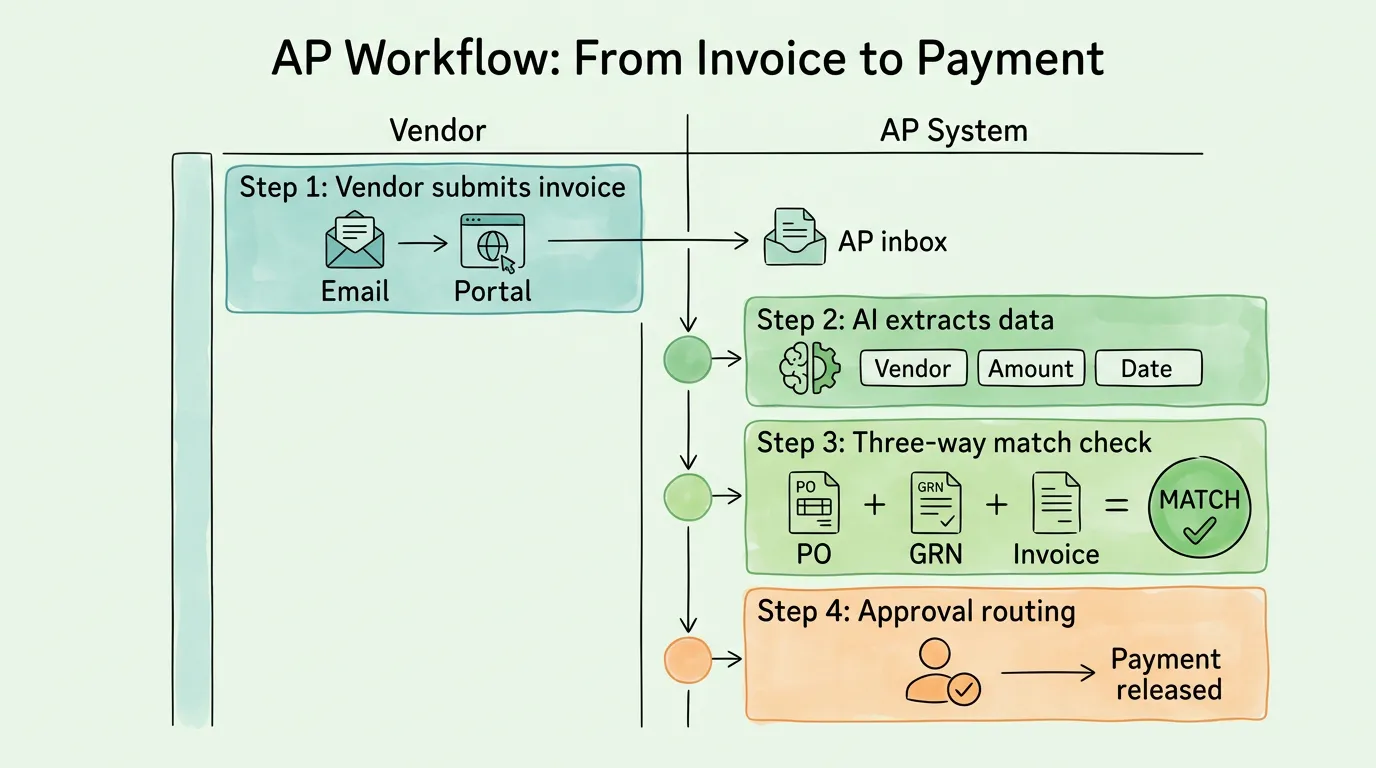
Three-way matching is the practice of cross-referencing the purchase order, the goods receipt note, and the vendor invoice before releasing any payment. Any discrepancy triggers a hold and an exception workflow rather than a payment.
This single control catches the four most common and costly AP errors:
- Price discrepancies — vendor invoices at a rate higher than the agreed PO price
- Quantity discrepancies — billing for units not yet delivered or returned
- Duplicate invoices — same invoice submitted twice, intentionally or by mistake
- Phantom invoices — billing for goods or services never ordered or received
According to Ardent Partners, best-in-class organizations process 89% of invoices touchlessly using automated matching. The industry average is only 38%. That gap represents significant annual overpayments at mid-market companies.
Implementation steps for three-way matching:
- Define your tolerance thresholds: Decide acceptable variance limits (e.g., auto-approve if within 1% or $25 of PO amount). This prevents minor rounding differences from creating unnecessary exceptions
- Choose your matching level by purchase type: Use 2-way matching (invoice vs. PO) for services and recurring subscriptions; 3-way matching (invoice vs. PO vs. GRN) for physical goods; 4-way matching (adds inspection report) for regulated industries
- Build an exception queue: Every failed match routes to a dedicated exception queue, not a general inbox. Assign a specific AP team member responsible for each exception category
- Set resolution SLAs: Exceptions unresolved within 3 business days automatically escalate to the AP manager
For a detailed walkthrough of 2-way, 3-way, and 4-way matching with exception handling workflows, see our invoice matching process guide.
Best Practice 4: Standardize Electronic Invoice Submission
Controlling how invoices enter your system is as important as how you process them once they arrive. When vendors submit invoices through inconsistent channels — fax, post, personal email, WhatsApp — each additional channel adds processing time, error risk, and audit gaps.
Electronic submission channels, ranked by processing efficiency:
| Channel |
Processing Speed |
Accuracy |
Best For |
| EDI / Direct Integration |
Fastest |
Highest |
High-volume, enterprise suppliers |
| Structured e-invoice (XML/UBL) |
Very fast |
Very high |
Mid-market, e-invoicing mandate countries |
| Vendor self-service portal |
Fast |
High |
Suppliers of all sizes |
| Dedicated AP email inbox |
Moderate |
Moderate-high |
Small suppliers |
| Scanned paper / postal mail |
Slowest |
Lowest |
Legacy vendors only |
The 2026 e-invoicing mandate wave makes this urgent. France, Germany, Poland, Malaysia, and multiple other countries are rolling out mandatory B2B e-invoicing between 2024 and 2027. If your suppliers in these countries are still emailing PDF attachments, you are already out of compliance in some jurisdictions. For a country-by-country compliance calendar, see our guide on what is electronic invoicing.
Implementation steps:
- Set up a dedicated AP inbox (e.g., invoices@yourcompany.com) as the minimum baseline
- Create a vendor portal for invoice submission, status tracking, and dispute communication — this alone eliminates the majority of "did you receive my invoice?" inquiries
- Build a vendor onboarding guide specifying required formats, required data fields, and submission deadlines
- Configure automated email acknowledgment on receipt (vendors stop calling when they get instant confirmation)
- Prioritize EDI or direct integration for your top 20 suppliers by volume, who generate the highest processing load
Best Practice 5: Maintain Clean Vendor Master Data
Your vendor master file is the foundation of your entire procure-to-pay cycle. If it contains duplicate entries, stale banking details, or missing tax IDs, every downstream process, matching, payment, and tax reporting, runs on corrupted data.
The most common vendor master data problems:
- Duplicate vendor records: The same supplier appears under different names or spellings (e.g., "Acme Corp.", "Acme Corporation", "ACME CORP"), leading to split payment history and failed duplicate detection
- Outdated banking details: ACH payments routed to closed accounts result in returned payments, late fees, and vendor disputes
- Missing tax IDs: Invoices without a complete W-9 (US) or VAT number (EU) create withholding compliance gaps
- No vendor categorization: Without spend categories, GL coding is manual and inconsistent
Vendor master data governance framework:
- Initial data cleanse: Audit your existing vendor list before any automation project. Merge duplicates, archive inactive vendors, verify banking details and tax IDs for all active suppliers
- Onboarding controls: Every new vendor must complete a standardized onboarding form capturing: legal entity name, tax ID, banking details, remittance address, preferred invoice format, and spend category. No vendor is activated without complete data
- Automated validation rules: Configure your ERP or AP system to prevent duplicate vendor creation (flag if tax ID already exists), enforce required fields, and validate bank account format
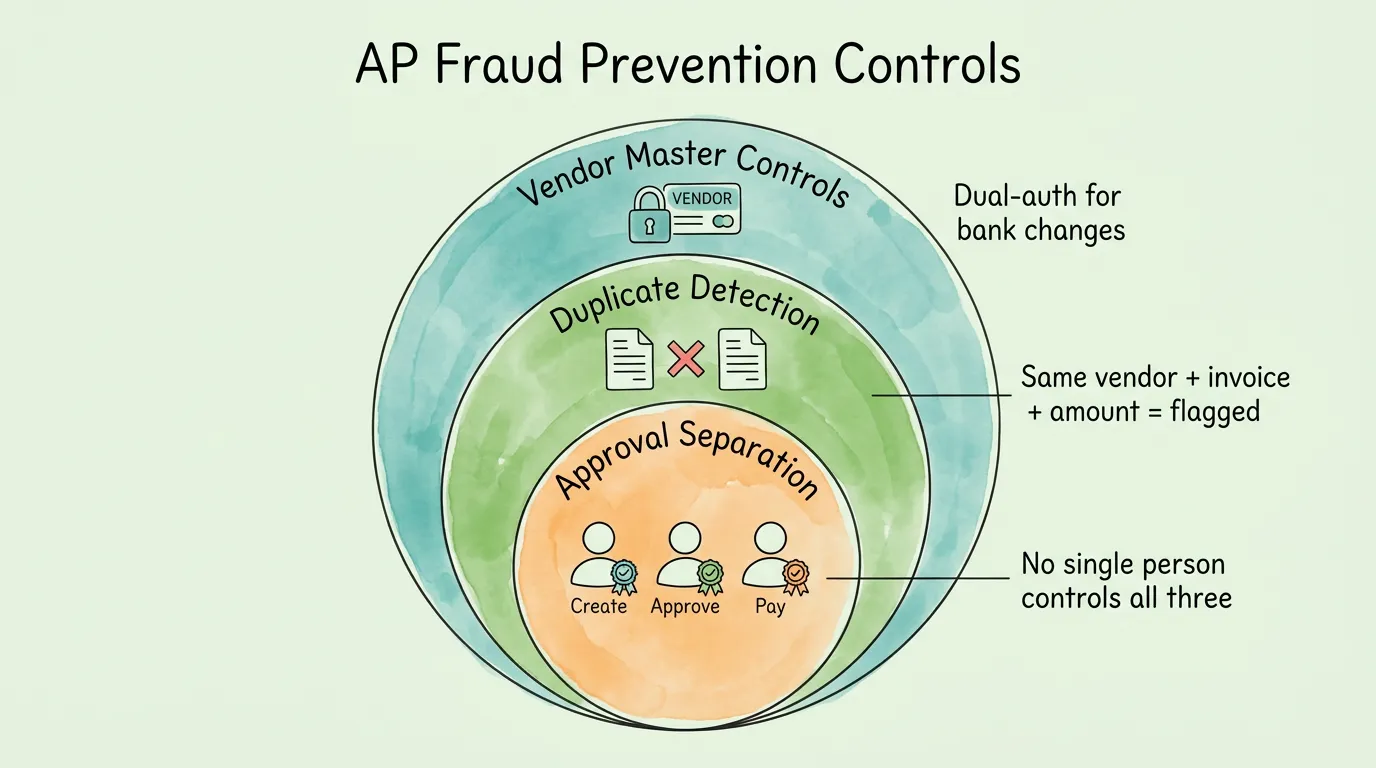
- Change management controls: Any change to banking details requires dual authorization (requester + separate approver) and email confirmation to the vendor's primary contact. This single control blocks the most common AP fraud scheme, business email compromise (BEC) vendor impersonation
Security note: According to the Association of Certified Fraud Examiners (ACFE), vendor fraud and billing schemes are among the most common forms of occupational fraud, with a median loss of $130,000 per incident. Strict vendor master data controls are your primary prevention layer.
Best Practice 6: Design and Automate Clear Approval Workflows
An approval process that lives in email inboxes is not a process. It is a series of individual decisions with no enforcement, no visibility, and no audit trail. When an auditor asks how an invoice was approved, "I think Sarah emailed John about it" is not an acceptable answer.
A documented approval matrix specifies:
- Dollar thresholds for each approval tier (e.g., under $1,000: auto-approve with PO match; $1,000–$10,000: cost center manager; $10,000–$50,000: VP; above $50,000: CFO)
- Department-specific approvers for each cost center or business unit
- Vendor categories requiring additional review (new vendors, related parties, international vendors)
- Exception approvals for PO-less invoices, which require a separate documented authorization
- Escalation triggers: if an approver does not act within 48 hours, the invoice automatically routes to their backup
What system-enforced approval delivers:
- Every approval is timestamped and logged automatically
- No invoice can bypass the approval matrix
- Audit queries about any invoice can be answered in seconds
- Exception rates and cycle time by approver are visible in real time, identifying bottlenecks immediately
For a full guide to building and configuring approval workflows with specific software recommendations, see our guide on invoice approval automation.
Best Practice 7: Build a Structured Exception Handling Process
This is the best practice that most guides skip, yet it is often where the most time disappears. Every AP automation system produces exceptions: invoices that fail matching, have missing PO numbers, contain unrecognized vendor IDs, or have price discrepancies above tolerance thresholds.
Without a structured exception process, these invoices pile up in a generic queue, get handled inconsistently, and create the bottleneck that makes your cycle time metric look worse than your automation rate would suggest.
Exception categories and ownership:
| Exception Type |
Root Cause |
Resolution Owner |
Target SLA |
| PO mismatch (price) |
Vendor invoiced above agreed rate |
AP analyst → Purchasing |
2 business days |
| PO mismatch (quantity) |
Delivery shortfall or surplus |
AP analyst → Receiving |
2 business days |
| Missing PO number |
Invoice submitted without reference |
AP analyst → Requestor |
1 business day |
| Duplicate invoice flag |
Vendor resubmitted existing invoice |
AP analyst |
Same day |
| Unrecognized vendor |
New vendor, no master record |
AP analyst → Procurement |
3 business days |
| Coding discrepancy |
Wrong GL code or cost center |
AP analyst → Finance |
1 business day |
Exception process design principles:
- Exceptions must have a dedicated queue, separate from normal processing
- Every exception must be assigned to a named owner, not a team inbox
- SLAs must be tracked and reported weekly; exceptions approaching SLA limits auto-escalate
- Root cause data must be captured for every resolved exception — this data drives process improvement
Tracking your exception root causes over 90 days will reveal whether your highest exception volume comes from a specific vendor (a data quality problem with that supplier), a specific purchase category (a PO creation problem in that department), or a system configuration issue. Fixing the root cause is always more effective than handling individual exceptions faster.
Best Practice 8: Implement Active Fraud Prevention Controls
AP fraud is not a theoretical risk. According to the AFP Payments Fraud and Control Survey, 71% of organizations experienced attempted or actual payments fraud in a recent year, and checks and ACH transfers are the most frequently targeted payment methods. The most common AP fraud vectors are:
- Duplicate payment fraud: Submitting the same invoice twice under slightly different reference numbers
- Business email compromise (BEC): Impersonating a vendor via email to redirect payment to a fraudulent bank account
- Ghost vendor fraud: Creating fictitious vendor records and submitting invoices for services never rendered
- Internal employee fraud: AP staff creating unauthorized vendor records or approving payments to accounts they control
Fraud prevention controls by category:
Duplicate detection:
- Configure your AP system to flag invoices with matching vendor ID + invoice number combinations before posting
- Also flag matching vendor ID + amount + date combinations (same invoice resubmitted with a different reference)
- Review all credit notes and adjustments applied manually outside the normal workflow
BEC and vendor impersonation:
- Require dual authorization for all banking detail changes in the vendor master
- Send verification email to the vendor's previously confirmed address (not the address in the change request) for every banking update
- Call the vendor on a known number to confirm before processing any payment to a new bank account
Ghost vendor and internal fraud:
- Separate the duties of vendor creation, invoice approval, and payment authorization (no single person should control all three)
- Audit new vendor additions monthly, comparing against known employee names, addresses, and related-party relationships
- Review any vendor with a PO box address, no tax ID, or a very recent creation date before approving payment
For a comprehensive fraud-aware AP audit framework, see our audit readiness checklist.
Best Practice 9: Optimize Payment Timing to Protect Cash Flow
Payment timing is one of the most underutilized levers in accounts payable. Most organizations pay invoices based on when they arrive in the queue, not based on a strategic decision about cash deployment. This passive approach has a measurable cost.
On the payables side — extending terms:
- Shifting from NET 30 to NET 45 on $500,000 in monthly payables provides 15 additional days of working capital deployment
- At a 5% cost of capital, that is approximately $1,027 in monthly value ($12,328 annually) from a single vendor negotiation
- Target your highest-volume suppliers for term extension conversations at contract renewal
On the discounts side — capturing early payment savings:
- A 2/10 NET 30 discount (2% for payment within 10 days) has an annualized value of approximately 36%
- Ardent Partners reports that best-in-class AP teams capture 92% of available early payment discounts, while the industry average is only 41%
- Missing a 2/10 NET 30 discount on a $10,000 invoice is a $200 loss that requires no work to capture — you simply need to know it is available and pay 20 days earlier
Days Payable Outstanding (DPO) optimization:
- Track DPO monthly by vendor category
- Prioritize capturing discounts from suppliers offering them; extend terms to suppliers who do not
- Never pay early without capturing a corresponding discount or building a strategic relationship rationale
For a broader framework on connecting payment term management to overall cash flow strategy, see our guide on how to improve cash flow.
Best Practice 10: Monitor KPIs and Conduct Regular Process Audits
Setting up good invoice processing practices is not a one-time project. Processes drift. Exception rates creep upward. Approval bottlenecks develop in new places. Vendor data degrades over time. Without a monitoring cadence, you discover these problems at year-end close — or during an audit.
The 7 KPIs every AP team should track monthly:
| KPI |
Best-in-Class |
Industry Average |
What It Reveals |
| Cost per invoice processed |
$2.78 |
$12.88 |
Overall process efficiency |
| Invoice cycle time |
3.1 days |
17.4 days |
End-to-end processing speed |
| Touchless processing rate |
89% |
38% |
Automation maturity |
| Early payment discount capture |
92% |
41% |
Payment timing management |
| Exception rate |
4.3% |
23.6% |
Data quality and matching accuracy |
| Duplicate payment rate |
Near 0% |
0.5-1.5% |
Duplicate detection effectiveness |
| On-time payment rate |
98%+ |
82% |
Approval workflow performance |
Audit cadence recommendations:
- Monthly: Review exception root causes, AP aging, and outstanding credit notes; verify vendor master changes from the prior month
- Quarterly: Sample 50–100 invoices and trace each one from receipt to payment, verifying that controls operated as designed; review KPI trends; assess cycle time by vendor and approver
- Annually: Full vendor master data cleanse; review approval matrix thresholds for business relevance; assess automation configuration for any gaps created by new vendor types or business units added during the year
Using metrics to drive improvement: Do not try to improve every KPI simultaneously. Identify your largest gap versus the industry average and focus there for 90 days. A rising exception rate often signals a vendor master data problem or a recent system configuration change. A rising cycle time almost always indicates an approval bottleneck at a specific tier. The metric tells you where to look; the audit tells you what to fix.
For a complete guide to AP KPI dashboards, monitoring cadences, and benchmarking your team against industry standards, see our accounts payable tracking guide. For the broader invoice management context these practices sit within, see our invoice management best practices guide.
Invoice Processing Best Practices: Comparison Table
| Best Practice |
Complexity |
Resource Need |
Primary Benefit |
Time to First Result |
| Centralize intake |
Low |
Low |
No missing invoices |
1-2 weeks |
| AI data extraction |
High |
Medium |
Eliminate manual entry cost |
4-8 weeks |
| Three-way matching |
Medium |
Medium |
Prevent overpayments and fraud |
2-4 weeks |
| E-invoice submission |
Medium |
Medium |
Faster intake, compliance |
4-12 weeks |
| Vendor master MDM |
High |
Medium |
Data quality, fraud prevention |
8-12 weeks |
| Automated approval workflow |
Medium |
Medium |
Faster cycle, audit trail |
4-6 weeks |
| Exception handling process |
Low |
Low |
Reduce exception backlog |
1-2 weeks |
| Fraud prevention controls |
Medium |
Low-Medium |
Reduce fraud exposure |
2-4 weeks |
| Payment timing optimization |
Low |
Low |
Improve cash flow |
1-4 weeks |
| KPI monitoring & audits |
Medium |
Medium |
Continuous improvement |
2-4 weeks |
Self-Assessment: Score Your Invoice Processing Maturity
Rate each area: 2 = Fully implemented and consistently operating, 1 = Partially implemented, 0 = Not yet implemented.
| Area |
2 |
1 |
0 |
| Intake centralization |
All invoices → one system automatically |
Most channels, 1-2 gaps |
Scattered inboxes/folders |
| Data extraction |
AI OCR, 98%+ accuracy, no manual entry |
OCR with significant correction |
Manual entry for most |
| Three-way matching |
Automated, exception queue for discrepancies |
Manual matching, some bypass |
No formal matching |
| E-invoice submission |
Vendor portal + dedicated inbox |
Email only, inconsistent |
Ad-hoc, paper still used |
| Vendor master data |
Annual cleanse, dual-auth for changes |
Partially clean, no governance |
Duplicates and stale data |
| Approval workflow |
System-enforced matrix, timestamped |
Rules exist, email-based |
Ad-hoc, no audit trail |
| Exception handling |
Named owners, SLAs tracked |
Queue exists, no SLAs |
Unmanaged pile |
| Fraud controls |
Duplicate detection + BEC controls active |
Some controls, inconsistently applied |
No formal fraud controls |
| Payment timing |
DPO tracked, discounts systematically captured |
Occasional discount capture |
Pay when invoices arrive |
| KPI monitoring |
Monthly dashboard, quarterly audit |
Basic volume tracking |
No measurement |
Score guide: 16-20 is best-in-class. 10-15 has targeted improvement opportunities. Below 10 requires systematic process redesign before the next audit or growth phase.
Frequently Asked Questions
What is the most impactful invoice processing best practice to implement first?
For most organizations, centralizing invoice intake delivers the fastest return with the lowest implementation complexity. It does not require software procurement or significant configuration — it requires setting up a monitored AP inbox, communicating it to vendors, and establishing a simple intake protocol. Within two weeks, every invoice is in one place. That foundation makes every subsequent improvement (automation, matching, approval workflow) more effective and easier to implement.
For organizations that already have centralized intake, the next highest-impact practice is typically automated data extraction, which eliminates the most expensive manual labor in the AP process.
How much does invoice processing automation actually cost to implement?
Implementation cost varies significantly by organization size and existing systems. Cloud-based AP automation tools typically range from $100 to $500 per month for small businesses to $1,000 to $5,000 per month for mid-market organizations. However, the ROI calculation almost always favors rapid implementation. At an industry-average processing cost of $12.88 per invoice, an organization processing 300 invoices per month spends $3,864 per month in processing labor. Reducing that to $2.78 per invoice saves $3,030 per month, covering a typical AP automation subscription cost in under 30 days.
How do I reduce the number of invoice processing exceptions?
Exception reduction is a root-cause exercise, not a processing speed problem. The most common exception causes are: incorrect PO numbers on vendor invoices (fix: vendor onboarding communication), price discrepancies (fix: confirm PO prices match contract rates before raising POs), missing goods receipt notes (fix: receiving department process improvement), and vendor master data gaps (fix: data cleanse and governance). Tracking exception root cause data for 60 to 90 days will reveal which two or three root causes account for the majority of your exceptions. Fix those, and your exception rate will drop materially without requiring any changes to your exception handling process itself.
What is three-way matching and is it necessary for every invoice?
Three-way matching is the process of verifying that the vendor invoice matches both the original purchase order and the goods receipt note before approving payment. It is the most effective single control for preventing overpayments, billing errors, and duplicate payments. Three-way matching is most critical for invoices tied to physical goods purchases with a purchase order. For recurring service invoices (monthly SaaS subscriptions, utilities, professional fees) at agreed fixed rates, two-way matching (invoice vs. PO or contract) is typically sufficient. For organizations that do not use purchase orders at all, three-way matching requires a parallel project to implement PO discipline before the matching control can operate. See our invoice matching process guide for a full breakdown.
How do I prevent duplicate payments in invoice processing?
Duplicate payment prevention requires two layers of control. The first is system-level: configure your AP software to flag any combination of matching vendor ID + invoice number before posting. Also flag matching vendor ID + amount + invoice date combinations, which catches the same invoice resubmitted under a different reference number. The second layer is process-level: vendor invoices received by email should be logged immediately on receipt to create a date-stamped record; if the same invoice arrives again, it is flagged as a duplicate at intake rather than during posting. For organizations without AP software, a simple shared spreadsheet log of received invoices (vendor, invoice number, date, amount) provides basic duplicate detection at no cost.
What invoice processing KPIs should a small business track?
For a small business processing under 100 invoices per month, three KPIs provide the most actionable signal: invoice cycle time (how many days from receipt to payment), exception rate (what percentage of invoices require manual investigation), and on-time payment rate (what percentage of invoices are paid within agreed terms). These three metrics reveal whether your process is fast enough to avoid late payment penalties, accurate enough to keep exceptions manageable, and reliable enough to maintain vendor relationships. As volume grows, add cost per invoice and early payment discount capture rate to the dashboard.
How do I handle invoices from vendors who do not accept purchase orders?
Vendors who do not use purchase orders, typically consultants, small service providers, and freelancers, require an alternative pre-authorization control. The standard approach is a blanket purchase order (an approved spending limit for a vendor or category over a period) or a service authorization form (a signed document approving a specific engagement scope and budget before work begins). The invoice is then matched against the blanket PO or authorization form rather than a transaction-level PO. This preserves the matching control without requiring the vendor to change their invoicing process. All PO-less invoice exceptions should route through a separate approval track that requires the cost center manager to confirm the services were received before payment is approved.
How do invoice processing best practices apply to global or multi-currency operations?
Multi-currency invoice processing adds three layers of complexity: exchange rate management (invoices must be converted at the transaction date rate, not the payment date rate), VAT and GST handling (rates, reclaim procedures, and tax ID requirements vary by country), and format compliance (several countries now mandate specific e-invoice formats for B2B transactions). Best practices for global invoice processing include: maintaining a vendor master that captures each supplier's country, currency, and applicable tax ID format; configuring your AP system to apply transaction-date exchange rates automatically; and building a compliance monitoring process for evolving e-invoicing mandates by country. For a comprehensive overview of e-invoicing compliance requirements across major jurisdictions, see our guide on what is electronic invoicing. For guidance on organizing business receipts across multi-jurisdiction operations, see our receipt organization guide.
The cost gap between best-in-class and average invoice processing ($2.78 vs. $12.88 per invoice) is not explained by the technology available. It is explained by the practices described in this guide: centralized intake, automated extraction, systematic matching, documented approvals, clean vendor data, structured exception handling, active fraud controls, strategic payment timing, and consistent performance monitoring.
None of these practices require a 6-month implementation project. The highest-impact ones, centralized intake, three-way matching, and payment timing optimization, can be operational within weeks. The rest follow in phases.
TallyScan automates the core steps: multi-channel invoice capture, AI-powered data extraction with 98%+ field accuracy, and direct sync to QuickBooks and Xero, creating the complete, timestamped record that best-in-class AP performance requires. For the full workflow picture, see our guide on how to streamline invoice processing.
Ready to close the gap? Start your free trial of TallyScan today and process your first invoices automatically within the hour.