Most small business owners do not have an accounting problem. They have a systems problem. The numbers are not wrong because of bad intentions or a lack of care. They are wrong because no one set up a reliable process for capturing, categorizing, and reviewing financial data on a regular basis. Tax season arrives and the scramble begins: receipts from three months ago, uncategorized expenses, invoices that were never followed up, a bank balance that does not match anything in the books.
The good news is that none of this requires a finance degree to fix. These small business accounting tips are practical, prioritized, and designed for business owners who need their finances to work, not just to exist. The goal is not a perfect set of books for their own sake. It is the clarity to make better decisions, the protection to survive an audit, and the foundation to grow without the financial floor giving way.
Tip 1: Why Should You Separate Business and Personal Finances First?
The single most foundational of all small business accounting tips for beginners is creating a clear, permanent boundary between business and personal money. Every dollar that flows through your business should enter and exit through accounts that belong only to the business.
This means a dedicated business checking account, a separate business savings account, and a business credit card used exclusively for company expenses. Owner compensation moves from business to personal as a salary or owner's draw, on a schedule, not whenever a personal expense comes up.
Why this matters beyond tidiness: For LLCs and corporations, commingling funds can pierce the corporate veil, exposing personal assets to business liabilities. For sole proprietors, it eliminates the tax-time work of separating six months of mixed transactions. For any business seeking a loan or investment, a bank account that doubles as a personal wallet is a red flag lenders notice immediately.
Implementation steps:
- Open a business checking account this week if you do not already have one. Most banks have small business accounts with no monthly fee for low-volume accounts.
- Apply for a business credit card. Use it for all recurring business expenses: software, advertising, office supplies.
- Set a fixed owner's draw schedule: the same amount, transferred on the same day each month.
- Review both statements monthly for any cross-contamination and correct it immediately.
Pro Tip: If you have been mixing finances, dedicate one afternoon to going through the last three months of statements and flagging every personal charge on the business account. Reclassify them now rather than leaving it for an accountant to untangle at tax time.
Tip 2: Cash vs Accrual: Which Accounting Method Is Right for Your Business?
Before you record a single transaction, you need to decide how you will record it. The choice between cash and accrual accounting shapes everything: when income and expenses appear, what your P&L looks like at any given moment, and which tax strategies are available to you.
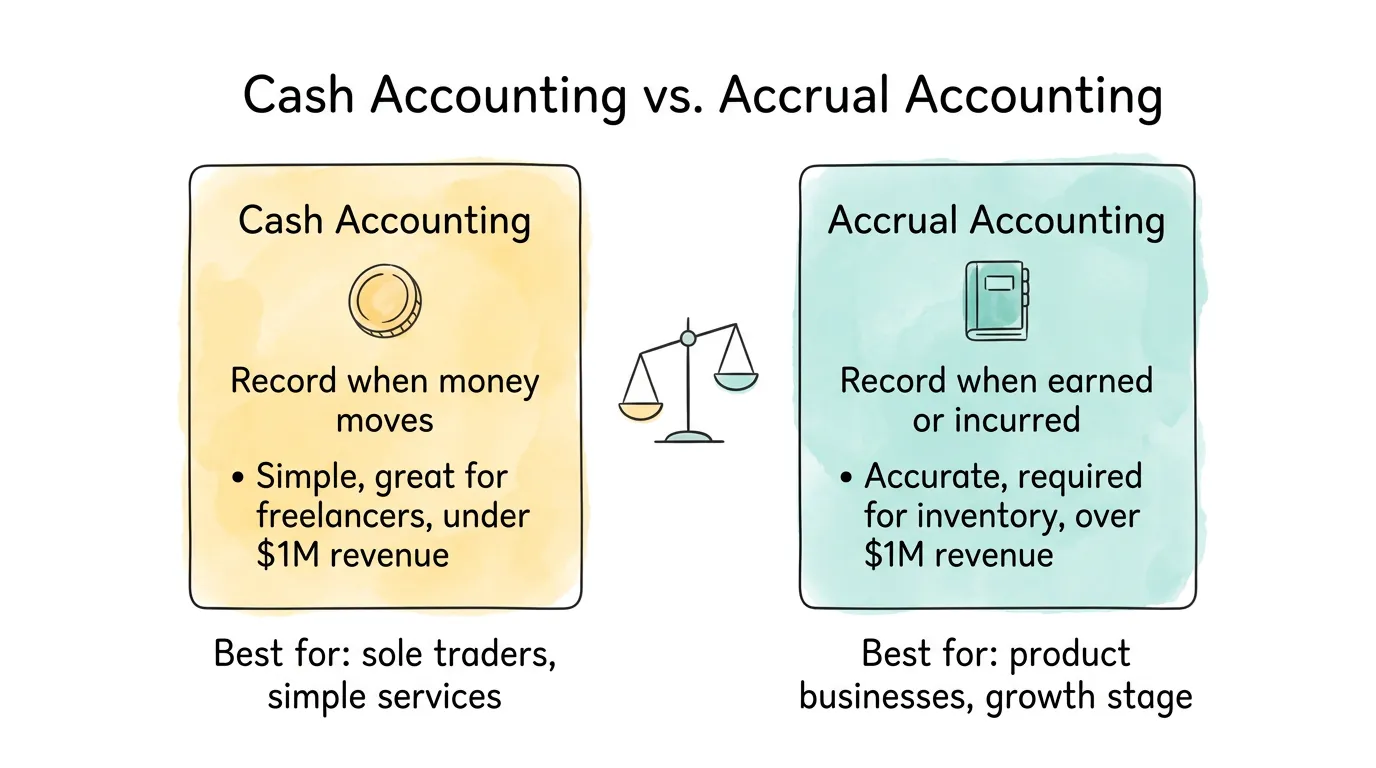
Cash accounting records revenue when you receive payment and expenses when you pay them. A consultant who sends an invoice in December but collects in January records the income in January. Simple, intuitive, and matches your bank balance.
Accrual accounting records revenue when it is earned and expenses when they are incurred, regardless of when cash changes hands. The same consultant records December revenue in December, creating a December receivable. More complex, but gives a more accurate picture of true performance.
|
Cash Accounting |
Accrual Accounting |
| When to record revenue |
When payment received |
When service delivered / goods sold |
| When to record expenses |
When payment made |
When expense incurred |
| Complexity |
Low |
Medium-High |
| Best for |
Freelancers, service businesses under $1M |
Product businesses, inventory holders, growth-stage |
| IRS requirement |
Optional under $30M average gross receipts |
Required for C-corps and businesses with inventory |
| Tax planning flexibility |
Can time income/deductions to shift tax years |
Less flexible but more accurate P&L |
According to IRS Publication 538 on accounting methods, businesses with annual gross receipts over $30 million are required to use accrual accounting. Most small businesses qualify for either method, but the right choice depends on your business model and growth trajectory.
The practical rule: Start with cash accounting if you are a service-based business under $1 million in revenue. Switch to accrual when you start holding significant inventory, approaching $1 million, or planning to raise outside investment.
Tip 3: How Do You Build a Bookkeeping Routine You Can Actually Maintain?
Consistency matters more than perfection in small business bookkeeping. A simple routine done reliably every week beats an elaborate system touched once a quarter.
The goal is to distribute the work across the month so month-end is a review, not a reconstruction. Businesses that reconcile monthly are always catching up. Businesses that work weekly or better maintain a current, accurate view of their finances at all times.
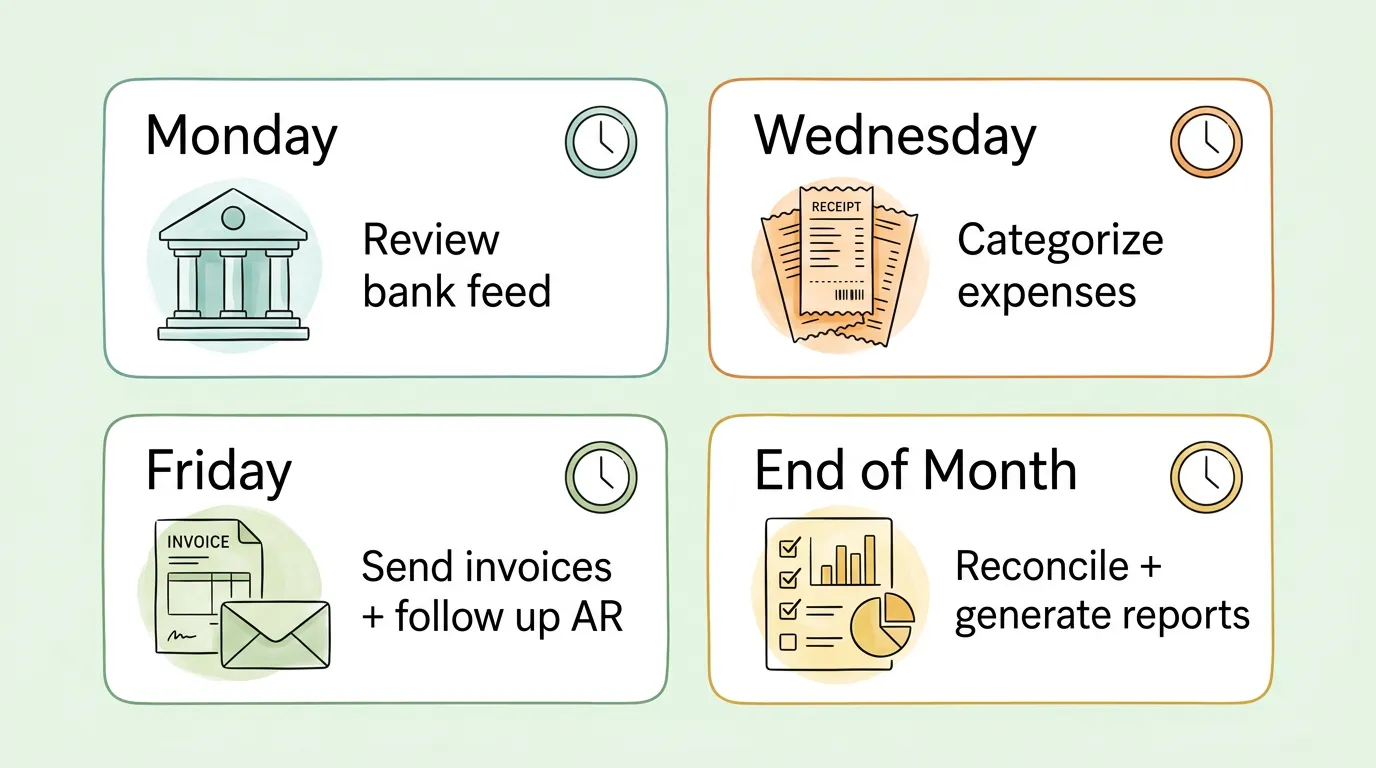
A sustainable weekly accounting routine for small business:
| Frequency |
Task |
Time Required |
| Daily (or every 2 days) |
Review new bank feed transactions |
5-10 minutes |
| Weekly (Monday) |
Categorize all new transactions |
20-30 minutes |
| Weekly (Friday) |
Send new invoices, follow up on outstanding AR |
15-20 minutes |
| Monthly (first week) |
Bank reconciliation |
30-60 minutes |
| Monthly (first week) |
Generate P&L, balance sheet, cash flow statement |
20-30 minutes |
| Quarterly |
Review financials with accountant, pay estimated taxes |
1-2 hours |
Most businesses overstimate how long bookkeeping takes when done regularly. A company with 100-200 monthly transactions, using accounting software with a bank feed, can stay current with two to three hours per week total. The same volume handled quarterly takes 10-15 hours in one sitting, with higher error rates and lower accuracy.
For a complete system covering the bookkeeping habits that compound over time, see small business bookkeeping tips.
Tip 4: How Should You Set Up Your Chart of Accounts From the Start?
Your chart of accounts is the taxonomy of your business finances. It defines the categories that every transaction falls into, and it directly determines the quality of the financial reports you generate. A poorly designed chart of accounts is one of the most common causes of financial reports that technically balance but are useless for decision-making.
Most accounting software comes with a default chart of accounts. The default is a reasonable starting point, but it is generic. It does not know that your "Marketing" expenses should be separated into "Paid Advertising," "Content Creation," and "Events," or that your "Revenue" should distinguish between product sales, service fees, and subscription income.
Common chart of accounts mistakes to avoid:
- Too few categories: dumping all marketing spend into one account means you cannot analyze where your acquisition dollars are working
- Too many categories: 50 expense accounts for a $200,000 business creates noise without insight; aim for 15-25 expense categories
- Wrong classification: booking a capital purchase (equipment lasting more than one year) as an expense overstates current costs and understates assets
- No sub-accounts: grouping all payroll into one line prevents distinguishing owner compensation from staff wages
The right approach: Work with an accountant to design your chart of accounts before you start entering transactions. Retroactively reclassifying transactions is painful. Getting it right upfront takes two hours and saves dozens of hours later.
Pro Tip: Match your chart of accounts to how you actually think about your business. If you make decisions by project, add project codes. If you have multiple revenue streams, create a top-level account for each one. Your reports are only as useful as your categories are meaningful.
Tip 5: How Do You Track Every Expense Without Losing Receipts?
Every unrecorded expense is a missed tax deduction. Every receipt that disappears is a gap in your audit trail. Thorough expense tracking is not about compliance for its own sake. It is about capturing every dollar your business spent so you can report it accurately and deduct it legally.
The IRS requires documentation for all business expenses. A bank or credit card statement alone is generally not sufficient for meals, travel, or mixed-use expenses. You need documentation showing the business purpose. That means receipts, and a system to capture them.
Expense tracking practices that actually work:
Photograph receipts immediately. The best time to capture a receipt is before you leave the table or the checkout counter. Use your accounting software's mobile app or a dedicated receipt app. A photo taken in the moment is infinitely better than searching through a wallet three weeks later.
Add a business purpose note for meals and entertainment. Write who you met with and what was discussed while the memory is fresh. Auditors ask this question; your future self will thank you.
Set up auto-categorization rules. Most accounting platforms let you create rules: "Any transaction from Adobe = Software Subscriptions." Set these up for your recurring vendors and eliminate manual categorization for 40-60% of your monthly transactions.
Run a monthly expense review. Spend 15 minutes at month-end reviewing your expense categories for anything miscoded, duplicated, or that looks unusual. Catching a duplicate vendor charge in month one is easy. Catching it in month eleven means investigating 11 months of statements.
Track mileage if you use a personal vehicle for business. The IRS mileage rate for 2026 is set annually and represents a meaningful deduction for businesses with travel. A GPS mileage app captures this automatically.
For a complete system for managing physical receipts and going digital, see organizing business receipts and how to organize receipts for taxes.
Tip 6: What Should You Look for in Accounting Software for a Small Business?
Manual bookkeeping using spreadsheets has a ceiling. It works at very low volume. It breaks when transactions increase, staff multiply, or the business operates across multiple platforms. The right accounting software removes the ceiling by automating the mechanical work so that your books stay current without requiring proportionally more time as the business grows.
The key word is "connects." Accounting software that sits isolated from your bank, your payment processor, your invoicing tool, and your payroll platform is just a better spreadsheet. The value comes from integration: bank feed transactions imported automatically, Shopify or Stripe sales recorded without manual entry, payroll entries synced from your payroll provider, invoices created and sent from within the same system.
What to evaluate when choosing accounting software for a small business:
| Feature |
Why It Matters |
| Bank feed integration |
Eliminates manual transaction import; updates daily |
| Invoicing built-in |
Keeps receivables and bookkeeping in one system |
| Mobile receipt capture |
Lets you photograph and code expenses anywhere |
| Payroll integration |
Prevents manual journal entries for payroll |
| Tax reporting |
Generates quarterly and annual tax reports automatically |
| Accountant access |
Lets your CPA work in the same system without file transfers |
| Scalability |
Handles growth without requiring a platform migration |
For businesses using QuickBooks Online, the direct integration with TallyScan captures invoices automatically from your email and vendor portals, eliminating the manual upload step entirely. For a guide on getting this integration working correctly, see integration with QuickBooks Online.
The broader automation layer that connects accounting software, invoice capture, and expense management is covered in our guide on accounting automation software.
Tip 7: How Often Should You Reconcile Your Bank Accounts?
Bank reconciliation is the process of confirming that every transaction in your accounting software matches a corresponding transaction on your bank statement. It is one of the most basic internal controls in accounting, and it is routinely underperformed by small businesses.
The standard advice is monthly reconciliation. The better practice is weekly, or at minimum biweekly. Here is why: a discrepancy discovered the week it occurred takes 15 minutes to investigate. The same discrepancy discovered 45 days later may require reviewing a month and a half of transactions, contacting a vendor, or disputing a charge that is now outside the dispute window.
What reconciliation catches:
- Duplicate vendor charges (billed twice for the same subscription or service)
- Bank fees and interest charges not recorded in your books
- NSF (non-sufficient funds) charges indicating a failed payment
- Unauthorized transactions or early-stage fraud
- Client payments that were deposited but never recorded as received
- Outstanding checks issued months ago that may indicate fraud or unclaimed property obligations
The mechanics: Pull your bank statement (or use the live bank feed in your accounting software). Match each bank transaction to its corresponding entry in your books. Identify anything that appears in one place but not the other, investigate it, and either create the missing entry or flag it as a reconciling item with a documented explanation.
For a step-by-step guide to making reconciliation faster and less painful, see bank reconciliation tips.
Pro Tip: Use accounting software with a live bank feed so your transactions import automatically every day. This turns reconciliation from a monthly batch process into a daily 5-minute review of the day's imports, flagging anything the software could not match automatically.
Tip 8: How Do You Manage Cash Flow Before a Problem Hits?
A profitable business can fail if it runs out of cash. This is not a theoretical risk: according to US Small Business Administration research, cash flow problems are among the leading causes of small business failure, even in businesses that are technically profitable on an accrual basis.
The difference between businesses that survive cash crunches and businesses that do not is usually not the severity of the crunch. It is whether the business saw it coming with enough time to respond.
The 13-week rolling cash flow forecast: This is the most practical tool for small business cash flow management. Each week, you update a spreadsheet (or a dashboard in your accounting software) showing:
- Cash inflows for the next 13 weeks: confirmed payments expected, invoice due dates, subscription renewals, seasonal peaks
- Cash outflows for the next 13 weeks: rent, payroll, supplier payments, loan payments, tax deposits, software subscriptions
- Net weekly position: what the cash balance will be at the end of each week if everything goes to plan
- Minimum balance alert: a threshold below which you need to act (draw on a line of credit, accelerate collections, delay a non-critical payment)
Other cash flow management practices that work:
- Invoice immediately. Every day of delay in sending an invoice is a day added to your collection cycle. Many accounting platforms support automatic invoice generation on project completion or on a recurring schedule.
- Shorten payment terms. Net-30 is not a law. Many service businesses successfully operate on net-14 or net-15, especially with clients who have good payment history.
- Follow up systematically. An automated reminder sequence (day 1 after due: polite reminder, day 7: second reminder, day 14: phone call) significantly improves collection rates without requiring manual tracking.
- Maintain a 3-month cash reserve. This is the buffer between a slow quarter and a business-ending cash crisis. Build it during good periods; protect it during bad ones.
For a complete guide to improving cash flow at the operational level, see improve cash flow.
Tip 9: Which Financial Metrics Should a Small Business Track Every Month?
Your bank balance is not your financial health. It is one number, at one moment in time, with no context. Financial metrics give you context: not just how much money is in the account, but whether the business is becoming more or less profitable, whether cash is being collected efficiently, whether you are covering your costs with enough margin to survive a bad month.
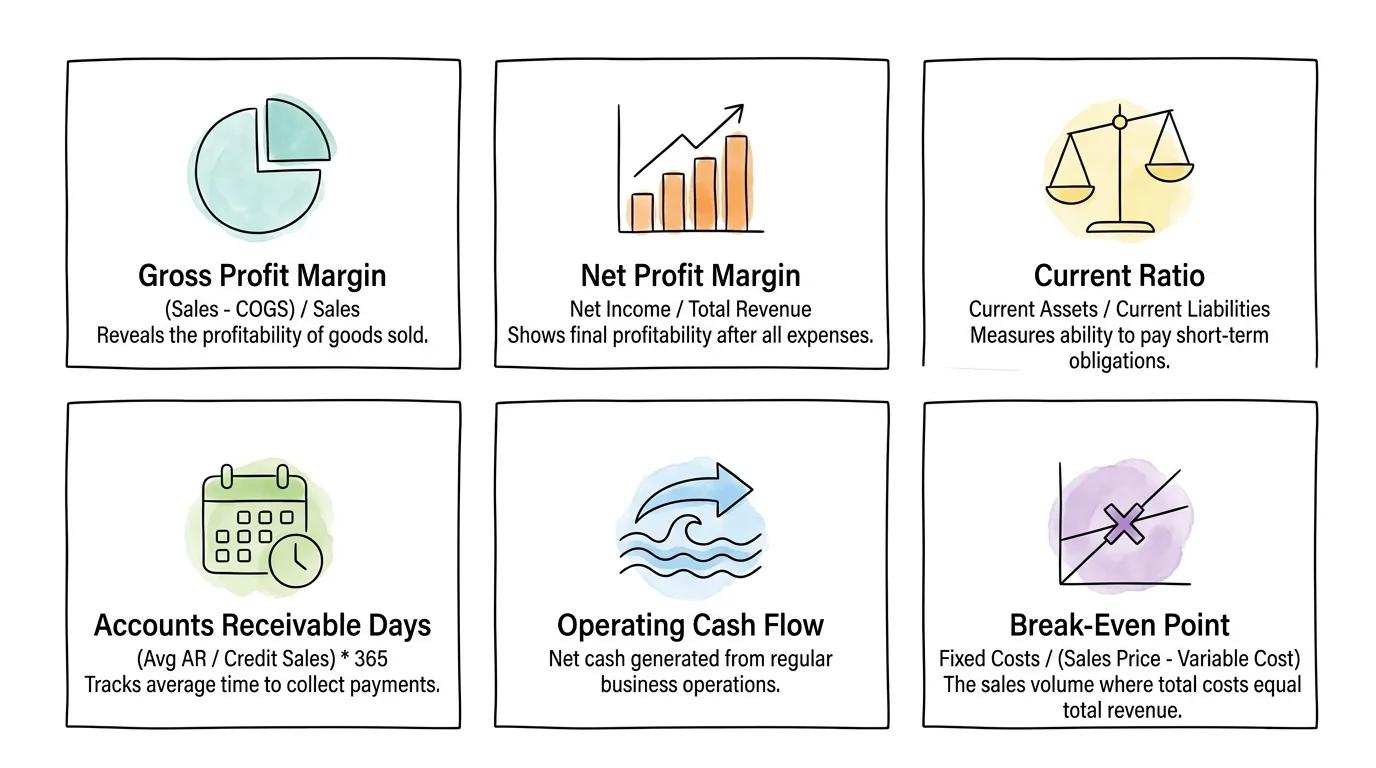
The six metrics every small business should track monthly:
| Metric |
Formula |
What It Tells You |
Healthy Target |
| Gross Profit Margin |
(Revenue - COGS) / Revenue |
How much you keep after direct costs |
Varies by industry; service firms 50-80%, retail 20-50% |
| Net Profit Margin |
Net Income / Revenue |
True bottom-line profitability |
Positive and improving; 10%+ is strong for most SMBs |
| Current Ratio |
Current Assets / Current Liabilities |
Ability to pay short-term obligations |
1.5-2.0 (above 1.0 = can cover current debts) |
| Accounts Receivable Days |
(Avg AR / Annual Revenue) x 365 |
Average days to collect payment |
Less than your payment terms; watch for upward trend |
| Operating Cash Flow |
Cash from operations (from cash flow statement) |
Cash generated by the actual business |
Positive; should grow in line with revenue |
| Break-Even Point |
Fixed Costs / (Revenue per Unit - Variable Cost per Unit) |
Minimum sales volume to avoid a loss |
Know this number; update quarterly |
How to use these metrics: Build a simple one-page monthly dashboard showing each metric's current value, prior month value, and a trend arrow. Review it in the first week of each month. Metrics moving in the wrong direction require investigation, not just observation.
For a broader look at how AI tools can surface these metrics automatically from your accounting data, see bookkeeping AI and accounting AI.
Tip 10: How Do You Plan for Taxes Year-Round Instead of Scrambling in April?
Tax preparation is not something you do in April. It is something you do in January through March, every month, when you categorize expenses correctly, keep receipts, and track deductible business costs. By April, you should be filing, not preparing.
The businesses that pay the most tax are not the most profitable ones. They are the ones that were not organized enough to claim every legitimate deduction. Receipts that were not captured, mileage that was not tracked, home office expenses that were never calculated, business meals that were not documented. These are not aggressive tax strategies. They are standard deductions that disappear when record-keeping is poor.
Year-round tax planning checklist for small businesses:
Track every business expense with documentation. If it is a legitimate business expense, record it immediately and keep the supporting document. The IRS standard for documentation is a receipt showing the amount, date, vendor, and business purpose.
Pay estimated quarterly taxes on schedule. Self-employed individuals and business owners who expect to owe more than $1,000 in federal taxes are required to pay quarterly estimated taxes. Missing these payments results in penalties. The 2026 due dates follow the standard IRS quarterly schedule.
Maintain a tax file for the year. Create a digital folder (organized by category: receipts, payroll records, contractor payments, bank statements, tax correspondence) and add to it throughout the year. Do not reconstruct this at year-end.
Understand the most common small business deductions: home office (percentage of home used exclusively for business), vehicle use (mileage or actual expenses), health insurance premiums (for self-employed), business travel, professional development, software subscriptions, and professional services fees (accounting, legal).
Meet with your accountant quarterly, not annually. A year-end tax meeting is primarily about documentation. A quarterly meeting is where tax planning actually happens: adjusting estimated payments, timing income or expenses across fiscal years, identifying deductions before the year closes.
Per IRS guidance on small business recordkeeping, you should generally retain supporting documents for at least three years from the date you filed the return, or two years from the date you paid the tax, whichever is later. For employment tax records, keep for at least four years. When in doubt, seven years is a safe standard.
For a guide specifically on organizing financial records for tax purposes, see how to organize receipts for taxes and audit readiness checklist.
When Is It Time to Stop DIYing and Hire an Accountant?
These small business accounting tips are designed for business owners who are managing their own books. But there is a point where DIY bookkeeping costs more than it saves, in time, errors, and missed opportunities.
Signs it is time to bring in a professional:
| Situation |
Why It Matters |
| Bookkeeping takes more than 5 hours per week |
Your time has an opportunity cost; at $50/hour, that is $1,000/month in lost productive time |
| You have unpaid invoices older than 60 days |
You need collection processes, not just bookkeeping |
| You are paying estimated taxes by guessing |
A CPA can calculate precise estimates and reduce underpayment penalties |
| You have employees or contractors |
Payroll and 1099 compliance requires specialist knowledge |
| Your business made more than $100,000 last year |
The tax savings from proper planning typically exceed a CPA's fee many times over |
| You received an IRS notice |
Do not respond to an IRS notice without professional advice |
| You are considering a major financial decision |
Acquisition, new location, significant debt: get professional input |
Fractional or outsourced bookkeeping: For businesses not ready for a full-time hire, outsourced bookkeeping services typically cost $300-$1,500 per month depending on transaction volume. An enrolled agent or CPA for tax preparation and quarterly planning typically costs $1,000-$3,000 per year for a simple small business return. Both are deductible business expenses.
For guidance on how AI-powered tools can reduce the bookkeeping workload before you need to hire, see automate bookkeeping and AI agent for accounting.
Which of These 10 Tips Should You Tackle First? (Priority Matrix)
| Tip |
Difficulty |
Time to Implement |
Impact |
Priority |
| Separate business and personal finances |
Low |
1 day |
Critical |
Do this week |
| Choose accounting method |
Low |
2 hours |
High |
Do this week |
| Set up accounting software |
Medium |
1-2 days |
Very High |
Do this month |
| Build weekly bookkeeping routine |
Medium |
Ongoing |
High |
Start immediately |
| Set up chart of accounts |
Medium |
2-3 hours |
High |
Before first transactions |
| Expense tracking system |
Low-Medium |
1 day |
High |
Do this month |
| Bank reconciliation cadence |
Low |
Ongoing |
High |
Start immediately |
| 13-week cash flow forecast |
Medium |
2-4 hours |
Very High |
Do this quarter |
| Financial metrics dashboard |
Medium |
2-3 hours |
High |
Do this month |
| Quarterly tax planning |
Medium-High |
Ongoing |
Very High |
Schedule now |
Frequently Asked Questions
What accounting method should a small business use: cash or accrual?
Most small service-based businesses under $1 million in annual revenue should start with cash accounting. It is simpler, matches your bank balance, and is sufficient for tax reporting at this scale. Switch to accrual accounting when you begin holding significant inventory, approach $1 million in revenue, or seek outside investment, since investors and lenders typically require accrual-basis financial statements to accurately assess business performance.
How often should a small business do bookkeeping?
Weekly is the recommended minimum for most small businesses. Daily transaction review (5-10 minutes using a bank feed) keeps the books current. Weekly categorization and AR follow-up (30-45 minutes) prevents backlogs. Monthly reconciliation and reporting (1-2 hours) provides the financial statements needed for business decisions. Quarterly reviews with an accountant ensure tax compliance and strategic planning. Annual or quarterly-only bookkeeping is the most common source of expensive errors and missed deductions.
When should a small business hire an accountant?
Hire a bookkeeper when bookkeeping consistently takes more than 5 hours per week. Engage a CPA or tax professional when your business exceeds $100,000 in annual revenue, when you have employees or contractors, or when you receive any IRS correspondence. Many small businesses use both: a bookkeeper for monthly transaction management and a CPA for quarterly tax planning and annual return preparation. The combination typically costs $800-$2,000 per month depending on complexity, and the tax savings and error avoidance usually exceed that cost.
What financial records should small businesses keep, and for how long?
Keep all records that support your tax return: receipts, invoices, bank statements, payroll records, contractor payments, and business expense documentation. The IRS generally recommends three to seven years depending on the situation. The safe standard for most small businesses is seven years for all tax-related records. Employment tax records should be kept for at least four years. For records related to property (purchase documents, improvement costs), keep them for as long as you own the property plus seven years.
What are the most important financial metrics for a small business to track?
Start with gross profit margin (revenue minus cost of goods sold, divided by revenue), net profit margin (net income divided by revenue), and operating cash flow (cash generated by normal business operations). Add accounts receivable days (how long it takes to collect payment) and your current ratio (current assets divided by current liabilities) as the business grows. The break-even point (fixed costs divided by gross margin per unit) is critical for pricing decisions and understanding minimum required sales volume. Review these monthly as a one-page dashboard rather than trying to track everything at once.
What accounting software is best for small businesses?
QuickBooks Online is the most widely used small business accounting platform and has the broadest integration ecosystem. Xero is a strong alternative, particularly popular with businesses that have international operations or work with accountants who prefer it. FreshBooks is well-suited for service-based businesses and freelancers who prioritize invoicing. Wave is free and functional for very simple needs. The right choice depends on your industry, transaction volume, integration requirements, and whether your accountant has a platform preference. Most offer free trials; test with your actual transactions before committing.
How can a small business reduce its tax burden legally?
Track and document every legitimate business deduction: home office (square footage percentage), vehicle use (mileage log or actual expenses), health insurance premiums for self-employed owners, business travel, professional development, software and tools, and professional service fees. Time income and expenses strategically across fiscal years when possible (accelerate deductions into the current year; defer income to the following year if your tax bracket will be lower). Contribute to tax-advantaged retirement accounts available to self-employed individuals (SEP-IRA, Solo 401(k)). Meet with a CPA quarterly rather than annually to identify these opportunities before the year closes.
What Do Good Books Actually Give You That Bad Books Never Will?
Every one of these small business accounting tips points to the same underlying truth: financial clarity is a competitive advantage. Businesses that know their margins can price confidently. Businesses that forecast cash flow can invest without panic. Businesses with clean records can respond to audit notices without drama and secure financing without weeks of scrambling.
The work is not glamorous. Setting up a chart of accounts, building a weekly reconciliation routine, photographing every receipt, running a 13-week cash flow forecast. None of it feels strategic in the moment. But collectively, these practices are what separate businesses that grow with confidence from businesses that grow and hope the finances work out.
TallyScan captures your invoices and receipts automatically from email inboxes and vendor portals, extracts every key field with AI-powered OCR, and syncs approved data directly to QuickBooks, Xero, and the accounting platforms your bookkeeper already uses. Less time on data entry, more time on the decisions that actually matter.
Start your free trial and eliminate manual invoice entry from your accounting routine.
Related reading: Small Business Bookkeeping Tips | Bookkeeping AI | Bank Reconciliation Tips | Improve Cash Flow | Accounting Automation Software | Audit Readiness Checklist | Automate Bookkeeping