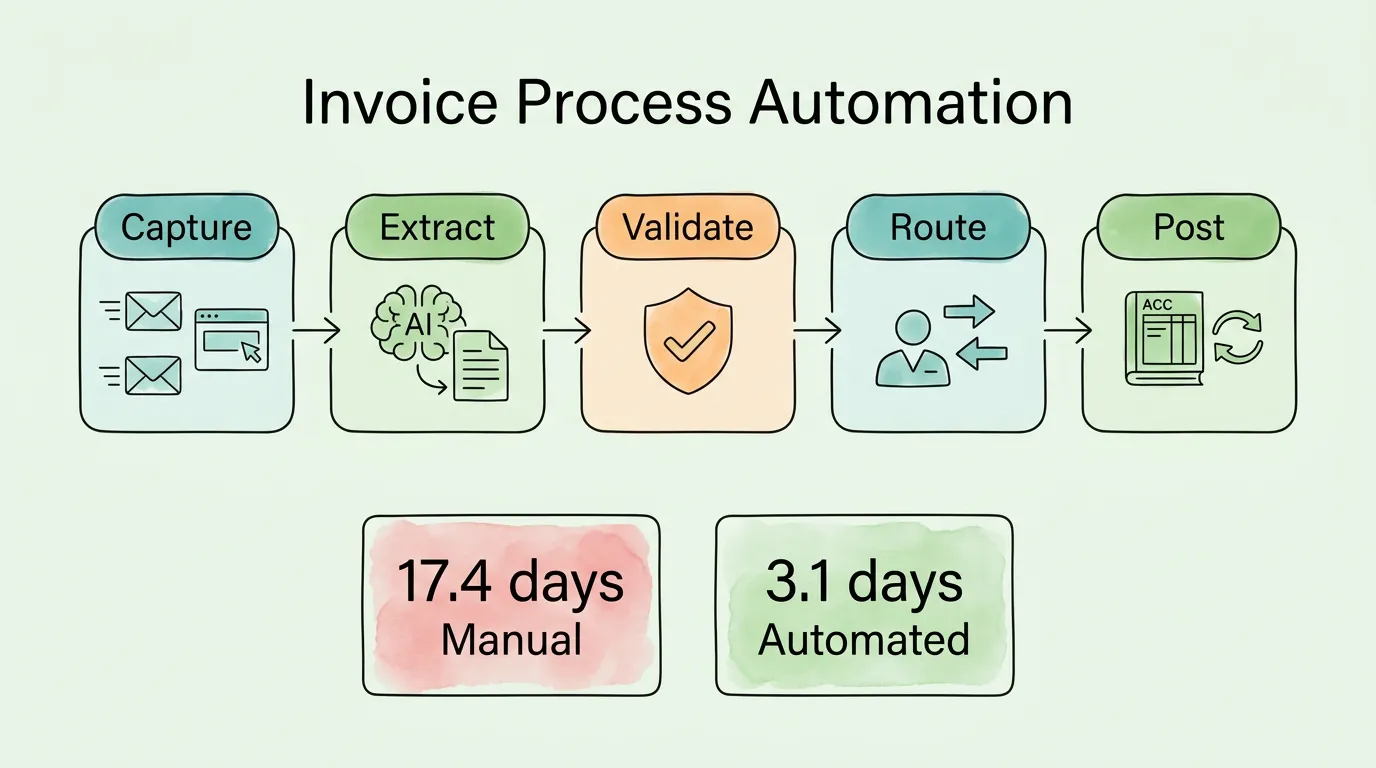
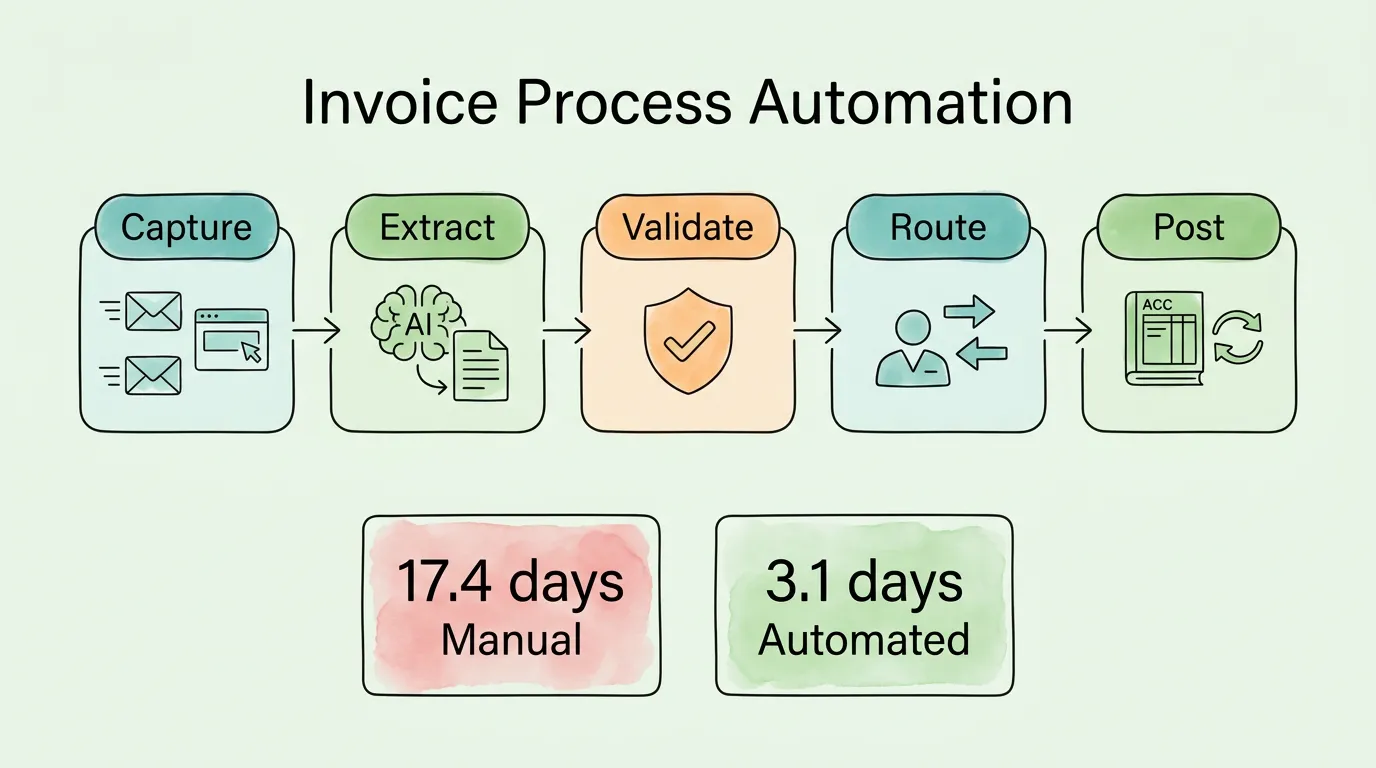
The average accounts payable team processes an invoice in 17.4 days at a cost of $12.88. Best-in-class teams processing the same invoice touchlessly do it in 3.1 days at $2.78.
That 82% reduction in time and 78% reduction in cost does not come from working harder or hiring more people. It comes from removing the manual steps (data entry, approval chasing, paper handling, status tracking) that consume most of the processing time and nearly all of the processing cost. Invoice process automation is the mechanism that removes those steps.
This guide explains exactly how that mechanism works: the technology stack, the five stages of an automated invoice lifecycle, how to calculate your specific ROI before purchasing anything, how to evaluate and select the right tool, and the five implementation phases that separate successful rollouts from expensive shelf-ware.
What Is Invoice Process Automation?
Invoice process automation is software that replaces the manual steps in accounts payable (data capture, validation, matching, approval routing, and accounting system posting) with automated workflows that require human involvement only for exceptions and strategic decisions.
The key distinction from earlier AP tools is scope. Basic digitization (scanning paper invoices and emailing PDFs) moves the document from physical to digital but does not eliminate the manual processing. Invoice process automation eliminates the manual processing itself: an invoice received at 2:00 AM is captured, data-extracted, matched against the purchase order, validated, and routed for approval before the AP team arrives at their desks.
What invoice process automation covers:
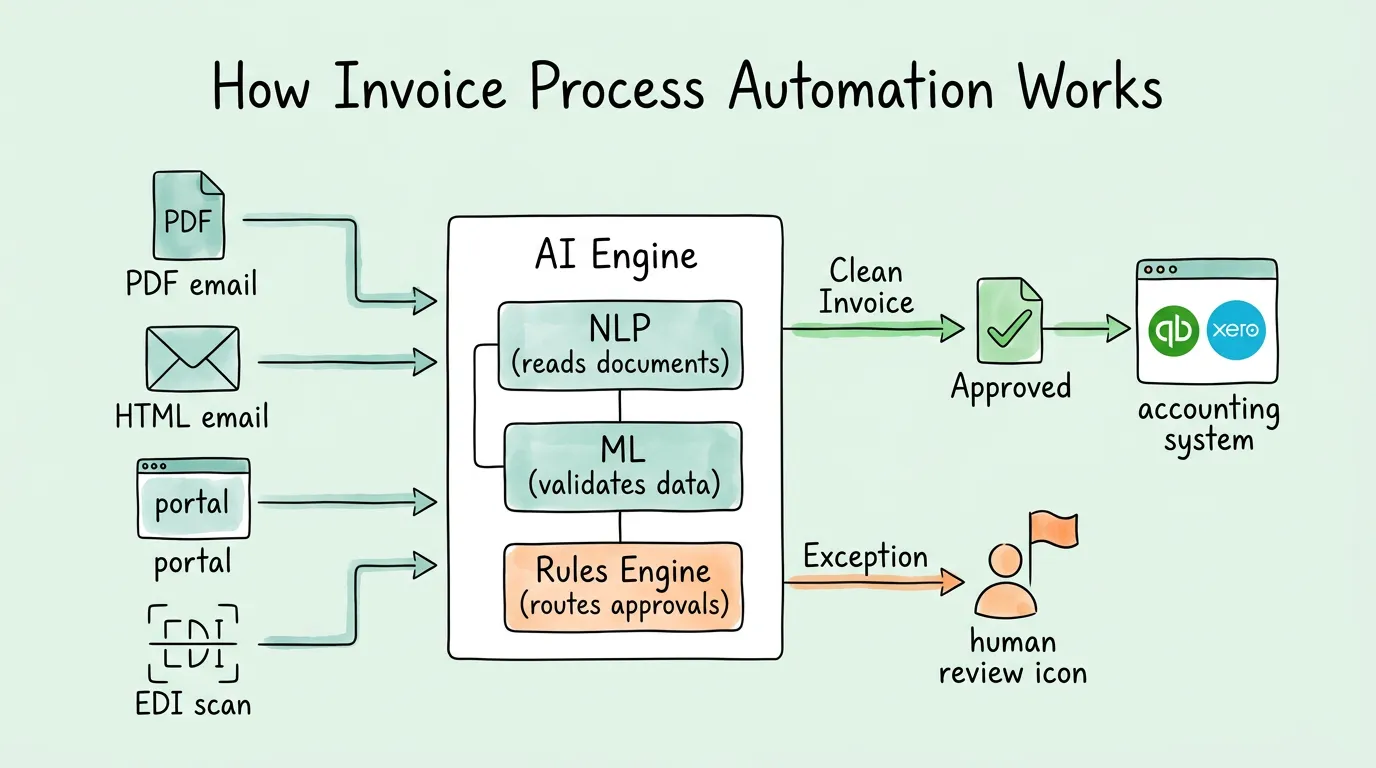
Multi-channel invoice capture (email attachments, email body HTML, vendor portals, EDI, postal mail scans)
AI-powered data extraction (vendor name, invoice number, date, due date, line items, amounts, tax, currency)
Automated 2-way and 3-way matching against purchase orders and goods receipts
Rules-based approval routing with mobile approvals and automatic escalation
Duplicate detection and fraud anomaly flagging
Direct posting to accounting systems (QuickBooks, Xero, NetSuite, SAP, Sage)
Searchable digital archive with complete audit trail
What invoice process automation does not replace:
Professional judgment on complex or disputed invoices
Vendor relationship management and contract negotiation
Strategic cash flow and payment timing decisions (though it provides the data for them)
Tax position analysis and compliance judgment
How Does Invoice Process Automation Work from PDF to Posted Entry?
Stage 1: Capture: Getting Every Invoice Into One Place
The first technology layer handles intake from every channel simultaneously. An AI-powered capture system monitors your dedicated AP inbox, connects to vendor portals via direct integration, processes EDI transactions, and handles uploaded scans, routing every invoice to a single processing queue regardless of how or when it arrived.
The critical capability here is handling invoices embedded in HTML email bodies, not just attached as PDFs. A large and growing category of SaaS vendors (AWS, Stripe, Uber, Google, Zoom) send billing information as inline HTML rather than PDF attachments. A capture system that only processes attachments misses these entirely, creating gaps in your AP ledger that surface during audit preparation.
For a detailed breakdown of the capture technology and what to look for when evaluating tools, see our guide on invoice capture software.
Stage 2: Extract: Reading the Invoice With AI
Once an invoice is captured, AI-powered extraction using Natural Language Processing (NLP) reads the document and identifies every relevant data field: vendor name, invoice number, invoice date, due date, purchase order reference, line item descriptions, quantities, unit prices, subtotals, tax codes, tax amounts, and total amount due.
The distinction between traditional OCR and AI-powered extraction matters significantly in practice:
Traditional OCR
AI-Powered Extraction
Approach
Reads characters in predefined positions
Understands field meaning in context
New vendor layouts
Requires new template
Handles automatically
Field accuracy
85-92%
98-99%+
Line-item extraction
Limited
Full
Email body HTML
Cannot process
Processes natively
Learning
Static
Improves with volume
At 98%+ field accuracy, one to two fields per 100 invoices require human correction, compared to a 3% to 5% keystroke error rate for manual data entry, plus the time cost of the entry itself. For a technical explanation of how AI extraction differs from template-based OCR, see our guide on what is OCR technology.
Stage 3: Validate: Checking the Data Before Anyone Touches It
After extraction, the system automatically validates the data against your business rules before any human review occurs:
Duplicate detection: Does this invoice number already exist for this vendor? Does the vendor + amount + date combination match an existing posted entry?
Vendor verification: Is this vendor in the approved vendor master? Does the bank account on file match a recently changed record (BEC fraud indicator)?
PO matching: Does the invoice amount match the open PO within tolerance? Does the quantity match the goods receipt?
Data completeness: Are all required fields present? Does the tax amount match the stated tax rate applied to the taxable subtotal?
Invoices that pass all validation checks move directly to approval routing. Invoices that fail any check route to a dedicated exception queue with the specific failure reason flagged. This is the step that generates the "touchless processing rate" metric: the percentage of invoices that complete validation and routing without any human intervention.
For a complete breakdown of matching logic including 2-way, 3-way, and 4-way matching, see our invoice matching process guide.
Stage 4: Route: Getting Approval Without Chasing Anyone
The workflow engine routes each validated invoice to the correct approver based on rules you configure: dollar amount thresholds, department or cost center, vendor category, GL code, or any combination. Every approver receives a notification (email or mobile app) with a single-screen view of the invoice, the matched PO, and a one-click approve or reject action.
Escalation is automatic: if an approver does not act within the configured SLA (typically 24 to 48 hours), the invoice routes to their backup or manager. The approval status of every invoice is visible in a real-time dashboard. No status-tracking spreadsheet, no follow-up emails.
Stage 5: Post: Syncing to Your Accounting System Automatically
Once approved, the system posts the invoice data directly to your accounting platform via API integration. The vendor record, amount, GL code, department code, project code, tax treatment, and payment due date all transfer automatically and accurately.
This eliminates the final manual step that many partially automated systems still retain: re-entering approved invoice data from the AP tool into the accounting system. A direct API integration with QuickBooks, Xero, NetSuite, or Sage means your general ledger is updated in real time, your cash flow forecasting data is current, and there is no opportunity for re-entry errors.
What Is the Real ROI of Invoice Process Automation?
Before evaluating any tool, calculate your specific ROI using your actual numbers. This calculation, done honestly, either confirms that automation is justified or identifies what volume threshold makes it justified.
Step 1: Calculate your current monthly processing cost
Current cost per invoice (industry average: $12.88) × invoices per month = monthly processing cost
Example: 400 invoices × $12.88 = $5,152/month
Step 2: Calculate your current monthly error correction cost
Invoices per month × error rate (industry average: 39%) × cost per error ($52) = monthly error cost
Example: 400 × 39% × $52 = $8,112/month
Step 3: Calculate your missed early payment discount cost
Monthly payables × percentage offering 2/10 NET 30 terms (typically 15-25%) × 2% discount × (1 - current capture rate) = missed monthly discount value
How Do You Choose Invoice Process Automation Software? A 6-Point Framework
The automation software market includes hundreds of products across a wide capability range. Do not evaluate them by feature list. Evaluate them by how they perform against your specific requirements.
1. Invoice capture coverage
Does the tool capture invoices from your actual channels? Verify: email attachment extraction, email body HTML extraction (for SaaS vendors), direct portal connections, and EDI support. Ask to see a live demo with your actual vendor invoices, not a curated demo dataset.
2. Extraction accuracy on your documents
Request a proof-of-concept using 50 to 100 of your real invoices. Measure field-level extraction accuracy before and after the vendor's claimed accuracy rates. Any system below 95% field accuracy on your specific document types will generate more human correction work than it saves. See our detailed evaluation guide in our invoice data capture software comparison.
3. Accounting system integration depth
Confirm direct API integration with your specific accounting platform (not CSV export). Ask specifically: Does the integration sync in real time or in batches? Does it support your chart of accounts structure including custom fields and project codes? Can it handle multi-entity and multi-currency if you need it?
4. Approval workflow configurability
Evaluate the workflow engine against your actual approval matrix: dollar thresholds, department-based routing, vendor categories, escalation paths. A workflow engine that cannot replicate your business rules will force you to change your controls to match the software, rather than configuring the software to match your controls.
5. Security and compliance certifications
For financial data, the baseline requirement is SOC 2 Type II certification: an independent audit of security controls conducted over a minimum 6-month period. Request the actual SOC 2 report, not a summary. Also verify: AES-256 encryption at rest, TLS 1.2+ in transit, role-based access controls, and (for EU operations) GDPR-compliant data processing agreements. More on compliance standards from the AICPA SOC 2 framework.
6. Total cost including implementation
List price is not total cost. Include: monthly subscription, implementation and configuration fees, staff training time, data migration, and ongoing administration. Compare against your Step 5 ROI calculation. A tool that costs $1,500/month but delivers $18,000/month in documented benefit is more valuable than a tool costing $300/month that delivers $4,000 in benefit.
How Do You Implement Invoice Process Automation in 5 Phases?
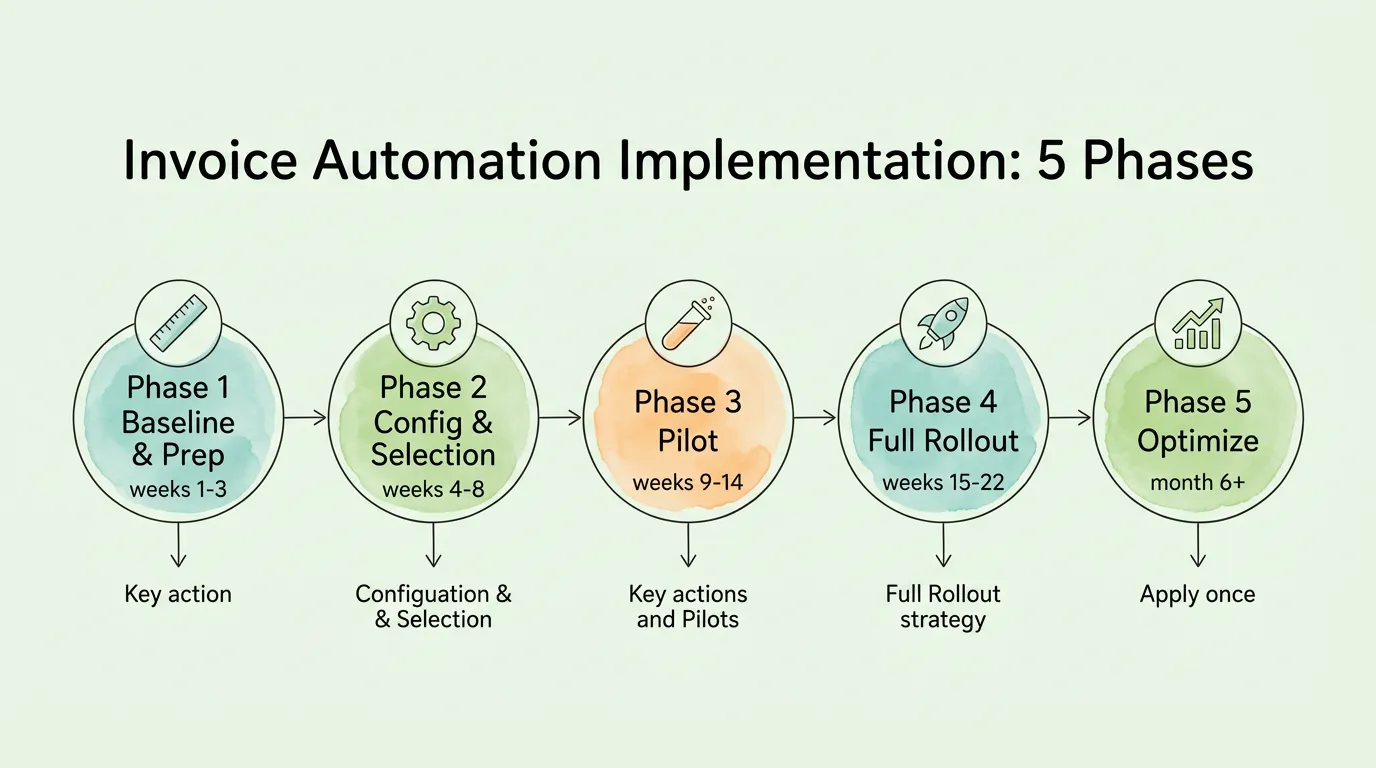
Phase 1: Baseline and preparation (Weeks 1-3)
Document your current process with precise measurements: invoices per month by source channel and type (PO-based, non-PO services, recurring), current cost per invoice, current cycle time, exception rate, and discount capture rate. These numbers are your before-state for ROI measurement and your diagnostic for which bottlenecks to address first.
Clean your vendor master data before go-live. Duplicate vendor records, stale banking details, and missing tax IDs will create systematic exceptions from day one. A vendor master cleanse before implementation is the single most underrated preparation step.
Phase 2: Tool selection and configuration (Weeks 4-8)
Run your proof-of-concept with real invoices. Configure your approval matrix, escalation rules, GL code mappings, and exception handling workflows before pilot. The configuration quality determines your day-one touchless processing rate. A system launched without proper rule configuration will generate high exception volume and create the impression that automation is not working.
Phase 3: Controlled pilot (Weeks 9-14)
Launch with one invoice type or one vendor category, preferably your highest-volume, most standardized invoices. Process 100 to 200 invoices through the full automated workflow. Measure daily: extraction accuracy, exception rate, approval cycle time, and touchless processing rate. Do not expand scope until touchless rate exceeds 80% on pilot invoices.
Communicate the pilot to relevant approvers in advance. Approval adoption (approvers actually using the system rather than requesting printed copies) is the most common pilot failure mode and is entirely predictable with proper preparation.
Phase 4: Full rollout (Weeks 15-22)
Notify all vendors of the new submission channel (dedicated AP email or portal). A single, clear email explaining the new address, preferred format (PDF or XML), and go-live date is sufficient for most vendors. Follow up individually with your top 10 to 20 vendors by volume. Communicate the benefit to them: faster processing means faster payment.
Train your AP team on the exception queue, not the full system. Most AP staff will interact primarily with flagged invoices (the 10% to 20% of invoices that require human review). Training focused on exception resolution is more efficient and more practical than training the full system to staff who will rarely use most features.
Phase 5: Optimization and monitoring (Month 6 onward)
Track the six core KPIs monthly: cost per invoice, cycle time, touchless processing rate, exception rate, early payment discount capture rate, and on-time payment rate. When metrics degrade, trace the root cause before assuming a technical problem. Most deteriorations come down to a new vendor format, a vendor master data gap, or a change in approval staffing.
Reassess automation rules quarterly. Your business adds new vendors, enters new spend categories, and changes approval structures. Rules that were optimal at implementation become misaligned with business reality within 6 to 12 months without active maintenance.
What Are the 5 Most Common Invoice Process Automation Pitfalls?
Pitfall 1: Going live with dirty vendor master data
The most common cause of high early exception rates is vendor master problems: duplicate records that defeat deduplication logic, missing tax IDs that block vendor matching, and banking details that don't match records from a prior period. Fix vendor data before go-live, not after.
Pitfall 2: Configuring approval workflows that mirror manual process complexity
Teams frequently build digital approval workflows that replicate every manual approval step, including redundant reviews that existed in the manual process only because paper needed to physically move between people. Redesign your approval matrix for the automated environment, where routing is instantaneous and escalation is automatic. Streamlined digital workflows consistently outperform digitized manual workflows.
Pitfall 3: Skipping the pilot and going straight to full rollout
Full company rollout without a controlled pilot means discovery of configuration problems at scale. Exception rates of 30% to 50% in the first month (common for poorly configured systems) generate more work for the AP team than manual processing, creating organizational resistance that is difficult to reverse. Run the pilot.
Pitfall 4: Expecting 100% touchless processing from day one
98%+ field extraction accuracy does not mean 98% touchless invoices. Exceptions are generated by vendor master mismatches, PO tolerance violations, and missing fields. None of those are extraction failures. A realistic day-one touchless rate for a well-configured system is 60% to 70%, rising to 80% to 89% within 90 days as vendor formats are learned and exception root causes are systematically addressed.
Pitfall 5: Not communicating to vendors before go-live
Vendors who continue sending invoices to individual employee email addresses after go-live create ongoing intake gaps. A single vendor communication email and a 30-day transition window eliminates most of this problem. Vendors are motivated to comply when the benefit to them is clearly communicated: faster, more predictable payment.
Which Invoice Process Automation Approach Fits Your Business Size?
Small businesses (under 150 invoices/month):
The ROI case for full AP automation at very low volume is marginal when measured on processing cost alone. The stronger case is operational: centralized intake and automated data extraction create a complete, searchable invoice archive that makes tax preparation and occasional audit queries a minutes-long task rather than a multi-day project. Start with receipt and invoice capture automation, then add approval workflow as volume grows. See our guide on receipt scanning OCR for the entry-level automation layer.
Mid-market (150–2,000 invoices/month):
This is where the ROI is clearest and most immediate. All five stages of invoice process automation are justified at this volume, and the implementation complexity is manageable without enterprise IT resources. Cloud-based tools with direct accounting integrations to QuickBooks or Xero deliver full automation at this scale for $500 to $3,000 per month, a fraction of the processing cost savings they generate.
Enterprise (2,000+ invoices/month):
At enterprise scale, the additional priorities are ERP integration depth, multi-entity support, and fraud analytics. The dollar amounts involved make even marginal exception rates and duplicate payment rates significant. Enterprise implementations typically involve integration with SAP, Oracle, or NetSuite; multi-currency and multi-jurisdiction e-invoicing compliance (see our guide on what is electronic invoicing); and sophisticated approval hierarchies with segregation of duties controls.
Frequently Asked Questions
What is invoice process automation and how is it different from just scanning invoices?
Invoice process automation is an end-to-end system that captures, extracts data from, validates, routes for approval, and posts invoices to your accounting system, automatically and without manual intervention for most invoices. Scanning invoices creates a digital image but still requires a human to read the scan and type the data. Invoice process automation eliminates the data entry, the manual routing, the approval chasing, and the re-entry into the accounting system. The practical difference is that with scanning, you still need a person to process every invoice. With automation, a person is only involved when the system flags an exception.
How long does invoice process automation take to implement?
A focused implementation for a mid-market business typically takes 6 to 12 weeks from contract signing to full production: 2 to 3 weeks for configuration and vendor master data preparation, 3 to 5 weeks for a controlled pilot, and 2 to 4 weeks for full company rollout and vendor communication. Enterprise implementations integrating with complex ERPs take 4 to 9 months. The most common reason implementations take longer than expected is insufficient vendor master data preparation before go-live, which generates high exception rates during the pilot that must be diagnosed and resolved before expanding scope.
What touchless processing rate should I expect?
A realistic day-one touchless processing rate for a well-configured system is 60% to 70%. This rises to 80% to 85% within 60 to 90 days as the AI extraction model learns your specific vendor formats, and to 85% to 89% within 6 months as exception root causes are systematically addressed. According to Ardent Partners, best-in-class organizations achieve an 89% touchless rate. Any vendor claiming 100% touchless processing from day one is overpromising. Legitimate exceptions (new vendors, PO mismatches, missing data) require human resolution by design.
How does invoice process automation handle invoices without purchase orders?
Non-PO invoices (consulting fees, utilities, subscriptions, and other services that were not procured through a formal PO process) require a different validation path. Instead of matching against a PO, the system routes the invoice to the relevant cost center manager for explicit approval with a service authorization question: was this service received and authorized? Good AP automation tools support configurable exception workflows for PO-less invoices, routing them through a separate approval track that requires explicit confirmation rather than a PO match. Some organizations use blanket POs for recurring non-PO vendors, creating a PO that the automation system can match against throughout the year. For the detailed workflow design, see our invoice approval automation guide.
Is cloud-based invoice process automation secure enough for financial data?
Cloud-based AP automation from reputable providers implements security controls that match or exceed what most organizations could build and maintain internally: SOC 2 Type II certification (independently audited security controls), AES-256 encryption at rest, TLS 1.2+ encryption in transit, role-based access controls, and immutable audit logs. The key is verifying these claims rather than accepting them: ask for the SOC 2 Type II report (not a summary), confirm which cloud infrastructure provider hosts the application (AWS, Azure, or GCP all have established security certifications), and review the data processing agreement for GDPR compliance if you have EU operations. A vendor unwilling to provide the SOC 2 report should not be trusted with financial data.
How do I get our vendors to send invoices in the right format?
Most vendor compliance problems are communication problems, not technical ones. A single clear email covering the new AP email address, preferred format (PDF with embedded text rather than scanned image), required fields (invoice number, PO reference, line item detail), and go-live date resolves compliance for the majority of vendors within 30 days. For your top 10 to 15 vendors by invoice volume, a follow-up phone call confirming receipt and answering questions reduces transition friction significantly. Frame the message around the benefit to the vendor: faster processing leads to faster payment, which is in their interest. Vendors who continue using unofficial channels after 30 days should receive a specific follow-up; persistent non-compliance after two attempts typically indicates a process issue on the vendor's side that requires a direct conversation.
What accounting systems does invoice process automation integrate with?
Leading AP automation tools offer pre-built, real-time API integrations with QuickBooks Online and QuickBooks Desktop, Xero, NetSuite, Sage Intacct, Sage 50, Microsoft Dynamics 365, SAP Business One, and SAP S/4HANA. When evaluating any AP tool, confirm the integration supports your specific platform version (not just the platform family), syncs in real time rather than in daily batches, and handles your custom fields and multi-entity structure if applicable. A CSV export integration is not equivalent to an API integration. It requires manual export/import steps that defeat the purpose of automation. For a full look at accounting system integration quality indicators, see our guide on accounting AI.
How do I measure the ROI of invoice process automation?
Measure ROI against four categories: processing cost reduction (current cost per invoice minus target cost per invoice, multiplied by monthly volume), error correction cost elimination (invoices × error rate × $52 per error), early payment discount capture improvement (monthly payables × percentage offering discount terms × 2% × capture rate improvement), and fraud prevention (estimated value based on ACFE median loss data). Compare the total monthly benefit against the monthly tool cost to calculate payback period. Most organizations processing more than 150 invoices per month achieve payback within 30 to 60 days. For the complete ROI calculation framework with worked examples, see our guide on improving accounts payable efficiency and our invoice processing best practices guide.
Invoice process automation is not a technology decision. It is a process decision that happens to require technology. The organizations that achieve 89% touchless processing and $2.78 per invoice are not distinguished by having bought a better tool. They are distinguished by having configured that tool against a well-designed process, maintained clean vendor data, trained their teams on exception management rather than routine processing, and monitored the KPIs that reveal when the process is drifting.
The five phases and six evaluation criteria in this guide are the process framework. The technology is what executes it.
TallyScan handles the capture, extraction, and accounting system sync: the three stages where most invoice processing time and cost accumulates. Direct integrations with QuickBooks and Xero mean approved invoices post automatically, with no re-entry. For the complete AP transformation context, see our guides on invoice management best practices and how to streamline invoice processing.