The accounts payable teams processing invoices fastest are not the ones working harder. They are the ones who identified exactly where their process was losing money and fixed those specific points.
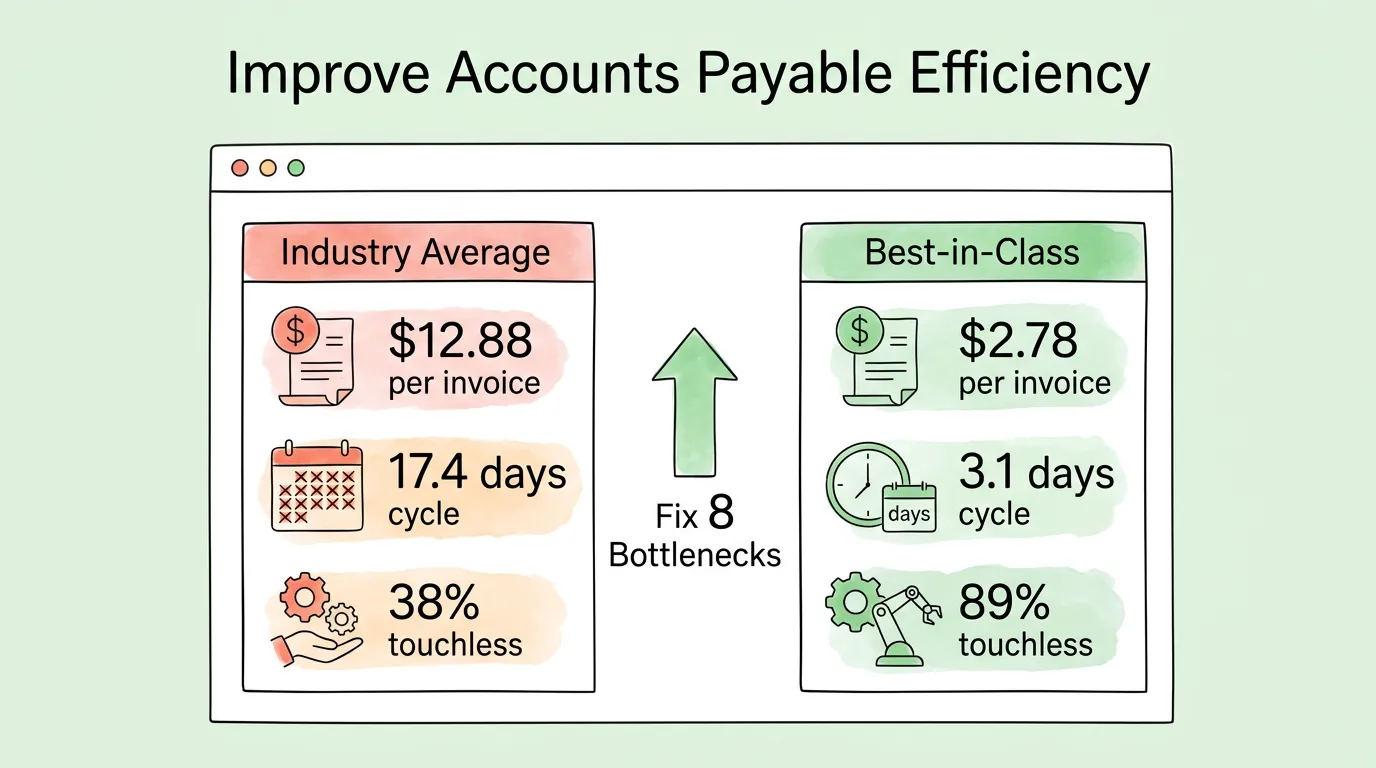
According to Ardent Partners' State of ePayables research, the industry average cost to process a single invoice is $12.88, with an average cycle time of 17.4 days. Best-in-class AP teams process the same invoice for $2.78 in 3.1 days. That 78% cost reduction and 82% time reduction do not come from a single technology purchase. They come from systematically closing eight specific efficiency gaps that exist in almost every AP department that has not yet made the transition from manual to automated workflows.
This guide identifies each bottleneck, explains how to measure it, and provides the specific steps to close it, whether you are a two-person finance team or a 50-person AP department.
Why Is AP Efficiency a Strategic Priority, Not Just an Administrative Detail?
Manual accounts payable has three costs that most finance leaders underestimate:
The direct labor cost is the most visible: data entry, paper handling, approval chasing, filing, and error correction. At $12.88 per invoice, a team processing 1,000 invoices per month is spending $12,880 monthly, or $154,560 annually, on a process that best-in-class organizations complete for $33,360. That $121,200 gap represents real budget that could fund additional headcount, technology, or strategic initiatives.
The error cost is less visible but equally significant. The Institute of Finance and Management (IOFM) reports that approximately 39% of manually processed invoices contain at least one data entry error, costing an average of $52 per error to investigate and correct. For that same 1,000-invoice-per-month team, that is 390 errors per month at $52 each: $20,280 in monthly error-correction costs, on top of the direct processing cost.
The opportunity cost is the hardest to see and the most expensive. Every hour an AP professional spends on manual data entry is an hour not spent analyzing cash flow, optimizing payment terms, capturing early payment discounts, or preparing for audit. According to Ardent Partners, best-in-class AP teams capture 92% of available early payment discounts, versus the industry average of 41%. For an organization with $1 million in monthly payables where suppliers offer 2/10 NET 30 terms, that 51-percentage-point gap in discount capture is worth approximately $10,200 per month, or $122,400 annually, in missed savings.
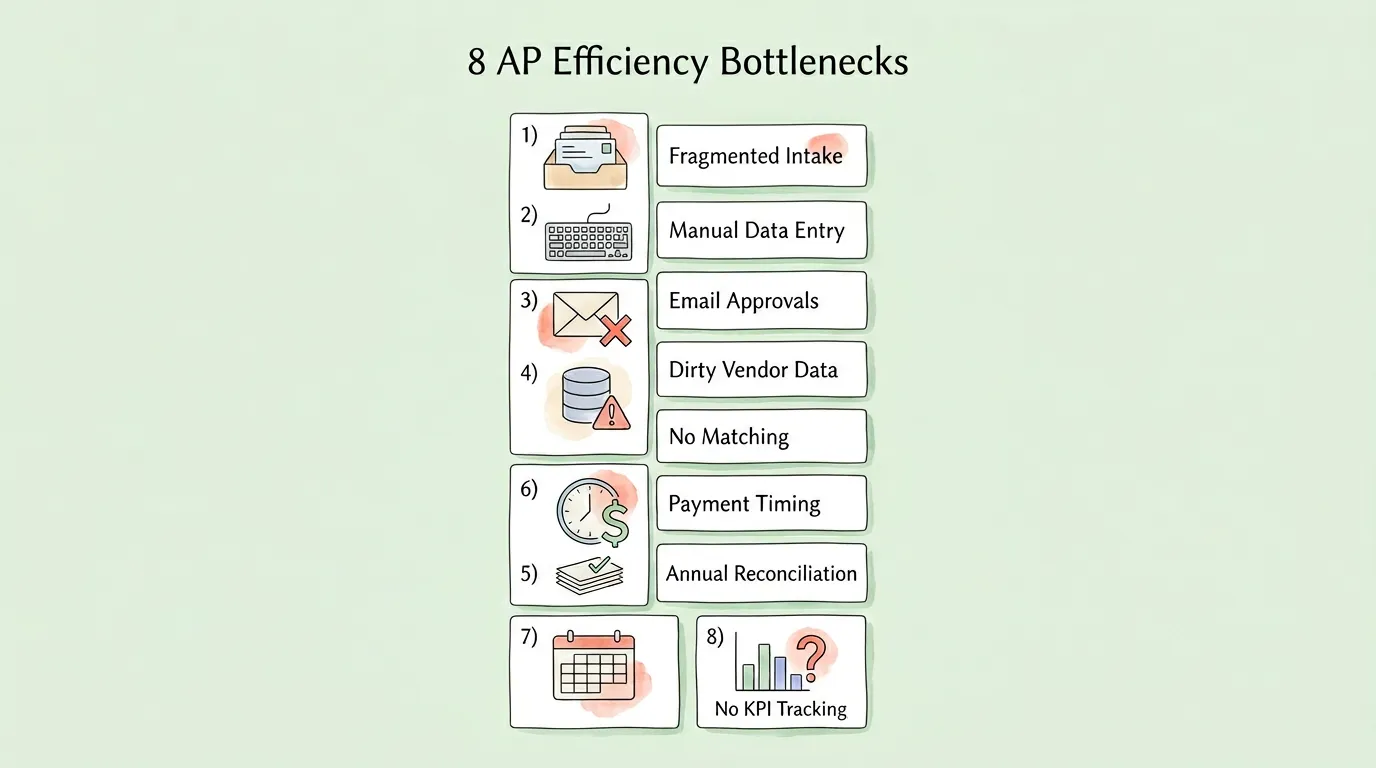
8 Accounts Payable Efficiency Bottlenecks
Bottleneck 1: Fragmented Invoice Intake
What it looks like: Invoices arrive through six or more channels simultaneously: personal employee email inboxes, a shared AP mailbox, postal mail, vendor portals, WhatsApp messages, and occasionally fax. Each channel delivers invoices to a different person, in a different format, with a different expected workflow.
Why it is expensive: Every additional intake channel is a potential gap in your AP ledger. Invoices received through unofficial channels (an employee's personal inbox, for example) frequently miss the formal processing workflow entirely, resulting in late payments, duplicate payment risks when the vendor follows up, and audit documentation gaps.
The fix: Establish a single, monitored AP inbox (such as invoices@yourcompany.com) as the authoritative intake channel for all vendor invoice submissions. Configure your AP system to monitor this inbox and automatically capture every invoice the moment it arrives. For vendors who embed billing data in HTML email bodies rather than attaching PDFs (common for SaaS vendors such as AWS, Stripe, and Uber), ensure your system can extract data from email body content, not just file attachments.
Measure it: How many separate places do invoices arrive before reaching your processing queue? More than two indicates a fragmented intake problem. Track the percentage of invoices that arrive through unofficial channels monthly, targeting 0%.
For the technology that enables centralized multi-channel capture, see our guide on invoice capture software.
Bottleneck 2: Manual Data Entry
What it looks like: An AP team member opens a vendor PDF, reads the invoice fields, and types them into the accounting system. This takes 8 to 15 minutes per invoice, and results in a data entry error rate of approximately 3% to 5% per field.
Why it is expensive: At 8 minutes per invoice for a team processing 500 invoices per month, manual data entry alone consumes 67 hours of labor per month, nearly two full working weeks. Add the error correction cost at $52 per error, and the total monthly cost of manual data entry at this volume is approximately $3,500 to $5,000, depending on wage rates and error rates.
The fix: AI-powered data extraction reads the invoice document using natural language processing, extracts all fields (vendor name, invoice number, date, due date, line items, subtotals, tax amounts, total), and posts the result to your accounting system without human involvement. Leading systems achieve 98%+ field accuracy on standard invoice formats, improving over time as the model processes more of your specific vendor layouts.
Measure it: Track time-per-invoice from receipt to data entry completion, and your manual correction rate (corrections made after initial data entry as a percentage of total invoices). Targets: under 2 minutes per invoice, under 1% correction rate.
Bottleneck 3: Approval Workflows That Live in Email
What it looks like: When an invoice is ready for approval, an AP team member forwards it to the relevant approver by email, then waits. The approver may reply the same day, may be on vacation without an out-of-office message, may lose the email in a crowded inbox, or may reply to ask for the purchase order that should have been attached. The AP team member follows up manually, tracks status in a spreadsheet, and escalates when deadlines approach.
Why it is expensive: Email-based approval has no enforcement mechanism. Invoices stall at the point of waiting for human response, which is why the industry-average invoice cycle time is 17.4 days, and the vast majority of that time is waiting, not processing. Late approval leads to late payment fees, damaged vendor relationships, and missed early payment discounts.
The fix: System-enforced approval workflows route invoices automatically based on predefined rules: dollar threshold, department, vendor category, or GL code. Every invoice has a named approver, a response deadline, and an automatic escalation path if the deadline is missed. Approvers receive a notification (email or mobile app) with a one-click approve or reject action. No manual forwarding. No status tracking spreadsheet.
Measure it: Track approval cycle time (time from invoice receipt to approval completion) by approver tier. Any approver tier averaging more than 2 business days represents a bottleneck. Also track exception rate (percentage of invoices requiring follow-up outside the standard workflow).
Bottleneck 4: Vendor Master Data That Nobody Maintains
What it looks like: Your vendor list contains multiple entries for the same supplier (Acme Corp., ACME CORPORATION, Acme Corp), some with outdated bank account details, several with missing tax IDs, and no consistent spend categorization. The list was accurate when it was created and has not been formally reviewed since.
Why it is expensive: Stale vendor data creates problems at every stage of invoice processing. Outdated banking details cause returned ACH payments, triggering late fees and vendor disputes. Duplicate vendor records defeat duplicate payment detection systems. Missing tax IDs create year-end withholding compliance gaps. And the most dangerous risk: uncontrolled vendor master data is the primary attack surface for business email compromise (BEC) fraud, where attackers impersonate a vendor to redirect payments to a fraudulent account. According to the Association of Certified Fraud Examiners (ACFE), the median loss per vendor fraud incident is $130,000.
The fix: Conduct a one-time vendor master data cleanse (merge duplicates, verify banking details and tax IDs for all active vendors, archive inactive vendors). Then implement ongoing governance: a standardized vendor onboarding form, required fields for activation, and dual-authorization for any change to banking details.
Measure it: Track the percentage of active vendors with complete required fields (tax ID, verified banking details, spend category) on a quarterly basis. Also track the number of returned ACH payments monthly. Each returned payment indicates a vendor master data failure.
Bottleneck 5: No Systematic Invoice Matching
What it looks like: Invoices are approved based on the approver's recollection that the purchase was authorized, without comparing the invoice to the original purchase order or the goods receipt confirmation. Discrepancies (price above agreed rate, quantity above delivered amount, duplicate submission) are caught only if a human reviewer happens to notice them.
Why it is expensive: Manual invoice review catches discrepancies inconsistently. According to Ardent Partners, organizations without automated matching have an exception rate of 23.6%, meaning nearly one in four invoices requires some form of manual investigation. Each investigation takes time and delays payment. Organizations that do implement automated three-way matching reduce their exception rate to 4.3% while simultaneously processing more invoices touchlessly.
The fix: Implement automated three-way matching: the system compares the vendor invoice against the purchase order and the goods receipt note, flags any discrepancy above your configured tolerance threshold, and routes the flagged exception to the appropriate resolver. Invoices that pass matching move directly to approval without manual review.
Measure it: Track your touchless processing rate (percentage of invoices that complete processing without any human intervention), exception rate, and duplicate payment rate monthly. Benchmarks: touchless rate above 80%, exception rate below 8%, duplicate payment rate below 0.1%.
For a complete breakdown of 2-way, 3-way, and 4-way matching with exception handling workflows, see our invoice matching process guide.
Bottleneck 6: Payment Timing That Is Not Strategically Managed
What it looks like: Invoices are paid based on when they are approved and when the payment run is scheduled, not based on a deliberate decision about when payment generates the most value. Early payment discounts are occasionally captured when someone remembers to check, but there is no systematic process.
Why it is expensive: This is the efficiency gap with the clearest and most immediate financial payoff. Ardent Partners reports that best-in-class AP teams capture 92% of available early payment discounts, versus the industry average of 41%. A 2/10 NET 30 discount (2% for payment within 10 days) on $500,000 in monthly eligible payables is worth $10,000 per month, or $120,000 annually, in missed savings if not captured systematically.
On the payables extension side, shifting from NET 30 to NET 45 on $500,000 in monthly payables provides 15 additional days of working capital deployment, worth approximately $1,027 per month at a 5% cost of capital.
The fix: Configure your AP system to flag invoices with discount terms at the point of intake, route them with higher processing priority, and alert approvers of the discount deadline alongside the invoice. Track discount capture rate monthly as a KPI. Negotiate extended payment terms at vendor contract renewal for suppliers who do not offer discounts.
For the broader cash flow context that payment timing optimization connects to, see our guide on how to improve cash flow.
Bottleneck 7: Reconciliation That Happens at Year-End Instead of Month-End
What it looks like: The AP subledger is reconciled to the general ledger once a year, typically driven by the annual audit preparation. Month-end close is extended because reconciliation needs to catch up on eleven months of activity. Errors that occurred in February are discovered in November.
Why it is expensive: The cost of reconciliation errors grows with age. An error caught within the week it occurred takes minutes to correct. The same error discovered eleven months later may require reconstructing supporting documentation, adjusting multiple accounting periods, and reissuing financial statements. Finance teams that reconcile annually average a 14 to 20 business day month-end close. Teams that reconcile monthly close in 5 to 7 business days, a 60% to 65% reduction in close time.
The fix: Establish a formal monthly AP reconciliation process: verify the AP subledger balance matches the GL control account, review all received-not-invoiced accruals, confirm all credit notes have been applied, and complete vendor statement reconciliations for key suppliers. AI-powered bank reconciliation tools automate the transaction matching component, reducing manual reconciliation time by 70% or more.
What it looks like: The AP team tracks invoice volume and payment status. Leadership receives a monthly report showing how many invoices were processed and whether any payments were late. There is no cost-per-invoice measurement, no cycle time tracking, no exception root cause analysis, and no benchmark comparison.
Why it is expensive: You cannot improve what you do not measure. Teams without KPI visibility typically discover efficiency problems at their worst: during a vendor dispute, a failed audit, or a year-end close crisis. Problems that would have been apparent from a weekly metric review (a rising exception rate indicating a vendor master data issue, a lengthening approval cycle indicating a bottleneck in a specific approver tier) go undetected for months.
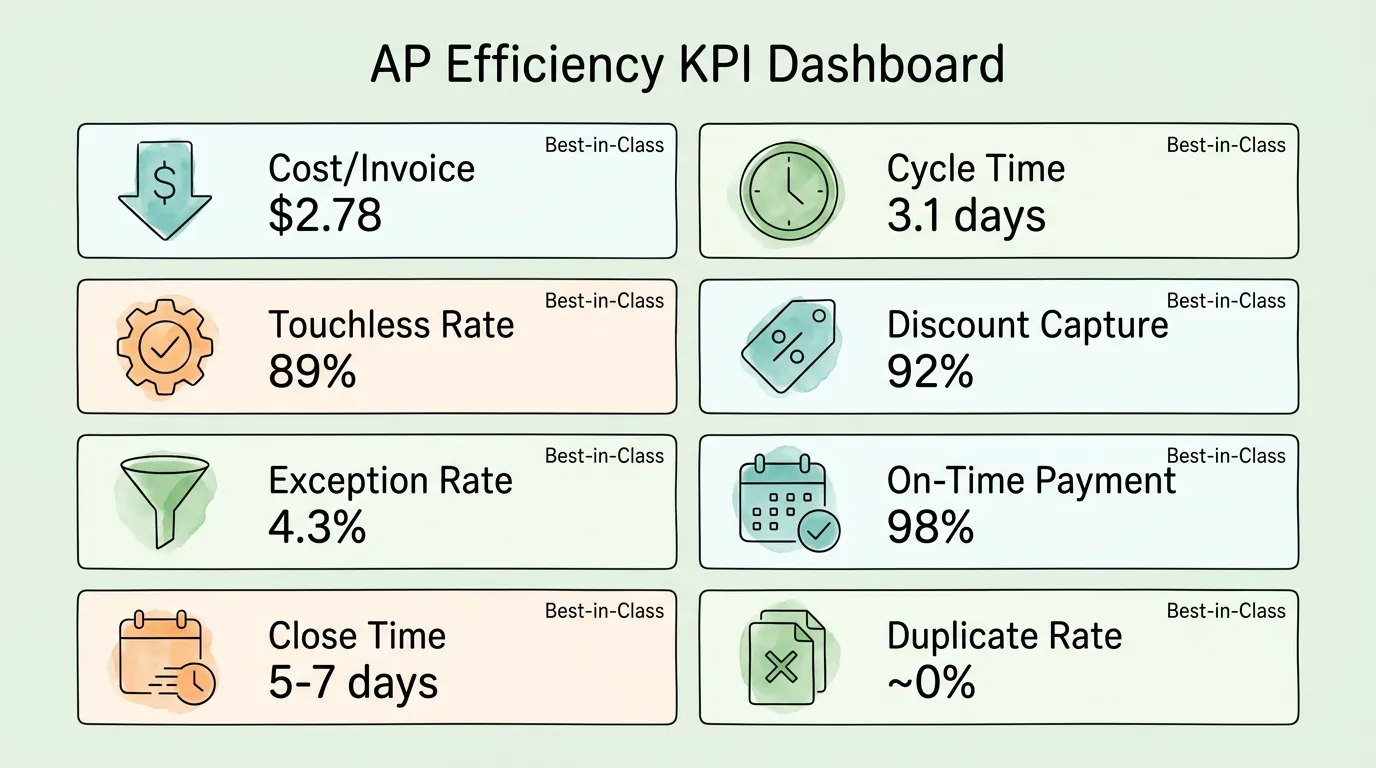
The fix: Implement a monthly AP performance dashboard tracking the seven core metrics: cost per invoice processed, invoice cycle time, touchless processing rate, early payment discount capture rate, exception rate, duplicate payment rate, and on-time payment rate. Review these metrics monthly. When a metric moves unfavorably, trace the root cause and address it within the same reporting period.
For a complete KPI tracking framework, benchmarks, and reporting cadence recommendations, see our accounts payable tracking guide.
What Are the Accounts Payable Efficiency Benchmarks You Should Target?
Use these benchmarks to identify which of the eight bottlenecks above to address first. Focus on your largest gap from best-in-class performance.
KPI
Best-in-Class
Industry Average
What It Diagnoses
Cost per invoice
$2.78
$12.88
Overall process efficiency
Invoice cycle time
3.1 days
17.4 days
Approval workflow performance
Touchless processing rate
89%
38%
Automation maturity
Early payment discount capture
92%
41%
Payment timing management
Exception rate
4.3%
23.6%
Data quality and matching accuracy
Duplicate payment rate
Near 0%
0.5-1.5%
Duplicate detection effectiveness
On-time payment rate
98%+
82%
Approval cycle reliability
Month-end close time
5-7 days
14-20 days
Reconciliation and data accuracy
Source: Ardent Partners State of ePayables, IOFM AP Benchmarking Research
What Is the Real ROI of Fixing Accounts Payable Efficiency?
For a mid-market company processing 500 invoices per month:
Current state (industry average):
Processing cost: 500 × $12.88 = $6,440/month
Error correction: 500 × 39% × $52 = $10,140/month
Missed early payment discounts: ~$5,000/month (estimated)
Total monthly AP cost: ~$21,580
After closing the eight bottlenecks (best-in-class):
Processing cost: 500 × $2.78 = $1,390/month
Error correction: 500 × 2% × $52 = $520/month
Captured early payment discounts: ~$9,200/month
Total monthly AP cost: ~$1,910 (and gaining $9,200 in discounts)
Annual improvement: ~$237,240 in combined cost reduction and discount capture.
AP automation tool costs for this invoice volume typically range from $500 to $2,000 per month, yielding a payback period of under 30 days at the conservative end of the efficiency improvement range.
How Should You Approach AP Efficiency Improvement by Business Size?
Small businesses (under 100 invoices/month):
The highest-impact starting point is centralizing invoice intake and implementing basic automated data extraction. At low volume, the primary pain is not processing cost but rather organizational chaos: invoices getting lost, missed due dates, and tax-time document scrambles. Solving intake and extraction creates a complete, searchable invoice archive that eliminates both problems. See our guide on invoice management best practices for a framework that scales from small business to enterprise.
Mid-market businesses (100–2,000 invoices/month):
At this volume, all eight bottlenecks are active and measurable. The highest-ROI sequence is: (1) fix intake and data extraction to eliminate manual entry cost; (2) implement three-way matching to catch overpayments; (3) automate approval workflows to cut cycle time; (4) add payment timing optimization to capture discounts. Address them in this order because each step creates the data infrastructure the next step requires.
Enterprise (2,000+ invoices/month):
At enterprise scale, the highest-value efficiency gains shift from processing cost reduction to fraud prevention and spend analytics. The dollar amounts involved make even marginal exception rates expensive. AI-powered anomaly detection, sophisticated vendor master data governance, and real-time spend analytics generate returns that exceed the processing cost savings that dominate the ROI calculation at lower volumes.
How Do You Lead a Successful AP Efficiency Improvement Project?
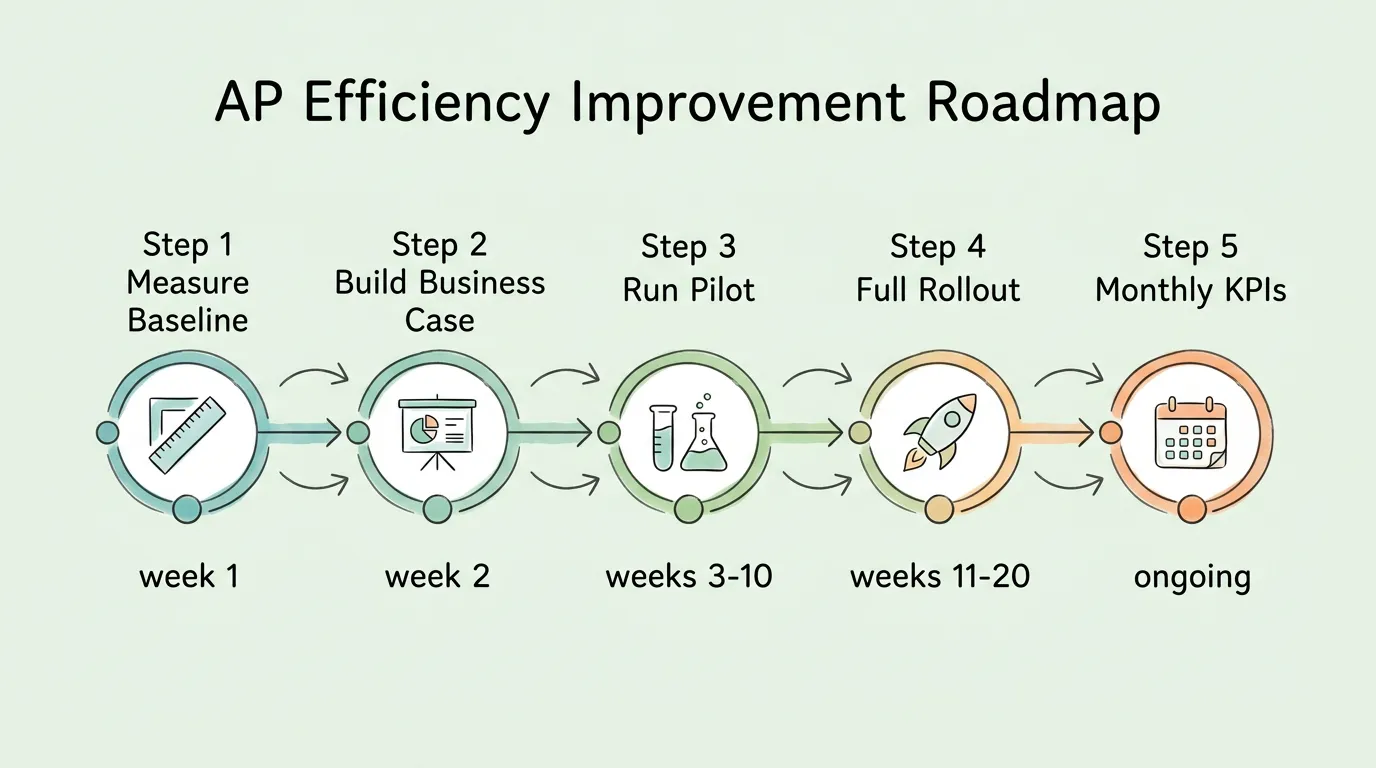
Step 1: Measure your current baseline (Week 1)
Before any change, document your current state: invoices per month, cost per invoice (total AP labor cost ÷ invoice count), cycle time from receipt to payment, exception rate, and discount capture rate. This baseline is essential for demonstrating ROI after implementation and for identifying which of the eight bottlenecks to address first.
Step 2: Build the business case (Week 2)
Translate your benchmark gaps into dollar amounts using the worked example framework above. Present to leadership in terms of: current annual AP cost, projected post-automation AP cost, annual ROI, and payback period. Include fraud risk reduction as a qualitative benefit.
Step 3: Run a pilot (Weeks 3–10)
Select one invoice type or vendor category, preferably high-volume and standardized, and process them through the new automated workflow. Measure accuracy daily for the first two weeks. Validate that extraction accuracy exceeds 95% on your specific documents before expanding scope.
Step 4: Full rollout and vendor communication (Weeks 11–20)
Notify vendors of the new submission channel and format requirements. A brief vendor communication covering: the new AP email address, preferred invoice format (PDF or structured XML), and implementation timeline reduces transition friction significantly. Most vendors adapt quickly when the change means faster payment.
Step 5: Monthly KPI review (Ongoing)
Review the eight KPIs monthly. When a metric moves unfavorably, trace the root cause and assign a named owner to correct it within the period. The discipline of monthly measurement is what converts a one-time improvement into a permanent efficiency gain.
The eight most important AP efficiency metrics are: cost per invoice processed (total AP labor cost ÷ invoices processed), invoice cycle time (days from receipt to payment), touchless processing rate (percentage of invoices processed without human intervention), early payment discount capture rate, exception rate, duplicate payment rate, on-time payment rate, and month-end close time. Start by measuring cost per invoice and cycle time. These two metrics are the most actionable and provide the clearest baseline for tracking improvement. For a complete measurement framework, see our accounts payable tracking guide.
What is the fastest way to improve AP efficiency?
The fastest measurable improvement almost always comes from centralizing invoice intake and automating data extraction. These two changes together typically reduce processing time by 70% to 80% within the first 60 days of implementation, without requiring changes to approval workflows or payment processes. They also create the centralized data record that every subsequent improvement depends on. The fastest change that does not require any new technology is simply establishing a dedicated AP email address and instructing all vendors to use it. Done in a single afternoon, this one change eliminates the intake fragmentation that causes many lost invoices and delayed payments.
How much does improving AP efficiency actually save?
The savings depend on your current volume and baseline cost, but the benchmarked range is clear. Moving from the industry average of $12.88 per invoice to the best-in-class rate of $2.78 saves $10.10 per invoice. At 500 invoices per month, that is $5,050 per month in direct processing cost savings, plus $10,140 in monthly error correction cost reduction, plus an estimated $4,200 to $10,200 in additional early payment discount capture, totaling $19,390 to $25,390 per month, or $232,680 to $304,680 annually. AP automation tools for this volume typically cost $500 to $2,000 per month, yielding a payback period of under 30 days.
What is a good touchless processing rate for accounts payable?
The industry benchmark for touchless processing rate (invoices processed without any human intervention) is 38% for average organizations and 89% for best-in-class organizations. A realistic initial target for an organization implementing AP automation for the first time is 60% to 70% within the first 90 days, reaching 80%+ after 6 months as the AI system learns your specific vendor formats and the exception handling process is refined. Touchless rate below 50% after 90 days typically indicates either poor invoice intake centralization (invoices arriving in the wrong format or through unofficial channels) or vendor master data problems (unrecognized vendor IDs causing systematic exceptions).
Will improving AP efficiency require replacing our existing accounting software?
No. AP automation tools are designed to integrate with existing accounting platforms rather than replace them. Leading AP automation solutions offer pre-built integrations with QuickBooks, Xero, NetSuite, Sage, SAP, and other platforms. The AP tool handles the front-end work (invoice capture, data extraction, matching, and approval routing) and posts approved invoice data directly to your accounting system via API integration. Evaluate any AP automation tool by confirming it has a direct, pre-built integration with your specific accounting platform before purchasing. A CSV export/import "integration" is not equivalent to a real-time API sync and will recreate the manual work problem you are trying to solve.
How do I get vendors to submit invoices the right way after changing our AP process?
Vendor adoption of a new submission process is primarily a communication challenge, not a technical one. A single, clear email to all active vendors covering: the new AP email address, preferred invoice format (PDF or XML), implementation date, and a contact for questions, is sufficient for the majority of vendors. For your top 10 to 20 vendors by invoice volume, a follow-up phone call confirming receipt of the instructions and answering any questions reduces transition friction significantly. Frame the communication around the benefit to the vendor: faster processing means faster payment. Most vendors are motivated to comply once they understand this. Set a 30-day transition window and track which vendors are still submitting through unofficial channels after the deadline. These require individual follow-up.
How long does an AP efficiency improvement project typically take?
A focused implementation targeting AP invoice processing typically shows measurable efficiency improvement within 60 to 90 days of go-live: 2 to 4 weeks for configuration and vendor master data preparation, 2 to 4 weeks for a controlled pilot on a subset of invoices, and 2 to 4 weeks for full rollout. Full optimization (reaching your target touchless processing rate and discount capture rate) typically takes 4 to 6 months as the AI extraction model adapts to your specific vendor formats and exception handling processes are refined. Enterprise implementations integrating with complex ERP environments take longer, typically 4 to 9 months from contract to full production.
What is the difference between AP efficiency and AP automation?
AP efficiency is the outcome: how quickly and cost-effectively your team processes invoices. AP automation is the primary tool for achieving that outcome. An organization can have high AP automation adoption and still have low efficiency if intake is fragmented, vendor data is dirty, or approval workflows are poorly designed. Conversely, a very small team processing low invoice volumes can achieve high efficiency with minimal automation through disciplined processes and clear protocols. The practical reality is that at volumes above 100 to 200 invoices per month, automation is the most reliable path to efficiency, because manual processes cannot consistently achieve the accuracy and speed benchmarks that best-in-class organizations demonstrate. For the full framework connecting automation tools to efficiency outcomes, see our guide on invoice processing best practices.
Improving accounts payable efficiency is not a one-time project. It is a continuous operating discipline: measuring the eight KPIs monthly, tracing root causes when metrics degrade, and maintaining the vendor master data and process governance that keep the automated workflow running accurately.
The organizations that achieve and sustain best-in-class performance ($2.78 per invoice, 3.1 days, 89% touchless) are not using dramatically different technology than the industry average. They are using similar tools, but applying them within a tighter process framework: the eight bottlenecks described in this guide, systematically closed and continuously monitored.
TallyScan automates the core of this efficiency improvement: AI-powered invoice capture from email and portals, 98%+ accurate data extraction, and direct sync to your accounting system, creating the automated intake-to-posting workflow that closes Bottlenecks 1 through 3 simultaneously. For the complete AP efficiency context, see our accounts payable automation best practices guide and our overview of accounts payable automation benefits.