Most accounting firms do not have a workflow problem. They have a visibility problem. Work is getting done. It just is not always clear by whom, on what timeline, or whether a step was missed somewhere between the client uploading their documents and the return being filed. The result is the same whether you have two staff or twenty: chasing status updates, duplicate effort, dropped handoffs, and the nagging suspicion that something important is sitting unattended in someone's inbox.
Accounting workflow management is the system that closes those gaps. Not software specifically (though tools help): the discipline of defining how work moves through your firm, who is responsible at each stage, and what triggers the next step. This guide covers what that system looks like, how to build it in stages, and how to measure whether it is actually working.
What Is Accounting Workflow Management?
Accounting workflow management is the structured approach a firm uses to organize, assign, track, and complete every client engagement from intake to delivery. It defines the sequence of steps for each service, the roles responsible at each stage, the documents and approvals required to move forward, and the communication protocols that keep clients and team members aligned throughout.
A mature accounting workflow management system handles all of this systematically rather than through ad-hoc coordination. When a client uploads their bank statements, the right team member is automatically notified, not because someone remembered to check. When a review is completed, the job advances to the next stage without a manager having to manually assign it. When a deadline approaches, the client receives a reminder without anyone drafting an individual email.
This is the meaningful difference between managing workflows and just having work to manage.
Manual vs. Automated Accounting Workflow: What the Gap Actually Costs
Dimension
Manual Workflow (Email + Spreadsheets)
Automated Workflow (Management System)
Task assignment
Manager delegates manually via email or meeting
Auto-assigned based on rules (role, capacity, service type)
Progress tracking
Requires follow-up calls or status emails
Real-time dashboard visible to entire team
Client communication
Scattered across individual inboxes
Centralized portal; automated reminders and status updates
Document storage
Local drives, email attachments, disparate folders
Centralized, version-controlled, searchable
Deadline management
Relies on individual calendars and memory
System-enforced with automated alerts and escalations
Handoffs between staff
Manual notification; high drop rate
Triggered automatically when preceding step is completed
Error rate
High; missed steps and data entry errors common
Significantly reduced through checklists and automated validation
Visibility for leadership
Limited; requires interrupting staff to get updates
Complete; work-in-progress visible at firm, client, and task level
Onboarding new staff
Informal; knowledge lives in individuals
Process-embedded; new staff follow the same documented steps
Scalability
Breaks as client volume grows
Scales with minimal additional management overhead
Research on accounting firm operations consistently finds that before implementing automated workflow tools, over half of firms spend more than five hours per week just on scheduling and assigning work. After implementing automated systems, three in four firms reduce that to under five hours, reclaiming meaningful capacity without adding staff. For a broader view of how automation changes firm operations, see our guide on accounting process automation.
Why Do Most Accounting Workflows Break Down?
Before designing a better system, it helps to understand the structural reasons most accounting workflows fail. The symptoms vary but the root causes are consistent.
Work Lives in Email Threads
Email is a communication tool, not a workflow system. When task assignment, document exchange, approval requests, and client communication all happen in email, context is scattered across inboxes, threads get buried, and there is no shared record of what happened or what is still pending. A staff member who is out sick takes all their context with them. A client email with an attached document that needs action sits unread until someone happens to notice it.
No Standardized Processes
When every client engagement is handled as a custom project, work quality becomes dependent on the individual handling it rather than the firm's standards. One accountant processes monthly bookkeeping with a thorough checklist. Another does it from memory. The inconsistency creates quality gaps, makes training new staff difficult, and prevents meaningful measurement of how long things actually take.
No Shared Visibility Into Status
When work status exists only in individuals' heads or personal task lists, leadership cannot see where capacity is being consumed, where jobs are stalled, or which clients are at risk of missing deadlines without interrupting the team to ask. This constant status-checking consumes everyone's time and produces information that is already stale by the time it is acted on.
Approval Bottlenecks Without Escalation Rules
Most accounting services require a review step before delivery. When review requests accumulate in a senior staff member's queue without prioritization, escalation rules, or visibility to the team, jobs routinely wait for approval longer than the actual preparation took. The bottleneck is not capacity. It is process design.
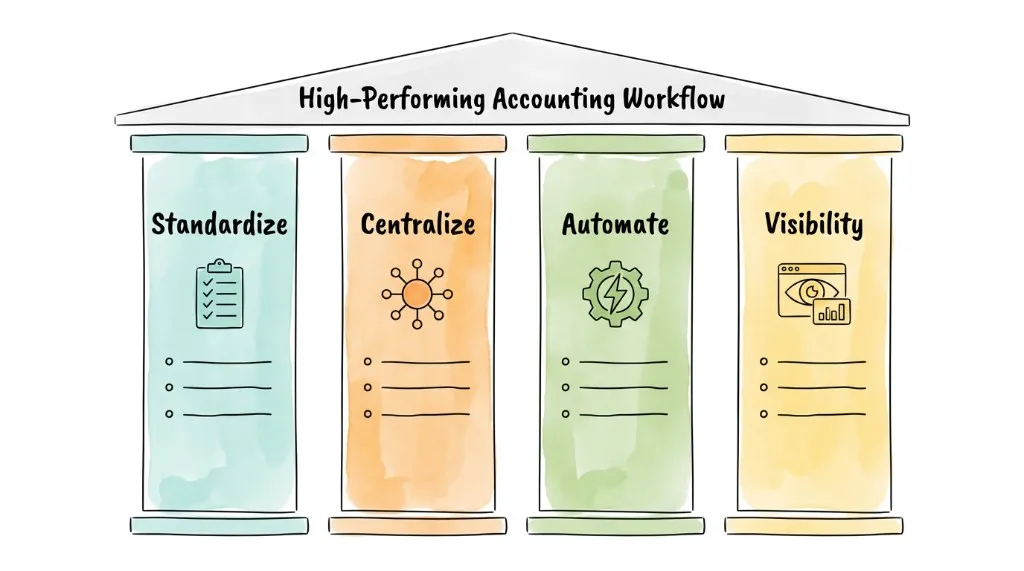
What Are the Four Pillars of Effective Accounting Workflow Management?
A durable accounting workflow management system rests on four pillars. Technology can support each of them, but the pillars themselves are organizational principles, not software features.
Pillar 1: Standardization
Every service your firm delivers should have a documented, repeatable process: a defined sequence of steps, the artifacts required at each step, the role responsible, and the expected timeline. This applies to routine monthly bookkeeping, annual tax preparation, client onboarding, and anything else your firm does more than once.
Standardization does not mean inflexibility. Complex or unusual client situations will always require judgment calls. But the 80% of work that is routine should follow a consistent path so that quality is determined by the firm's process, not by which individual is handling the engagement that week.
A standardized monthly bookkeeping workflow might specify: receive client bank feeds by the 5th, categorize all transactions by the 10th, flag exceptions for client review by the 12th, receive client responses by the 15th, complete reconciliation by the 18th, deliver reports by the 20th. Each step has an owner, a deadline, and a clear handoff trigger. For related guidance on the invoice processing side of this equation, see invoice processing best practices.
Pillar 2: Centralized Communication and Documents
Client files, team conversations, approval requests, and client communications should live in one place, not distributed across email, text messages, shared drives, and sticky notes. Centralization creates a single source of truth: any team member can see the full history of a client engagement without having to ask someone else.
Industry data consistently shows that centralized dashboards, automated client reminders, and secure client portals are the most sought-after features when firms evaluate workflow software. These are not feature preferences. They are responses to the real cost of fragmented information. According to AICPA-CIMA research on accounting firm operations, 73.9% of firms name centralized dashboards as their top priority, followed by automated client reminders (69.3%) and secure client portals (60.6%).
Pillar 3: Automation of Repetitive Tasks
Standardization reveals which tasks are purely mechanical: sending the same document request email every month, creating a new bookkeeping job at the start of each period, routing a completed return to the reviewer, sending a reminder when client documents have not arrived by the due date. These steps do not require human judgment. They require reliability. Automation provides that reliability while freeing staff for the work that does require judgment.
The distinction matters. Automation of repeatable, rule-based steps is a different category from automation of analytical or advisory work. The former is well-defined, high-value, and well within the capability of current workflow tools. The latter is where human expertise remains essential.
A workflow system that only manages tasks but does not surface status is still making leaders manage by intuition. Real-time visibility means a firm leader can see (at any moment, without interrupting anyone) every active engagement, its current stage, who is responsible, whether it is on track, and where capacity is concentrated or stretched.
This visibility enables proactive management: shifting resources before a bottleneck becomes a missed deadline, identifying which services consistently take longer than estimated, spotting which clients require the most non-billable coordination time. For more on how real-time financial data complements operational visibility, see improve cash flow.
What Does Accounting Workflow Management Look Like by Service Type?
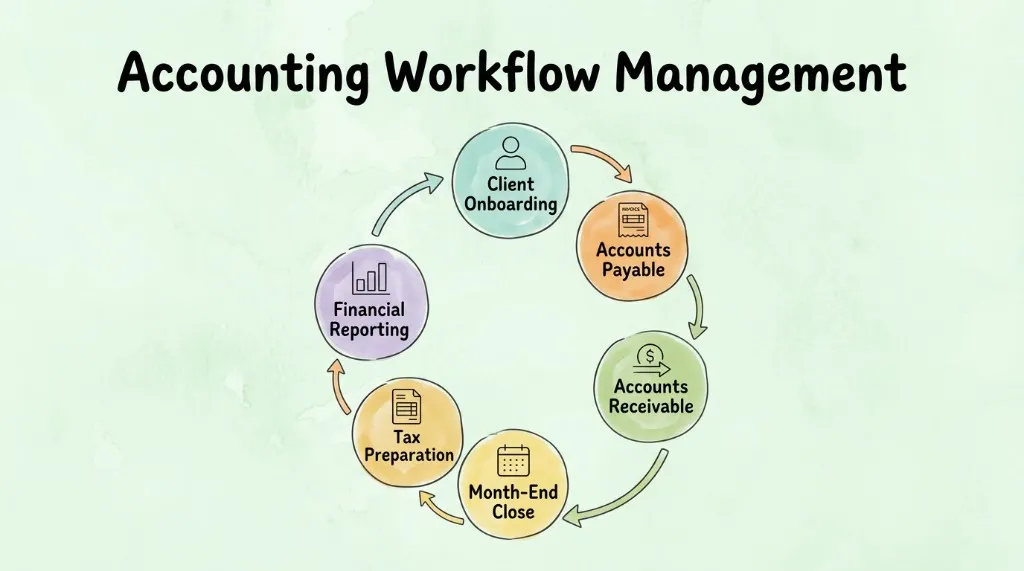
The same four pillars apply across all service lines, but the specific workflow design differs by service type. Here is what effective workflow management looks like for the most common accounting service lines.
Monthly Bookkeeping Workflow
Trigger: Beginning of each month (or agreed client cycle)
Key steps: Bank feed receipt and verification → transaction categorization → exception flagging and client query → client response and resolution → reconciliation → report preparation → report delivery → client approval → file archival
Critical automations: Recurring job creation, client bank feed connection status alerts, automated document request if feeds are missing, automated report delivery upon completion
Common bottleneck: Client response delays on flagged transactions. Mitigation: automated reminder sequence with escalating urgency, configurable per client based on their historical response patterns.
Accounts Payable Workflow
Trigger: Invoice received (by email, portal, or physical scan)
Key steps: Invoice capture → data extraction → PO or contract matching → coding and GL assignment → approval routing → payment scheduling → payment confirmation → reconciliation
Critical automations: Email monitoring for invoice receipt, AI-powered data extraction, rule-based approval routing by amount and vendor, payment reminders, duplicate detection
Common bottleneck: Approval delays from senior staff. Mitigation: clear approval thresholds, mobile approval capability, escalation rules that trigger after a defined waiting period.
Trigger: Start of tax season (or client engagement agreement signature)
Key steps: Client onboarding and document checklist send → document collection and completeness check → preparer assignment → preparation → manager review → client review and query resolution → client approval → filing → delivery of filed return → post-filing follow-up
Critical automations: Document checklist delivery, completeness verification alerts, preparer assignment based on capacity and expertise, review request routing, client approval reminders, deadline alerts tied to statutory filing dates
Common bottleneck: Document collection. Clients are often slow to provide everything on the checklist. Mitigation: automated reminder sequences starting 30+ days before the filing deadline, itemized status display in the client portal showing exactly what is still missing.
Client Onboarding Workflow
Trigger: Signed engagement letter or new client agreement
Key steps: Welcome communication → access provisioning (portal, bank feed connections, accounting software) → information gathering (historical data, preferences, contacts) → systems setup → kick-off meeting scheduling → first deliverable
Critical automations: Welcome email with portal access link, bank connection setup guide, standardized information request form, automatic assignment to relationship manager and service team
Common bottleneck: Delayed bank feed or accounting software access setup. Mitigation: step-by-step setup guide sent immediately on onboarding trigger, with automated follow-up if connection is not confirmed within 48 hours.
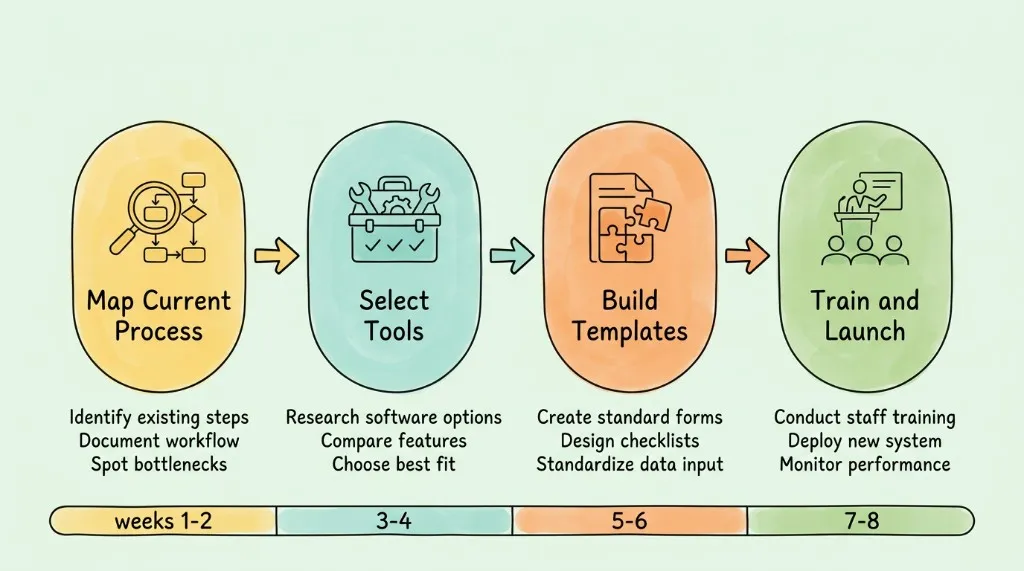
How Do You Implement an Accounting Workflow Management System?
Implementing a new accounting workflow management system does not require a disruptive overhaul. A staged approach (starting narrow and expanding) produces better outcomes than attempting a firm-wide transformation at once.
Step 1: Map Your Current State
Before evaluating any software, document how work actually moves through your firm today. Pick one core service (monthly bookkeeping is usually the best starting point) and trace it from client intake to delivery. For each step, capture: who is responsible, where documents are stored, how the handoff to the next person happens, and where things most commonly get delayed.
This mapping exercise invariably reveals that the process people describe ("we send the client a document request, they upload, we process it") differs significantly from what actually happens ("someone emails the client when they remember, uploads go to various places, the right person may or may not notice"). The gap between the described process and the actual process is where the most improvement lives.
Step 2: Identify and Prioritize Bottlenecks
From your process map, identify the three to five steps that consistently cause delay, error, or extra coordination effort. Common findings: document collection is unpredictable, handoffs between staff are frequently missed, approval requests pile up in a single person's queue, and client communication requires individual manual effort for each touchpoint.
Prioritize the bottlenecks by their impact on throughput and client experience. Addressing the highest-impact bottleneck first produces visible improvement quickly, which builds team confidence in the broader initiative.
Step 3: Select Tools That Address Your Specific Problems
Match tools to the bottlenecks you identified, not to feature lists. A firm whose primary problem is email-based document collection needs a client portal with a clear document status view, not necessarily an end-to-end practice management suite. A firm whose AP process is manual and error-prone needs invoice automation software integrated with their accounting platform, not a better spreadsheet.
The questions to ask when evaluating tools:
Does this tool directly address the bottleneck I mapped in Step 2?
How does it integrate with the accounting software my team already uses? See our guide on accounting software integration for what good integration looks like.
What does the exception handling workflow look like when something goes wrong?
What does implementation actually require, and what ongoing administration does the tool need?
According to Karbon's 2025 Accounting Firm Benchmark Report, firms that define their key processes before selecting software report significantly higher satisfaction with their tools than firms that choose software first and adapt processes to fit. Technology should enforce good processes, not define them.
Step 4: Build Templates and Configure Automation Rules
With your tool selected, translate your standardized service processes into workflow templates: the sequence of tasks, the role assigned to each, the dependencies between steps, and the automated triggers (task completion advances the workflow, approaching deadline sends a reminder, document received notifies the preparer).
Start with one or two templates for your highest-volume services. Build them completely (every step, every automation) and test them with internal examples before moving to client-facing workflows. Partial templates create ambiguity about which steps are managed by the system and which still require manual action.
Step 5: Train Your Team, Then Run a Controlled Pilot
Introduce the new system to your team with a clear explanation of why it is changing, not just how to use it. Show specifically how the new system reduces the administrative burden each individual currently carries: fewer status update requests from managers, automated handoff notifications instead of having to remember to tell someone, visible task lists instead of relying on personal to-do systems.
Run a pilot with a small group of clients for four to six weeks. During the pilot, maintain your existing process in parallel so that any gaps in the new system do not affect client deliverables. Collect feedback from both staff and clients, identify any steps where the workflow breaks down in practice, and refine before firm-wide rollout.
Step 6: Measure With KPIs Before Expanding
Before expanding to all clients and all service lines, establish baseline measurements and track whether the new workflow is actually improving performance. This is both a validation step and the foundation for ongoing management of the system.
KPIs That Tell You Whether Your Workflow Is Working
Most firms implement a workflow management system and assess success by feel: "it seems less chaotic." That is useful but insufficient. These metrics quantify whether the system is delivering its intended benefits.
KPI
What It Measures
How to Track
Target After 90 Days
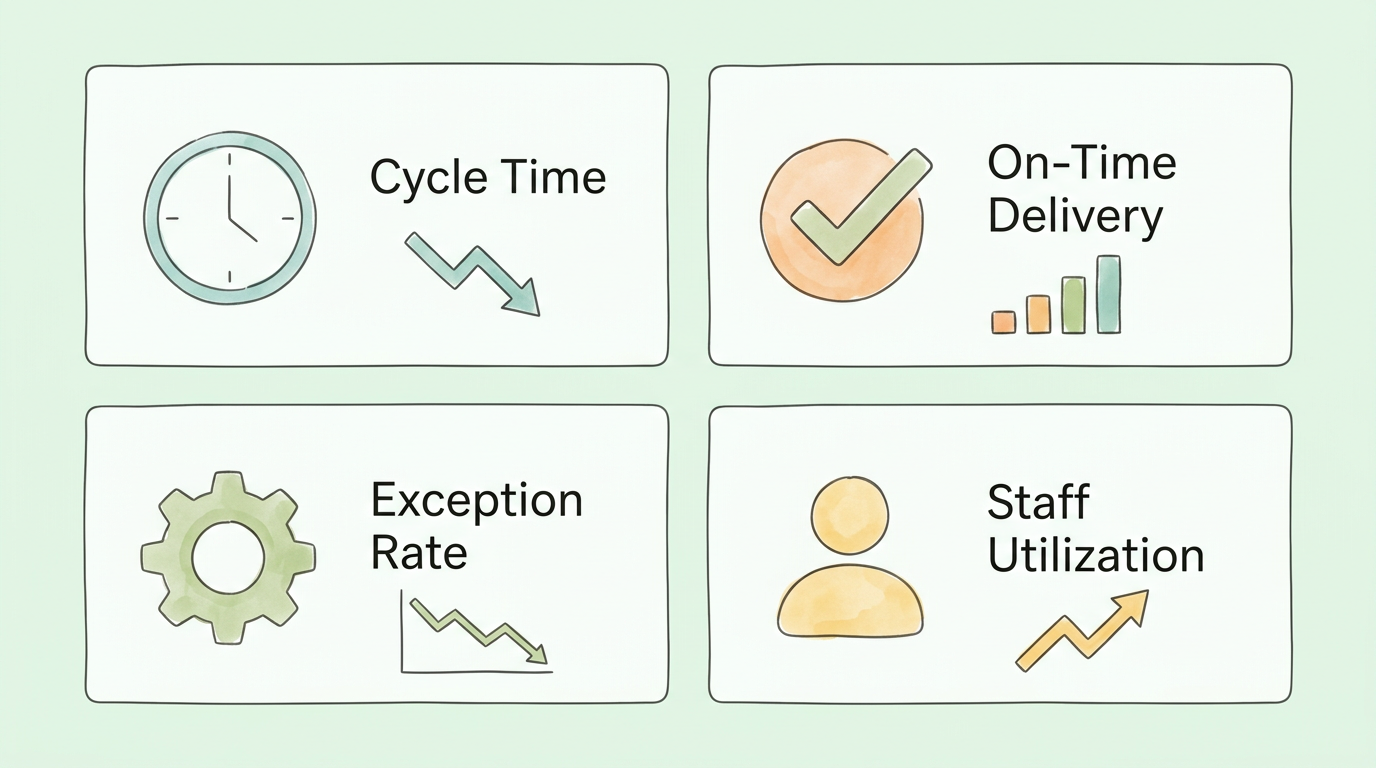
Average job cycle time
Days from engagement start to delivery, by service type
Workflow system timestamps
15-20% reduction from baseline
On-time delivery rate
% of jobs delivered by committed deadline
Workflow system reports
>90%
Exception rate
% of jobs requiring manual intervention outside standard steps
Workflow system flags
Declining trend month-over-month
Time in approval queue
Average hours a job waits for manager review
Workflow system timestamps
Under 24 hours for standard reviews
Administrative time per job
Hours spent on non-billable coordination per engagement
Time tracking by category
25-40% reduction from baseline
Client portal adoption
% of clients submitting documents via portal vs. email
Portal usage logs
>70% within 60 days
Staff utilization
% of billable capacity actually billed
Time tracking vs. capacity
Increasing trend as admin time decreases
Client satisfaction score
Post-delivery client survey rating
Automated survey
Stable or improving vs. pre-implementation
Review these metrics monthly for the first six months, then quarterly once the system is stable. For guidance on audit-related tracking that complements workflow metrics, see audit readiness checklist.
What Are the Most Common Accounting Workflow Implementation Mistakes?
These are the patterns that most reliably predict implementation failure, based on what goes wrong when firms rush the process.
Automating a broken process. Software accelerates whatever process it is built on. If your current monthly bookkeeping workflow has unclear ownership, inconsistent document collection, and ad-hoc approval steps, automating it will produce faster confusion. Always simplify and document the process first, then build automation on top of a workflow that already makes sense.
Treating the software selection as the project. Firms often spend significant time evaluating platforms and then consider the project done once they sign the contract. The actual work (mapping processes, building templates, training staff, running a pilot, measuring results) is what happens after the contract. The software is infrastructure; the project is the process change.
Skipping the pilot phase. Firm-wide rollouts that skip the controlled pilot phase consistently encounter problems that a four-week pilot would have caught: a step in the template that does not match how work actually flows, an automation trigger that fires incorrectly, a client-facing communication that confuses rather than informs. The pilot exists to catch these before they affect every client.
Insufficient attention to staff adoption. A workflow system that staff do not use consistently produces worse outcomes than no system at all, because leadership believes the workflow is tracking work that staff are actually managing outside it. Adoption requires explaining the "why," reducing the friction of using the new system below the friction of the old one, and making the system's value visible to each individual user.
No measurement after launch. Without tracking the KPIs above, firms cannot distinguish between a workflow system that is working and one that simply looks organized. Many systems are configured, launched, and never reviewed until a specific problem forces attention back to them. Scheduled quarterly workflow audits prevent slow drift back toward previous habits. For practical bookkeeping discipline that supports clean workflow data, see small business bookkeeping tips.
How Mature Is Your Firm's Accounting Workflow? (Self-Assessment)
Use this scorecard to evaluate your firm's current workflow maturity and identify the highest-priority areas for improvement.
Area
Signs of Low Maturity
Signs of High Maturity
Your Rating (1–5)
Process standardization
Every job handled differently; no documented steps
Documented templates for all core services used consistently
Task visibility
Status requires asking individuals directly
All active jobs visible on a shared dashboard by stage
Document management
Files in email, local drives, and multiple folders
Centralized, version-controlled, accessible to authorized staff
Client communication
Individual emails; no central log
Portal-based; all communication logged per client
Deadline management
Individual calendars; missed deadlines common
System-enforced alerts; escalation rules active
Approval workflows
Ad-hoc; bottlenecks in senior staff inboxes
Configured routing rules; mobile approval; escalation after threshold
Automation of repeatable tasks
Manual for most recurring tasks
Automated triggers for job creation, reminders, handoffs
Performance measurement
No workflow KPIs tracked
Monthly KPI review; cycle time and on-time delivery tracked
Staff adoption
Mixed; some staff use system, others work around it
40–50: Strong workflow foundation. Focus on optimization and measurement.
25–39: Functional but inconsistent. Prioritize the lowest-scoring areas.
10–24: Significant gaps. Start with process mapping and one or two high-impact automations before expanding.
Under 10: Workflow design is largely informal. Begin with standardizing one core service before selecting tools.
How Do You Keep an Accounting Workflow System Running Over Time?
Most firms treat implementation as the finish line. It isn't. A workflow system launched without ongoing maintenance drifts within months: staff bypass steps they find inconvenient, new services get handled ad-hoc, and the self-assessment scorecard above quietly stops reflecting reality.
So why does this happen so often? Because no one is formally responsible for it after go-live. The fix is simple: assign workflow ownership and schedule three recurring practices.
Quarterly Workflow Audits
Once per quarter, pull the team together for a focused review. Not a general meeting. A specific look at workflow performance data: cycle times by service, exception rates, approval queue times, client portal adoption. Where are the numbers trending wrong? Which steps consistently require manual workarounds?
The answers will either confirm the system is healthy or surface the two or three specific issues worth fixing before they become habits. Most firms find that one meaningful adjustment per quarter keeps the system improving steadily without requiring a full overhaul.
Continuous Staff Training as You Scale
When you add a new team member, the workflow system only protects quality if that person learns to use it correctly from day one. Generic software training isn't enough. The effective approach: have each new hire shadow an experienced colleague running one complete workflow cycle before handling client work independently. Show them the system in action, not in a demo.
The same principle applies when you add a new service line. Build the workflow template before the first client engagement, not after three clients have experienced an informal, ad-hoc version of it.
Gathering and Acting on Client Feedback
Your clients experience your internal workflows through every interaction: how quickly you respond, whether they're asked for the same document twice, whether deadlines are met without a last-minute scramble. A short automated survey sent after each major deliverable (year-end close, tax filing, quarterly reporting) takes clients under two minutes to complete and gives you direct signal on where the process is failing from their side.
The firms that act on that feedback and tell clients they did build loyalty that goes well beyond technical competence. It's the difference between a firm clients renew with automatically and one they shop around on every year.
Pro Tip: Track one workflow metric publicly inside your team. A shared dashboard showing "on-time delivery rate this month" creates more accountability and improvement momentum than any internal review process.
Frequently Asked Questions
What is accounting workflow management and why does it matter?
Accounting workflow management is the systematic approach a firm uses to define, assign, track, and complete client work from intake to delivery. It matters because without a defined system, work quality and turnaround time depend on individual habits rather than firm standards, making it impossible to scale, train new staff consistently, or identify where time is actually being consumed. Research consistently shows that firms with defined workflows spend significantly less time on administrative coordination and deliver work more consistently on time than firms that rely on informal processes.
What is the difference between accounting workflow management and accounting process automation?
Workflow management defines the process: who does what, in what order, with what dependencies, and how handoffs occur. Automation executes specific steps in that process without human intervention: sending a document request when a new engagement is created, routing a completed return to the reviewer, sending a payment reminder on a defined schedule. Good workflow management defines what should be automated; automation then handles the mechanical execution. For a detailed look at the automation side, see accounting process automation.
Where should a small firm or solo practitioner start?
Start with one service that causes the most coordination effort or delivers the most inconsistent results. Map the current process in full: every step, every decision, every waiting period. Simplify and standardize that process on paper or in a simple document before selecting any software. Then identify the two or three steps that are most time-consuming or error-prone and look specifically for tools that address those steps. Expanding from one well-functioning workflow is significantly more effective than implementing a complex system across all services simultaneously.
How long does it take to implement an accounting workflow management system?
For a small firm standardizing one or two service lines, a basic implementation (process mapping, template building, team training, and pilot) typically takes six to ten weeks. For a mid-size firm implementing across multiple service lines with a full practice management platform, four to six months is realistic. The timeline is driven more by the process design work (which requires human judgment and team input) than by the technology configuration, which is usually faster than expected. Rushing the process design phase in order to go live sooner is the most common source of implementation problems.
What features should accounting workflow management software include?
The non-negotiable features for most accounting firms: configurable workflow templates with task sequences and role assignments, real-time progress dashboards, automated task triggers and reminders, centralized document storage with version control, client portal for document submission and communication, and integration with the accounting platform the firm uses. Important at scale: capacity management views, multi-level approval routing, time tracking integration, and reporting on job cycle time and on-time delivery. The best tools for the AP-heavy parts of accounting workflow include dedicated invoice automation capabilities, see invoice automation software for a detailed comparison.
How does accounting workflow management improve client satisfaction?
Clients experience your internal processes through their interactions with your firm: how quickly you respond, whether you ask for the same document twice, whether deadlines are met, and whether they know what to expect next. A well-managed workflow eliminates the client-facing symptoms of internal disorganization: lost documents that require resubmission, delayed responses because a handoff was missed, and surprise timeline slips because a bottleneck went undetected. Consistent, predictable service (supported by automated status updates and clear communication through a client portal) directly improves client satisfaction scores and retention rates.
What is the ROI of implementing accounting workflow management?
The ROI comes from three sources: time savings from eliminating manual coordination (typically 5-10 hours per week per staff member in firms with no current workflow system), error reduction and the associated cost of error correction and remediation, and capacity gains that allow the firm to serve more clients without proportional headcount increases. Firms that automate repeatable AP processes specifically report significant reductions in cost per invoice processed and fewer late payment penalties. For the accounts payable component of this ROI calculation, see accounts payable automation benefits. Most firms see positive ROI within six to nine months of a well-implemented workflow system, with the break-even point accelerating for firms with higher client volume or more manual coordination burden.
The System Behind the Service
The accounting firms that clients trust most over time are not necessarily the ones with the most technical expertise. They are the ones that are reliable: work comes back when expected, nothing falls through the cracks, and clients always know what is happening with their engagement. That reliability is a product of accounting workflow management, not individual talent or effort, but a system that enforces the right steps every time.
The path to building that system is the same regardless of firm size: map what you do now, simplify what does not need to be complex, standardize what should always happen the same way, automate the mechanical steps, and measure whether performance is actually improving. Technology makes this faster and easier to maintain, but the system itself is the work.
TallyScan handles the invoice and receipt capture side of the workflow automatically, pulling documents from email inboxes and vendor portals, extracting every key field with AI-powered OCR, and syncing approved data directly to QuickBooks, Xero, and the accounting platforms your team uses. One less manual step in the workflow; one more reliable handoff your system can count on.